Big things are happening quietly in the world of WordPress. After a grand release of WordPress 6.8, WordPress 6.8.2 is landing on July 15, and it’s bringing powerful updates that developers have been waiting for: custom social icons, smarter plugin rollout logic, new Interactivity API upgrades, and major Playground enhancements.
Whether you’re maintaining plugins for thousands of installs, refining your theme’s design system, or just trying to keep up with evolving APIs, this month’s developer update delivers exactly what you need to stay ahead, without the guesswork.
Smarter Plugin Releases: Phased Rollouts May Be Coming
Imagine shipping your plugin update to just 10% of your users first, catching bugs, gathering feedback, and refining the release before it goes global. That’s exactly what’s being proposed in a new discussion opened by Matt Mullenweg: phased plugin rollouts for WordPress.
Inspired by systems like the Google Play Store and Apple’s App Store, this idea would give plugin developers a powerful way to reduce risk and ensure stability, especially when serving large, diverse user bases.
Why it matters:
- Reduces the blast radius of bugs in production
- Enables real-world A/B testing
- Helps you iterate confidently
While WordPress may take time to bring this feature to life, InstaWP users already have the perfect environment to simulate phased rollouts. Want to test your plugin on five versions of WordPress across multiple site types? Spin up isolated sandboxes and gather feedback before releasing anything live.
This might just be the beginning of a smarter plugin ecosystem, and InstaWP makes sure you’re ready for it.
Custom Social Icons Are Finally Here
For years, developers have asked for more flexibility in the Social Icons block, and it’s finally happening. With Gutenberg 21.1, you can now add custom social networks like Ko-fi, Signal, IMDB, or anything else your audience uses.
This change gives developers the power to stay ahead of social trends without waiting for core updates when they are developing custom themes or plugins. Just a little JavaScript, PHP, and CSS is all it takes to register new icons.
Why it’s a game-changer:
- No more being limited to default networks
- Total branding control for client sites
- Ideal for niche platforms and creator tools
Custom icons aren’t just a feature; they’re a design superpower. And you can start using them right now.
Security Support Dropped for WordPress 4.1–4.6: Time to Move On
The WordPress Security Team has officially ended support for versions 4.1 to 4.6. That means no more security patches, no more fixes; just a loud admin notice urging users to upgrade.
Over 99% of sites are already on WordPress 4.7 or higher. If you’re still clinging to older versions, you’re putting your projects and your clients at risk.
- No patches = vulnerability exposure
- Plugins and themes may stop supporting older versions
- Clients may face performance and compatibility issues
Better to update the WordPress version.
Or, the smarter move is to use the site management service and schedule the WordPress core updates so that your site is always running on the latest WordPress version.
When you build with InstaWP, you’re always on secure ground. Every new site defaults to the latest stable version of WordPress (currently 6.8.1), and you can even pre-load beta or nightly versions to test future releases, without risking production data.
Old WordPress versions are history. Let’s build on what’s next.
Interactivity API Just Got Smoother (and Smarter)
The Interactivity API is quietly evolving into one of the most powerful tools for modern WordPress development, and Gutenberg 21.1 delivers key improvements.
The latest updates make dynamic region rendering cleaner using attachTo, allowing popups, overlays, and conditional UI elements to load only when needed. Plus, new type helpers like AsyncAction and better script/style handling mean your pages will run faster and feel snappier during client-side navigation.
What’s new:
- Smarter rendering with attachTo
- Clean transitions between pages
- Stronger type support (NavigationOptions, PrefetchOptions, etc.)
Here’s the next section:
Playground Upgrades: More Power, Less Setup
If you love testing without setting up a full server, WordPress Playground just became your new favorite dev tool. And this month, it got major upgrades.
What’s new in Playground:
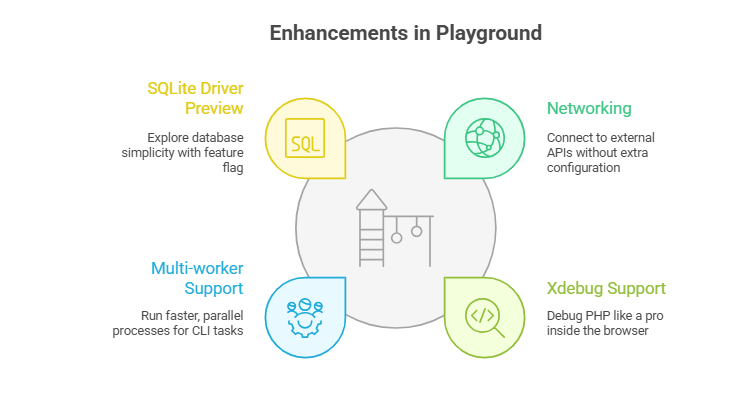
? What this means for developers:
You can now test plugin API calls, debug PHP logic, and build demos faster than ever—all in a self-contained Playground instance.
Theme Improvements You’ll Appreciate (Especially If You Hate Overriding CSS)
Theme authors, rejoice as July’s updates include long-awaited fixes that make styling blocks way easier and more consistent with theme.json.
Key fixes you’ll notice:
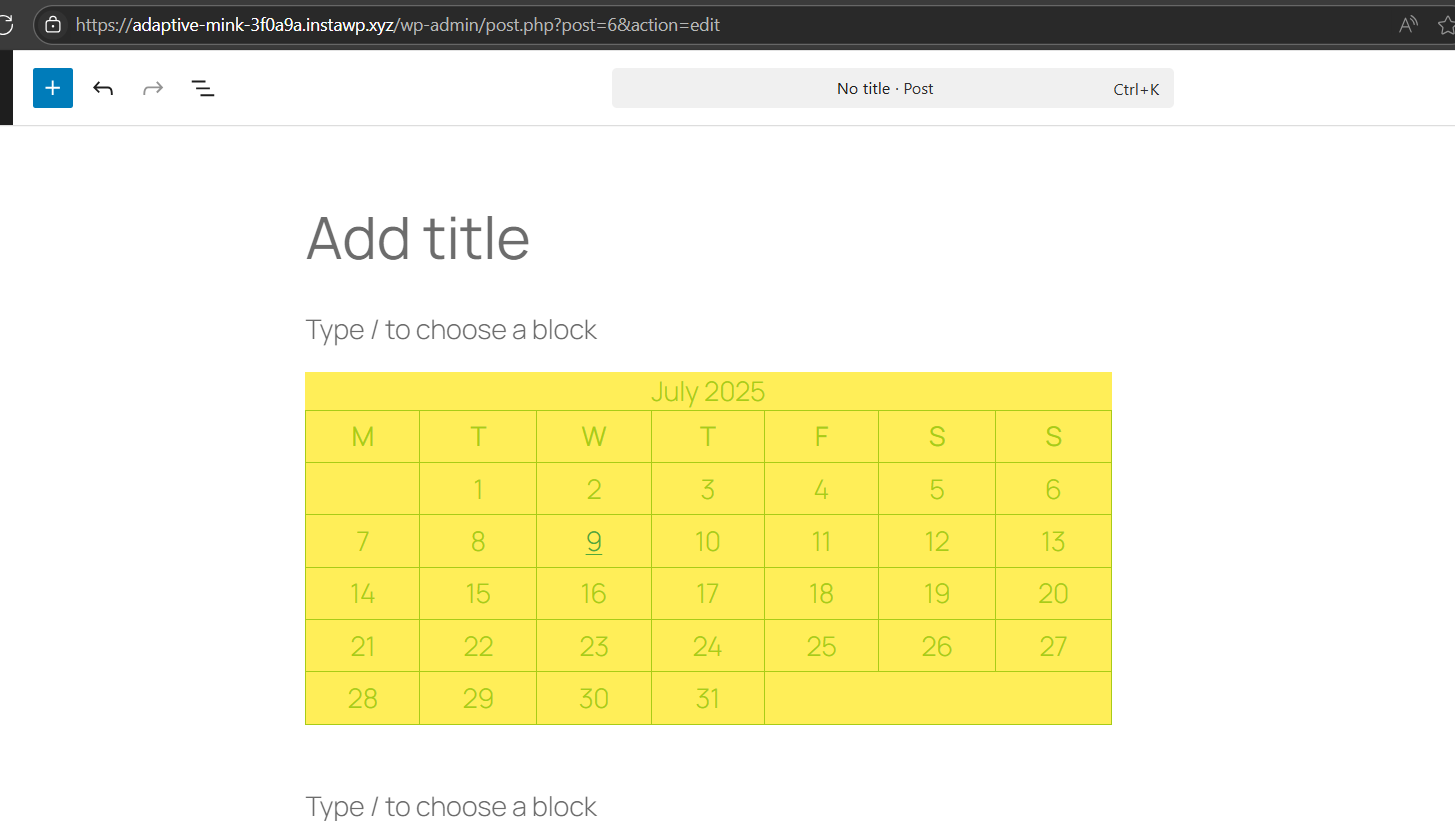
- Calendar block now respects theme-defined colors for text and borders
- Comments Pagination block no longer has hardcoded margins (goodbye messy CSS overrides!)
- Form block gets cleaner previews, better class handling, and improved global style compatibility
These changes mean less custom CSS, fewer theme clashes, and more reliable styling straight from your config. Your design system can finally breathe.
Trying to see how your theme.json changes affect the Calendar or Form blocks? Just launch a sandbox site, load your theme, and preview the updates in seconds.
WordPress theming is becoming cleaner and more structured. With InstaWP, you’re in the ideal place to prototype and fine-tune every pixel.
Block UI Enhancements That Streamline the Editor Experience
Beyond developer-focused tools, July’s updates also polish the editing experience, making it smoother for users and more consistent for anyone building custom blocks.
What’s changed:
- The Screencast Embed block has been removed after Screencast.com deprecated its oEmbed endpoint
- The Avatar block is now faster thanks to optimized user queries
- Duplicate video tracks are now prevented in the Video block editor
- Blocks like Author, Site Logo, Avatar, and Post Navigation now use the ToolsPanel UI for a more unified editor experience
If you’re building reusable templates or onboarding clients into the WordPress Block Editor, these fixes mean fewer quirks, better previews, and faster block behavior.
Want to check how your templates render across different user roles, themes, or content blocks? Just spin up a new sandbox with InstaWP, toggle user types, and preview the entire editor flow..
The block editor just got friendlier, and you can experience the difference right now.
Developer Docs, SQLite, and Testing Resources Just Got Better
This month isn’t just about new features; it’s also packed with behind-the-scenes updates that make developing with WordPress faster, cleaner, and better documented.
- Clearer stylesheet guidance for the Commands API
- Namespace support added to the Create Block tool
- Better explanation of the role attribute in block attributes
If you’re serious about modern WordPress development, July’s documentation and dev tool improvements are pure gold.
Get Ready for What’s Next: WordPress 6.9 and Beyond
While WordPress 6.8.2 is the focus this month, the groundwork is already being laid for bigger changes in 6.9.especially around plugins and extensibility.
What’s brewing:
- The proposed phased plugin rollouts might land in 6.9
- Enhanced tooling for plugin developers is under discussion
- Ongoing refinements to the Interactivity API and Playground workflows continue to evolve
Build Smarter, Test Faster, and Stay Ahead with InstaWP
This month’s WordPress updates may not come with flashy headlines, but they unlock real power for developers, from custom social icons and theme styling fixes to Interactivity API upgrades and Playground enhancements.
The best part? You don’t have to set up a complex dev environment to experience any of it.
Just spin up WordPress 6.8.2 sandboxes instantly, preview Gutenberg 21.1 changes safely, test Form blocks, plugin behavior, or custom block styling in seconds, and use Playground and Xdebug tools without touching your local stack
Whether you’re building themes, refining plugins, or just staying sharp, everything new in WordPress is already within reach. And InstaWP makes sure you’re always ready to build, test, and launch faster than anyone else.