

Improve your WordPress SEO: Write better content and have a fully optimized WordPress site using the Yoast SEO…
About Asset CleanUp: Page Speed Booster
Asset CleanUp Lite is a WordPress plugin that helps improve the speed of your website by reducing the number of CSS and JavaScript files that are loaded. It also offers features such as minifying files, combining files, and removing unnecessary links and meta tags. While the Lite version has many helpful features, the Pro version offers even more benefits and premium support.Screenshots


Frequently asked questions
What does the Asset CleanUp plugin do?
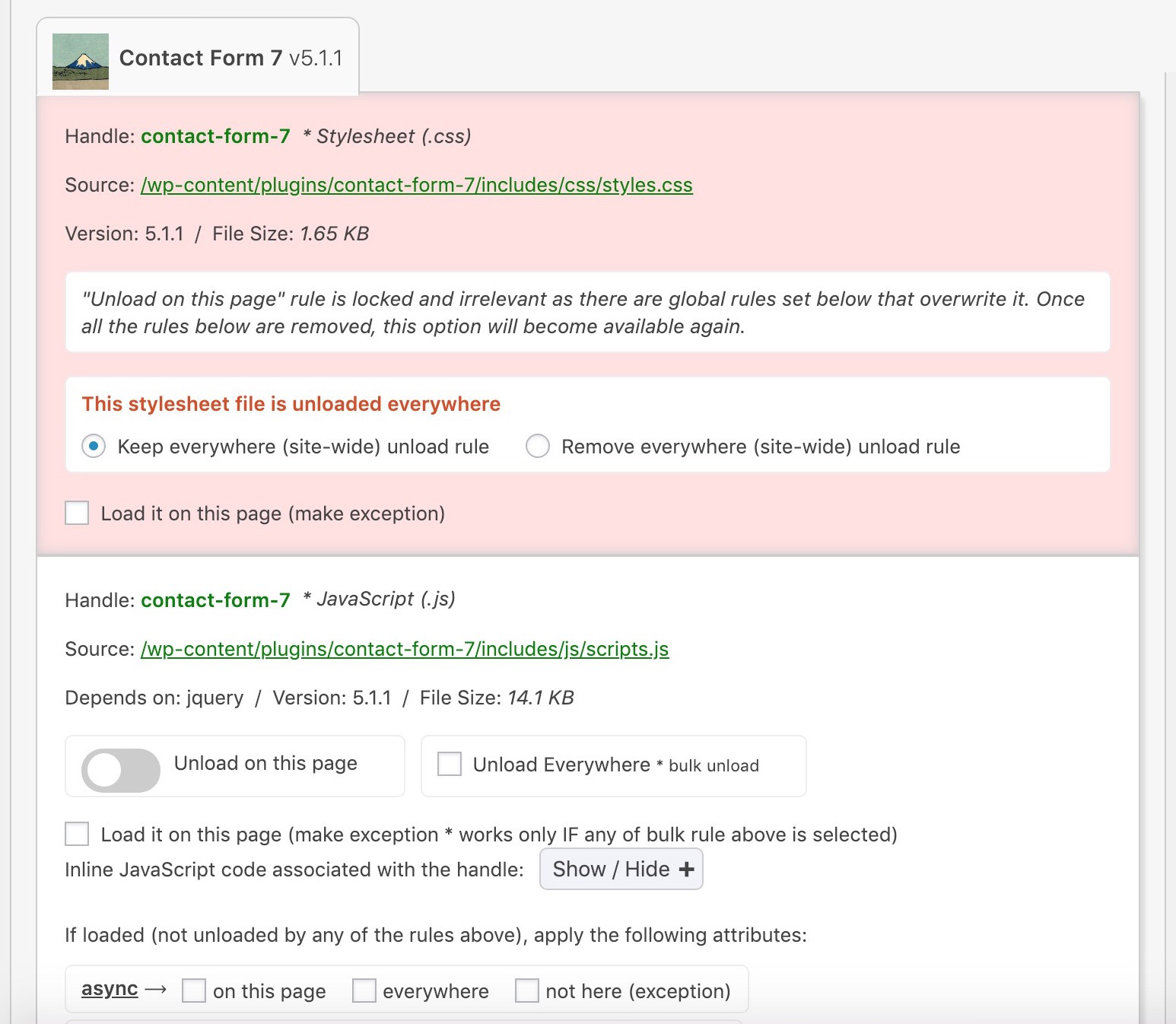
The Asset CleanUp plugin scans your page and detects all the assets that are loaded. It allows you to select the CSS/JS files that are not necessary to load, reducing bloat and improving website speed.
What are the benefits of using the Asset CleanUp plugin?
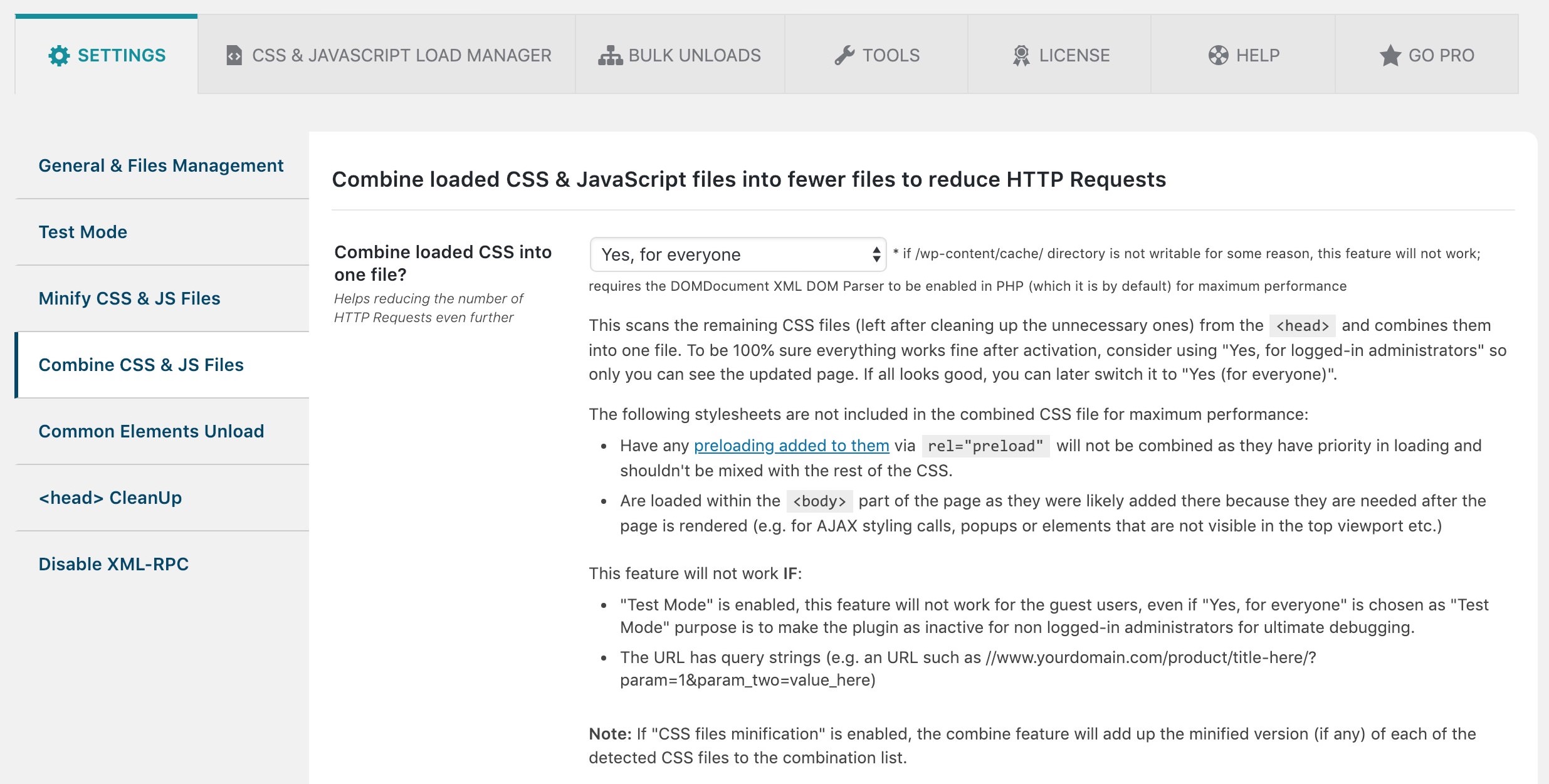
The main benefits of using the Asset CleanUp plugin include decreasing the number of HTTP requests, minifying CSS and JavaScript files, combining loaded CSS and JavaScript files, and removing possible conflicts between plugins and themes.
What does the Google Fonts Optimization feature do?
The Google Fonts Optimization feature combines all Google Font requests into fewer requests, saving round trips to the server. It also allows you to choose the method of delivery and apply the 'font-display' CSS property to all loaded Google Font requests.
What does the Local Fonts Optimization feature do?
The Local Fonts Optimization feature preloads local font files and applies the 'font-display' CSS property value to LINK and STYLE tags.
What can be removed by the plugin to optimize the website?
The plugin can remove useless links, meta tags, and HTML comments within the HEAD and BODY tags of the website. This includes removing various link tags, meta tags, and RSS Feed Link Tags.
Changelog
1.4.0.2
- WPML compatibility (it works with other similar plugins as well): Make sure that whenever CSS/JS manager is used in the Dashboard, if the domain/subdomain is different (e.g. es.domain.com instead de.domain.com), the assets will be fetched without getting blocked by the browser’s CORS policy
- Improvement for plugin’s JavaScript files: The main “script” file was split into two files, one containing the most common code that clears the caching and it’s used in many pages (e.g. when clicking the clear caching link from the top admin bar), which weights around 11% in comparison with the other files; This way, on many pages, fewer JavaScript code is loaded, thus reducing bandwidth for admin visits, and eliminating any potential conflicts with other JS files belonging to other plugins
- Improvement (admin area): Prevent SweetAlert and extra CSS to load if there’s no CSS/JS manager loaded (e.g. edit post area)
- Google Fonts Combine Fix: W3C Validator / ‘Error: Bad value for attribute href on element link: Illegal character in query: | is not allowed.’ – The character ‘|’ is replaced with ‘%7C’
- Fix: “Warning realpath(): open_basedir restriction in effect. File(/) is not within the allowed path(s):” – Extra checks are made to bne sure that the error won’t be printed when features such as minify CSS are used
- Fix: “Bulk Changes” / When removing unload rules, a PHP error was showing up preventing the rule from being removed
1.4.0.1
- New Feature For The Admin: “Settings” — “Plugin Usage Preferences” — “Announcements” / The admin would be notified within the Dashboard (if he/she prefers) of critical updates, new features, usage tips, special offers / read more: https://www.assetcleanup.com/docs/?p=1946
- Make sure plugin generated STYLE/SCRIPT inline tags (e.g. from features such as “Inline CSS”) have the “type” attribute (unless the theme supports HTML5) / read more: https://www.assetcleanup.com/docs/?p=2086
- Moved “CSS/JS Cache” tab into the “CSS/JS Manager” one and grouped options within the ‘CSS/JS Manager’ (for better readability)
- Fix / Notice: “Function _load_textdomain_just_in_time was called incorrectly. Translation loading for the ‘wp-asset-clean-up’ domain was triggered too early.”
1.4
- Fix – Error message: Uncaught TypeError: in_array(): Argument #2 ($haystack) must be of type array, string given in […]/templates/_admin-page-settings-plugin-areas/_plugin-usage-settings/_access.php:43
- Fix – PHP Deprecated: trim(): Passing null to parameter #1 ($string) of type string is deprecated in […]/classes/OptimiseAssets/OptimizeCommon.php on line 903
- Fix – PHP Warning: Undefined global variable $wpassetcleanup_external_srcs_ref
- Updated the external links to the help pages
1.3.9.9
- Fix: Server Side Request Forgery (SSRF) has been discovered on an AJAX call within the CSS/JS manager; New parameters were added to the call to avoid any unsanitized input
1.3.9.8
- Fix: Avoid deprecated PHP notice if PHP version >= 8.1; A “null” parameter was passed to the native WordPress function add_submenu_page(), instead of an empty string ”
- Fix: When using Query Monitor, the “Update” button from the CSS/JS manager was showing up on top of the bottom Query Monitor data
1.3.9.7
- CSS assets can now be preloaded (via the CSS/JS manager) in an async way as well * Read more
- Reduce the total number of SQL queries used to obtain information
- Stop triggering PHP code and SQL queries on pages where they are not relevant
- Cache SQL queries that are time consuming, which is ideal for websites with a very large database (e.g. tens / hundred of thousands of users)
1.3.9.6
- Fix: The “usermeta” table is populated with duplicate entries, leading to a larger database, and sometimes, leading to a high CPU usage
1.3.9.5
- New Option: “Settings” — “Plugin Usage Preferences” — “Plugin Access” / Choose user roles or particular users, apart from administrators, that could have access to the plugin area * e.g. the admin could give Asset CleanUp Pro access within the Dashboard to a developer that is optimizing the website, but the developer does not have the “administrator” role for security reasons
- “wpacu_access_role” filter is no longer active (related to the option mentioned above), as it wasn’t 100% effective into changing who accesses the Asset CleanUp Pro area
- “Nextend Social Login and Register” plugin compatibility / Make sure the homepage is still detected if the following query string is in the URI: “nsl_bypass_cache”
- Fix: When oEmbed is disabled, make sure the REST route is also inactive
- Fix: When the plugin’s main menu is hidden from the left sidebar, make sure the following option stays selected whenever a plugin page is accessed: “Settings” — “Asset CleanUp”
1.3.9.4
- Option to manage critical CSS (in “CSS & JS Manager” » “Manage Critical CSS”) from the Dashboard (add/update/delete), while keeping the option to use the “wpacu_critical_css” hook for custom/singular pages
- Preload CSS feature: When a .css file is preloaded (Basic), the “media” attribute is preserved if it’s not missing and different than “all”
- Hardcoded assets’ sorting: The assets are now sorted based on the option chosen in “Assets List Layout:” (e.g. if you sort them by their size, you can view the hardcoded assets from the largest one to the the smallest)
- “GTranslate” plugin compatibility: The JavaScript handle starting from “gt_widget_script_” and having a random number on each page reload gets an alias (“gt_widget_script_gtranslate”) to avoid misinterpretation that the asset is a different one on each page reload (this way it could be unloaded, preloaded, etc.)
- Combined CSS/JS: Whenever a file from a plugin or a theme is updated by the developer/admin, there’s no need to clear the cache afterwards, as sometimes, users forget about this; the plugin automatically recognizes the change and a new combined CSS/JS is created and re-cached
- CSS/JS manager: When the “src” of a SCRIPT tag or “href” of a LINK tag starts with “data:text/javascript;base64,” and “data:text/css;base64,” respectively, a note will be shown with the option to view the decoded CSS/JS code
- If the menu from the sidebar is not showing up, make sure that “Asset CleanUp” from “Settings” (Dashboard sidebar) is always highlighted, whenever a plugin page is visited
- Improvement: When using specific themes, the navigation sub-tabs from the “CSS & JS Manager” were overwritten by the theme’s style (added unique references to the HTML classes)
- Improvement: Make sure the red background is kept whenever a load exception is unchecked if there was already an unloading rule set (this is more for aesthetics reasons)
- Improvement: Backend Speed – The plugin processes its PHP code faster, thus reducing the total processing time by ~50 milliseconds for non-cached pages (e.g. backend speed testing plugins such as “Query Monitor” and “Code Profiler” were used to optimize the PHP code)
- Improvement: CSS Minifier – Specific “var()” statements were minified incorrectly in Bootstrap / more: https://github.com/matthiasmullie/minify/issues/422
- Improvement: Added the option to change the way the assets are retrieved (“Direct” as if the admin is visiting the page / “WP Remote POST” as if a guest is visiting the page) from the CSS & JS manager within the Dashboard (for convenience, to avoid going through the “Settings” as it was the case so far)
- Improvement: Higher accuracy in detecting the “type” and “data-alt-type” attribute before determining if an inline SCRIPT tag has to be minified
- Improvement: In very rare cases in the “options” table, if “page_on_front” has a value and “show_on_front” is set to “posts” (this happens when there’s an incomplete update of the settings in the database), it will confuse Asset CleanUp Pro and consider that “Your homepage displays” is actually set to “A static page” which is wrong
- Improvement: The plugin is optimised to load fewer functions then before (e.g. PHP classes that aren’t required on the targeted page) in order to reduce the total front-end optimization time
- Improvement: Removed unused PHP code from specific files
- Improvement: CSS/JS Minifier – Prevent calling @is_file() when it’s not the case to avoid on specific environments errors such as: “is_file(): open_basedir restriction in effect”
- Improvement: Whenever the following option is enabled, the META generator tags are stripped faster after being cached: ‘HTML Source CleanUp’ — ‘Remove All “generator” meta tags?’
- Improvement: Apply “font-display:” CSS property for Google Fonts when they are loaded via Web Font Loader (source: https://github.com/typekit/webfontloader)
- Rank Math & other SEO plugins compatibility: Prevent Asset CleanUp Pro from triggering, thus saving extra resources, whenever URIs such as /sitemap_index.xml are loaded to avoid altering the XML structure or generate 404 not found errors
- “WooCommerce” plugin compatibility: Avoid using extra resources in Asset CleanUp Pro to process specific CSS files (they are loading after the latest WooCommerce plugin release) that are already minified
- “SiteGround Optimizer” plugin compatibility: When enabled, on some environments, errors are triggering if Asset CleanUp’s JavaScript minify option is turned on
- “GiveWP” plugin compatibility: Prevent Asset CleanUp Pro from loading whenever the URI is like /give/donation-form?giveDonationFormInIframe=1 as the page loaded within the iFrame is already optimized and there are users that had problems when Asset CleanUp Pro was triggering its rules there
- “GiveWP” plugin compatibility: Prevent CSS/JS minification as the files are already optimized and there’s no point in wasting extra resources
- “Settings” — Replaced text that sometimes caused confusion (e.g. some people didn’t notice the small “if” and thought their caching directory is not writable)
- “Settings” — “Plugin Usage Preferences”: Re-organised the tab contents from into multiple sub-tabs for easier access and understanding the options
- “Settings” — “Plugin Usage Preferences” – “Do not load on specific pages” — “Prevent features of Asset CleanUp Pro from triggering on specific pages”; This allows you to stop triggering specific plugin features on certain pages (e.g. you might want to prevent combining JavaScript files on all /product/ (WooCommerce) pages due to some broken functionality on those specific pages)
- Fix: In some environments, the tags with “as” attribute were not properly detected (e.g. when “DOMDocument” is not enabled by default in the PHP configuration)
- Fix: Sometimes the “src” value was detected incorrectly on hardcoded assets due to the fact that the string “src=” was inside document.write() within the tags (which had no “src” attribute at all) / e.g. console.log(‘test’); document.write(”);
- Fix: When “WP Remote Post” was used as a fetch method of the CSS/JS assets within the Dashboard, information about the targeted URL was showing up twice (e.g. the admin could be confused of viewing redundant text printing out)
- Fix: Make sure ‘post__in’ is never empty when called within a WP_Query whenever a post search is made within “CSS & JS Manager” — “Manage CSS/JS”
- Fix: On some environments, FS_CHMOD_DIR and FS_CHMOD_FILE weren’t defined, triggering errors such as: Uncaught Error: Undefined constant “WpAssetCleanUpFS_CHMOD_DIR”
- Fix: In specific environments that loaded similar code to the one from Asset CleanUp Pro, errors were showing up, thus more uniqueness had to be added to avoid conflicts such as unique PHP namespaces
- Fix: On some environments, the following error would show up when WP CLI is used: “PHP Fatal error: Uncaught Error: Call to a member function getScriptAttributesToApplyOnCurrentPage() on null”
- Fix: Combined CSS/JS – The preload and stylesheet LINK tags had the same “id” attribute which shouldn’t be like that as the “id” should be unique for each HTML element
- Fix: After a theme is switched, there’s sometimes a browser error showing up related to multiple failed redirects
1.3.9.3
- WordPress 6.3 compatibility: Updated the code to avoid the following notice: “Function WP_Scripts::print_inline_script is deprecated since version 6.3.0”
- “WPML Multilingual CMS” plugin compatibility: Syncing post changes on all its associated translated posts / e.g. if you unload an asset on a page level in /contact/ (English) page, it will also be unloaded (synced) in /contacto/ (Spanish) and /kontakt/ (German) pages
- “WP Rocket” plugin compatibility: “Settings” — “Optimize JavaScript” — “Combine loaded JS (JavaScript) into fewer files” is automatically disabled when the following option is turned on in “WP Rocket”: “File Optimization” — “JavaScript Files” — “Delay JavaScript execution”
- “Hide My WP Ghost – Security Plugin” plugin compatibility: Asset CleanUp’s HTML alteration is done before the one of the security plugin so minify/combine CSS/JS will work fine
- “Site Kit by Google” plugin compatibility: JavaScript files from this plugin are added to the ignore list to avoid minifying as they are already minified (with just a few extra comments) and minifying them again, due to their particular structure, resulted in JS errors in the browser’s console
- Improvement: Changed the name of the cached files to make them more unique as sometimes, handles that had UNIX timestamps and random strings (developers use them for various reason, including debugging), were causing lots of redundant files to be generated in the assets’ caching directory
- Added jQuery Migrate script to the ignore list to avoid minifying it (along with jQuery leave it as it is, if the developer decided to load the large versions of the files, for debugging purposes)
- Front-end view: In the “Asset CleanUp” top admin bar menu, a new link is added that goes directly to the manage CSS/JS area for the current visited page for convenience
- Remove the usage of “/wp-content/cache/storage/_recent_items” directory from the CSS/JS caching directory as it was redundant to the caching functionality
- Option to skip “Cache Enabler” cache clearing via using the “WPACU_DO_NOT_ALSO_CLEAR_CACHE_ENABLER_CACHE” constant (e.g. set to ‘true’ in wp-config.php) – read more: https://www.assetcleanup.com/docs/?p=1502#wpacu-cache-enabler
- “Knowledge Base for Documents and FAQs” plugin: Do not show the CSS/JS manager at the bottom of the page when “Edit KB Article Page” is ON
- New “Brizy – Page Builder” setup: Prevent Asset CleanUp from triggering when the editor is ON
- Fix: “Do not load Asset CleanUp on this page (this will disable any functionality of the plugin)” – if turned ON, make sure the hardcoded list loads fine in the front-end view (Manage CSS/JS)
- Fix: Use the same “chmod” values from FS_CHMOD_DIR and FS_CHMOD_FILE (WordPress constants) for all the files and directories from the assets’ caching directory when attempting to create a file/directory to avoid permission errors on specific environments
1.3.9.2
- New Option: Contract / Expand All Assets within an area (e.g. from a plugin)
- “Overview” area: Added notifications about deleted posts, post types, taxonomies and users, making the admin aware that some rules might not be relevant anymore (e.g. the admin uninstalled WooCommerce, but unload rules about “product” post types or a specific product page remained in the database)
- Stopped using the “error” class (e.g. on HTML DIV elements) and renamed it to “wpacu-error” as some plugins/themes sometimes interfere with it (e.g. not showing the error at all, thus confusing the admin)
- Keep the same strict standard for the values within the following HTML attributes: “id”, “for” to prevent any errors by avoiding any interferences with other plugins
- Improvement: Only print the notice (as an HTML comment) about the “photoswipe” unload to the administrator (it’s a special case where the HTML has to be hidden in case the CSS file gets unloaded)
- WPML Fix: Prevent Asset CleanUp from triggering whenever /?wpml-app=ate-widget is loaded (in some environments, the content returned was empty and the automatic translation area was not loading)
Previous versions
To check older logs, please refer to the separate changelog.txt file within the root of the plugin directory!

