

Enables the previous "classic" editor and the old-style Edit Post screen with TinyMCE, Meta Boxes, etc. Supports all…

About Tabby Responsive Tabs
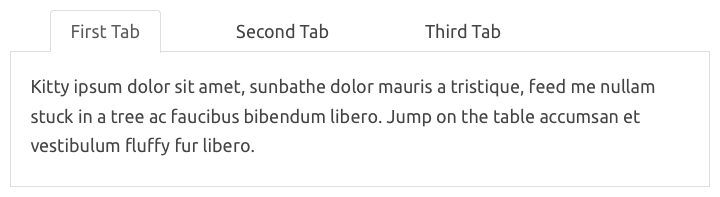
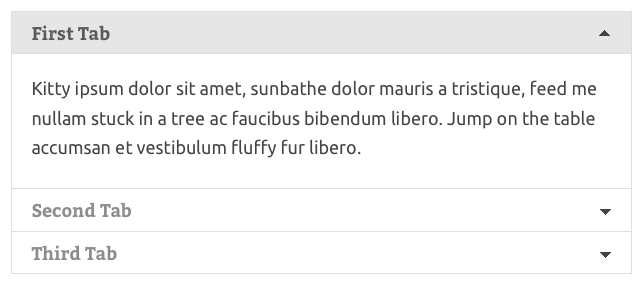
The Tabby responsive tabs plugin allows you to easily add horizontal tabs to your content that will transform into an accordion on smaller screens. It supports multiple sets of tabs on the same page and includes accessibility features for screen readers. There are also optional add-ons available to customize the display of the tabs and add additional functionality, such as linking to specific tabs or setting tabs to act as links to external URLs.Screenshots
Frequently asked questions
What is Tabby Responsive Tabs?
Tabby Responsive Tabs is a WordPress plugin that creates responsive tabs inside posts, pages, or custom post content using simple shortcodes. It displays as horizontal tabs on wider viewports and changes to an accordion on narrow viewports.
What accessibility features does Tabby Responsive Tabs include?
The plugin includes Aria attributes and roles to aid screen reader accessibility. Tabs and their content are also accessible via keyboard navigation.
Can I customize the appearance of the tabs?
Experienced developers can customize the display by replacing the built-in CSS rules. The Tabby responsive tabs customiser add-on provides a settings panel and presets for easier customization without code editing.
Are there any add-ons available for Tabby Responsive Tabs?
Yes, there are several optional add-ons including the Customiser, Link to Tab, Tab to URL Link, Load Accordion Closed, and Reopen Current Tab on Reload add-ons.
How do I create tabs using this plugin?
Tabs are created using the [tabby] and [tabbyending] shortcodes. These shortcodes must be used together to form a tab group.
Changelog
1.4.1
- New setting to specify the font awesome icon style
1.4.0
- Added localization and a few translations
1.3.4
- tab titles sanitized with
wp_kses()to allow line breaks in tab titles - Sanitize html for tab title element
1.3.3
- Added option to change the tab title element
1.3.1
- Fixed issue with the option value saving
- using target url parameter overrides open shortcode parameter for which tab is to be open on page load
- Shortcode parameters now used in array, not extracted
- Priority of tabbytrigger can be changed by adding ‘priority’ shortcode parameter with an appropriate value
- Priority of tabbytrigger changed to 30 by default to prevent breakage on pages created with gutenberg
- ico shortcode parameter added to enable custom icons to be added without adding font-awesome prefixes
1.3.0
- using target url parameter overrides open shortcode parameter for which tab is to be open on page load
- Shortcode parameters now used in array, not extracted
- Priority of tabbytrigger can be changed by adding ‘priority’ shortcode parameter with an appropriate value
- Priority of tabbytrigger changed to 30 by default to prevent breakage on pages created with gutenberg
- ico shortcode parameter added to enable custom icons to be added without adding font-awesome prefixes
1.2.3
- Enable targeting the tab from url query string when the title contains an accent
1.2.2
- Included print stylesheet as a separate file
1.2.1
- Added index.php to prevent the content of plugin directories being viewed if the site has not had directory browsing disallowed.
1.2.0
- Added basic print styles to default stylesheet
1.1.1
- Improvements to default CSS
- Addition of ‘open’ shortcode attribute to allow tabs other than the first to be open when the page loads
- First tab now is open by default when displayed as accordion
- Changed links in plugin table
- Get Plugin Version function
- Prevent tabs overlapping if there are too many
- Remove hard coded paragraph tags in tab content & improve
- Added icon font support. Note: Font Awesome needs to be loaded by your theme or another plugin (including the Tabby Responsive Tabs Customiser)
- Added functionality to allow target url parameter to control which tab is open on page load.
1.0.3
- improved theme compatibility with default css
1.0.2
- enqueue plugin js only when needed
- css for improved specificity
1.0.1
- Updated js & css
1.0.0
- Initial Version

