

Just another contact form plugin. Simple but flexible.
About Stackable – Page Builder Gutenberg Blocks
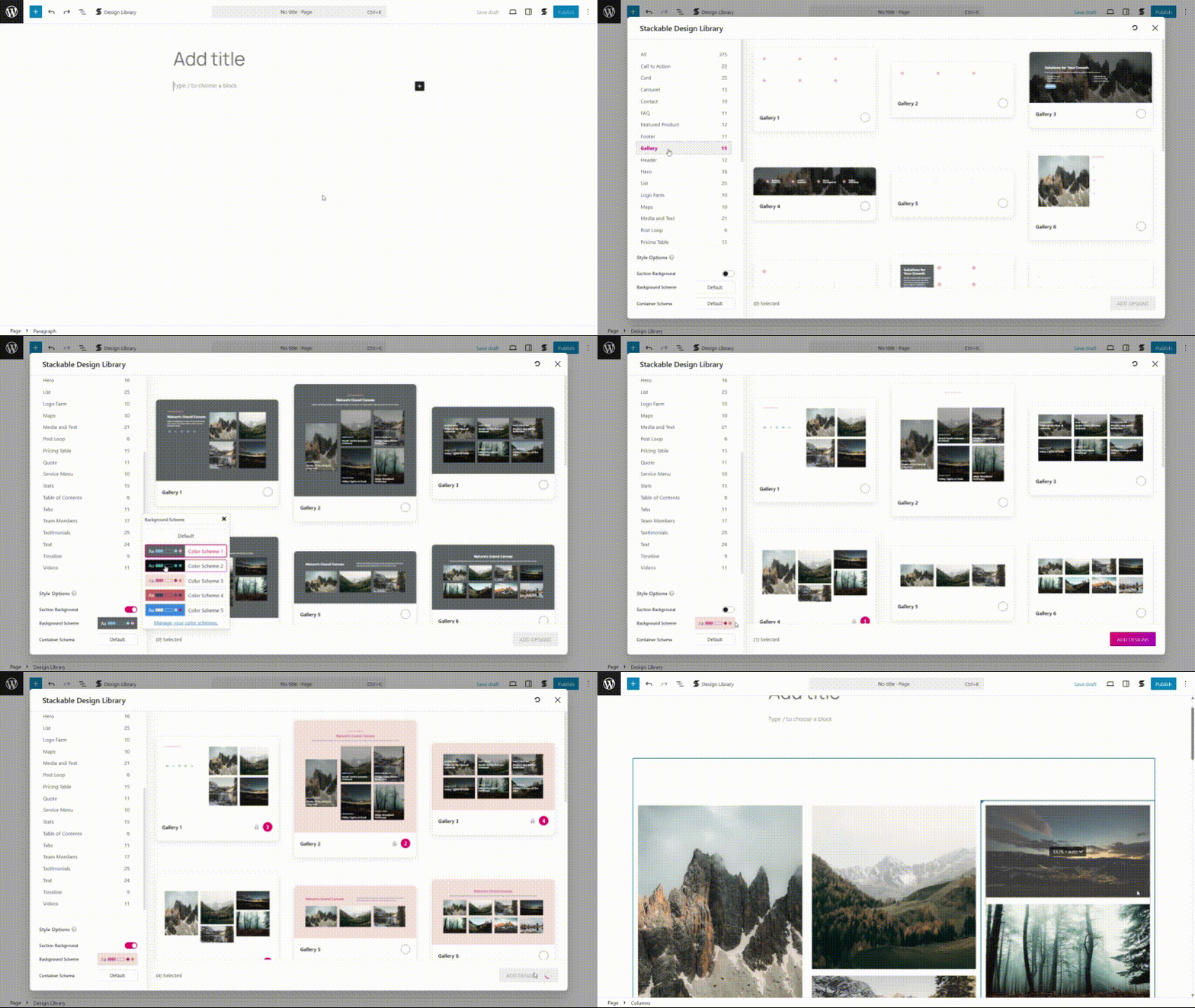
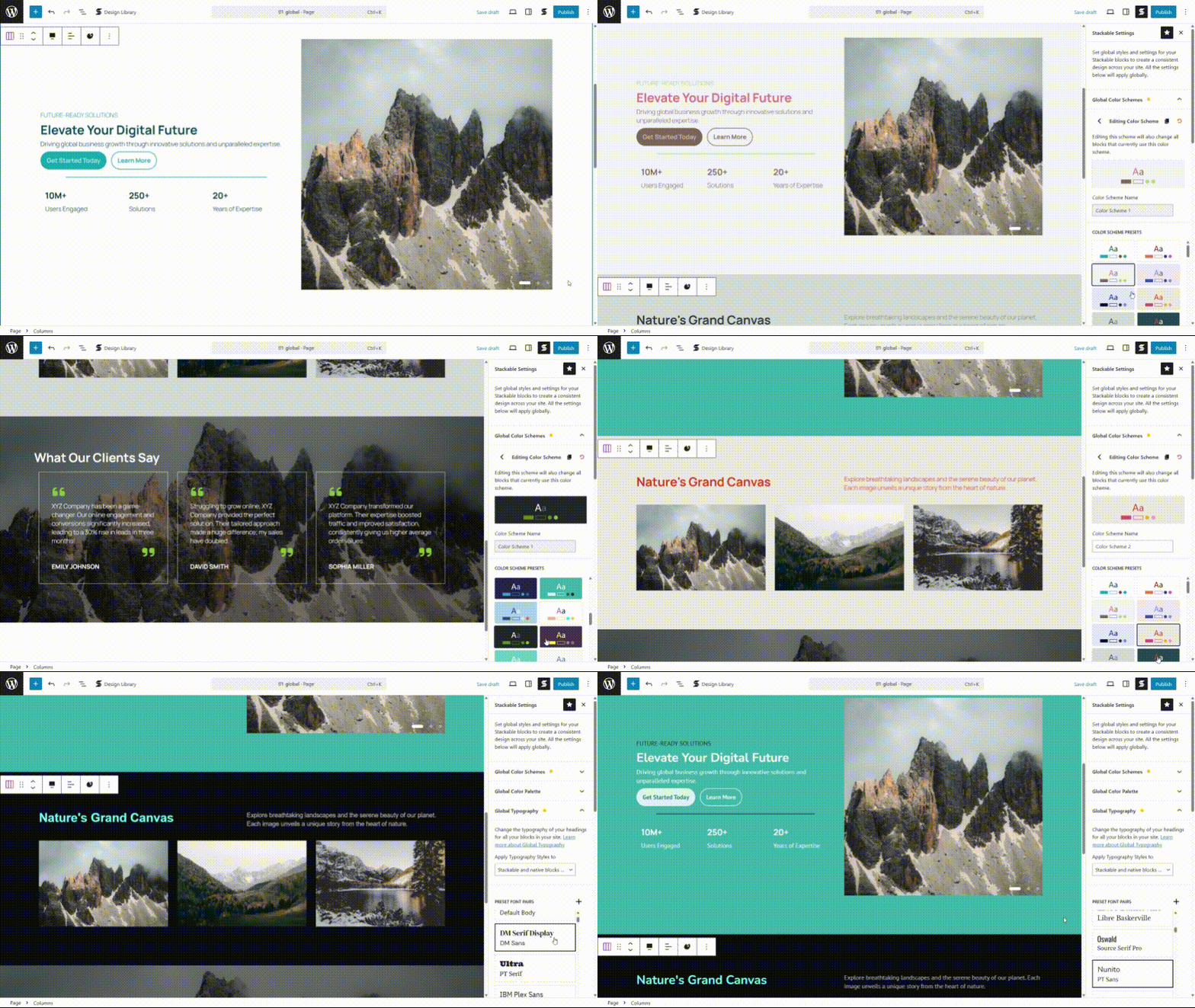
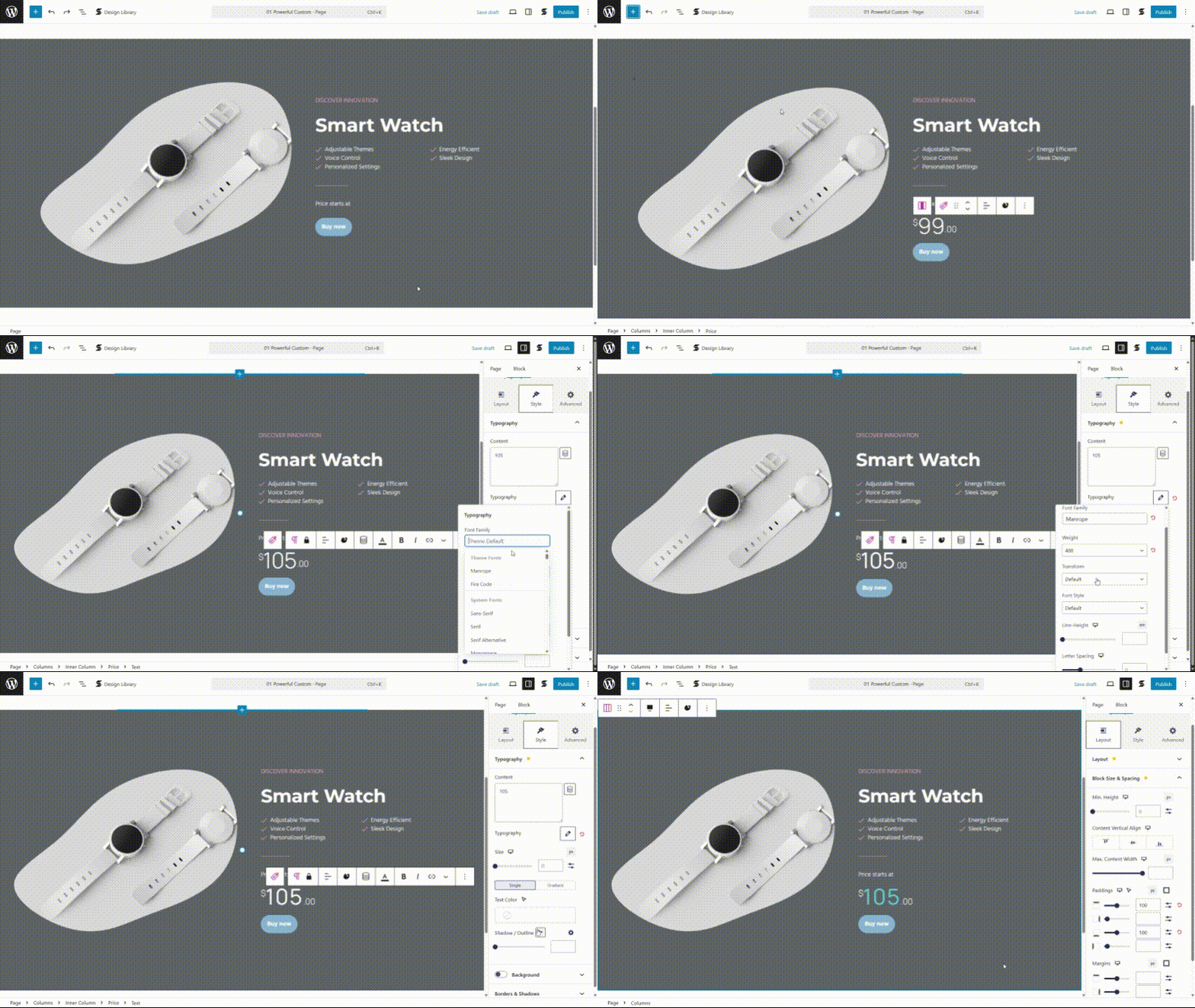
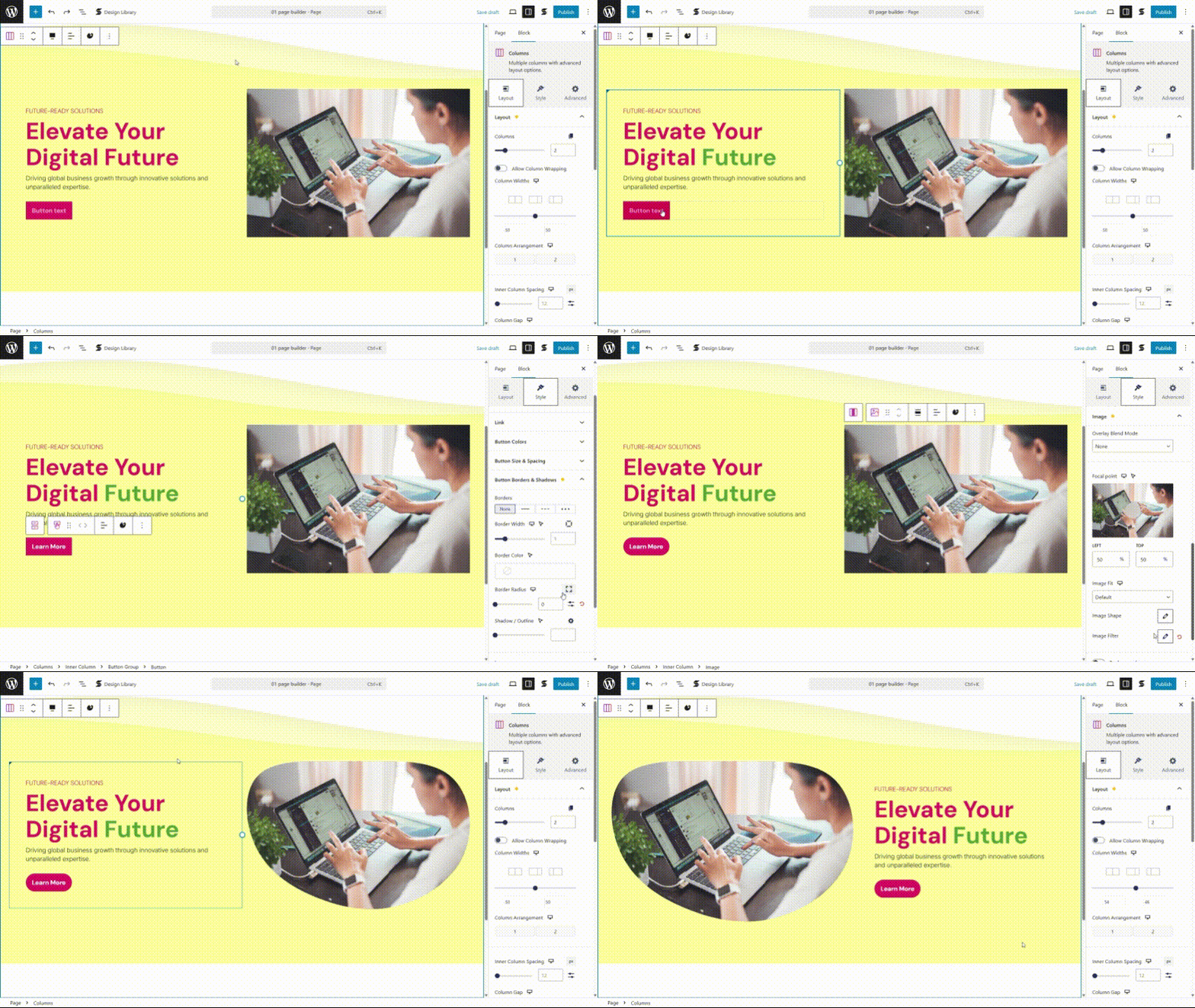
Stackable is a trusted WordPress block plugin that allows you to build dynamic websites with powerful and lightweight custom blocks. With ready-made designs, UI kits, and advanced customization options, you can easily create professional and standout websites using the WordPress Block Editor.Screenshots

Frequently asked questions
What is Stackable?
Stackable is a WordPress plugin that enhances the Block Editor (Gutenberg) by transforming it into a page builder. It provides custom blocks, ready-made designs, and advanced customization options.
Who is the author of Stackable?
The author of Stackable is Benjamin Intal.
How many active installations does Stackable have?
Stackable has 100,000+ active installations.
What kind of design resources does Stackable offer?
Stackable offers an impressive Design Library including dozens of UI Kit designs, hundreds of ready-made block designs, dozens of block layouts, and various shape separator designs.
How many custom blocks are available in Stackable?
Stackable provides 42 flexible custom WordPress blocks. Users can choose which blocks to enable or disable based on their workflow.
Changelog
3.14.2
- New: Added support for Blocksy modern font stacks #3435
- New: Responsive breakpoint settings will now show Blocksy’s breakpoints as the default value ce727ce
- Fixed: Responsive breakpoints – added better support for dynamically inserted content 6911ebe
- Fixed: Responsive breakpoints – now working properly in preview in some styles #3394
- Fixed: Number box – typography gradient color now works properly #3307
- Fixed: Icon list – typography gradient color now works properly #3309
- Fixed: Columns – nested columns may show up in different order on tablet or mobile if parent has different order #3398
- Fixed: Accordion block – may open upward if parent has different column arrangement #3406
- Fixed: Settings may appear blank because of browser caching #3419
- Fixed: Global settings – button does not appear in older WP versions #3425
3.14.1
- Fixed: Hotfix for EWWW Image Optimizer compatibility – freezing in the frontend if lazy loading and auto scaling are both enabled #3415
3.14.0
Icon Library & Granular Plugin Settings
- New: Granular plugin settings – enhanced settings page for better control of plugin features #3354
- New: Added option to use an empty alt tag in images #3376
- Fixed: Image block – using small images no longer stretch #3239
- Fixed: Image block – switching between % and px width now doesn’t cause the image to be too small or too big #3268
- Fixed: Dynamic Content – better compatibility with Blocksy Content Blocks #368
- Fixed: EWWW Image Optimizer compatibility – no longer causes blurry images #3296
3.13.13
- New: Icon Library (Premium feature) – you can now upload custom SVGs and re-use them for the Icon Block! #361 #3317
- Fixed: Text block: typing in the inspector will no longer escape html entities #3399
- Fixed: Typing in the middle of an option in the inspector will no longer move the cursor to the end #3396
- Fixed: Updated Freemius SDK to v2.11.0
3.13.12
- Fixed: Pasting text creates a new block instead of pasting on the current block #3371
- Fixed: Pasting on icon list block makes a new block and loses cursor placement #3382
- Fixed: Blocks inside a WooCommerce shop page can show css styles #3381
- Fixed: Clearing the icon from the icon picker can make the icon blank #3348
- Fixed: Sanitize titles for lightbox #3390
- Fixed: Enhanced text sanitazion #3391
3.13.11
- Fixed: Icon Label block: Error when missing an Icon block #3368
- Fixed: Disable Dynamic Content when inside the Customizer #3352
- Fixed: Allow pasting of blocks when focused on a Stackable Text Block #3330
3.13.10
- Fixed: Compatibility with WordPress 6.7 #3336
- Fixed: Better support for custom SVGs in the icon picker #3265
- Fixed: Cleanup of some code related to the previous performance update #3320
- Fixed: Accordion block: text can become unselectable #3350
- Fixed: Save default blocks: saving can be called multiple times and can cause the browser to hang #3355
- Fixed: Map block: prevent error when using a custom map marker #3362
3.13.9
- Fixed: Text blocks: text gradient color doesn’t show for misspelled words #3305
- Fixed: Button block: adding a button block now places the cursor inside the button ##3324
- Fixed: Conditional display: inspector options do not re-render when changing values #3342
- Fixed: Optimized CSS: mobile styles can overwrite tablet styles sometimes (to fix, please re-save the page) #3345
3.13.8
- Fixed: Possible editor freezing when using deprecated icon lists inside patterns #3332
- Fixed: Timeline block: last timeline doesn’t cut off in mobile view (part 2 of fix) #3292
- Fixed: Icon List block: can produce an error when migrating from an old version #3334
- Fixed: Prevent possible PHP error when calling kses too early
3.13.7
- Fixed: Stylesheets can sometimes not load in the frontend
- Fixed: SVG error when using custom SVGs with a use tag #3323
- Fixed: Carousel block: column alignment stops working for nested columns #3327
- Fixed: Global colors: color not copied over when pasting in another site #3329
- Fixed: Only do kses fixes when the user can edit posts
3.13.6
- New: Drastically improved performance of the Block Editor #3261
- New: Added option to enable Stackable Text block as the default editor block #3279
- New: Added
--stk-transition-defaultCSS variable for easier transition customization #3266 - Change: Disable Inner Column block margins in Carousel blocks #3173
- Fixed: Posts block “<a” text may appear in post excerpts #3301
- Fixed: Improved performance of Stackable Global Colors #3299
- Fixed: Columns block: some settings may not work when used inside a Query Loop block #3109
- Fixed: Carousel block: slide orders change if used inside a Columns block with different responsive column orders #3113
- Fixed: Carousel block: fixed jumping and popup issues when infinite scrolling and autoplay are enabled #3287
- Fixed: Posts block: Load more can load the wrong data if you have multiple Posts block in a page #3189
- Fixed: Icon List block: transforming to this block can cause errors #3277
- Fixed: Horizontal Scroller block: images no longer dragged when dragging to scroll #3280
- Fixed: Timeline block: last timeline doesn’t cut off in mobile view #3292
3.13.5
- Fixed: Otter Blocks compatibility #3276
- Fixed: Carousel block: Same-page navigation now works properly #3098
- Fixed: Some custom SVGs can interfere with othr uploaded custom SVGs #3265
3.13.4
- Fixed: Improved WordPress 6.6 compatibility and performance #357 #3258
- Fixed: Text block performance #3271
- Fixed: Carousel Block: Aria role errors when using infinite scrolling #3269
- Fixed: Media query shortcuts not working in Custom CSS #3214
- Fixed: Posts Block: Date now follows current website language setting #3241
3.13.3
- New: Enhanced WordPress 6.6 compatibility
- New: You can now select multiple adjacent same-type blocks and adjust their inspector settings at the same time #2711
- New: You can now pick a font family from the available ones in the Block Theme fonts or uploaded fonts #3195 #3244
- New: Faster pattern rendering in the editor #3229 #3225
- New: Added admin warning when settings page REST API fails #2882
- Change: Icon Label block: reworked Icon Gap option, now properly measures gap between icon and text #3126
- Fixed: Dynamic Content: using custom date format now works correctly #2570
- Fixed: Aspect Ratio tablet & mobile settings now working properly #3232
- Fixed: Hover transitions not smoothly transitioning #3207
- Fixed: Shadow color support for theme colors #3176
- Fixed: Bottom separator can sometimes not go behind the content #3061
- Fixed: Team Member block: fixed cover layout issue #2985
3.13.2
- New: Added new Aspect Ratio option to Image block and relevant blocks #3200
- New: Added filter stackable_force_css_load – when returning true, Stackable css files will always be loaded in the frontend even if no blocks are present #3218
- New: Accordion block – accordions show open when printing the webpage #3186
- Fixed: Posts block – empty excerpts may show some excerpt markup #3185
- Fixed: Posts block – excerpt length not being followed #3210
- Fixed: Load more block – clicking rapidly can load the same posts #2280
- Fixed: Accordion block – prevent highlighting text when toggling #3096
- Fixed: Accordion block – some icons in the content rotate when opening the accordion #3211
- Fixed: Table of Contents block – excluding headings can affect another TOC block in the same page #3197
- Fixed: Inner column block – top and bottom margins looks different in Firefox #3193
- Fixed: Some CSS validation errors #3087
- Fixed: Some custom SVG icons may not display properly #3103
- Fixed: Image blob shapes sometimes look different in Firefox #3042
- Fixed: Nested selectors in Custom CSS now work properly #3164
- Fixed: Security improvements
3.13.1
- Fixed: (Hotfix update): Style codes can show on some instances
- Fixed: Copy and paste styles now work correctly #350
3.13.0
Improved Stackable Server Performance
- New: x2-x3 plugin performance – improved plugin execution times, reduced memory usage, and faster loading times #340 #3169 #347 #3178
- New: Performance improvements – options are now autoloaded correctly for better database performance #343 #3175
- New: Role Manager – when in content editing mode, a console warning will appear #2911
- Fixed: Dynamic Content – detected custom fields now show up in the Site Editor ##344
- Fixed: Carousel block – infinite scrolling also works for the previous button #3143
- Fixed: Full width buttons and flex wrapping now work correctly #3181
- Fixed: Button text now doesn’t wrap – they look more like what you get in the editor #3181
- Fixed: Button group vertical alignment now works correctly on multiple buttons #3181
- Fixed: Copy and paste styles now work correctly if native blocks are used #341
- Fixed: ACF Dynamic Content line breaks in wysiwyg fields now do not get added #3110
- Fixed: Block preview error when using Stackable blocks in block patterns #3191
3.12.17
- Fixed: (Hotfix update): Display Conditions not working in some cases
3.12.16
- Fixed: Improved database performance of dynamic content when dealing with auto-detected meta fields #337
- Fixed: Transforming blocks to columns can produce block errors #3151
- Fixed: Dynamic content – possible Metabox error when using some fields #3156
- Fixed: Dynamic content – warning when using a featured image that has already been deleted #3168
- Fixed: Security improvements
3.12.15
- New: Tabs Block – added new option to set anchor links per tab that you can use to open each tab #3124
- New: Accordion Block – added support for anchor links that you can use to open each accordion block #3136
- Fixed: Accordion Block – now shows gradient colors with the correct z-index #3138
- Fixed: Accordion Block – removed video background option since it’s not supported by browsers #3138
- Fixed: Metabox Settings – now shows properly other options registered in settings pages #335
- Fixed: Video Popup Block – prevent theme from adding button styles to the video popup #3121
- Fixed: Carousel Block – no longer clones slides when the screen is resized #3132
- Fixed: Carousel Block – DOM events now work correctly in slides when infinite scrolling is enabled #3137
- Fixed: Columns Block – block error when deleting a block in Firefox #3148
3.12.14
- Fixed: Table of Contents Block – WordPress 6.5 compatibility in the Site Editor #3133
- Fixed: Table of Contents Block – Auto-generate anchors now work after the editor refreshes #3133
- Fixed: (Hotfix) Rolled back separator fix since it was producing errors #3131
- Fixed: Some blocks may produce errors when editing in multisite when editing as a non-super user #3130
- Fixed: In multisite, prevent parts of custom icons from being stripped #3130
- Fixed: Buttons block – full width now occupies the entire full width correctly #2991
3.12.13
- Fixed: (Hotfix update) Rolled back some optimizations that caused styling issues in the frontend after saving.
3.12.12
- New: WordPress 6.5 compatibility #3115 #3116 #333
- New: Improved editor and saving performance #3119 #3114
- New: Added support for Metabox settings #330
- New: Columns Block – you can now wrap columns in desktop view #3072
- New: Carousel Block – new infinite scroll option #3060
- New: Added thumbnail option for video backgrounds #3040
- New: Border color picker now has the new opacity slider #3074
- New: Design Library – added error logger in the network tab for easy checking of errors #3112
- New: WooCommerce – dynamic content product description now has option to not strip HTML tags #331
- Change: Removed Navigation Panel feature – it was already disabled by default back in 3.10.2 #3119
- Fixed: Prevent bottom separator from overlapping content #3081
- Fixed: Card block – fixed possible block error when reseting layouts #3080
- Fixed: Posts block – better display for horizontal layouts with large featured image #3108
- Fixed: Tabs block – changing styles now updates the border radius correctly #3106
- Fixed: Lightbox – prevent possible PHP error #3083
- Fixed: Security improvements
3.12.11
- New: You can now use YouTube shorts and unlisted Vimeo videos in the Video Popup block
- Fixed: Ordered Icon List block numerals no longer wrap to the next line
- Fixed: Native list block behaviors no longer create Stackable Icon List Item blocks
- Fixed: Clicking WooCommerce add to cart button no longer changes the Tabs block to the first tab
- Fixed: No longer need to have v2 compatibility enabled for the random order option to work in the Posts block
- Fixed: Carousel block default icon color can now be changed correctly
- Fixed: Pasting a bullet list no longer converts it to a Stackable Icon List block
- Fixed: Frontend scripts now will not initialize more than once
- Fixed: Updated .pot file to allow manual JS strings translations
3.12.10
- Fixed: (Hotfix update) Some themes can add bullets or numbers on the Icon List block
3.12.9
- New: Revamp of Icon List Block (please expect some slight changes in the block’s appearance after the block migrates)
- New: New Icon List Block options: item borders, vertical icon alignment, and more
- New: Cleaner output: inlined script for animations is no longer added if there are no animations
- New: Dynamic Content: you can now search for a post ID in the post search field
- Fixed: Block error when adding an anchor on a Button block
- Fixed: Clicking once on links inside the Carousel block now works in iOS
- Fixed: Anchors are not anymore copied with our copy and paste style feature
- Fixed: Error when using a category that’s shown as a link
- Fixed: Compatibility with Thrive themes global header
- Fixed: Compatibility with Core Framework: inspector panels now open properly
3.12.8
- New: (Hotfix update) Added new option “Lazy Load Images within Carousels” that fixes carousel spacing issues with some image lazy loading solutions
- Fixed: (Hotfix update) Turned carousel image lazy loading fix into an option instead of a default
- Fixed: Dropdown arrows in the block resizers shows up as a square / no icon
- Fixed: Accessibility warning in lightboxes that aria-* attributes are misspelled
3.12.7
- New: Better multisite support
- New: Multisite network license key activation is now possible
- New: Font Awesome 6 support, you can now choose between Font Awesome 5 and 6 icon libraries from the settings
- Fixed: You can now use text formatting on Image block captions
- Fixed: Dynamic Content show different post data when used with JetEngine loops and other query builders
- Fixed: Better scrollbar styling support with Firefix
- Fixed: Column size indicator sometimes shows up as a square / no icon and without a label
- Fixed: Dynamic breakpoints not producing correct breakpoints when used with specific values
- Fixed: Conditional Display can produce a PHP error if post meta is an array
- Fixed: Inner block gap option sometimes resets to 0
- Fixed: Accordion block now opens correctly when editing in the theme Customizer
- Fixed: Carousel & Horizontal scroller height issues when images are lazy loaded
- Fixed: Corrected account and contact us links in the settings when network activated
- Fixed: Network activating will no longer redirect to a 404 page
3.12.6
- Fixed: Block error for blocks with containers and video backgrounds #2967
3.12.5
- Fixed: Edge case PHP error with unique id checking #2961
- Fixed: Resolved PHP warning with Metabox integration #317
3.12.4
- New: WordPress 6.4 compatibility
- New: Tabs block option: Equal tab height – to toggle on/off equal tab heights #2844
- New: Dynamic Content: Added “show as link” option for author name and taxonomies #2878
- New: Image block now has a built-in caption #2875
- New: You can now use a URL for images and background images #2873
- Change: Tabs block now by default will now have non-equal tab heights
- Change: Added note in fixed background option that it only works in desktop and Android mobile #2917
- Fixed: Carousel block is now RTL compatible #2910
- Fixed: Duplicated blocks that are inserted dynamically will now style correctly #2890
- Fixed: Margin bottom draggable control now works correctly when using percentage #2904
- Fixed: Added border radius corner icons #2914
- Fixed: Timeline block lines now connect properly in Firefox #2872
- Fixed: Timeline block in Safari mobile workaround: now always filled with accent color #2912
- Fixed: Progress bar and circle blocks now show correctly dynamic content if edited in widgets #2952
- Fixed: Dragging margin bottom control is now smoother #2904
3.12.3
- Fixed: When updating a container, it has a chance of incorrectly enabling the container
- Fixed: Resolved PHP warning about global styles variable
- Fixed: Accordion block produces a PHP error on saving when structure is malformed
- Fixed: Prevent new border radius control from overflowing the corners
3.12.2
- Fixed: (Hotfix update) PHP error if using PHP 7.2 and below
3.12.1
- Fixed: (Hotfix update) Possible PHP error with Dynamic Content
3.12.0
WooCommerce Integration and Enhanced Color, Gradient and Opacity Settings
- New: WooCommerce integration: you can now use WooCommerce product fields in Dynamic Content and inside the native Query Loop block (premium) #2907
- New: WooCommerce integration: you can now use WooCommerce product fields as Display Conditions (premium) #2907
- New: Enhanced color picker: now includes opacity #2740
- New: Enhanced gradient color picker: multiple color stops, type and angle. Also supports theme gradient colors. #2740
- New: Accordion FAQ Schema option #2874
- New: You can now adjust border radius corners individually #2877
- Change: Global colors can no longer be used when picking gradient colors (backward compatible, if you used them before, they will still work unless the gradient is edited)
- Fixed: Global settings get removed when switching between code view and visual view #2855
- Fixed: Posts block, added missing note about extra options #2879
- Fixed: Global typography preview now reflects the theme’s default font family #2858
3.11.6
- Fixed: Design Library not loading, changed CDN
3.11.5
- Fixed: Fixed styles not loading the the Getting Started page in Firefox #2901
- Fixed: Remote URLs in lightbox gallery now work correctly #2864
- Fixed: PHP warning in PHP 8.2 #2897
- Fixed: Possible PHP warning in admin from Freemius SDK
3.11.4
- New: Added Video Popup block options: disable video download, no full screen & enable/disable loop for self-hosted videos #2876
- New: Range controls now show the inherited value from larger screen sizes as placeholders #2859
- Fixed: Responsive column widths now reset when decreasing columns to one ##2792
- Fixed: Parent hover state cannot be selected without reselecting a recently moved block 3573c51
- Fixed: Accordion toggle animation is now works when inside columns #2728
- Fixed: Firefox fixes for alignments, removed polyfill script for :has selector #2824
- Fixed: Spacer block dragging again fails to update the editor #2866
- Fixed: Single columns block spacing looks different in Firefox #2862
- Fixed: Column arrangement’s responsive values do not disappear on refresh #2706
- Fixed: Timeline block – if background is enabled, dot is not aligned on mobile #2863
- Fixed: JetEngine PHP warning
3.11.3
- Fixed: Compatibility issues with WordPress 6.1
- Fixed: Dynamic Content now display in the editor correctly when used in a Query Loop block
- Fixed: Typing on a field will turn “current post” Dynamic Content source source to a specific post ID
3.11.2
- Fixed: Dynamic Content did not show up when used inside a native Query Loop block
3.11.1
- Fixed: (Hotfix update) PHP error missing function encountered sometimes when updating
3.11.0
Introducing: New Timeline Block
- New: Timeline block
- New: Various performance optimizations, lesser memory usage and better script loading #2835
- New: Page now scrolls to the opened Accordion if it’s not in the viewport #2726
- New: Added a tip when incorrectly using a Google Map in a lightbox #2807
- New: Added some new getting started videos
- Change: Removed settings wizard
- Fixed: Normal or centered block widths are not visible in the editor in WP 6.3
- Fixed: Blocks were not being loaded in the Customizer for classic themes #2846
- Fixed: Global colors and typography not showing in the editor if Content Editing Mode is enabled
- Fixed: Custom Fields admin menu UI
- Fixed: Blocks can encounter an error when dragging inside or from a reusable block #2768 #2791
- Fixed: Picking an icon from the icon picker inside the editor area doesn’t work #2772
- Fixed: Block link now correctly occupies the entire container block if it has a background #2743
- Fixed: Removed ReactDom.render console error messages #2786
- Fixed: Native spacing tabs appear in WP < 6.3 #2837 #2828
- Fixed: Design Library block cannot be selected
- Fixed: Columns content max width unit resets after saving #2826
- Fixed: Icon gap responsive settings resets after saving #2670
- Fixed: Carousel now uses passive listeners to improve scrolling performance #2831
- Fixed: Sometimes inactive tabs can still get mouse focus
3.10.3
- Fixed: (Hotfix update) PHP error incompatibility with some plugins
3.10.2
- New: Compatibility with WordPress 6.3
- New: Updated all blocks to use the new Block API Version 3 – now all Stackable blocks can be iframed in the editor. Learn about the benefits of an iframed editor
- New: Improved editor loading performance #2797
- New: Support for the Navite Group block flexbox options when nesting Stackable blocks #2773 #2774
- Change: The Navigation Panel is now disabled by default #2789
- Fixed: When duplicating or transforming blocks, sometimes changes get applied to multiple blocks ##2749
- Fixed: Added Safari <= 15.3 and Firefox support for some flexbox options #2784
- Fixed: Link picker UI issue where the reset button overlapped #2761
- Fixed: WooCommerce compatibility where the Stackable settings button was not showing up #2793
- Fixed: Inspector panels did not auto-collapse in the Site Editor #2759
- Fixed: Resolved a few console warnings #2787 #2788
3.10.1
- New: Improved Block Theme & Site Editor color compatibility #2599 #2601 #2641
- New: Improved Color palette popup – now has built-in color picker, and color categories for global colors, theme colors, default colors, and custom Site Editor colors. #2600
- New: Improved Global Color panel UI, includes reoredring of global colors and new options to show/hide color categories in the color palette popup
- New: Added vw and vh units to some block options #2735
- New: Added a new
stackable_activation_screen_enabledPHP filter that when false bypasses the welcome and wizard screen. #2676 - New: Added new “Fixed Icon Position” option in Tab Labels block for better text alignment #2739
- Change: Stackable global colors now are no longer included in the color picker of Native blocks to prevent confusion and possible conflicts.
- Fixed: Bug when you have a custom color in the Site Editor, it stops displaying the other colors in the color picker #2599 #2601
- Fixed: Column resize doesn’t snap correctly when the Columns block has a background enabled #2579
- Fixed: Columns block content max width and horizontal align options reset upon save #2742
- Fixed: Resolved missing dependencies warning in Query Monitor #2562
- Fixed: Divider block tablet and mobile alignments not working #2733
- Fixed: Some embedded content do not show up in lightbox #2658
- Fixed: Added support for WP Rocket’s Image Lazy Loading feature in the lightbox #2724
- Fixed: Enabling template locking on a container can cause inner blocks to overlap #2672
- Fixed: A scrollbar was visible on the carousel block in Firefox #2701
- Fixed: Better accessibility: pressing the escape key will close popovers #2766
- Fixed: Colors not working for the collapsed state of accordion blocks (need to edit the block for it to take effect) #2723
- Fixed: Carousel block aria warning #2722
- Fixed: Design library tab focus outline #2727
- Fixed: Map block JS callback warning is now resolved #2734
- Fixed: Progress bar and cirlce blocks can now handle dynamic content that has commas #2688
- Fixed: V2 Feature Grid encounters an error when using the advanced tab #2707
3.10.0
- New: Tabs Block
- New: Revamped Getting Started page with new videos and links
- New: Added new inset option for shadows
- Fixed: Table of Contents block font family not being applied
- Fixed: Some block options did not show correctly in Safari
3.9.1
- New: Inspector UI improvements and reskin
- New: New help tooltips UI
- New: Better inspector accessibility
- New: PHP filter stackable_block_category_index to adjust the block category index
- FIxed: All Dynamic Content Fields from ACF, Metabox and JetEngine are now shown in the field picker
- Fixed: Dynamic Content issues with the Site Editor
- Fixed: Added missing help tooltips
- Fixed: Focal point picker going outside the inspector panels
- Fixed: Expand block accessibility improvements
- Fixed: Progress bar block fullwidth issues
- Fixed: Updated Freemius SDK to 2.5.10
3.9.0
Introducing: New Carousel Block
- New: Carousel block
- New: Typography Letter Spacing is now responsive #2674
- Fixed: The first entry in the Icon list block can get misaligned #2636
3.8.2
- Fixed: Dynamic Content sometimes not displaying in the frontend
- Fixed: Dynamic Content backend field picker issues with ACF
- Fixed: Lightbox now works with PerfMatter’s Image Lazy Loading option
- Fixed: Lightbox compatibility issues with Twenty Twenty One theme
- Fixed: Feature Grid Column gap option resets
3.8.1
- New: Added orange modified indicators to panels and controls – know which options you’ve modified in your blocks!
- New: Added justify text option for the Advanced Text block #2528
- Fixed: Better backspace handling when typing in the number of columns #2675
- Fixed: Scrolling the Horizontal Scroller block now doesn’t open links #2657
- Fixed: When adding background color or a background image, it now auto-enables the block’s background option #2673
- Fixed: Better Dynamic Content support for template/layout CPTs
- Fixed: Lightbox now works with NitroPack’s Image Lazy Loading option
- Fixed: Reset button in Global Typography now resets correctly #2667
- Fixed: Subtitle help icon alignment issue in Global Typography #1903
- Fixed: Handled case when the responsive toggle button doesn’t work when site editor files are loaded in the post editor
- Fixed: Minor translation issues #2596
3.8.0
- New: New Block Inspector UI – reorganized and added new options
- New: Visual Guides – helps visualize layout options like justify and paddings
- New: Flexbox options
- New: Lightbox option in Image blocks and in containers with links – check the Advanced tab > Link panel. Lightbox supports: images, videos, YouTube, Vimeo and web pages.
- New: Typing ‘auto’ in block margins now works visually in the block editor
- Change: Renamed to “Adv. Copy and Paste” styles to make it different from the native copy and paste option
- Change: Removed “Fit all columns to content” option in Columns, this has been replaced with flexbox controls
- Fixed: Some blocks encounter a block error when inside a Query Loop block #2577
- Fixed: Some textarea Dynamic Content fields do not show line breaks correctly #2602
- Fixed: Better inspector panel scrolling when opening and closing panels
- Fixed: Inner Column blocks with paddings made the column widths uneven
- Fixed: Missing meta option in the Posts Block content order option #2646
- Fixed: Video backgrounds now show up as one network request
- Fixed: Block titles and descriptions are now translated correctly in the Getting Started page #2597
- Fixed: Navigation panel cannot be resized properly #2640
- Fixed: Navigation panel closes when selecting another block
- Fixed: Dragging the margin bottom of blocks quickly will stop the current drag
- Fixed: The Block Linking learn more link redirects to the wrong page #2564
- Fixed: In the free version, premium notices have lower priority
- Fixed: Dynamic Content can now be used in the Progress Bar and Progress Circle percentage value #2647

