
Just another contact form plugin. Simple but flexible.
About Simple Taxonomy Ordering
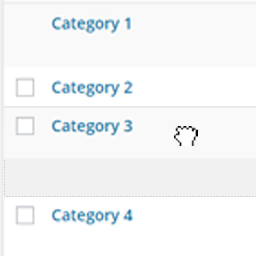
This plugin allows you to easily order the taxonomy terms on your WordPress site using a drag and drop interface. It works for both the core taxonomies (Categories and Tags) as well as any custom taxonomies you have created. The ordered terms will be displayed on the front end of your site as well.Screenshots
Frequently asked questions
What does the Simple Taxonomy Ordering plugin do?
The Simple Taxonomy Ordering plugin allows you to quickly and easily reorder taxonomy terms on your WordPress site using an intuitive drag and drop interface. It works for both WordPress core taxonomies (Categories and Tags) and any custom taxonomies you have created. Once ordered, the taxonomy terms will display on the front end of your site in the set order.
How do I enable a taxonomy for ordering?
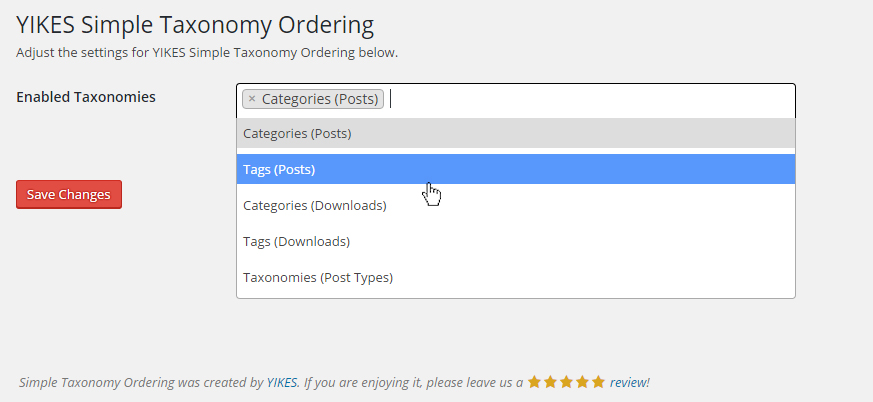
After activating the plugin, you need to visit the settings page. From there, you can enable the specific taxonomies you wish to reorder using the drag and drop interface.
What WordPress version is required for this plugin?
This plugin requires WordPress 4.4 or later. This requirement is due to its use of the term meta functionality introduced in that version.
How can I query taxonomy terms in the custom order?
When querying for taxonomy terms (e.g., with WP_Query or get_terms()), you need to include the 'tax_position' parameter in your call. Specifically, set 'meta_key' to 'tax_position' and 'orderby' to 'tax_position' to retrieve terms in the order specified by the plugin.
Changelog
2.3.4
- Fixes custom order not being displayed on edit-tags pages.
2.3.3
- Housekeeping
2.3.2
- Fixes column span bug present after updating to WordPress 5.5.
2.3.0
- Fixes bug with illegal string offset when disabling taxonomies under certain conditions.
2.2.0
- Added action
yikes_sto_taxonomy_order_updatedto hook into updated Taxonomy event. Thanks @d4mation!
2.1.0
- Singleton Pattern. This approach makes removing the filter, which sets the custom order, a lot easier.
2.0.3
- Fixed uninstall method. The plugin should now uninstall and clean up after itself without error.
2.0.2
- Fixed footer callout URLs and placement. It should only display on the settings page now.
2.0.1
- Fixed an issue with PHP versions < 7 (renaming class method from
includetoinclude_files). - Fixed an issue where new taxonomies were not being saved.
- Fixed an issue where the plugin’s action link to the settings page was going to the admin dashboard.
- Updated the plugin’s pot file with the proper text domain.
2.0.0
- Completely rewrote the plugin: it is now fully WPCS linted, assets are minified, inline styles and javascript have been removed, nonces are included in AJAX requests.
- Fixed bugs with defaulting a taxonomy’s order.
- Fixed bug where ordering on a subsequent page would overwrite the first page’s order.
1.2.7
- Added some variable checks to prevent PHP Notices.
1.2.6
- Changed the global (localized) JS variable from
localized_datatosimple_taxonomy_ordering_datato avoid any potential conflicts.
1.2.5
- Fixed an issue where terms weren’t being returned if the termmeta table was empty. A big thanks to @doppiogancio on GitHub for finding this and helping us reach the solution.
1.2.4
- Fixed a JS issue that occurs when HTML is added to category description. A big thanks to @mateuszbajak for finding this and fixing it!
1.2.3
- Fixed a bug where the same SQL join statement was being added to a query twice on the front end (props to @burisk for calling this out)
1.2.2
- Added a CAST call to order taxonomies as integers instead of strings (props to Timothy Couckuyt / @devplus_timo for calling this out)
1.2.1
- Removed the
disableSelection()call to allow selection of quick edit fields
1.2
- Added i18n: added domain path, languages folder, .pot file, and load_text_domain() hook
1.1
- Reverted query, added missing ORDER BY argument.
1.0
- Altered the query run when ordering terms (Props to Daniel Schwab for the pull request.
0.1
- Initial release

