

Improve your WordPress SEO: Write better content and have a fully optimized WordPress site using the Yoast SEO…
About Prevent Direct Access – Protect WordPress Files
Prevent Direct Access (PDA) is a WordPress plugin that protects your files and prevents them from being indexed by search engines or accessed by unauthorized users. It offers features such as customizing the "No Access" page, generating private download links, blocking IP addresses, and preventing image hotlinking. The Gold version of PDA provides additional advanced features like file encryption, protecting new file uploads automatically, and integrating with other plugins.Screenshots

Frequently asked questions
What does Prevent Direct Access (PDA) do?
Prevent Direct Access (PDA) offers a simple solution to protect your WordPress files as well as prevent Google, other search engines and unwanted users from indexing and stealing your hard-to-produce ebooks, documents, and videos.
What types of files can PDA protect?
Prevent Direct Access is designed to protect all your WordPress media files such as images (PNG, JPEG), documents (PDF, DOCX, PPTX), audios, and videos (MP4, MP3) that you upload to your website under Media Library or via Media, Pages or Posts.
Who can access protected files?
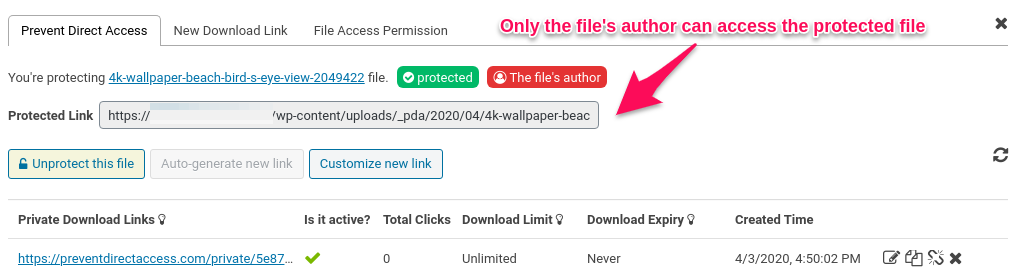
Once protected, only admin users and the file's author can access them directly. Unwanted users will be redirected to your 404 not found page when attempting to read and download these file URLs.
Can I customize the 'No Access' page?
Yes, instead of redirecting unauthorized users to the 404 page, you can show them a custom page, e.g registration or login page. Users will have to log into your site in order to access these protected files.
How do private URLs work?
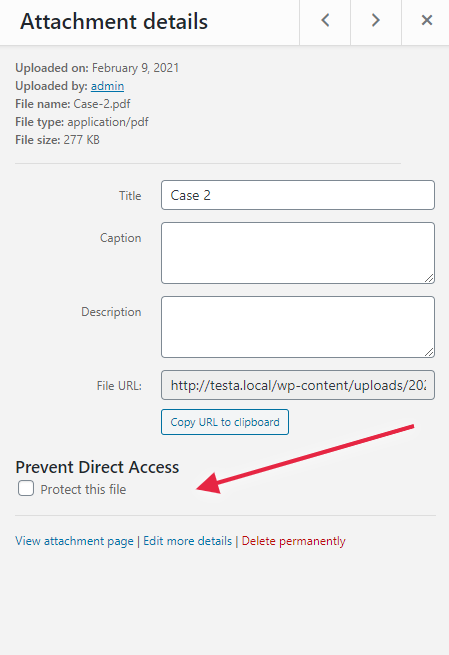
Once a WordPress file is protected, Prevent Direct Access will automatically generate a private download link containing a random string for you to access or share this private file with others. You can then copy that private download link to clipboard and subsequently paste it on your browsers and/or email by clicking on the Copy URL button.
Changelog
2.8.8.2 Feb 26, 2025
- [Bugfix] Resolved the developer tool alert issue for page builders.
2.8.8.1 Feb 17, 2025
- [Bugfix] Fixed an issue with shortcut blocking and detection in developer tools prevention.
- [Improvement] Enhanced security measures for generating unique strings.
2.8.8 Jan 28, 2025
- [Improvement] Added customizable right-click alert with tooltip message.
- [Improvement] Enhanced developer tools prevention with shortcut blocking and detection.
2.8.7 July 01, 2024
- [Bug Fix] Resolved issues with Protection and Unprotection links for custom upload directories without year-month paths.
2.8.6.1 May 15, 2024
- [Bugfix] Code improvements and optimizations
2.8.6 May 13, 2024
- [Bugfix] Fixed Callback permission in rest api
2.8.5 September 11, 2023
- [Improvement] Comprehensive code comment documentation has been added
- [Improvement] Added text domains for strings in places where they were previously missing
- [Improvement] Removed unnecessary commented-out code, ensuring a cleaner and more efficient codebase
- [Improvement] The settings page sidebar has been revised to provide users with updated information and a helpful guide
2.8.4 April 07, 2023
- [Fix] Free plugin not working if we have install premium plugin and activate the license and then deactivate the premium plugin
2.8.3 Dec 16, 2022
- [Improvement] Disable right-clicks on iFrames
- [Improvement] Show error messages when protecting deleted files
- [Improvement] Show confirmation messages when protect/unprotect files under Media Library Grid View
2.8.2 August 25, 2022
- [Improvement] Show alert messages when right-clicking on web pages
- [Improvement] Disable more keyboard shortcuts
- [Fix] Allow text input on Safari when disabling right-clicks
2.8.1 Jun 12, 2022
- [New Feature] Restrict media files access to file’s authors only
- [Improvement] Show warning messages on multisites
- [Fix] Show non-latin characters in protected file names
2.8.0 April 20, 2022
- [Improvement] Disable text selection and image drag-and-drop features
- [Improvement] Disable content copy functions
- [Improvement] Display alert message on mouse right click
2.7.10 February 9, 2021
- [Refactoring] Secure input and output data
- [Refactoring] Update Settings UI using WordPress built-in jQuery libraries
2.7.9 Jan 28, 2022
- [New Feature] Provide an settings option to prevent right-clicking on all pages
- [Improvement] Remove “Invite & Earn” submenu & UTM tags on the plugin author URI
2.7.8 December 6, 2021
- Allow admins to access protected files whose FAP are “the file’s author” via a hook
- Display success & error messages when saving IP Restriction settings
2.7.7 October 5, 2021
- Allow protecting unlimited files with PDA Lite plugin
- Improve UI: Remove disabled options
2.7.6 August 13, 2021
- Update embedded documentation links in UI settings
- Test compatibility with WordPress 5.8
- Update GetResponse API 3.0
2.7.5 June 16, 2021
- Provide hook to display PDF thumbnails in the Media Library
- Fix error PHP log when updating a new PDA version
2.7.4 April 7, 2021
- Show rewrite rules for IIS users
- Improve UI: Hide PDA Gold features in the settings page
- Remove error log
- Show Configure pop-up under Media Library for all servers
2.7.3 February 10, 2021
- Improve UI on settings page and show rewrite rules for Nginx users
- Allow users to protect files under Media Library Grid View
2.7.2 December 18, 2020
- Allow admin users to access protected files
2.7.1 August 24, 2020
- Fix PHP notices with WP 5.5
2.7.0 June 16, 2020
- PDA Gold requires PDA Lite
- Un-protecting files don’t update _pda_protection value
- Remove unused files & folders
- Hide “upgrade to PDA Gold” notice if PDA Gold is active
- Change the domain of translation
- Do not support in multisite mode
2.6.0 April 3, 2020
- Improve UI: compatible with WordPress 5.3
- Allow the file’s author to access protected file by default
2.5.1.2 February 5, 2020
- Improve UI: hide Like Plugin column in the settings page
2.5.1.1 November 16, 2019
- Fix add_submenu_page PHP notice issue
2.5.1 November 7, 2019
- Add feature “Prevent Image Hotlinking”
- Prevent Google Indexing for private links
- Fix file access permission when filename contains size
2.5.0.4 October 4, 2019
- Improve UI under settings page
2.5.0.3 August 9, 2019
- Update switch button under settings page
- Show notification when saving settings successfully
2.5.0.2 May 16, 2019
- Fix get lucky button
2.5.0.1 December 04, 2018
- Fix typo
2.5.0 November 18, 2018
- Revamp UI
2.4.0.1 August 10, 2018
- Hot fix [] array declaration cannot work under PHP version < 5.4
2.4.0 June 14, 2018
- Fix cannot remove rewrite rules when deactivate plugin
2.3.9 Tue, April 17, 2018
- Fix “This plugin is not properly prepared for localization”
2.3.8 Thu, April 12, 2018
- Apply localisation
2.3.7 Wed, February 28, 2018
- Test WordPress 4.9.4
2.3.6 Wed, January 31, 2018
- Fix undefined index when get option FREE_PDA_SETTINGS
2.3.5 Fri, January 26, 2018
- Improve UI for settings page
2.3.4 Tue, January 23, 2018
- Improve UI on settings page by revamping checkbox option
- Integrate stop image hotlinking feature
- Show information in order to know whether the file is protected
2.3.3 Mon, January 8, 2018
- Revamp settings page
2.3.2 Wed, November 15, 2017
- Fix wp::prepare warning messages when using in WordPress version 4.8.3.
2.3.1: Sat, November 4, 2017
- Add warning messages when users are using a deprecated wp api plugin.
2.3: Thu, August 17, 2017
- Protect files from search engine’s index
2.2: Wed, June 14, 2017
- Add settings page
2.1.5: Thu, June 1, 2017
- Notify users to upgrade to Gold version
- Update plugin’s data after users remove media files
2.1.4: Mon, May 22, 2017
- Change the way to get non-protected URL
- Redirect to default 404 page if the file is protected
- Support websites hosted on WP Engine
2.1.3: February 25, 2017
- Tweak: Change the plugin’s logic to cater for those files that couldn’t be found in the _postmeta table
2.1.2
- Fix Twitter, Google Plus and Facebook open graph issue
2.1.1
- Fix .htaccess rules to recognize the special characters
- Find in _postmeta table in case of cropped images via wordpress

