

Just another contact form plugin. Simple but flexible.
About Phoenix Media Rename
The "Phoenix Media Rename" plugin can greatly improve your website's SEO by renaming your media files. You can find a complete guide on how to use and configure the plugin on the official Phoenix Media Rename page.Screenshots
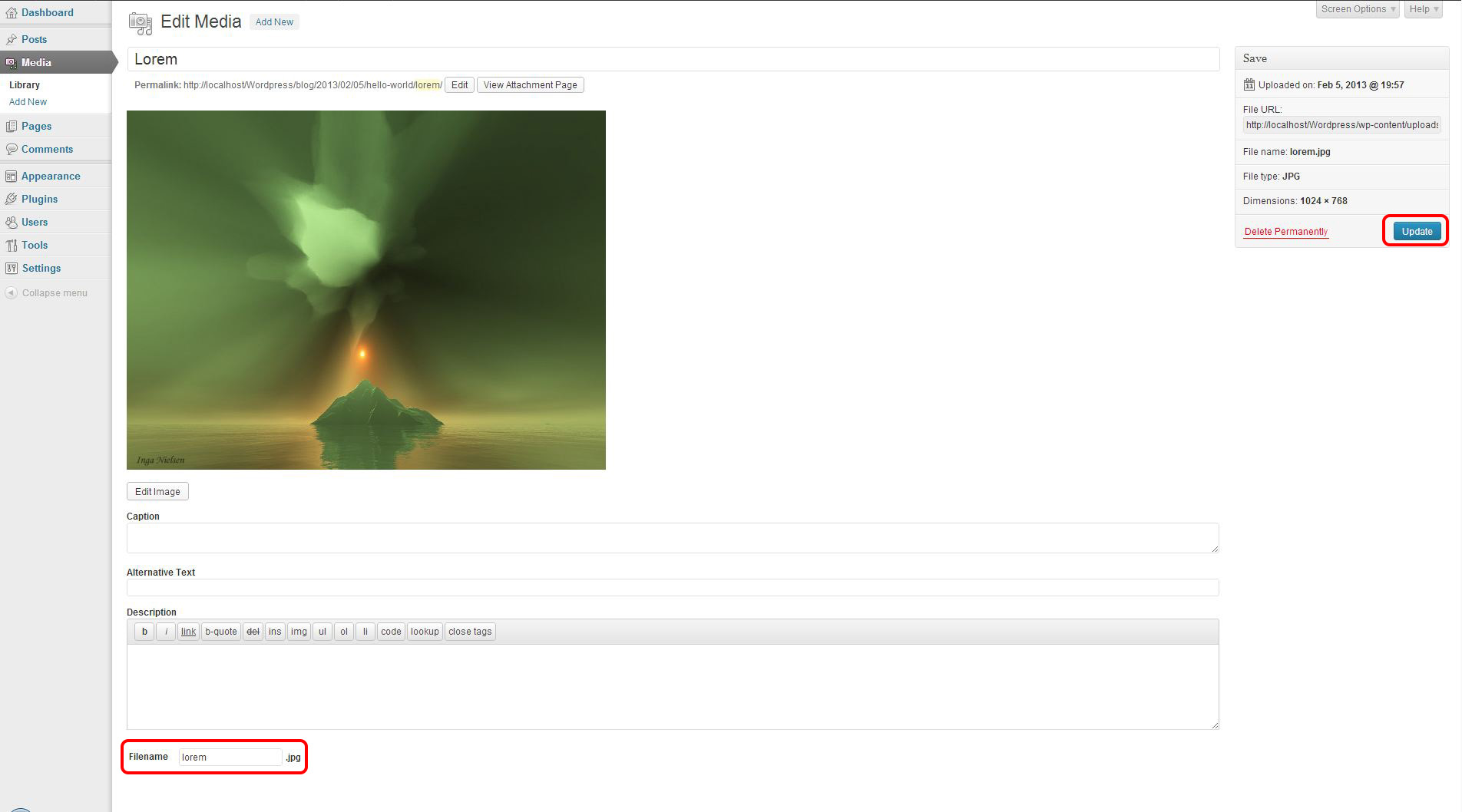
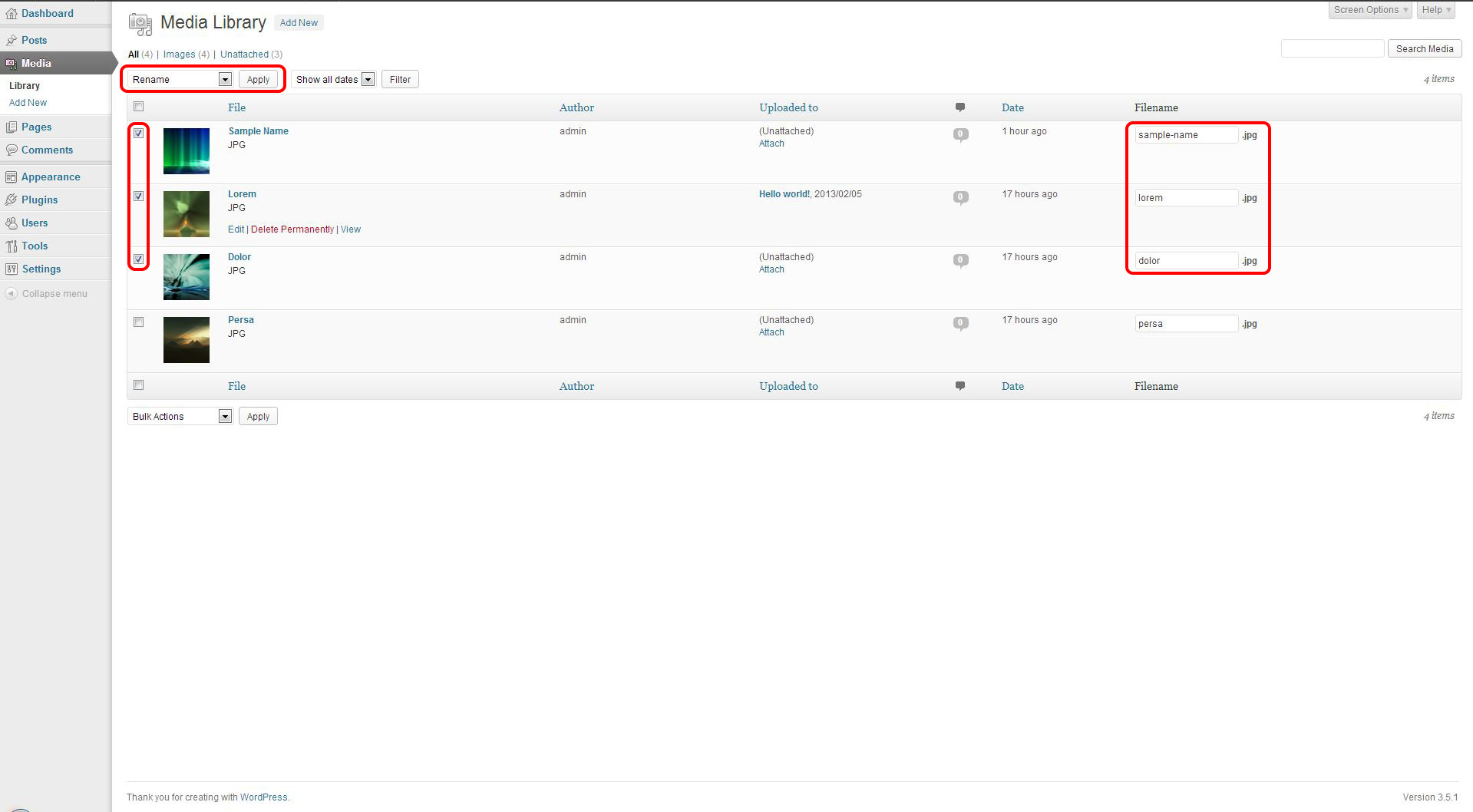
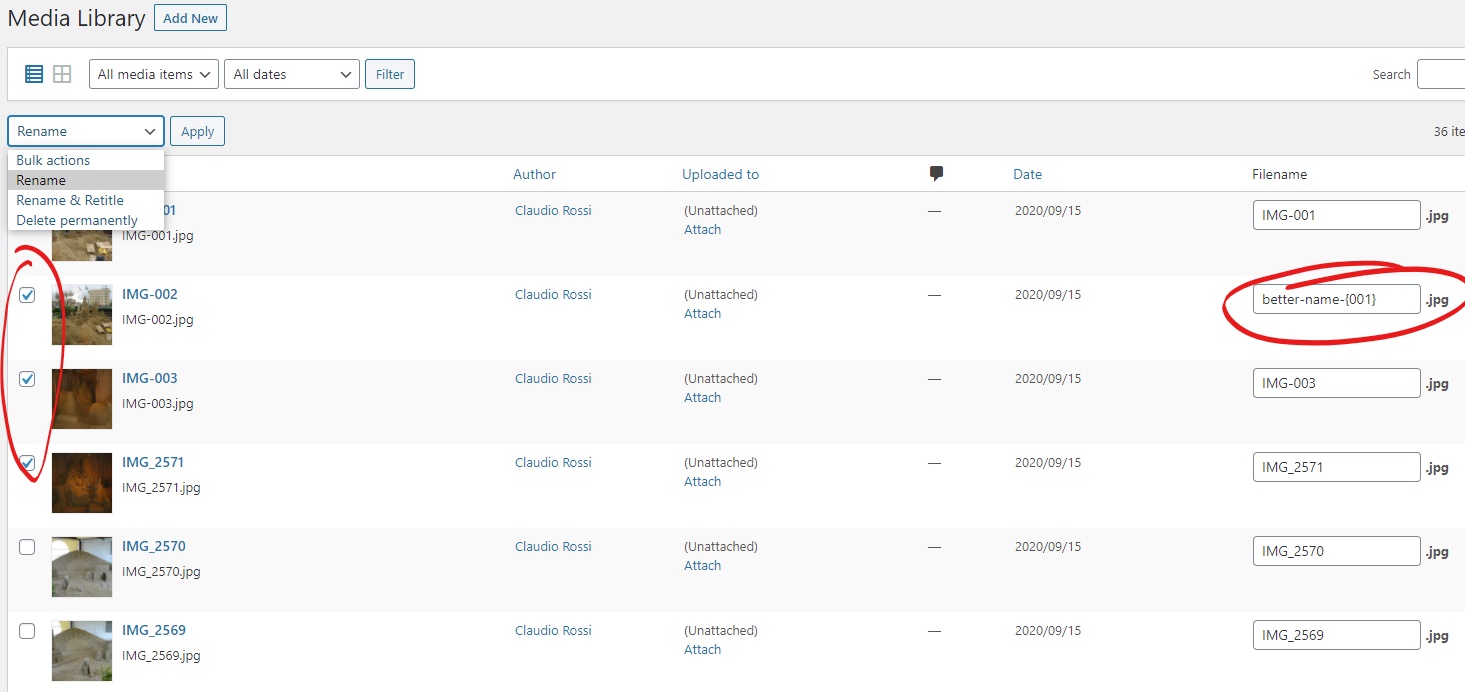
Frequently asked questions
What does the Phoenix Media Rename plugin do?
The Phoenix Media Rename plugin greatly improves your SEO by allowing you to rename your media files.
Where can I find a complete guide on how to use and configure Phoenix Media Rename?
You can find a complete guide on how to use and configure Phoenix Media Rename at the official page: https://www.eurosoftlab.com/en/phoenix-media-rename/
Changelog
3.12.8
- prevented the plugin from running on frontend
3.12.7
- optimized cookies usage
3.12.6
- fixed plugin activation
3.12.5
- added notification if no bulk action is selected
3.12.4
- fixed issue with unset cookie
3.12.3
- replaced the database table with session cookies to record bulk renaming info
3.12.0
- changed uninstall procedure
3.11.9
- fixed single media rename for non-image files
3.11.8
- added automatic checkbox activation when the filename is edited
3.11.7
- optimized renaming process
3.11.6
- added compatibility with Beaver Builder Lite
3.11.5
- added integration with AltText.ai
3.11.4
- fixed issue with site options update
3.11.3
- fixed issue with thumbnails deletion (thank to @ripper33rus for addressing the issue)
3.11.2
- fixed php warning in Media Library Assistant check
3.11.1
- disabled Phoenix Media Rename on Media Library Assistant custom page
3.11.0
- fixed issue with php versions older than 8 (thanks to @wayneljw for addressing the issue)
3.10.5
- removed . character from sanification list due to issues with WordPress core that causes problems during images upload
3.10.4
- added troublesome characters to sanification process
3.10.3
- fixed issue in renaming from post when filename already exists
3.10.2
- fixed issue in renaming from post
3.10.1
- fixed issue in renaming scaled files
- fixed issue in renaming process when debug mode is disabled
3.10.0
- changed rename process
3.9.1
- fixed issue with scaled files
3.9.0
- added options to add post parent category name as prefix or suffix of the filenames
3.8.9
- changed revision update management
3.8.8
- fixed issue when header constant is empty and trailer constant has a value
3.8.7
- fixed issue in trailer constant cleaning
3.8.6
- fixed title in retitle bulk action when filename requires sanitization
3.8.5
- fixed renaming webp and avif files generated by ShortPixel when the filename contains more than one “-” character
3.8.4
- fixed renaming webp and avif files generated by ShortPixel
3.8.3
- fixed renaming webp and avif files generated by ShortPixel
3.8.2
- fixed “Retitle from post” behavior when there is no post attached to the media
3.8.1
- added new bulk operation “Retitle from post”, that allows to change only the title of the file getting it from the title of the post to which the media is attached
3.8.0
- added new bulk operation “Retitle”, that allows to change only the title of the file
3.7.9
- fixed compatibility issue with Elementor background images
3.7.8
- fixed compatibility issue with Elementor custom page templates
3.7.7
- fixed compatibility issue with Elementor
3.7.6
- fixed compatibility issue with WMPL
3.7.5
- fixed compatibility issue with WordPress 6.0
3.7.4
- added support for Rank Math redirections
3.7.3
- fixed error in thumbnail regenation from wp-cli for a file renamed using Phoenix Media Rename
3.7.2
- fixed “filename already present” error when many files could get the same name
3.7.1
- fixed “filename already present” error when a file has been uploaded in a subfolder (thanks to @niwin for the help addressing the issue)
3.7.0
- changed “rename from post” management
- fixed some case of infinite loop during bulk rename
3.6.0
- added option to serialize filename if a file with the target filename is present
3.5.1
- grouped options “Sanitize filenames” and “Remove accents” and added integrity check
3.5.0
- added option to convert filename to lowercase when the action “rename from post” or “rename and retitle from post” is selected
3.4.10
- changed iterator in metadata deserialization (thanks to @alx359 for addressing the issue)
3.4.8
- minor optimization in ShortPixel metadata management
3.4.7
- added parameters to add constants to the beginning and end of file names
3.4.6
- added termination to ajax code
3.4.5
- prevented initialization of the plugin on frontend
3.4.4
- added security check in ajax rename process
3.4.2
- added translation support for title in settings page
3.4.0
- added option to disable filename sanitization
3.3.1
- fixed compatibility issue with Elementor
3.3.0
- added option to create a 301 redirection when a file has been renamed. The option is disabled by default, to enable it visit the Phoenix Media Rename settings page. (thanks to @ortonom for the suggestion)
Please Note: the free plugin Redirection is required to add and manage the 301 redirection
3.2.5
- fixed minor issue in “option debug” management
3.2.4
- fixed compatibility issue with WPML (many thanks to Diego Pereira for his help)
3.2.2
- fixed issue when plugin is called via code from frontend
3.2.1
- fixed compatibility issue with Archivarix External Images Importer
3.2.0
- changed rename process management
- added new option “debug mode”
- pushed minimum required WordPress version to 5.0
- pushed minimum required PHP version to 7.1
3.1.0
- added new bulk operations “Rename from post” and “Rename and retitle from post”, that gets the name for the media files from the post they are attached to
- changed database table creation logic (thanks to @rinatkhaziev for the contribution)
3.0.5
- fixed issue with ShortPixel
3.0.4
- fixed javascript error on single media page
3.0.3
- changed filename textbox size in attachment page
3.0.1
- fixed issue with older php versions
3.0.0
- added support for filename serialization
2.3.0
- added action ‘pmr_renaming_successful’
2.2.5
- changed renaming error message to have more information about the source of the error
2.2.4
- fixed error with old files stored in year- month- based subfolders (many thanks to @jockolad who addressed the issue)
2.2.3
- fixed distribution error
2.2.2
- fixed issue with media files organized in subfolders
2.2.1
- fixed another issue with new big image management introduced in WordPress 5.3
2.2.0
- fixed issue with new big image management introduced in WordPress 5.3
- fixed issue with shortpixel image optimiser
2.1.1
- fixed default value for accent sanitization option
2.1.0
- added option to manage accent sanitization in file name
2.0.3
- fixed issue with multisite (many thanks to @synetech for addressing the issue)
2.0.2
- fixed localization support for link to settings page in plugin list
2.0.1
- added link to settings page in plugin list
2.0.0
- added settings page (thanks to @mrleif)
1.4.0
- added support for elementor
1.3.4
- changed post title management in bulk operations
1.3.3
- fixed issue with WPML
1.3.2
- removed unnecessary php warnings from log file (thanks to @alx359)
1.3.1
- removed unnecessary php warnings from log file (thanks to @alx359)
1.3.0
- fixed issue with WPML
1.2.6
- fixed issue with WP Compress plugin
1.2.5
- disabled submit button during bulk rename
- added js minification
1.2.4
- fixed error in Smart Slider custom table update
1.2.3
- fixed error in Smart Slider custom table update
1.2.2
- optimized sql for Smart Slider custom tables update
1.2.1
- fixed error in Smart Slider custom table update
1.2.0
- added support for Smart Slider
1.1.4
- fixed ajax notification issue on php 7
1.1.3
- added support for non-latin characters in file name
1.1.2
- added sanitization to file names
1.1.1
- added licence for phoenix icon
1.1.0
- added support for localization
1.0.1
- fixed author username
1.0.0
- Initial version

