

The Elementor Website Builder has it all: drag and drop page builder, pixel perfect design, mobile responsive editing,…
About Meta Generator and Version Info Remover
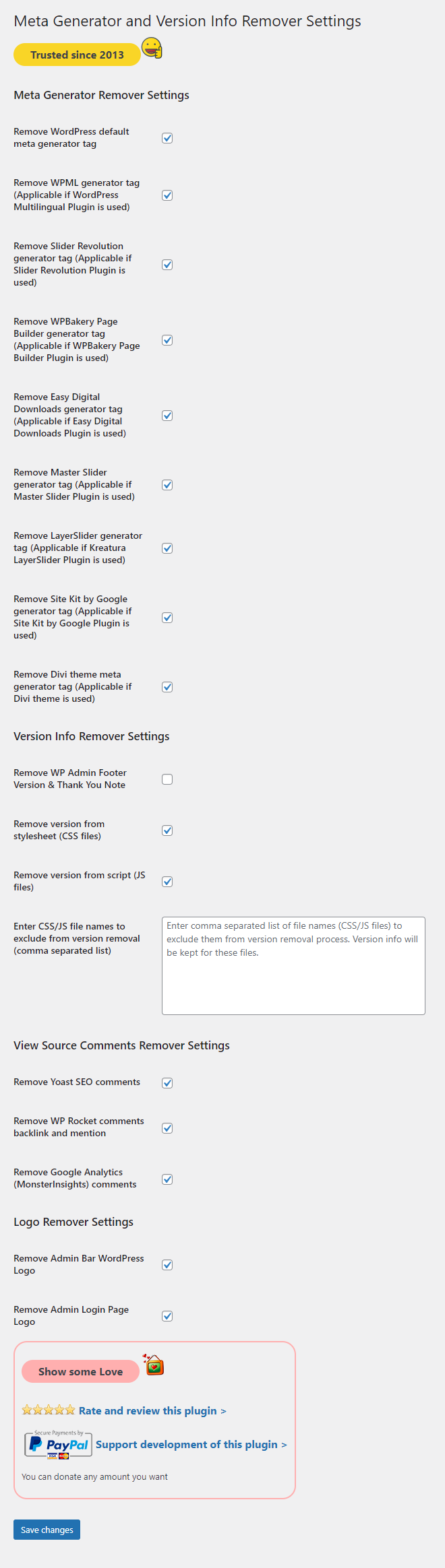
This plugin removes version information from enqueued styles and scripts, as well as the Meta Generator tag in the head and RSS feeds. It also has options to remove specific plugin meta generator tags, admin page logos, and other WordPress related information. You can enable or disable each removal option from the admin dashboard.Screenshots

Frequently asked questions
What does this plugin do?
This plugin removes version information from enqueued style and script URLs. It also removes various Meta Generator tags from the head section and RSS feeds.
What types of Meta Generator tags can this plugin remove?
It can remove Meta Generator tags for WordPress, WPML, Slider Revolution, WPBakery Page Builder, Easy Digital Downloads, Master Slider, LayerSlider, Site Kit by Google, Divi Theme, Image Placeholders, Performance Lab, Performant Translations, and WEBP Uploads (Modern Image Formats).
Can I selectively control what is removed?
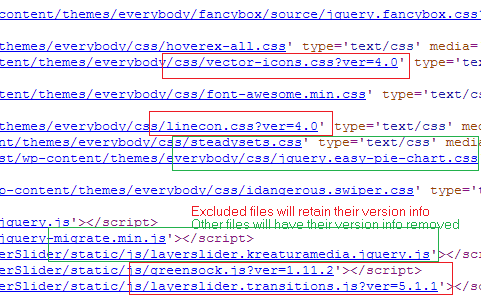
Yes, you can enable or disable each removal option from the admin dashboard. There is also an option to exclude specific style or script files from the version info removal process.
Changelog
16.0
- Added: Image Placeholders Meta Generator Removal.
- Added: Performance Lab Meta Generator Removal.
- Added: Performant Translations Meta Generator Removal.
- Added: WEBP Uploads (Modern Image Formats) Meta Generator Removal.
15.1
- Added: Remove ‘Powered by WordPress’ from Admin Login Page source code.
15.0
- Added: Remove Admin Dashboard Help Tab.
14.0.2
- Updated: OB Flush null check added.
14.0.1
- Updated: OB Flush Hook from wp_head to shutdown.
14.0
- Added: Remove WordPress Text from Admin Login Page Title.
- Added: Remove WordPress Text from Admin Pages’ Titles.
13.1
- Updated: Google Analytics (MonsterInsights) comments removal.
13.0
- Added: WP Rocket comments backlink and mention removal.
12.2
- Added: Admin Footer Version Removal.
- Added: Admin Footer Thank You Text Removal.
12.1
- Removed: Deprecated screen_icon function.
12.0
- Added: Site Kit by Google Meta Generator Removal.
11.0
- Added: Divi Theme Meta Generator Removal.
10.0
- Added: Admin Bar WordPress Logo Removal.
- Added: Admin Login Page Logo Removal.
9.0
- Added: LayerSlider Meta Generator Removal.
8.0
- Added: Master Slider Meta Generator Removal.
7.0
- Added: Easy Digital Downloads Meta Generator Removal.
6.2
- Updated: Yoast SEO comments removal code updated.
6.1
- Updated: Eliminate any PHP Notices and to meet PHP Strict Standards requirements.
6.0.4
- Removed: Other language translation files to fix display errors.
6.0.3
- Updated: Supported generator name.
6.0.2
- Updated: PHP notice fix for screen_icon.
6.0.1
- Updated: Language translations.
6.0
- Updated: Version removal feature – Added version argument checking.
5.1.1
- Updated: Code improvements.
5.1
- Added: Google Analytics (MonsterInsights) comments removal.
5.0
- Added: Yoast SEO comments removal.
4.4.1
- Updated: Language translations.
4.4
- Added: WPBakery Page Builder Meta Generator Removal.
4.3
- Added: Slider Revolution Meta Generator Removal.
4.2
- Added: WPML (WordPress Multilingual Plugin) Meta Generator Removal.
4.1
- Added: German language translations.
- Added: Spanish language translations.
- Added: French language translations.
- Added: Italian language translations.
4.0
- Added: i18n (Internationalization) support.
3.4
- Updated: Refactoring and improvements.
3.3
- Updated: Data persistence logic on plugin re-activation hook.
3.2
- Updated: Eliminate any PHP Notices and to meet PHP Strict Standards requirements.
3.1
- Updated: Support for servers running PHP 5.3 or less added. Version 3.0 used a code that was supported only for PHP 5.4+. This has been modified to support all servers.
3.0
- Updated: Feature enhancement – Exclude files from version info removal process (by providing comma separated file names).
- Added: Screenshots
2.2
- Updated: WordPress Tested Upto Info. WordPress 4.0 supported.
2.1
- Updated: Generator Remover Filter.
2.0
- Added: Options to manage the settings from Administrator Dashboard.
1.0
- Initial Commit.

