

The Elementor Website Builder has it all: drag and drop page builder, pixel perfect design, mobile responsive editing,…

About Login as User
The Login as a User WordPress plugin allows admins to easily access the frontend as a specific user, making it easier to solve problems and provide customer support. With just one click, admins can log in as the external user or customer and handle any situation quickly and efficiently. The plugin also offers additional features such as WooCommerce integration and role management permissions for enhanced functionality and control.Screenshots
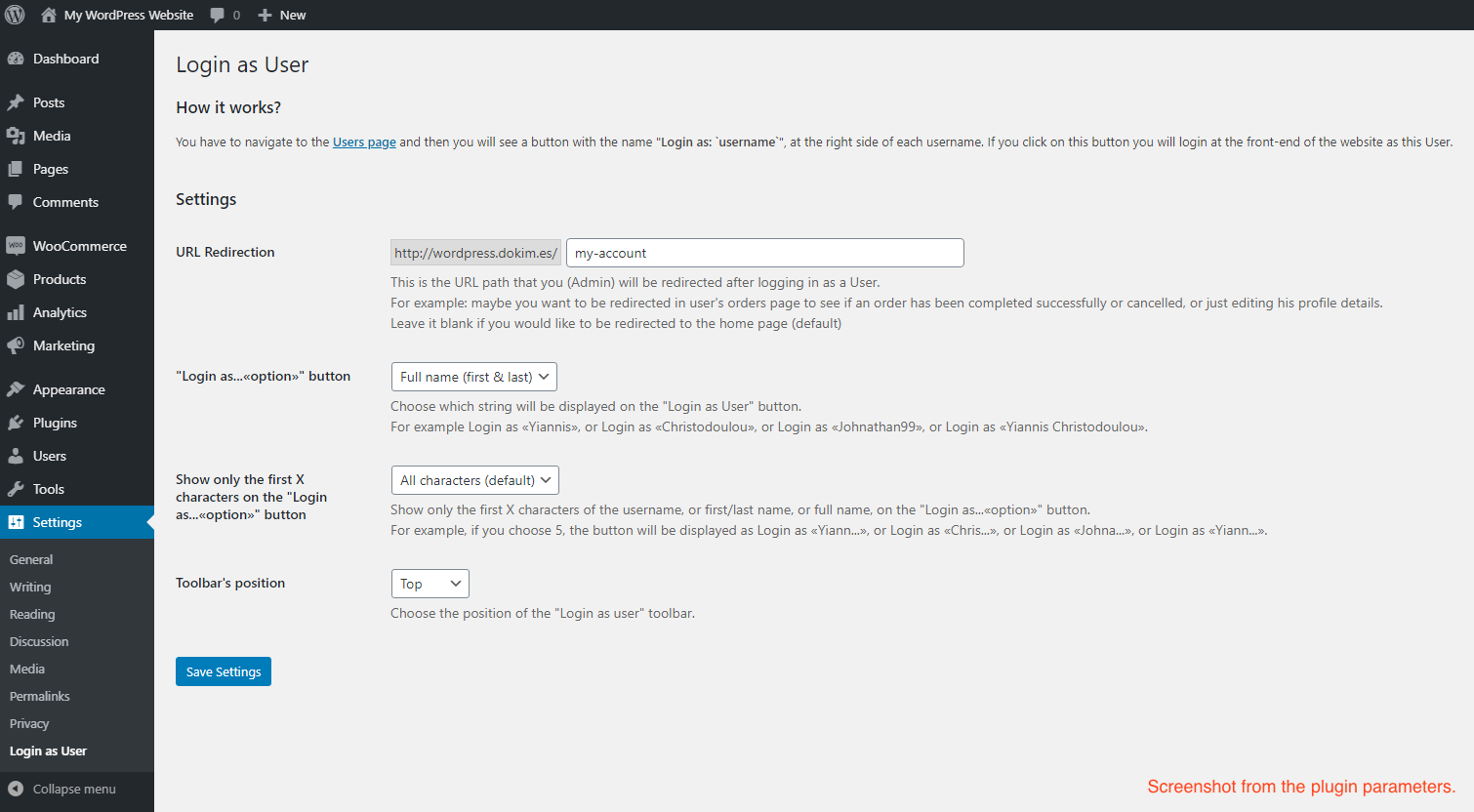
Frequently asked questions
What is the purpose of the Login as User plugin?
The Login as User plugin allows administrators to instantly switch to a specific user's account on the frontend. This helps in solving problems and providing faster customer support by directly accessing the user's view.
How do I switch user accounts using this plugin?
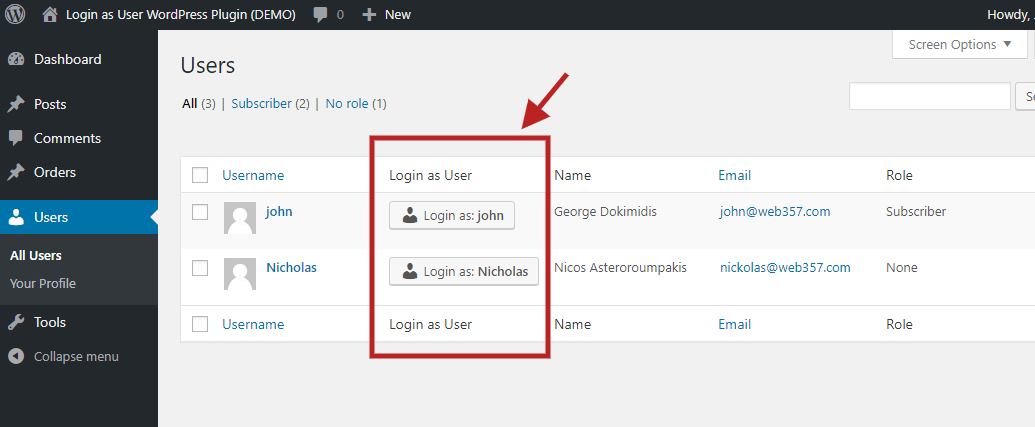
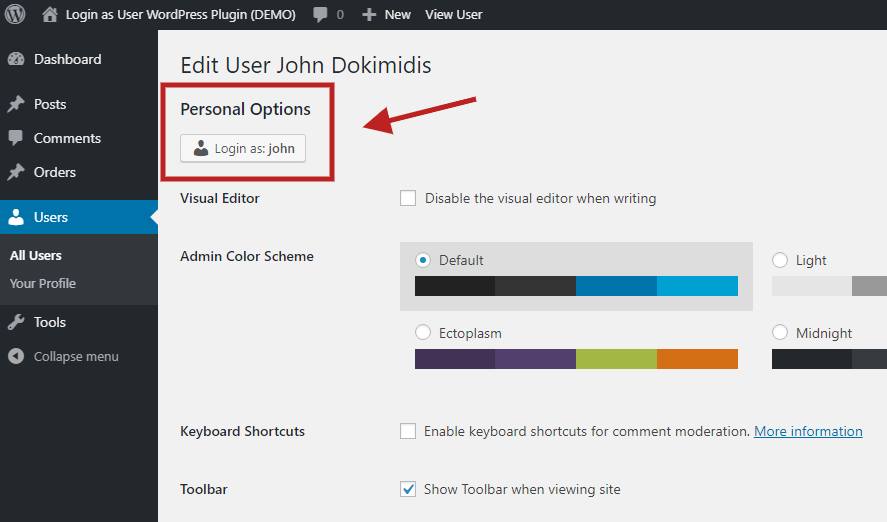
In the WordPress Admin area, navigate to 'Users' > 'All Users'. You will find a 'Login as...' button next to each user's name. Clicking this button will switch your account to that user. Alternatively, when viewing a user's profile, a 'Login as:' button will appear at the top left to facilitate switching.
Does Login as User support multisite installations?
Yes, the plugin offers multisite support. Administrators can log in as any user across the network without requiring SuperAdmin privileges.
Is there any integration with WooCommerce?
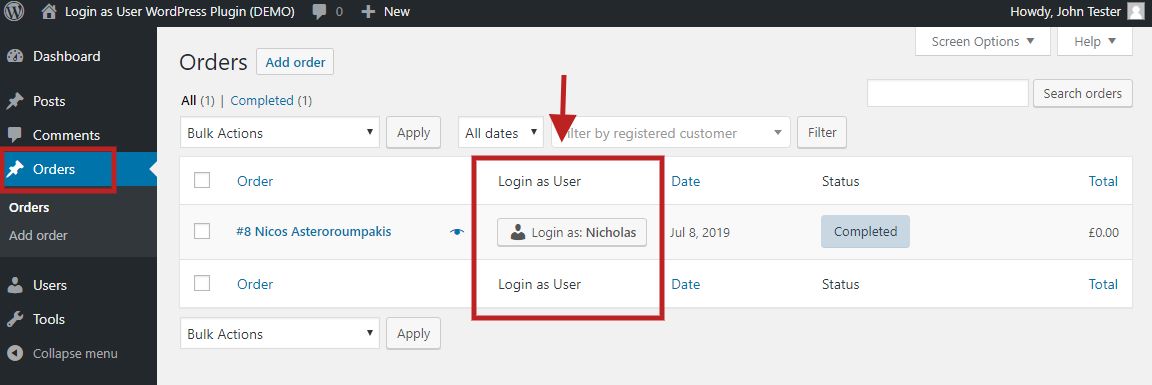
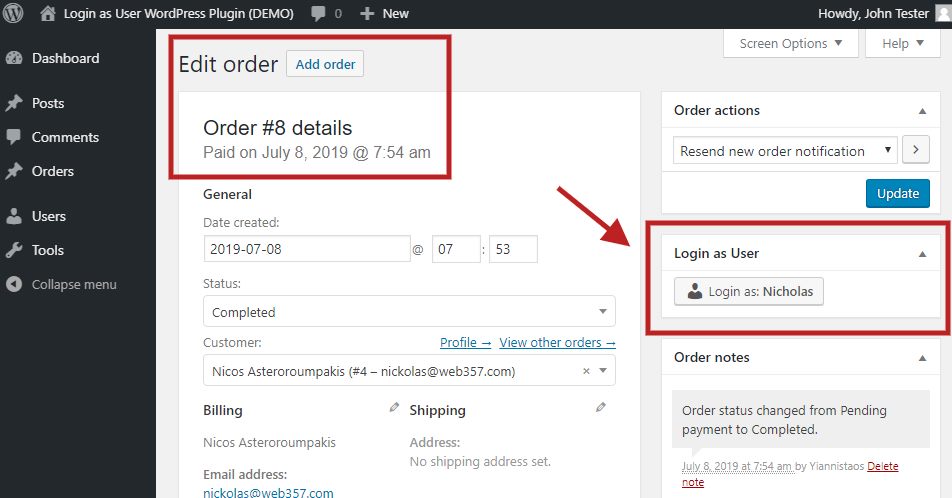
The PRO version of the plugin includes WooCommerce Integration. A 'Login as user' button appears next to each customer on the WooCommerce orders page to assist with customer support. It also integrates with WooCommerce Subscriptions.
Changelog
29-Jan-2025 : v1.5.9
- Fix callback method login_as_user_metabox in WooCommerce Subscriptions integration
28-Jan-2025 : v1.5.8
- Added: Improved integrations architecture by moving integrations to separate files.
- Added: Full integration with MemberPress plugin. Now you can login as any MemberPress user. The buttons are displayed in the Members, Subscriptions and Transactions pages in WordPress Admin panel.
- Minify Existing *.min.css and *.min.js Files for Free and Pro Versions.
- Minor fixes and improvements.
04-Jan-2025 : v1.5.7
- Fully compatible with WordPress v6.7.x
- Fully compatible with WooCommerce v9.5.x
- Introduce the new demo site: https://login-as-user-wordpress-demo.web357.com/wp-admin
17-Oct-2024 : v1.5.6
- Fixed: PHP notices due to accessing properties of a non-object in certain cases when there is no logged-in user. Improved validation of the current user object before accessing display_name and user_login properties.
- Minor stability and performance improvements.
03-Oct-2024 : v1.5.5
- PHP message: PHP Warning: Undefined variable in /wp-content/plugins/login-as-user/includes/class-w357-login-as-user.php on line 667
- Other Minor fixes and improvements.
02-Oct-2024 : v1.5.4
- Optimized Asset Loading: Prevent CSS and JavaScript files from being enqueued when no user is logged into the site, improving performance. (Thanks to “ss88_uk” for the suggestion!)
- Update: Removed the includes/plugin-update-checker folder from the free version.
- Fully compatible with WooCommerce v9.3.x.
- Role-Based Login Management: Added functionality to define which user roles have the ability to log in as users of other roles. For example, Administrators can be configured to log in as any user with the roles of Customer or Shop Manager, while Office Managers can log in as users with the Author role. [Pro version]
- Minor stability and performance improvements.
19-Aug-2024 : v1.5.3
- Fully compatible with WordPress v6.6.x
- Fully compatible with WooCommerce v9.1.x
01-Jul-2024 : v1.5.2
- [Bug Fixed] PHP Fatal error: Uncaught Error: Call to undefined method WP_Post::get_customer_id() in /wp-content/plugins/login-as-user-pro/includes/class-w357-login-as-user.php:796
28-Jun-2024 : v1.5.1
- Fully compatible with WooCommerce v9.0.x and WooCommerce Subscriptions v6.4.x
- [New Feature]: Role Management Permissions in Login as User Plugin. Define which roles can log in as users of other roles, enhancing security and control by limiting this capability to specific roles. Learn more https://docs.web357.com/article/118-role-management-permissions-in-login-as-user-plugin-pro-only
- [New Feature]: Added option to display the admin link in the topbar.
- Fixed ‘Login as User’ column compatibility with WooCommerce Subscriptions 6.4.
- [Bug Fix] Enhanced order column compatibility using WooCommerce’s get_customer_id method.
- [UI] Implemented minor fixes and improvements for a smoother user experience, including a go-back link in the WordPress top navbar.
- Added button_name parameter to [login_as_user] shortcode for customizable button text, including support for dynamic user type placeholder (e.g., [ login_as_user user_id=”357″ redirect_to=”/my-account” button_name=”Login as “]). [Thank you, Giorgos Iordanidis] Documentation updated: https://docs.web357.com/article/102-shortcode-login-as-user
- [Improvement] The default value for the message_display_position should be “bottom”, not “top”.
- Minor fixes and Improvements.
26-Apr-2024 : v1.5.0
- Improved handling of user_id and redirect_to parameters in the [login_as_user] shortcode for enhanced functionality. Documentation updated: https://docs.web357.com/article/102-shortcode-login-as-user
18-Apr-2024 : v1.4.9
- Fully compatible with WordPress v6.5.x and WooCommerce v8.8.x
- CSS Bug fixed: The “Login as User” button is currently overflowing its column within the table. [Thank you, Anthony Grullon]
- Bug fixed: After clicking the button “go back to admin as..” a 404 error occurred. It does not give the correct URL. It mostly happens when the WordPress is in a subdirectory [Many thanks to )]
- Introduced a new attribute for the [login_as_user] shortcode, enabling administrators to redirect users to a specific page after logging in. Example usage: [login_as_user user_id=”1″ redirect_to=”/my-account”].
- Now supports WooCommerce High-Performance Order Storage (HPOS) [Thank you, Rein Ridder]
- Ensured functionality remains intact when WordPress is given its own directory, following the guidelines provided https://wordpress.org/documentation/article/giving-wordpress-its-own-directory/ [Thanks, James]
- Implemented minor fixes and improvements for a smoother user experience.
23-Oct-2023 : v1.4.8
- Fully compatible with WordPress v6.3.x and WooCommerce v8.2.x
- Minor fixes and improvements
27-Jul-2023 : v1.4.7
- Added PHP 8.2 Compatibility to the Plugin Update Checker and fix deprecation notices regarding PHP 8.2.x.
- Fix CSS issues regarding z-index on Divi themes.
26-Jul-2023 : v1.4.6
- [PHP 8.2 Deprecated Warning]: Creation of dynamic property LoginAsUser_AdminPro:: is deprecated in /wp-content/plugins/login-as-user-pro/admin/class-admin.php on line 51 on PHP 8.2, and WordPress 6.2.2.
07-Jun-2023 : v1.4.5
- [Compatibility] Fully compatible with WordPress v6.2.x and WooCommerce v7.7.x
- Compatible with the WooCommerce Mobile App
- After login as a user, in the notification bar show the email instead of username. Example: “go back to admin as Yiannis Christodoulou (yiannis [@] web357 [.] com)”
- Bug fixed after going back to admin dashboard. Bug message: “The link you followed as expired.”
- PHP Warning fixed: Undefined array key “SERVER_NAME” in …/wp-content/plugins/login-as-user-pro/login-as-user-pro.php on line 67
- Minor fixes and improvements
14-Jun-2022 : v1.4.4
- Minor bugfix: The “Login as User” button is missing for specific user roles.
14-Jun-2022 : v1.4.3
- [Compatibility] Fully compatible with WordPress v6.0 and WooCommerce v6.5+
- Minor fixes and improvements
11-Feb-2022 : v1.4.2
- [New Feature] You can use the shortcode [login_as_user user_id=”357″] to display the login as user button everywhere, event at the frontend. You just have to specify the user_id. Do not forget to replace the 357 with the user ID you want. (This feature included only in the Premium version)
- [Compatibility] Fully compatible with WordPress v5.9 and WooCommerce v6.2
- Minor fixes and improvements
28-Jul-2021 : v1.4.1
- [Styling improvement] To fix the display of the login as user button when you have a lot of columns in Users/Orders area, we ‘ve created a new option to decrease the width of “Login as User” column. Navigate to: Settings > Login as User > “Login as…«option»” button > None (display only the user icon). [Thank you, Robert]
- [Compatibility] Fully compatible with WordPress v5.8 and WooCommerce v5.5
- Minor fixes and improvements
08-Apr-2021 : v1.4.0
- [Compatibility] Fully compatible with the User Insights WordPress plugin.
- [Compatibility] Fully compatible with WordPress v5.7 and WooCommerce v5.1.x
- Minor fixes and improvements
09-Jan-2021 : v1.3.0
- [Compatibility] Fully compatible with Loco Translate plugin.
- [New feature] Validate website license key in the plugin settings (only for the premium version).
- [Compatibility] Fully compatible with WordPress v5.6 and WooCommerce v4.8.
19-Oct-2020 : v1.2.2
- [New option] You can now choose the position of the “Login as user” toolbar. There are two available positions, the TOP and the BOTTOM.
- [Compatibility] Fully compatible with WordPress 5.5 and WooCommerce 4.6.
15-Apr-2020 : v1.2.1
- [Bug Fixed] Error with the redirection URL after a successful login attempt. Admin is redirected to a URL that contains twice the value of the function “home_url()”, and gives a 404 error.
30-Mar-2020 : v1.2.0
- [Style Improvement] Remove any margin of the button that displayed on the toolbar at frontend.
- [Bug Fixed] The “login as user” button is not displayed. There was a filter conflict because a 3rd plugin calls the “manage_users_custom_column” filter too. We have change the priority and the issue has been resolved. [Many thanks to Michael Kuhlman for his help]
- [Bug Fixed] Error with the redirection URL. Admin is not redirected to the correct page from settings, after logged in as a user.
14-Feb-2020 : v1.1.0
- [New feature] You can now choose from the settings, which string will be displayed on the “Login as User” button. You can choose one from the following, nickname, or first name, or last name, or full name. For example Login as «Yiannis», or log in as «Christodoulou», or log in as «Johnathan99», or log in as «Yiannis Christodoulou».
- [New Feature] Show only the first X characters of the username, or first/last name, or full name, on the “Login as…«option»” button. For example, if you choose 5, the button will be displayed like this: Login as «Yiann…», or Login as «Chris…», or Login as «Johna…», or Login as «Yiann…».
- [Bug Fixed] Do not load the files “public.min.css” and “public.min.js” if the Login as User functionality is not enabled.
- Minor bug fixes and improvements.
29-Jul-2019 : v1.0.1
- If an admin is already logged in, a short message replaces the button. Example: “Already logged in” instead of “—“.
- The language files have been updated with new strings.
11-Jul-2019 : v1.0.0
- First beta release

