

Just another contact form plugin. Simple but flexible.
About IP2Location Country Blocker
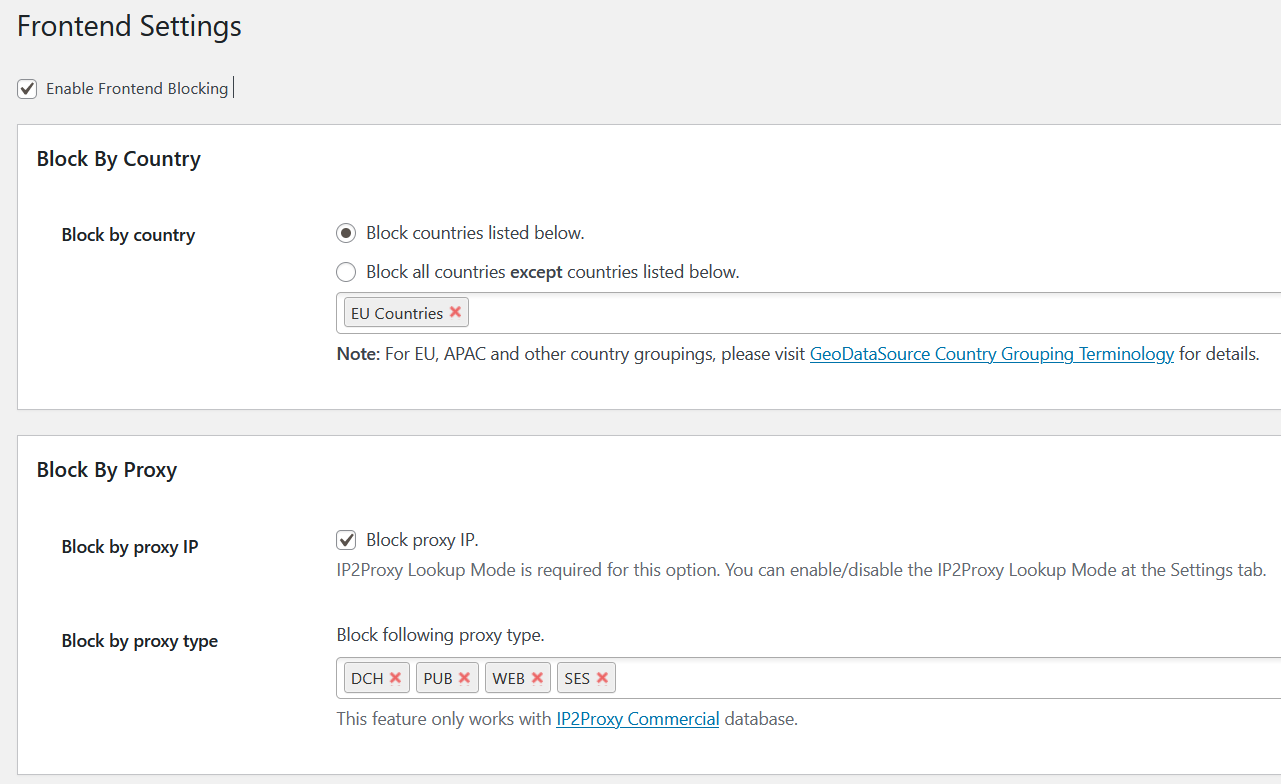
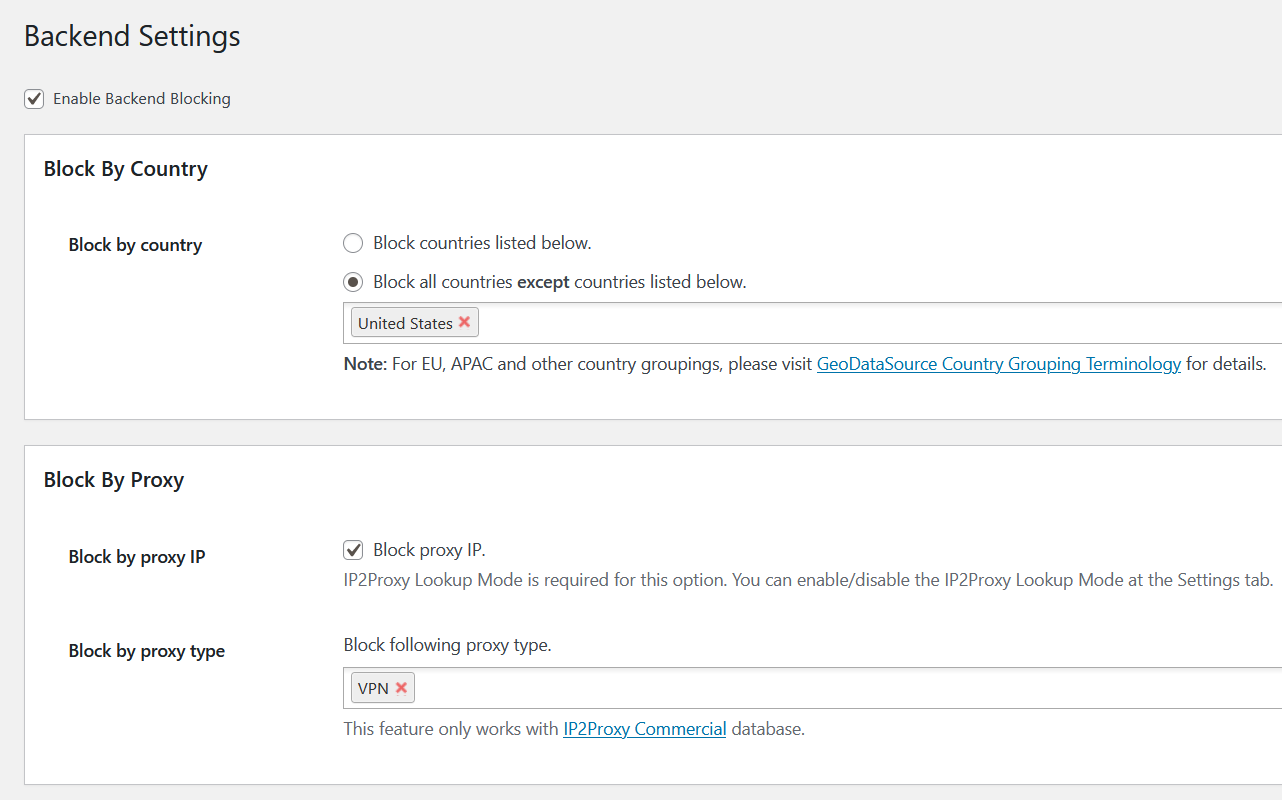
This plugin allows you to block unwanted traffic from accessing your website by countries or proxy servers, helping to reduce spam and unwanted sign-ups. It has features like blocking access from multiple countries, blocking access from anonymous proxies, and whitelisting search engine crawlers. Please note that the plugin will not work if any cache plugin is enabled.Screenshots

Frequently asked questions
What does the IP2Location Country Blocker plugin do?
This plugin blocks unwanted traffic from accessing your frontend (blog pages) or backend (admin area) based on countries or proxy servers. It helps reduce spam and unwanted sign-ups by preventing unwanted visitors from browsing specific pages or your entire website.
What are the key features of this plugin?
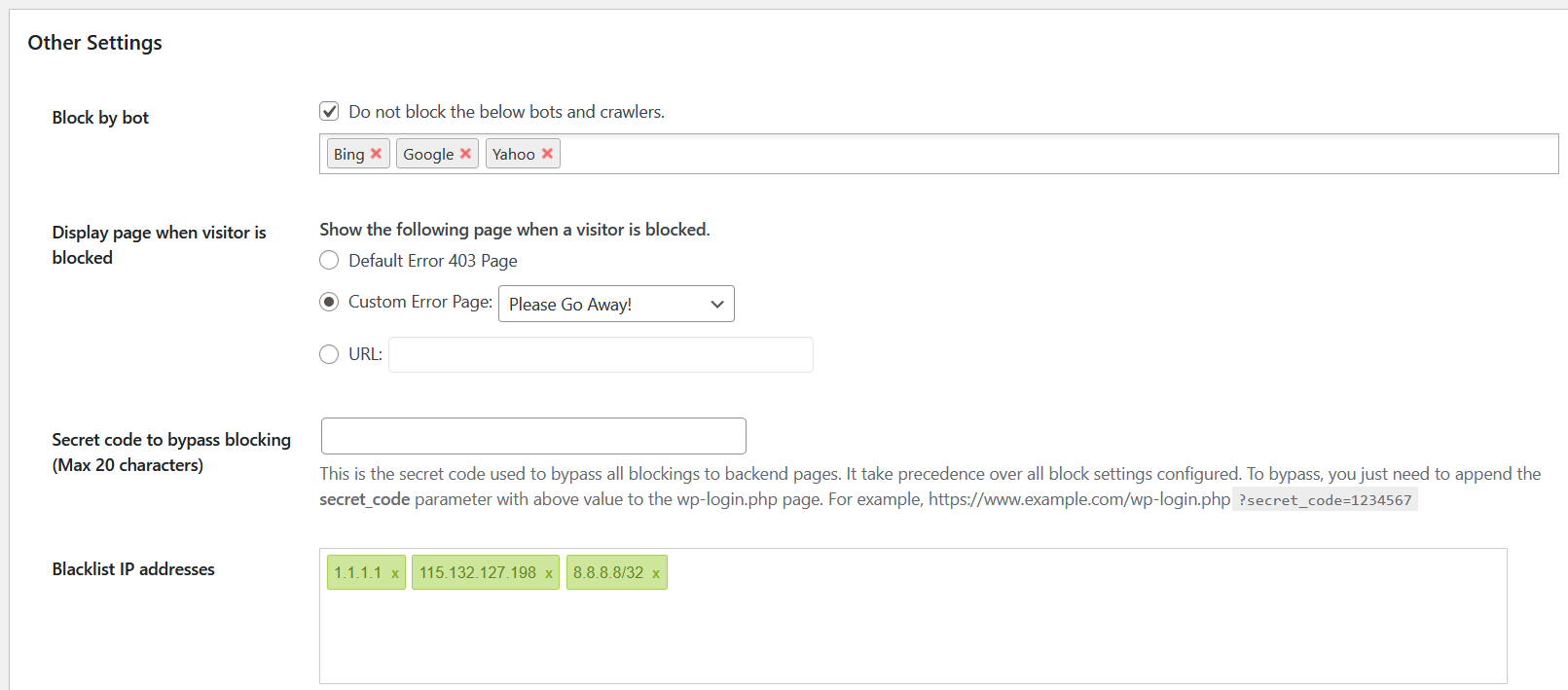
Key features include blocking access from multiple countries, by country groupings (e.g., EU, APAC), from anonymous proxies, and by IP ranges. It also allows whitelisting crawlers for SEO, supports IPv4 and IPv6, and provides a customizable 403 error page.
Does this plugin support both IP2Location BIN data and web services?
Yes, this plugin supports both IP2Location BIN data and web services for IP geolocation lookup. You can download and update BIN data via the plugin settings page or manually, and a free plan is available for the IP2Location.io IP Geolocation API.
Will this plugin work with caching plugins?
No, this plugin will NOT work if any cache plugin is enabled.
Does the plugin provide any reporting or notifications?
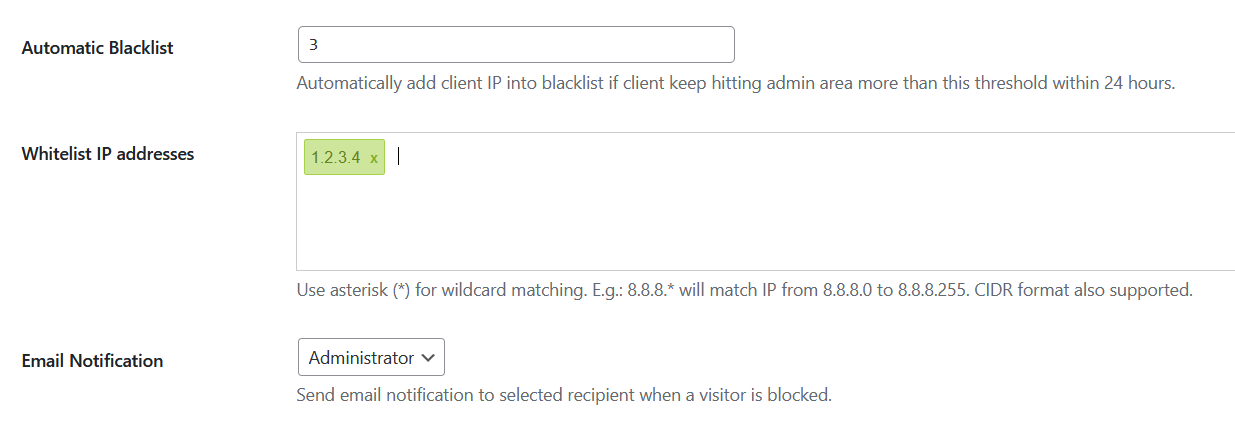
Yes, the plugin sends an email notification if someone tries to access your admin area and provides a statistical report of blocked traffic.
Changelog
- 2.38.9 Fixed XSS vulnerabilities on admin_init function.
- 2.38.8 Fixed restore function.
- 2.38.7 Fixed link in default 403 page design.
- 2.38.6 Updated default 403 page design.
- 2.38.5 Updated default 403 page design.
- 2.38.4 Fixed vulnerability in restore.
- 2.38.3 Improved external calls error handling.
- 2.38.2 Fixed Javascript selector.
- 2.38.1 Able to detect more cache plugins.
- 2.38.0 Added more crawlers into the list and some improvements.
- 2.37.2 Clean up all options after uninstall.
- 2.37.1 Tested up to WordPress 6.7.
- 2.37.0 Added emergency stop action when secret code is provided.
- 2.36.2 Minor update.
- 2.36.1 Fixed JavaScript conflict on setup wizard.
- 2.36.0 Added feature to override real IP header.
- 2.35.1 Tested up to WordPress 6.6.
- 2.35.0 Added backup/restore feature.
- 2.34.8 Fixed precision warnings.
- 2.34.7 Fixed CIDR matching in IPv6.
- 2.34.6 Tested up to WordPress 6.5.1.
- 2.34.5 Removed BIN database warning if Web service is used.
- 2.34.4 Fixed CSRF issues.
- 2.34.3 Fixed CSRF replace on API key value.
- 2.34.2 Fixed decompress issue in Linux environment.
- 2.34.1 Fixed SQL statement error.
- 2.34.0 Updated setup wizard to include IP2Location.io Geolocation API service.
- 2.33.7 Fixed value returned by get_current_url function.
- 2.33.6 Fixed deprecated warning messages in PHP 8.
- 2.33.5 Fixed undefined constants.
- 2.33.4 Added a private key to protect debug log.
- 2.33.3 Randomize debug log to protect unwanted access.
- 2.33.2 Tested up to WordPress 6.4.1.
- 2.33.1 Fixed string casting in PHP 8.x.
- 2.33.0 Enabled pasting multiple IP addresses in blacklist/whitelist. Minor bugs fixed.
- 2.32.4 Fixed undefined constant error.
- 2.32.3 Fixed the proxy lookup issue when using IP2Location.io.
- 2.32.2 Fixed database download issue for some users.
- 2.32.1 Improved IP matching for IPv6.
- 2.32.0 Added button to reset auto blacklist log.
- 2.31.0 Added IP detection for website behind Securi firewall.
- 2.30.2 Fixed CIDR function error.
- 2.30.1 Improved accuracy of IP detection with CloudFlare.
- 2.30.0 Improved IP detection for reverse proxy and CloudFlare services.
- 2.29.2 Stop obtain client IP from custom header to prevent IP spoofing.
- 2.29.1 Updated documentation and UI tweaks.
- 2.28.9 Fixed undefined array key warning.
- 2.28.8 Tested up to WordPress 6.2.
- 2.28.7 Improve I18N Issues. (Credit: Alex Lion)
- 2.28.6 Added source field into API web service.
- 2.28.5 Updated to use IP2Location.io IP Geolocation API.
- 2.28.4 Fixed error when running in wpcron.
- 2.28.3 Updated “Requires at least” information.
- 2.28.2 Tested up to WordPress 6.1.
- 2.28.1 Prevent email notification when a blacklisted IP is blocked.
- 2.28.0 Included automatic blacklist on frontend.
- 2.27.1 Fixed typo.
- 2.27.0 Added CIDR format supports in whitelist/blacklist. Added automatic blacklist when exceeding threshold.
- 2.26.16 Added sorting in whitelist & blacklist. Fixed minor bugs.
- 2.26.15 Fixed whitelist/blacklist get wiped out when inserting a reserved IP address.
- 2.26.14 Tested up to WordPress 6.0.
- 2.26.13 Fixed cache warning message.
- 2.26.12 Fixed local cache storage issue.
- 2.26.11 Further improve plugin security level.
- 2.26.10 Migrated remote CDN scripts to host locally.
- 2.26.9 Fixed XSS reported in https://www.exploit-db.com/exploits/50709
- 2.26.8 Sanitized inputs to increase security level.
- 2.26.7 Tested up to WordPress 5.9.
- 2.26.6 Improved security against CSRF by adding nonces.
- 2.26.5 Fixed security issues with CSRF.
- 2.26.4 Removed missing Javascript.
- 2.26.3 Updated default blocking template.
- 2.26.2 Fixed header warnings.
- 2.26.1 Fixed IP2Proxy database download.
- 2.26.0 Performance tuning and code fixes.
- 2.25.16 Fixed administrator notice keep showing after dismissed.
- 2.25.15 Fixed setup issue for commercial database.
- 2.25.14 Fixed incorrect country detected when proxy database enabled.
- 2.25.13 Fixed library for backward compatibilities.
- 2.25.12 Updated EU countries list.
- 2.25.11 Fixed whitespace issue in Ajax callings.
- 2.25.10 Use PX2 database as default for proxy lookup.
- 2.25.9 Fixed file permission issues for some users.
- 2.25.8 Improved manually uploaded BIN database detection.
- 2.25.7 Removed memory restriction on IP2Proxy database download.
- 2.25.6 Fixed missing default value on activate.
- 2.25.5 Fixed IP2Proxy library to support PHP 7.0 and below.
- 2.25.4 Prevent web browser from caching plugin scripts.
- 2.25.3 Added bcmath extension checking during setup.
- 2.25.2 Fixed setup guide issues due to memory limit when downloading IP2Proxy database.
- 2.25.1 Fixed download issues for LITE users.
- 2.25.0 Improved UI and added setup guide for new user.
- 2.24.1 Tested up to WordPress 5.6.
- 2.24.0 Added tour guide for new user.
- 2.23.1 Updated IP2Location library to support earlier version of PHP.
- 2.23.0 Updated file structures to use composer for IP2Location libraries.
- 2.22.1 Minor UI update.
- 2.22.0 Added support for blocking using proxy type.
- 2.21.2 Fixed deactivation issue when conflicting with other plugins.
- 2.21.1 Tested with WordPress 5.5.
- 2.21.0 Added URL in email notification.
- 2.20.2 Fixed warning when IP2Proxy database is not in use.
- 2.20.1 Updated IP2Location library to support older PHP version.
- 2.20.0 Implemented internal cache and fixed several bugs.
- 2.19.21 Cleaned up codes and sanitized user inputs.
- 2.19.20 Fixed variable error.
- 2.19.19 Added attribution instructions.
- 2.19.18 Fixed deactivation issue.
- 2.19.17 Fixed version issue.
- 2.19.16 Updated readme.txt.
- 2.19.15 Tested with WordPress 5.4.
- 2.19.14 Fixed pop out reminder not hiding.
- 2.19.13 Fixed notification email recipient not saving.
- 2.19.12 Increased timeout in BIN download.
- 2.19.11 Improved UI.
- 2.19.10 Fixed typo.
- 2.19.9 Minor fixes.
- 2.19.8 Added feedback request.
- 2.19.7 Tested with WordPress 5.3.2.
- 2.19.6 Prevented empty API key submission in settings page.
- 2.19.5 Updated IP2Location library to 8.1.0.
- 2.19.4 Fixed backend page detection.
- 2.19.3 Fixed infinite redirection when using custom page.
- 2.19.2 Removed debug message.
- 2.19.1 Minor bugs fixed.
- 2.19.0 Multiple features enhanced.
- 2.18.1 Fixed minor bugs.
- 2.18.0 Added support for dynamic admin page.
- 2.17.6 Added FeedBurner into bot list.
- 2.17.5 Bug fixes.
- 2.17.4 Updated manual upload instructions.
- 2.17.3 Fixed issue download token not saved.
- 2.17.2 Fixed IP2Location BIN database not downloading.
- 2.17.1 Fixed BIN database download issues.
- 2.17.0 Migrated BIN database directory to WordPress upload directory to prevent BIN files get deleted during updates. Grouped same visitor in debugging log.
- 2.16.0 Fixed country grouping issues.
- 2.15.3 Updated documentation links.
- 2.15.2 Tested up to WordPress 5.1.1.
- 2.15.1 Fixed IP2Location API check credit interface.
- 2.15.0 Upgraded IP2Location API to v2. Added additional checks for log table.
- 2.14.6 Fixed database file detection in both Windows and Linux environment.
- 2.14.5 Abort blocking when IP2Location database is missing or corrupted to prevent administrator get locked.
- 2.14.4 BIN database no longer shipped together to prevent local copy being overwritten. Prevented IP2Location & IP2Proxy database removing each other during a database update.
- 2.14.3 Tested with WordPress 5.0.1.
- 2.14.2 Fixed IP detection when server forwarded wrong IP address.
- 2.14.1 Updated country list based on latest ISO-3166 standards.
- 2.14.0 Added country grouping to block several countries at once.
- 2.13.2 Fixed database update issue.
- 2.13.1 Minor bug fixed.
- 2.13.0 Added option to enable/disable forwarder IP.
- 2.12.0 Added option to purge all logs.
- 2.11.3 Ignored Facebook crawler.
- 2.11.2 Removed Facebook from bot list.
- 2.11.1 Fixed charts display error.
- 2.11.0 Added debug log.
- 2.10.4 Fixed custom blocking not working.
- 2.10.3 Minor bug fixed.
- 2.10.2 Fixed syntax issues when using on older version of PHP.
- 2.10.1 Minor changes.
- 2.10.0 IP2Location database update changed to use download token.
- 2.9.2 Fix minor bugs.
- 2.9.1 Separated IP2Proxy as an optional service.
- 2.9.0 Added proxy detection using IP2Proxy.
- 2.8.8 Minor changes.
- 2.8.7 Minor update.
- 2.8.6 Added Serbia in the country list.
- 2.8.5 Only administrators will be listed in notification email list.
- 2.8.4 Fixed warnings message when there is no data in statistic charts.
- 2.8.3 Fixed charts alignment issues when viewing with smaller screen.
- 2.8.2 Separated charts into frontend and backend.
- 2.8.1 Fixed notice dismiss issue.
- 2.8.0 Allow custom bots/crawlers to bypass. Supports wildcard IP address blocking.
- 2.7.5 Fixed empty country name in statistic charts.
- 2.7.4 Added bots detection.
- 2.7.3 Fixed bug in logging. Updated IP2Location database.
- 2.7.2 Fixed empty country information in notification email.
- 2.7.1 Skip blocking if user logged in as administrator.
- 2.7.0 Added feature to whitelist or blacklist IP. Also option to skip blocking for logged in users.
- 2.6.7 Fixed ban list cannot be empty.
- 2.6.6 Bugs fixed.
- 2.6.5 Improved Javascript performance.
- 2.6.4 Fixed Javascript conflicts with other plugins.
- 2.6.3 Fixed typo error.
- 2.6.2 Minor bug fixed.
- 2.6.1 Fixed upgrade script.
- 2.6.0 Various changes for better user experience and performance.
- 2.5.3 Fixed conflicts when multiple IP2Location plugins installed.
- 2.5.2 Fixed Web service lookup issue.
- 2.5.1 Fixed setting page issue.
- 2.5.0 Use IP2Location PHP 8.0.2 library for lookup.
- 2.4.5 Use latest IP2Location library for lookup.
- 2.4.4 Fixed close sticky information panel issue.
- 2.4.3 Fixed uninstall function.
- 2.4.2 Prevent settings lost when deactivate/activate the plugin.
- 2.4.1 Use latest IP2Location library for lookup and updated the setting page.
- 2.4.0 Added option to disable log.
- 2.3.9 Reverted changes to support older PHP version.
- 2.3.8 Fixed warning message in WordPress 4.3.
- 2.3.7 Fixed compatible issue with PHP 5.3 and earlier.
- 2.3.6 Fixed compatible issue with PHP 5.3.
- 2.3.5 Fixed issue when upgrading from previous version.
- 2.3.4 Use latest IP2Location library for lookup.
- 2.3.3 Fixed redirect issue with iOS devices.
- 2.3.2 Fixed security issues for backend blocking.
- 2.3.10 Tested with WordPress 4.4.
- 2.3.1 Minor bug fixed.
- 2.3.0 Fixed layout issue. Added warning if blocking own country.
- 2.2.5 Fixed issue with secret code to by pass blocking.
- 2.2.4 Fixed issue with Query IP. Prevent admin from blocking themselves in admin area.
- 2.2.2 Fixed session issues.
- 2.2.2 Fixed blocking failed in backend area.
- 2.2.0 Added IP2Location web service support. Minor layout changes, and code behind rewrote.
- 2.1.0 Added statistic to log blocked traffics.
- 2.0.3 Fixed redirection issue that may not work if additional header information defined by other plugins.
- 2.0.2 Updated redirection using javascript to rectify the not working issues reported under certain circumstances
- 2.0.1 Fixed crash issue with other IP2Location plugins.
- 2.0.0 Added IPv6 supports.
- 1.9.2 Emergency bug fix.
- 1.9.1 Fixed performance issues.
- 1.9.0 Added logic to verify if the default old sample bin used for checking.
- 1.8.0 Fixed the country display issue: South Georgia And The South Sandwich Islands
- 1.7.0 Fixed download script errors.
- 1.6.0 Added user details in the email alert message.
- 1.5.0 Support secret code to bypass backend validation.
- 1.4.0 Send email notification if an user from blocked countries was trying to access your backend page.
- 1.3.0 Move the configuration page to settings, to alleviate the confusion of setting page location.
- 1.2.0 Allow user to custom their own error page.
- 1.1.0 Added dropdown selection for product code.

