*Applies to credit purchases starting from $100.

Validity: Nov 24 - Dec 05, 2025

Embedder For Google Drive

Embedder For Google Drive

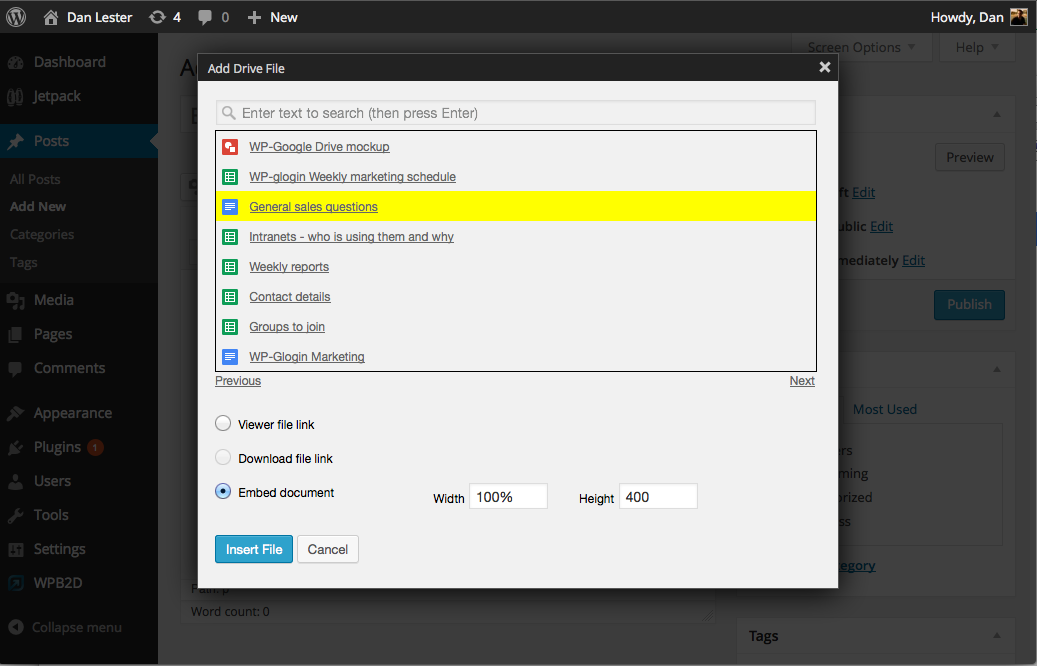
Browse for Google Drive documents and embed directly in your posts/pages. This WordPress plugin extends the Google Apps Login plugin so no extra user …
Rating:
4.0
star-rating-1star-rating-2star-rating-3star-rating-4star-rating-5
Active Installations:
6000+
Last Updated:
Mar 30, 2023
WordPress Version:
5.0 or higher
Tested up to:
6.2.0

Easy Access

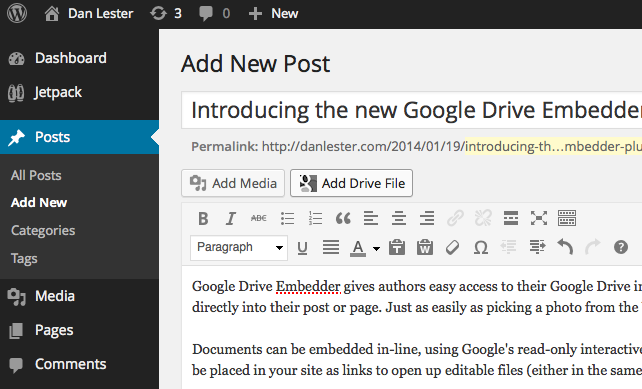
Embed Google Drive documents directly into your post or page with a simple popup box.

Multiple File Types

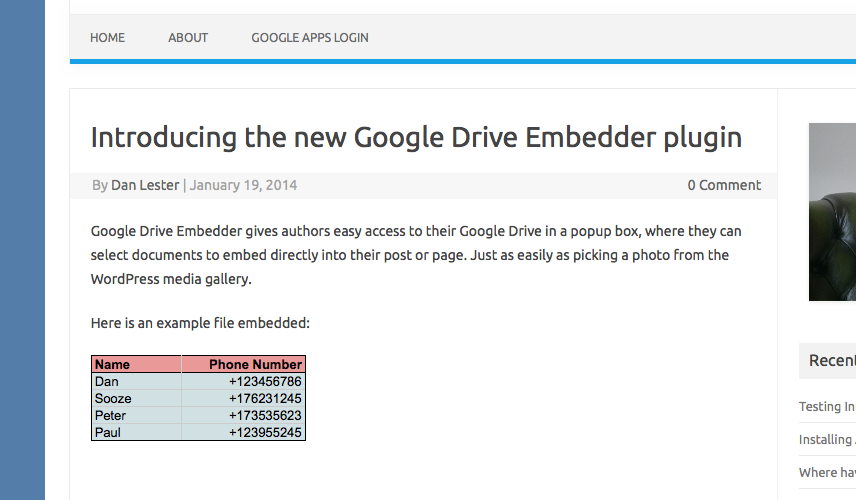
Display PDFs, Word docs, videos, and more in-line for your audience to view.

Secure Sharing

Set document sharing settings to control who can access and view your files.

Premium Features

Upgrade to the premium version for advanced features like browsing Drive folders and embedding Google Calendars.

=5.2.6=

Updated: Move to Google Identity Services

=5.2.5=

Fix: PHP Error with Shortcode

=5.2.4=

Change: Update Plugin Name
Fix: Sanitize setting inputs

=5.2.3=

Added compatibility for WordPress 5.6

=5.2.2=

Updated Team Drive to Shared Drive in compliance of Google Drive updates.
Added compatibility for WordPress 5.4.1

=5.2.1=

Added American with Disabilities Act compliance compatibility for google drive folder and files icons
Added compatibility for WordPress 5.3.2

=5.2=

Added compatibility for WordPress 5.3.1

5.1

Added compatibility for WordPress 5.2.1

5.0

Added compatibility for WordPress 5.0

4.2

Compatibility for Gutenberg Editor

4.1

No longer asks user for Drive permissions when they ‘Login with Google’. Instead, it asks for Drive
permissions only when they come to interact with the Drive functionality (clicking ‘Add Google File’ for example).

4.0

Free version now supports videos, images, and forms.

Changed to Google Drive API v3.

3.9.7

Some file titles were not being escaped correctly ([ and ] characters) so could cause WordPress to parse the shortcode incorrectly.

3.9.2

Fix to match a change made by Google in the way the API works.

3.9.1

Some users were seeing warning messages about a missing variable – now fixed.

3.9

Updated readme to reflect new Google Workplace naming.
Some internal code refactoring bringing up to date with Premium/Enterprise versions.

3.8.5

Improved error handling when admin inadvertently activates multiple versions of the plugin.

3.8.2

No longer shows trashed files in Add Google File dialog box.

3.8.1

iframe embeds (e.g. videos) now have allowfullscreen as a default attribute so the viewer can click into full screen mode.
Add allowfullscreen=”no” to your shortcode to turn this off.

The jump in version number is to match Enterprise/Premium versions of the plugin.

3.7

Ready for WordPress 4.4.
Internal changes for code readability and to prepare for ‘My Drive’ version.

3.6

Due to changes in Google’s Drive API some embeds (e.g. PDFs) were not always showing up. This version fixes it.

3.3

Workaround for a Google change to iFrame permissions – PDF and other standalone docs now embed better.

3.2

Embed as Drive is now the only option for non-native file types (e.g. PDF, Word, Excel). Avoids the old-style Google Document Viewer completely.

3.1.1

Introduced ‘Embed As Drive’ option (now default) for non-native file types (e.g. PDF, Word, Excel).
This uses Drive natively rather than sending the file via the external Google Document Viewer.
It also means non-native file types can be embedded based on permissions of the logged-in Google user – does not required Anyone with the link can view.

3.1

Tidied up file structure, and brought documentation in line with the new Enterprise version of Embedder For Google Drive.

2.3

Provides information about Google forms availability

2.2

Instructions for video embed

2.1

Clearer error messages

2.0

Provides information about premium upgrade to embed certain new filetypes

1.4

Layout changes ready for WordPress 3.9 release

1.3

Extra support for non-Google file types such as PDF, Word DOC – can now be embedded inline or direct-download links.

1.2

Added Search box functionality

1.1

Multisite installations now have the choice of Network Activate (so Add Drive File available on all sites), or
individual sub-site activation.

1.0

Google Drive document embedder

Prompt Response Time.

By Zane Matthew (ZaneMatthew) on January 25, 2024

I've used their services, had an issue, sent a response, received a timely and professional response, 5/5 stars. Simple enough. Thank you.

From Heaven to hell

By Blutarsky on January 27, 2023

<p>Update, Jan 2023 - I used to be fan of this plugin, but as soon as this was sold to Lionsher, the troubles began.</p> <p>Not only no significant update was delivered to users who keep paying for the annual subscription, year after year. Now the plugin is broken, throws error, and tech suport will reply days after your request, stating that the technician who manages the tech support is out of town! You are ridiculous guys, aren't you!</p> <p>Even worst, when I have renewed my subscription a few days ago, I couldn't get through the payment online and, as a result, I was email bombed by Lionsher's CEO:</p> <p> </p>
<p>Hi,</p> <p>I just noticed that you tried to purchase WP Glogin, but unfortunately it looks like we were having some trouble.</p> <p>Did something happen with our order page?</p> <p>(If so, please let me know so we can fix it)</p> <p>If you closed out of the page already, don't worry! I found your order and created a link for you with your details already in the form so you can pick up where you left off:</p> <p>Click here to continue purchasing WP Glogin</p> <p>If you need any help, feel free to reach out to us here.</p> <p>To your success,</p> <p>Nathan Singh<br />CEO of WP-Glogin</p>
<p> </p> <p>To your success???!!<br />This is scam Nathan! Shame!</p> <p> </p> <p>********************* OLD REVIEW *********************************</p> <p>Google Drive Embedder is a powerful plugin that allows embedding & linking documents stored in Google Drive, in your posts. This is a great opportunity because you can take advantage of using built-in Google viewers to embed Word, Excel, Powerpoint and PDFs, avoiding users to download and open attached documents particularly if they don't own the corresponding program.<br />Read carefully the instructions to make the plugin work as expected, and once done, you are on your way!<br />The developer is very helpful and patient, we fixed a lot of little issues (my fault!).</p> <p>Keep it going :-)</p>

There is no plugin

By saltychalkginga on June 20, 2022

There is no plugin just three lines of text advertising you to buy. This violates WP terms of rogue plugins and should be removed. NOTHING BUT SPAM!

Setup wasn't able to create the required database tables.

By vkk2055 on October 5, 2021

Error is showing while Activating the google doc embedder."Setup wasn't able to create the required database tables." Kindly Help.

Coolest APP ever! Great support!

By tarukuu on May 15, 2021

WP-Glogin team! I received great support. I received great support. I'm sure this plugin will be useful for many users. If you are struggling, try contacting them before you become pessimistic. You'll probably get support as easily and quickly as I did. I am sure this plugin will be useful for many users. Thank you WP-Glogin team and Mr. Bhavesh Akhade, Lead Solution engineer. このプラグインはとても良いです。Google driveと容易に連結してくれます。これからはいちいちDLとULを繰り返すことも必要ありません。Googldrive内に例えばDropboxのショートカットを作成しておけば、Dropboxのファイルにもアクセスできるでしょう。WP-Gloinに感謝

Not very simple to set up

By BarbMil on January 12, 2021

They make you go through a lengthy setting up process and only then tell you that you need the premium version for pretty much anything. Among other things, you can't use the free version to embed elements on the website.

nice scam kid

By dhanamerdeka on July 8, 2020

lol

Super useful plugin

By avimegiddo (juanmoore) on May 29, 2020

I am more of a content developer than a coder, and I wanted a simple way to share my various Google Drive documents with the world. This plug-in does exactly that and allows you to provide a link to open/download your Google Doc, and by that, I mean most file types that you have stored in your Google Drive, such as PDFs, Sheets presentations, videos, etc. You can choose to embed a custom-sized preview of your document that can even be scrolled before opening it, optionally in a new tab. This plugin has really facilitated my site development.

plugin isn't free & better alternative exists

By samcfam on April 6, 2020

I wanted a plugin where the visitors could preview the files from within my website. Luckily there was another method I found (link: stackoverflow.com/a/61034751 ) which worked for my case.

Excellent support

By cjouper on March 19, 2020

I used this on two sites. The first one set up very easily, but the second one had some issues. I asked for technical support and had an excellent response from the support team. Highly recommend!
Try other plugins too!

SEO Ultimate

This all-in-one SEO plugin gives you control over meta titles & descriptions, open graph, auto-linking, rich-snippets, 404 monitoring, siloing &am …

Try Demo More Details

Simple Universal Google Analytics

Enable Universal Google Analytics tracking option on your WordPress site. Add tracking code to every page with WordPress Google Analytics plugin.

Try Demo More Details

LighTag – Lightweight Google Tag Manager

The ultimate lightweight Google Tag Manager plugin for WordPress!

Try Demo More Details
Screenshots
Author Site Author Site

Try Embedder For Google Drive With InstaWP

Contact Sales

Reach out to us to explore how InstaWP can benefit your business.