
Site Kit is a one-stop solution for WordPress users to use everything Google has to offer to make…

About flowpaper
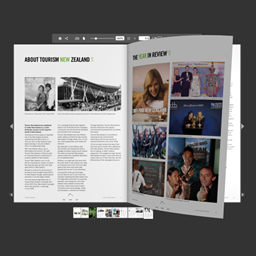
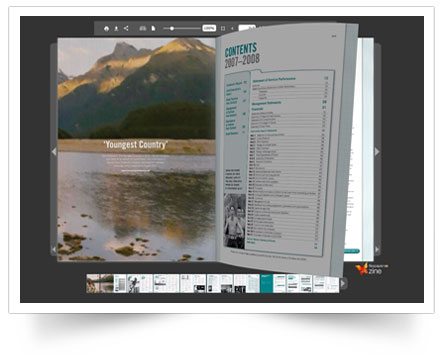
This plugin allows you to embed your PDF catalogs, magazines, and brochures as flipbooks on your website for free. It supports most browsers and devices and offers customization options such as changing the theme, setting a header, and opening the viewer in a lightbox overlay. For larger PDF documents and more features, you can visit the FlowPaper homepage.Screenshots
Frequently asked questions
What is the FlowPaper plugin?
FlowPaper is a WordPress plugin that allows you to embed PDF catalogs, magazines, and brochures as HTML5 flipbooks on your website. It supports various browsers and devices.
How do I embed a PDF using a URL?
You can embed a PDF by adding the shortcode [flipbook pdf="http://full-url/document.pdf"] to your post, replacing the URL with your PDF's direct link.
How do I embed a PDF uploaded to WordPress?
Upload your PDF to the WordPress Media Library, copy its URL, and then use the shortcode [flipbook pdf="http://full-url/document.pdf"] in your post, updating the URL with the one from your media library.
How do I embed a publication uploaded to FlowPaper Cloud?
Upload your publication to FlowPaper Cloud using the desktop publisher, copy the generated link, and then use the shortcode [flipbook pdf="http://online.flowpaper.com/publication"] in your post, updating the URL with the copied link.
Can I customize the theme of the viewer?
Yes, you can customize the viewer's theme by adding the "theme" parameter to the shortcode and setting it to either "light" or "dark", for example: [flipbook pdf="http://full-url/document.pdf" theme="light"].
Changelog
1.0
- Initial release
1.1
- Slight change in URL for the iframe that gets embedded
1.2
- Use HTTPS/SSL if the page is using SSL
1.3
- Implemented method for loading the PDF directly from WordPress if hosted as wp-content
1.4
- Improved http headers
- Improved support for browsers not supporting iframes
1.5
- Tighter access control checks
1.6
- Fixed possible character encoding issue
1.7
- Renamed parse request function name to avoid conflict with other plugins
- Wrapped flowpaper_plugin_parse_request content in try/catch to allow fallback to work
1.7.2
- Minor changes to url that gets passed to the viewer
1.7.3
- Corrected an issue related to wp_upload_dir which was giving errors on some multi-site scenarios
1.7.4
- Another small correction for wp_upload_dir related to older versions of PHP
1.7.5
- Another the ability to set theme as part of the tag. Set it to either theme=”light” or theme=”dark”
1.7.6
- Added the ability to handle options requests, will speed up WordPress hosted PDFs
1.7.7
- Minor correction to previous version
1.8.0
- Added options for allowing “title” and “header” to be set
1.8.1
- Bump version to refresh read me
1.8.2
- Fixed so viewer refreshed when post gets modified to make sure the latest version of the PDF is always shown
1.8.3
- Added support for publications hosted on FlowPaper cloud
1.8.4
- Fix for set_magic_quotes_runtime which was being set (depricated in PHP 5.3 and higher)
1.8.5
- Fixed an issue where https/SSL wasn’t used when using cloud hosting
1.8.6
- Added support for opening the viewer in a fancybox/modal/popover overlay. Use it in combination with the cover setting to show a cover of the publication. For example:
[flipbook pdf=”https://flowpaper.com/Paper.pdf” lightbox=”true” cover=”https://flowpaper.com/images/demo/[email protected]”]
1.8.7
- General code cleanup
1.8.8
- General read me update
1.8.9
- Added missing js and css files
1.9.0
- Added support for the “singlepage” parameter which forces the viewer to show one page at the time
- Resolved a function that was conflicting with woocommerce
1.9.1
- Improved the ability to embed self hosted publications created with the desktop publisher
1.9.2
- Changed the way the lightbox plugin is included to avoid css cluttering
1.9.3
- Minor bug fixes
1.9.4
- Small styling corrections
1.9.5
- Regression issue w/ unclosed div around viewer
1.9.6
- Support for subdomains to flowpaper.com added
1.9.7
- Verified against new version of WordPress
1.9.8
- Minor spelling adjustments
1.9.9
- Minor spelling adjustments
2.0.0
- Improved security checks for XSS injections
2.0.1
- Minor fix for lity related to lightboxes
2.0.2
- Version number correction
2.0.2
- Minor adjustments to styling of lightboxes
2.0.4
- Improved security checks against XSS injections
2.0.5
- Minor textual changes and minor link adjustments
2.0.6
- Adjusting compatible WordPress version

