*Applies to credit purchases starting from $100.

Validity: Nov 24 - Dec 05, 2025

Conditional Menus

Conditional Menus

This plugin enables you to set conditional menus per posts, pages, categories, archive pages, etc.
Rating:
4.3
star-rating-1star-rating-2star-rating-3star-rating-4star-rating-5
Active Installations:
70000+
Last Updated:
Feb 25, 2025
WordPress Version:
5.0 or higher
Tested up to:
6.7.2

Custom Menus

Swap menus based on conditions

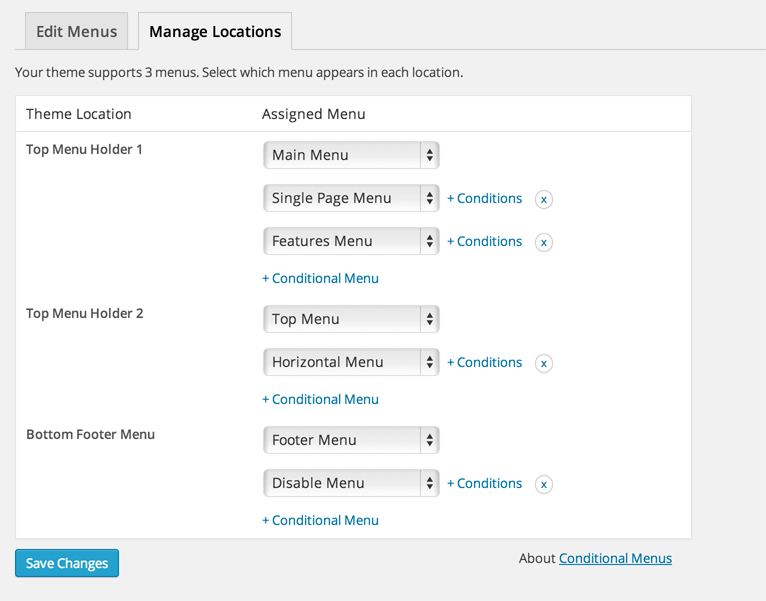
Conditional Menus is a WordPress plugin that allows you to have different menus for different posts, pages, categories, and archive pages. Easily customize your website navigation based on specific conditions.

Easy Setup

Manage menus effortlessly

The changelog is located at: https://themify.org/changelogs/conditional-menus.txt

Perfectly solved my problem!

By xyrik on January 29, 2025

I'm running a WP site with multiple pages - each for an ads landing page. Each page needed its own menu and this plugin solved it perfectly. Thank you so much!

It really works but there are some inconvenients

By annamitja on November 25, 2024

I think it really works but I have problems everytime I change the language. The homepage gets updates but not the menu that corresponds to that language. Just when I refresh the homepage...

It doesn't work pretty well neither in mobile phones.

Sadly, doesn't work

By timboc on October 16, 2024

ALways suspicious when a plugin hasn't been updated for a few months, especially when it is "untested with my current version of Wordpress".

However, thought I would give it a go - and it simply doesn't work. Nothing works. You can't click on anything. Had to uninstall it.

Doesn't work or I am too stupid...

By vispastei on June 19, 2024

I am simply trying to create two types of menus. One is for the Wordpress website itself and the other is only for the webshop, which is WooCommerce ofcourse. No matter what I do or change. The best result I am getting is that the website menu is hidden on the webshop, but the webshop menu isn't shown then. Sigh.

This plugin was exactly what I was looking for based on the description.
But does it work? No. Is it easy to understand? Again no. It's either this or I am plain stupid.

//update: well gave it a completely new go. It now works, however partially. If I go to certain webshop pages, the original website menu appears. So this is useless. It should be displayed on every page with WooCommerce in it and hide the stupid other menu. I am going to uninstall this. Not going to work.

doesn't work

By mr108 on March 26, 2024

Doesn't work neither for pages nor posts.

The best conditional menus for Wordpress

By LEXit on August 14, 2023

Excellent, works great and easy to configure
Thank you so much Themify!

Greetings from Madrid

BIT COMPLICATED BUT POWERFUL

By multmediadesigns on July 22, 2023

Bit complicated in that you are to create multiple menus depending on the conditions you define, such as roles. Rather it have been embedded into one menu, but it is also very powerful this way.

Ideal to traslate webs without a translator plugin

By M. F. (miryamferris) on July 22, 2023

I love this plugin. It allows me to translate my website without paying annual fees to translator plugins. Thank you so much!!

Useless

By ouicoding (yasineouicoding) on July 3, 2023

Did not work for me , I have different menus for logged in & logged out users and I want to show menu for logged out users only in front page but this plugin doesn't know how to do so !

Half way working

By Hans Wahlgren on May 10, 2023

I got it working, half ways.
I can make a menu change from open menu to members menu when members log in. PERFECT.
I can't make a meny change back from members menu to open menu when members log out.

Can anyone tell me how to do that? Then I would go from three to five starts.

Try other plugins too!

Admin Menu Editor

Lets you edit the WordPress admin menu. You can re-order, hide or rename menus, add custom menus and more.

Try Demo More Details

Custom Favicon

This plugin allows you to add upload custom favicon & Apple touch icon for your website and WordPress Dashboard using built-in media uploader.

Try Demo More Details

HT Menu – WordPress Mega Menu Builder for Elementor

HT Menu is a Elementor page builder addon to create menu and mega menu for WordPress websites. It allows to add Elementor templates to build coloumn a …

Try Demo More Details
Screenshots
Author Site Author Site

Try Conditional Menus With InstaWP

Contact Sales

Reach out to us to explore how InstaWP can benefit your business.