

Just another contact form plugin. Simple but flexible.
About Clearfy Cache – WordPress optimization plugin, Minify HTML, CSS & JS, Defer
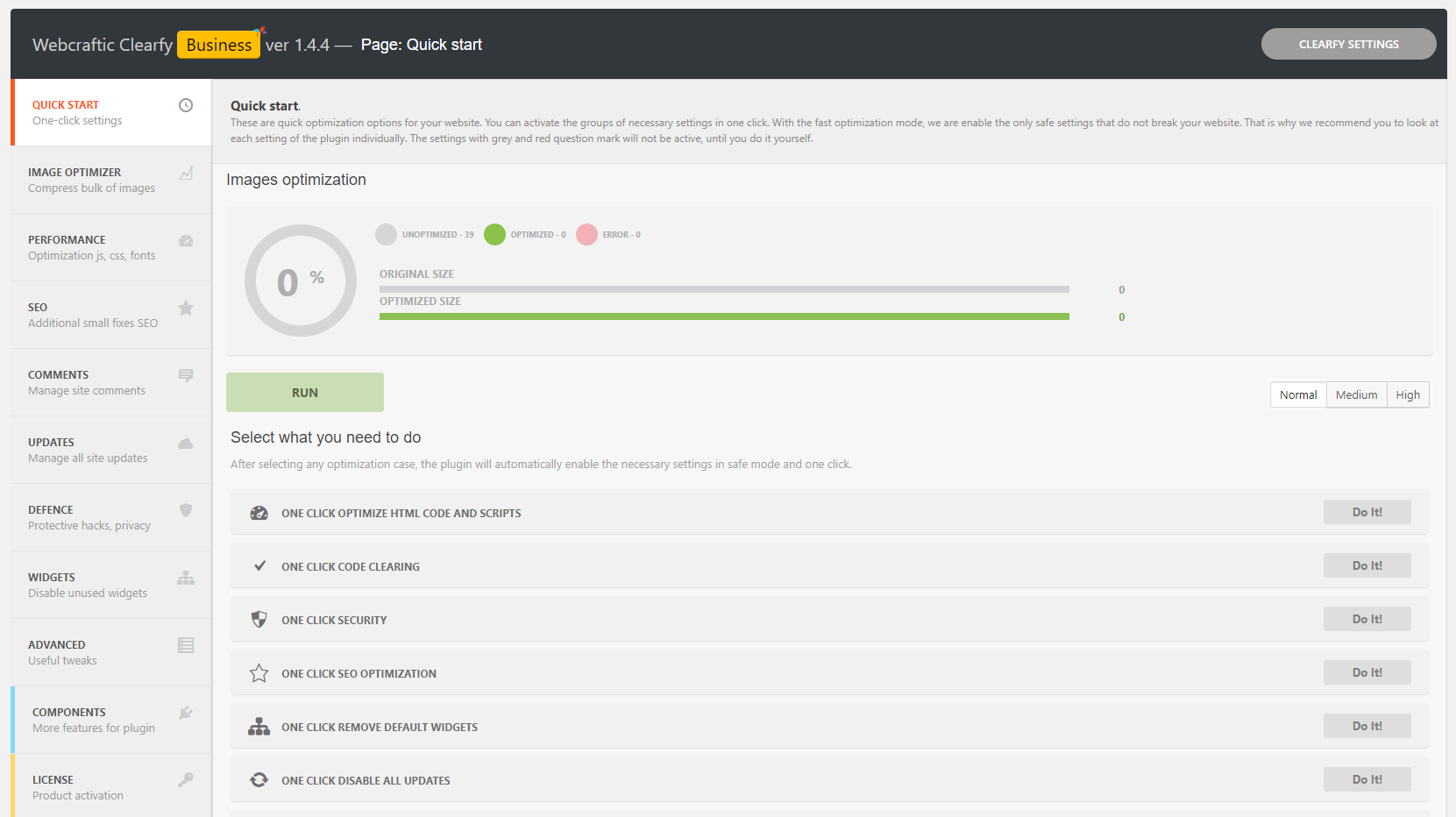
Clearfy is a multipurpose WordPress plugin that helps optimize and secure your website. It offers over 50 features including code cleanup, SEO optimization, performance optimization, and more. It's easy to use and can improve your website's speed and SEO in just a few minutes.Screenshots


Frequently asked questions
What is the Clearfy plugin?
Clearfy is a multipurpose and free WordPress plugin that helps optimize and secure your website. It provides over 50 useful functions for website optimization, including code cleanup, SEO optimization, caching, and more.
How does Clearfy improve WordPress SEO?
Clearfy improves WordPress SEO by optimizing page indexing, improving ranking by search engines, and making websites cleaner for search engines. Users who have optimized their WordPress sites with Clearfy have seen performance growth at services like Pingdom, GTmetrix, Google PageSpeed Insights, and YSlow.
What are some features of Clearfy?
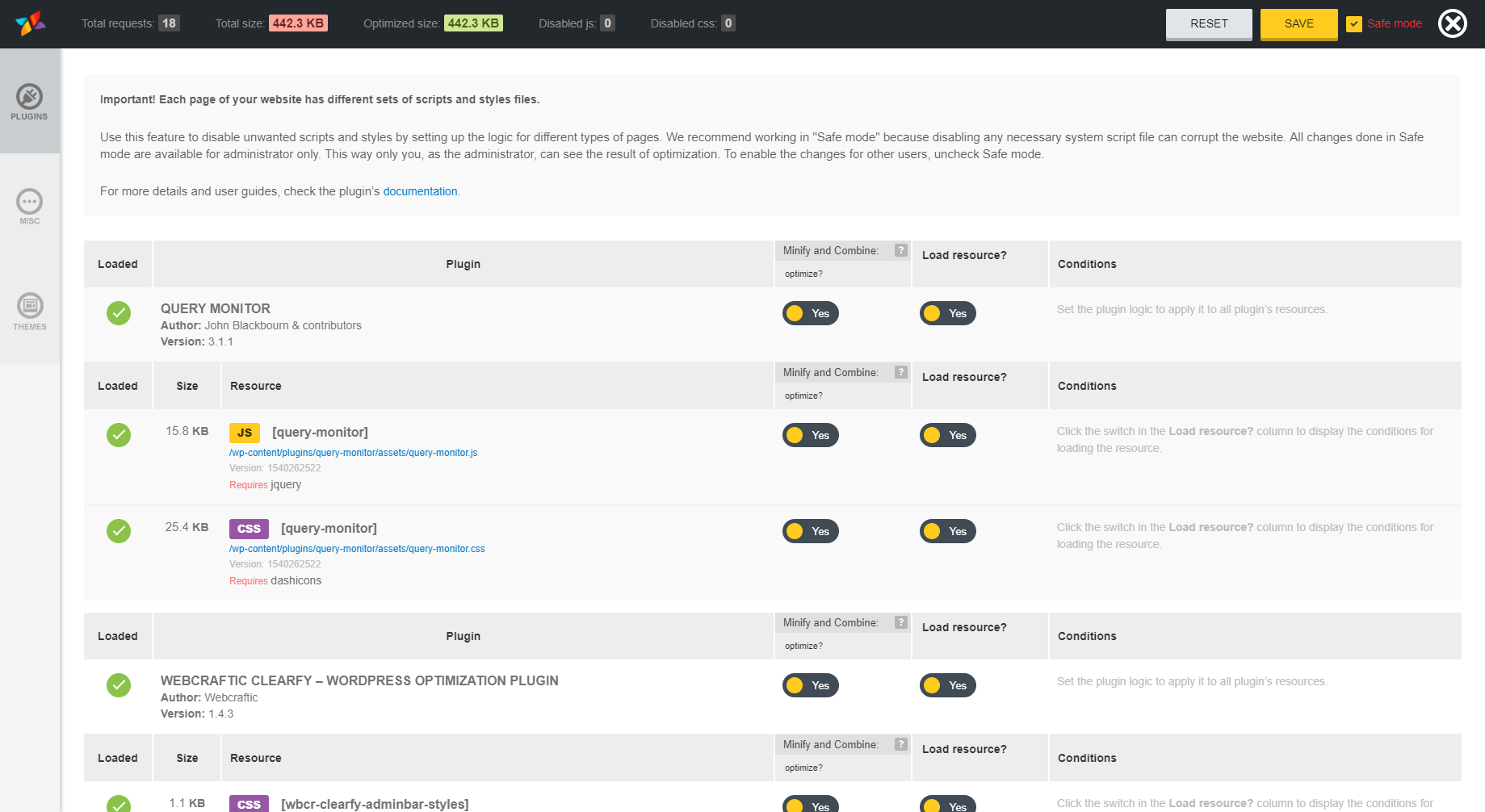
Clearfy offers features like page caching, performance optimization, code cleanup, WordPress SEO optimization, removing WordPress page duplicates, WordPress privacy settings, WordPress defense, WordPress widgets, WordPress updates management, WordPress comments management, admin notices and updates notifications management, Heartbeat API optimization, WordPress admin bar optimization, WordPress posts optimization, and WordPress scripts and styles management.
Can Clearfy replace other WordPress plugins?
No, Clearfy does not replace defense, promotion, and acceleration plugins. It complements them by providing additional optimization functions.
How can I contribute to the translation of Clearfy?
If you want to help translate Clearfy into your native language, you can contact the plugin developers via email or create a topic on their support forum. In exchange for your help, they offer better support and their premium plugins for free.
Changelog
2.3.0 (05.12.2024)
- Fixed: Minor bugs
2.2.9 (05.12.2024)
- Fixed: Compatibility with premium plugin
2.2.7 (05.12.2024)
- Added: Compatibility with WordPress 6.7
2.2.5 (29.09.2024)
- Fixed: Security issues fixed
2.2.4 (24.07.2024)
- Fixed: Security issues fixed
2.2.2 (17.07.2024)
- Added: Compatibility with WordPress 6.6
- Fixed: Minor bugs
2.2.0 (25.03.2024)
- Added: Compatibility with php 8.3
- Added: Compatibility with WordPress 6.5
2.2.0 (21.11.2023)
- Added: Compatibility with php 8.2
- Added: Compatibility with WordPress 6.4
2.1.9 (26.05.2023)
- Added: Compatibility with php 8.1
- Fixed: Minor bugs.
2.1.5 (22.03.2023)
- Fixed: Freemius framework conflict
- Added: Compatibility with WordPress 6.2
2.1.4 (30.01.2023)
- Fixed: Minor bugs.
2.1.3 (25.12.2022)
- Added new caching features.
2.1.2 (16.11.2022)
- The caching module is unlocked and now all caching functions are available for free.
2.0.6 (29.10.2022)
- Fixed: Minor bugs.
2.0.5 (02.06.2022)
- Fixed: Security issue
2.0.4 (27.05.2022)
- Added: Compatibility with WordPress 6.0
2.0.2 (24.03.2022)
- Removed code causing rest api blocking for unauthenticated users.
2.0.1 (24.03.2022)
- Added: Compatibility with WordPress 5.9
2.0.0 (24.11.2021)
- Added: Page caching. It creates static HTML files of frontend pages and stores them on the server’s disk. This allows the static HTML files to be delivered instead of generating pages on the fly, avoiding resource intensive backend processes from the WordPress core, plugins, and database.
- Improved: Compatibility with premium plugin
1.9.6 (15.09.2021)
- Fixed: Minor bugs.
- Improved: Compatibility with WordPress 5.8
1.9.4 (01.07.2021)
- Fixed: Bug https://wordpress.org/support/topic/php-fatal-error-261/
- Fixed: Bug https://forum.webcraftic.com/threads/php-notice-undefined-index-path-in.792/
- Added compatibility with premium plugin 1.3.6
1.9.3 (31.05.2021)
- Fixed: Bug https://wordpress.org/support/topic/pagespeed-api-quote-exceeded/
- Fixed: Bug https://wordpress.org/support/topic/random-fatal-error/
- Fixed: Bug https://wordpress.org/support/topic/php-fatal-error-254/
- Fixed: Minor bugs.
1.9.1 (12.05.2021)
- Fixed: Bug with connecting old google analytics. Removed unnecessary Facebook pixel and Google analytics connections.
- [Minify and combine] Now script and style optimization is disabled by default for administrators and authorized users. If you want to enable optimization, you can do so by checking the “Also optimize JS/CSS for logged in editors/administrators?”
1.9.0 (08.05.2021)
In this update, the plugin interface has been simplified, some options have received more automation. In this update, the plugin interface has been simplified, some options have received more automation. Fixed some bugs in the plugin.
1.8.9 (06.04.2021)
- Fixed: Clearfy was blocking htaccess file overwriting in some cases, now the problem is fixed.
1.8.8 (05.04.2021)
- Added: Compatibility with the new version of the premium plugin
- [Minify and Combine] When you aggregate css files into one, the site design can be destroyed, now this bug has been fixed.
- Improved: Compatibility the option “Remove html comments” with Gutenberg
- [Assets Manager] Added new “Query string” conditional logic. Now you can disable scripts if the query string contains certain variables.
1.8.7 (17.03.2021)
- The plugin now requires php 7 and wordpress 5.2 to work properly.
1.8.6 (03.03.2021)
- Improved: Compatibility with WordPress 5.7
1.8.5 (08.02.2021)
- Fixed: Minor bugs.
1.8.4 (08.02.2021)
- Fixed: Minor bugs in the plugin interface.
- Improved: compatibility with php 8.
- Improved: compatibility with premium plugin.
- Improved: [Disable admin notices] compatibility with Google SiteKit plugin.
1.8.3 (25.01.2021)
- Added: wp rocket compatibility
- Fixed: minor bugs
1.8.2 (22.12.2020)
- Updated: subscription form will disappear from this moment if you have already subscribed.
- Fixed: [Assets manager component] duplicate templates and scripts error when rendering html views of Assets manager.
1.8.1 (15.12.2020)
- Added: Subscribe form
- Fixed: Minor bugs.
1.8.0 (20.10.2020)
- Сompatible with premium plugin 1.1.6. Added page caching feature to premium plugin.
- Fixed: Minor bugs.
1.7.4 (16.09.2020)
- Fixed: Cannot declare class Minify_HTML (Conflict with WP-Optimize).
1.7.3 (7.09.2020)
- Fixed: Critical error in the Gutenberg editor
1.7.2 (4.09.2020)
- Fixed: Error with white screen
1.7.1 (4.09.2020)
- Added: Setup wizard.
- Fixed: Minor bugs.
1.7.0
- Added: Compatibility with WordPress 5.5
1.6.9
- Added: Critical CSS options
1.6.8 (3.06.2020)
- Fixed: critical bug
1.6.7 (3.06.2020)
- Added: options search in the plugin interface. You can enter the option name, the plugin will automatically redirect you to the desired page where the option is located.
- Updated: main navigation menu.
- Fixed: Minor bugs
1.6.6 (29.04.2020)
- Fixed: Minor bugs
1.6.5 (28.04.2020)
- Fixed: The license was activated during synchronization with the server, but the license has not expired yet and was active.
- Fixed: The notification “Please, install premium plugin” no longer appears if the plugin was installed manually.
- Added: Сompatibility with php 7.4
- Added: Сompatibility with WordPress 5.4
- Fixed: [Webcraftic Disable Admin Notices Individually] Conflicts with plugins 404page, Lara’s Google Analytics, YITH WooCommerce Gift Cards
- Fixed: [Minify and combine] Minor bugs.
1.6.4 (12.02.2020)
- Fixed: Minor bugs.
1.6.3 (21.01.2020)
- Fixed: Minor bugs.
- Fixed: Compatibility with Robin image optimizer 1.4.2
- Fixed: Broken links in plugin interface.
- Fixed: Bug with translations of components.
- Fixed: [Minify and combine] compatibility php 7.4
1.6.2 (20.11.2019)
- Fixed: Minor bugs.
1.6.1 (13.11.2019)
- Fixed: Compatibility with WordPress 5.3
- Fixed: [Assets manager component] Minor bugs. Added an admin notice about great release.
- Fixed: [Assets manager component] Conditional logic in the premium plugin didn’t work in previous version due an error.
- Added: [Assets manager component] You can control asset requires. Now if you disabled asset and it required for which other asset, you will get prompt with warning.
- Added: [Assets manager component] If you click on the “requires” tag, you will be gone to the asset for which require the current asset.
- Added: Restored plugin Hide my wp for premium build. And added compatibility Clearfy with Hide my wp.
1.6.0 (12.10.2019)
- Fixed: [Google analytic cache] a bug with creating a local copy of the Google analytics library.
- Fixed: [Assets manager component] fatal error with “Call to undefined function wp_scripts_get_suffix”
- Fixed: [Assets manager component] bugs with jquery library and improved compatibility with other optimization plugins.”
- Fixed: [Robin image optimizer] a bug with converting webp in image optimizer. Under the Clearfy license images weren’t converted.
- Fixed: Removed ads for premium users
1.5.9 (04.10.2019)
- Fixed: [Assets manager component] fatal error with “Call to undefined function wbcr_gnz_deploy_mu_plugin()”
- Fixed: [Assets manager component] fatal error with “Use of undefined constant WGZ_PLUGIN_DIR”
- Fixed: Minor bugs with uninstall plugin
1.5.7 (04.10.2019)
- Fixed: [Cyrlitera component] fatal error with “class ‘WCTR_Helper’ not found”
1.5.6 (04.10.2019)
- [Assets manager component]: The interface has become more compact and friendly.
- [Assets manager component]: The speed and productivity of the editor is increased, it loads faster and does not freeze, as it was before.
- [Assets manager component]: Extended conditional logic has been added, now you can create complex conditions for disabling assets.
- [Assets manager component]: An additional mode has appeared to completely disable the plugin (you can disable not only scripts, but also stop executing plugin scripts).
- [Assets manager component]: Known bugs in the previous version are fixed.
1.5.3
- Fixed: Bug with Elementor plugin. If you enable options “remove query strings for static resources”, elementor plugin stopped its work
- Fixed: [Update manager component]: When you disable WordPress core updates, you still see an update notification for version 5.x.x
- Fixed: [Update manager component]: Clearfy compatibility error. Namely, when the component was activated, the cron tasks for checking for updates were not runned.
- Fixed: [Update manager component]: PHP Notice “Undefined property: stdClass::$plugin”
- Fixed: [Assets manager component]: Php error “Cannot use string offset as an array”
- Fixed: [Assets manager component]: Broken interface and some javascript errors
- Fixed: [Assets manager component]: PHP Notice “Trying to get property ‘taxonomy’ of non-object”
- Fixed: When you enable the remove meta generator option, meta tag viewport can also be removed.
- Fixed: After enabling the Google Fonts asynchronous option, you could see php notice “Notice: Trying to get property of non-object”
- Fixed: Disabling revisions in WordPress 5.0 does not work (Gutenberg).
- Fixed: Compatible with Robin Image Optimizer 1.3.6
1.5.0
- Fixed: Bug when disabling embeds, in WordPress 5.0 did not work editor gutenberg
1.4.9
- Fixed: Bug with Woocommerce Memberships
- Fixed: Bug with License manager
- Fixed: [Cyrlitera component]: when using transliteration on frontend, duplicate pages were created.
- Fixed: [Update manager component]: no longer disables plugin update checking.
- Fixed: [Update manager component]: inverted switches to disable auto-updates.
- Fixed: [Update manager component]: removed the “Update Manager” button on the plugin and themes page.
- Fixed: Bug with wbcr_factory_409_imppage_after_form_save: you will no longer see the PHP notification.
1.4.6
- Fixed: Bug when license activated [Call to undefined function mime_content_type].
- Fixed: Disable comments component: [Uncaught Error: Class ‘WCTR_Plugin’ not found].
- Fixed: Removed notifications that cannot be dismissed.
- Fixed: Update manager component: [Notice: Trying to get property of non-object].
- Fixed: Update manager component: [Warning: Invalid argument supplied].
1.4.5
- Fixed: Update manager: [Undefined index: clearfy]
1.4.4
- Fixed: Added compatibility with ithemes sync
- Fixed: Assets manager: A bug when the interface did not open on the frontend.
- Fixed: Unlocked multisite support for individual sites. Network management mode, still remained only for premium.
1.4.3
- Fixed: Compatibility with W3 total cache
- Fixed: Compatibility with External Media without Import
- Fixed: Fatal error when activating plugin
- Fixed: Removed tab on the page to get premium for free.
1.4.2
- Fixed: Errors in the plugin on user requests
- New: The Updates Manager component has been completely redesigned, many additional functions have been added.
- New: The Assets Manager component has been completely redesigned, many additional functions have been added.
- New: Friendly interface
- New: Step to php 5.3 and above
- New: Import/export has been moved to the Clearfy Settings page.
- Added: Multisite support for most components.
- Added: Compatibility with external components
- Added: Additional hooks and filters for white label.
- Added: New components.
1.3.184
- Fixed: Critical error with WCL_Helper::minifyHtml()
- Fixed: Disable rest api
- Fixed: Disable emojis
- Fixed: Translations
- Fixed: Bug when loading components with Clearfy business
- Fixed: Added compatibility with Learndash
1.3.183
- Fixed: Critical error when plugin activate
- Fixed: Conflict due to the jsMin library
- Fixed: Crush of the markup for the additional Clearfy menu in the adminbar
- Added: Option to disable the extra Clearfy menu in the adminbar
1.3.182
- Fixed: Critical error when plugin update
1.3.181
- Fixed: Fatal error when plugin update
1.3.18
- Added: new component for image optimization. We’ve created a 100% free solution for image optimization, which is as good as the paid products. The plugin optimizes your images automatically, reducing their weight with no quality loss.
- Added: new component for scripts & styles optimization – this component combines all your scripts and styles in one file, compresses & caches it.
- Added: new component for HTML compression – we’ve completely redesigned HTML compression of the pages and added these features to another component. It’s more stable and reliable solution for HTML code optimization of your pages.
- Added: new [premium] component for Hide WordPress – this premium component helps in hiding your WordPress from hackers and bots. Basically, it disables identification of your CMS by changing directories and files names, removing meta data and replacing HTML content which can provide all information about the platform you use. Most websites can be hacked easily, as hackers and bots know all security flaws in plugins, themes and the WordPress core. You can secure the website from the attack by hiding the information the hackers will need.
- Added: updated the robots.txt layout (like in Yoast studio)
- Fixed: compatibility problems with PHP 7.0 in helpers.php
- Fixed: malfunctioned transliteration in frontend and several custom posts.
- Fixed: php error instead of the warning message, when a user has already had other webcraftic plugins and tried to add Clearfy.
- Fixed: some users had problems with the “Remove post pagination” feature – now this option is marked with grey.
- Fixed: recommended mode for the quick plugin setup has been removed. This has been done because users couldn’t figure out what features they were activating and why.
- Fixed: problems with editing pages in such popular plugins as elementor and visual composer with enabled “Remove versions from request lines” feature. We’ve decided to keep the version in the request line for authorized users.
- Added: you can exclude sending the If-Modified-Since header for the main page, because main pages update really rare.
- Fixed: conflict with the Divi theme – some users were missing the settings panel when the “Hide Admin notification” component was used.
- Fixed: problem with displaying the Font Awesome icons with enabled asynchronous font loading.
- The “Hide login page” module turned into the separate component. It is no longer enabled by default. Attention! If you’ve ever used features associated with hiding login page, then, please, re-activate this component.
- Improvements in activation and deactivation of components.
- Added: premium version support, licensing page and ability to install paid components.
- Donate widget has been removed. Now if you want to support our project, you can switch to the premium version and get the best support & extra features.
1.2.1
- Fixed: Bug with Buddypress (forum issue BUG. Blank Edit buddypress page)
- Fixed: In version 1.2.0, changes were lost 1.9.1 and 1.9.2
- Fixed: Did not work function to remove XFN profiler
- Fixed: Changed the redirect type from 302 to 301 when you try go to through of page navigation.
- Fixed: Problems with translations
- Fixed: Remove comments function kill the tags
- Fixed: [Cyrlitera component] bug with transliteration of file names
- Added: [Cyrlitera component] – transliteration of cyrillic symbols into Latin alphabet, normalization of file names.
- Added: [Cyrlitera component] Forced transliteration for file names
- Added: [Cyrlitera component] Function of converting files to lowercase
- Added: [Cyrlitera component] Forced transliteration function
- Added: [Cyrlitera component] The function of redirecting old records to new ones
- Added: [Cyrlitera component] Ability to change the base of symbols of transliteration
- Added: [Cyrlitera component] Button for converting old posts, categories, tags
- Added: [Cyrlitera component] Button to restore old links
- Added: Compatibility with PHP 7.2
1.2.0
- Fixed: Google fonts dns-prefetch erroneous deletion
- Fixed: Importing and saving settings issues
- Fixed: The “Recent Comments” widget does not deleted
- Fixed: Redirection for rss feeds did not work
- Fixed: urlspan.js was loaded when it was not necessary
- Fixed: “Disable All WordPress Updates” deleted notifications in the adminbar
- Fixed: Clearfy and DeliPress сonflict on php 7.1
- Fixed: The gravatars didn’t turned off when disable comments
- Fixed: Slowing down the plugins page when updates were disabled
- Fixed: Issues with setting alt attributes for images
- Fixed: The plugin interface did not work and the styles were not loaded due to security settings
- ADDED: Plugin options caching to reduce database queries for 90%. Clearfy became lighter and faster.
- ADDED: Compress and cache the plugin core files, to reduce the load on the admin panel
- ADDED: Google Analytics cache
- ADDED: Google Fonts asynchronous
- ADDED: Font Awesome asynchronous
- ADDED: Google Fonts disabling
- ADDED: Google Maps disabling
- ADDED: Dashicons disabling
- ADDED: XFN (XHTML Friends Network) Profile Link disabling
- ADDED: Gravatars disabling
- ADDED: html minification settings was enhanced
- ADDED: Transliteration of Cyrillic alphabet for URLs and filenames
- ADDED: Login page protection (you can rename the login page)
- ADDED: Warnings about plugin conflicts. You can see the warnings if you have plugins’ options which can intersect with Clearfy and cause conflicts.
1.1.92
- Fixed bug: admin area loads slower – when theme and plugin updates: disabled
- Fixed bug: hide errors when logging into the site – breaks login
1.1.91
- Fixed forum issue: [Issue or error caused backend delay] A non-existent style file was called.
- Fixed forum issue: [Error filling Alt, if at the end of the space] Php error prevented the import of goods into Woocomerce, when the option “Automatically set the alt attribute” was turned on.
- Fixed bug in tab styles of the plugin control panel
- Fixed bug: don’t inserted alt attribute text in WooCommerce
- Fixed bug: there were javascript errors when the “Remove html comments” option and the nextgen gallery plugin were enabled.
- Fixed bug: plugin doesn’t change sitemap link in Robots.txt after settings import
- Plugin components settings are now available for export
- The “Heartbeat frequency” time range has been increased up to 500 seconds
1.1.9
- Fixed forum issue: [Plugin conflict with “Disable admin top bar”]
- Fixed forum issue: [WooCommerce Order Notes!]
- Fixed forum issue: [Remove html comments DOUBLE setting]
- Fixed: Export/import. Now doesn’t contain a hidden notification options
- Fixed: Translation
- Fixed: Deleted dangerous options from quick settings
- Fixed: We have moved the plugin menu to the general settings for your comfort. There are new plugin features. Please go to the plugin page to learn more!
- Added a new feature: To restore hidden admin notices individually
- Added a new feature: We have divided plugin features into components. You can turn off unused plugin functions.
- Added a new feature: Added page for cleaning comments
1.1.8
- Added new feature You will see the link “Hide notification forever” in each notice. Push it and they will not bother you anymore.
- Added new feature Disable/Enable plugin updates individually.
- Added new feature Disable/Enable plugin auto updates individually.
- Added new feature Updates nags only for Admin. This plugin allows you to hide the update WordPress reminder from all users that are not assumed Administrators (cannot upgrade plugins).
- Translation into Italian
- Fixed quick mode
- Updated interface style
- Fixed a problem with the fonts in the update manager
- Fixed problem with auto update of plugins and themes
1.1.7
- Fixed bug with disable embeds option
- Fixed bug with core update
- Fixed plugin translation
- Removed CDN package
1.1.6
- Fixed bug reduced plugin weight.
- Fixed JS error with external links option.
- Fixed bug woocommerce with if-modified-since option.
- Fixed bug with loading exists style files with factory bootsrap.
- Upadated design, improved availability for mobile devices.
- Add French translation
- Added assets manager in beta mode. This is a very useful and convenient tool for enabling and disabling file scripts.
1.1.4
- Fixed a bug where you selected the recommended mode, on some pages you see a white screen. Now you will not encounter this error.
1.1.3
- Fixed bug for tag image:image from XML site map in Yoast SEO
- A platform for writing add-ons has been deployed.
- Rename plugin options
- Added new features Remove html comments
- Added new features Disable comments, remove comments and close comments
- Added new features Enable Sanitization of WordPress
- Added new features Disable admin notice
- Added new features Disable adminbar
- Added new features Remove admin bar WP logo
- Added new features Replace “Howdy” text with “Welcome”
- Added new features Disable autosave
- Added new features Disable capitalization in WordPress branding
- Added new features Disable WPautop
- Added new features Disable Heartbeat
- Added new features Heartbeat frequency
1.1.2
- Redesigned plugin interface design
- Updated quick setup assistant, now it provides you with information about disabled functions.
- Added plugin import and export settings
- Added new features “Remove default widgets settings and quick mode”
- Added new features “Disable and enable automatic updates of plugin or themes”
- Added new features “Disable and enable auto core updates”
- Added new features “Disable all updates qick mode”
- Added donate button
- Update readme.txt
1.1.1
- Fixed caching of styles and scripts
1.1.0
- Hide description for checkbox control
- Added new feature “Remove Version from Stylesheets”
- Added new feature “Remove Version from Scripts”
- Added new feature “Marking of safe and warning settings”
- Added tooltips, instead of short descriptions.
1.0.9
- Added quick start assistant
- Added new feature “Right robots.txt”
- Added new feature “Html minify”
- Update core functions
- Added new feature “Redirect Http to Https”
1.0.3
- Updated readmy.txt file
- Updated translation
- Added new feature “Disable Embeds”
- Added new feature “jQuery Migrate”
- Added uninstall.php
1.0.2
- Updated readme.txt file
- Translated the plugin into Russian

