

Improve your WordPress SEO: Write better content and have a fully optimized WordPress site using the Yoast SEO…
About Clear Cache for Me
Clear Cache For Me is a WordPress plugin that clears the cache of various caching systems, including popular plugins like W3 Total Cache and WP Super Cache. It also forces the browser to reload CSS and JS files for your theme, ensuring that any changes you make are immediately visible. The plugin supports a wide range of caching plugins and can clear cache for various actions like saving widgets, menus, and form submissions.Screenshots
Frequently asked questions
What caching systems does Clear Cache for Me work with?
Clear Cache for Me works with Autoptimize, Breeze Cache, Cache Enabler, GoDaddy Cache, Kinsta Cache, LiteSpeed Cache, Elementor (CSS cache), Premium Addons for Elementor, SiteGround SuperCacher, WP Fastest Cache, WP Optimize Cache, WP Rocket, WP Super Cache, W3 Total Cache, and WPEngine Cache.
What problem does Clear Cache for Me solve?
Caching plugins and systems often do not recognize when widgets or menus are updated, leading to outdated content being displayed. This plugin purges all cache when you save widgets, menus, or settings, ensuring changes are immediately visible.
Can Clear Cache for Me force a browser to reload CSS and JS files?
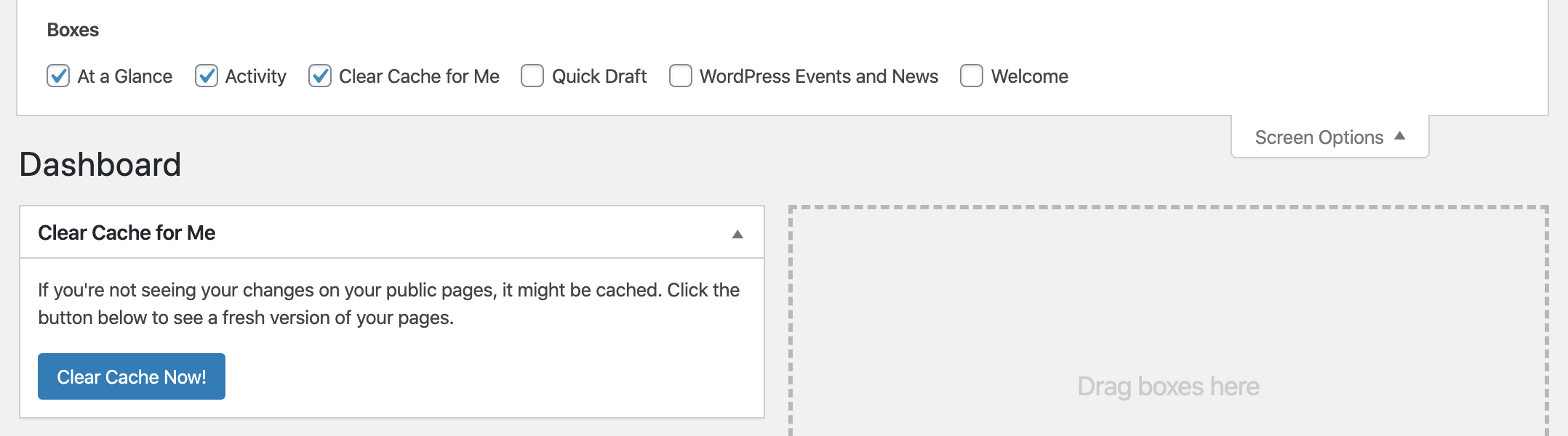
Yes, clicking the "Clear Cache Now!" button on the dashboard will force the browser to reload the current theme's CSS and JS files. Additionally, when saving Qode theme options, the CSS and JS files will be forced to reload in the browser on the public side.
Changelog
2.3
Updated Clear Cache for Me on dashboard.
Added option to exclude cache clearing for theme’s CSS and JS assets.
2.2
Added cache clearing when automatic updates complete.
2.1.1
Fixed “Edit with Elementor” in toolbar not working.
Fixed settings page so “WP Optimize” shows correctly when being used.
2.1
Added CSS cache clearing for Elementor. (thanks to @ronr1999!)
2.0.1
Fixed WP Rocket cache clearing. (thanks to @deargeek!)
2.0
Added cache clearing for additional plugins that save their own cache.
Added cache clearing for WP Rocket.
Organized code.
1.8
Updated cache clearing for LiteSpeed Cache.
1.7
Added cache clearing when fields in Advanced Custom Fields are updated.
1.6
Added cache clearing when WordPress core is updated.
Added cache clearing when plugins are activated, deactivated, and updated.
Added cache clearing support for Insert Headers and Footers plugin.
Fixed admin-bar loading when admin bar is not present.
1.5.1
Remove ajax from admin bar when jQuery is not available.
1.5
Updated admin bar link to clear cache in place.
Added cache clearing support for Cache Enabler.
Fixed cache clearing for Breeze.
1.4.1
Updated Clear Cache For Me button in admin bar.
Updated clearing WP Fastest Cache to include clearing minified cache.
(thanks to Ov3rfly)
1.4
Added cache clearing for LiteSpeed Cache.
Added cache clearing for SiteGround SuperCacher.
Added cache clearing for Autoptimize.
Added Clear Cache For Me button in admin bar.
Added Development Mode to always load a fresh copy of javascript and stylesheet files.
1.3
Added cache clearing for Breeze cache.
Added cache clearing when WP Forms is saved
Added cache clearing when WooCommerce settings are saved.
Moved the settings to its own page under Settings.
Fixed cache clearing for GoDaddy so all pages are cleared.
1.2
Added cache clearing for WP Optimize cache.
1.1.1
removed hosting notice, fixed js error.
1.1
Added cache clearing for Kinsta hosting.
Added cache clearing for GoDaddy manged hosting.
Added cache clearing for Formidable Forms.
1.0
Added clearing cache for all JS and CSS theme files.
Added clearing cache when Qode theme options are saved.
0.93
Fixed button not showing up when admin doesn’t have permissions. Button will now always show for the admin user with manage_options capability.
0.92
Fixed clearing cache on widgets when widgets are saved or reordered.
0.91
Minor fix checking if certain WPEngine functions exist. Thanks to @tharmann!
0.9
Added clear cache for NextGen Gallery saving, but not sure if all actions are accounted for.
0.8
Added clear cache for WooThemes options.
Fixed cache not clearing on some WP Super Cache installations.
0.7.1
Added clear cache for settings pages.
Added clear cache for Contact Form 7 form saving.
Updated description and added donation link on plugin page only.
0.6.2
minor updates to css class names
0.6.1
Updated German translation (thanks to Ov3rfly!).
Updated admin HTML and styles (thanks to Ov3rfly!).
0.6
Fixed cache not clearing when widgets are re-ordered or deleted (thanks to Ov3rfly!).
Added optional instructions to be shown above the button (thanks to Ov3rfly!).
Added to and updated German translations (thanks to Ov3rfly!).
Added more security checks. (thanks to Ov3rfly!).
Added customize theme detection. Clears cache when customizing theme.
Reorganized code a bit.
0.5
Added German language translation (thanks to Ov3rfly)
Added hooks for 3rd party code.
0.4
Bug fixed: Fixed cache not clearing when updating nav menu. (thanks to Ov3rfly for catching this and supplying the fix)
0.3
Added clear caching for menus
Added clear cache button to dashboard
Added option to set what capability is needed to view the clear cache button for admins.
0.2
Removed garbage at the end of the plugin url.
0.1
Initial release.

