
Just another contact form plugin. Simple but flexible.
About Catch Web Tools
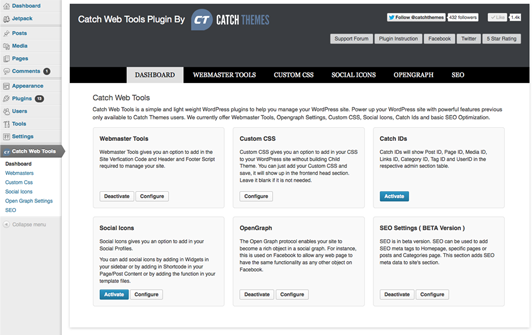
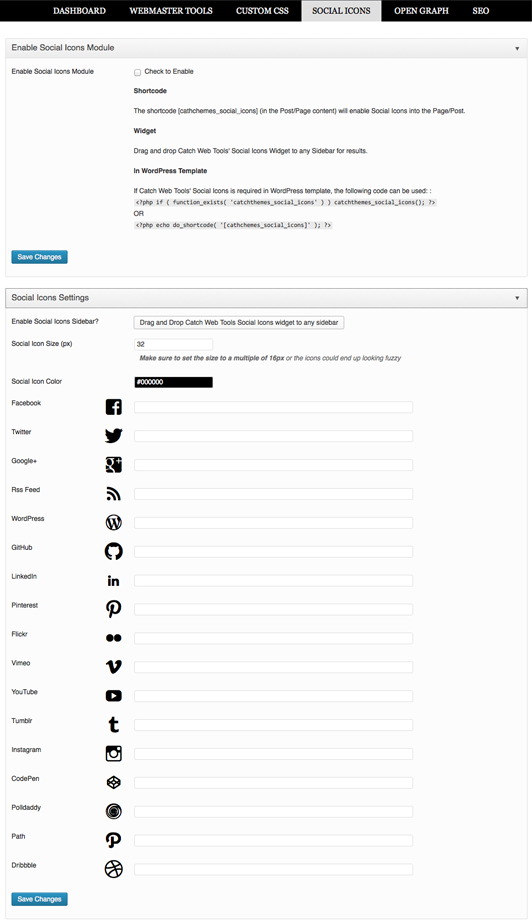
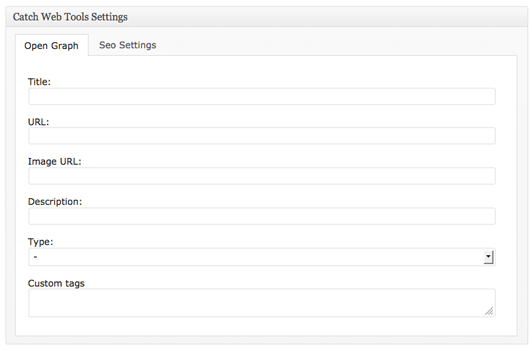
Catch Web Tools is a plugin for WordPress that offers various features to enhance your website, such as Webmaster Tools, Open Graph, Custom CSS, Social Icons, Security, Updator, and Basic SEO optimization. It is easy to set up and you can choose which features to activate, so your site won't be overloaded. The plugin is free to download and is compatible with WordPress themes. Support is available on the Catch Web Tools Support Forum, and the plugin is also translation ready.Screenshots





Frequently asked questions
What is Catch Web Tools?
Catch Web Tools is a modular WordPress plugin designed to enhance website capabilities with powerful features. It offers simple and utilitarian features to power up your WordPress site.
What modules are included in Catch Web Tools?
It currently offers Webmaster Tool, Open Graph, Custom CSS, Social Icons, Security, Updator, and Basic SEO optimization modules. More additions are planned for future updates.
How does Catch Web Tools impact website performance?
Catch Web Tools offers modular plugins that you activate manually. This means your site will not load features unless you activate them, preventing unnecessary overload.
Is Catch Web Tools free?
Yes, Catch Web Tools is available for free downloads. It provides advanced features to make your site interesting, efficient, and professional without cost.
Where can I get support for Catch Web Tools?
Support for Catch Web Tools is provided at the Catch Web Tools Support Forum. The Catch Plugins team does not provide support on the WordPress.org forums.
Changelog
2.7.5 (Released: April 17, 2024)
- Bug Fixed: Deprecation notice in PHP 8.2
- Compatibility check up to version 6.5
2.7.4 (Released: November 15, 2023)
- Compatibility check up to version 6.4
2.7.3 (Released: November 19, 2022)
- Compatibility check up to version 6.1
2.7.2 (Released: April 14, 2022)
- Bug Fixed: Open graph custom tags/keywords not displayed correctly
- Sanitize catchwebtools_opengraph_custom tags
2.7.1 (Released: January 21, 2022)
- Compatibility check up to version 5.9
- Bug Fixed: Nonce and User capabilities check in ajax calls (Reported by wpscan)
2.7 (Released: September 18, 2021)
- Bug Fixed: Security issue on ajax calls
2.6.6 (Released: August 17, 2021)
- Bug Fixed: Undefined variable issue $get_image in frontend/inc/opengraph-tools.php on line 25
2.6.5 (Released: August 05, 2021)
- Compatibility check up to version 5.8
2.6.4 (Released: March 07, 2021)
- Compatibility check up to version 5.7
2.6.3 (Released: September 24, 2020)
- Added: Catch Updater module – Link added in info message
2.6.2 (Released: September 15, 2020)
- Bug Fixed: Social Icons shortcode issue.
2.6.1 (Released: August 19, 2020)
- Bug Fixed: Issue in add new theme page
2.6 (Released: August 11, 2020)
- Added: Disable by default if WordPress version 5.5 or above is installed and show notice
- Compatibility check up to version 5.5
2.5 (Released: March 13, 2020)
- Compatibility check up to version 5.4
2.4 (Released: November 20, 2019)
- Added: Big image size threshold toggle option
2.3 (Released: November 12, 2019)
- Compatibility check up to version 5.3
2.2 (Released: August 20, 2019)
- Added: Option to turn off Catch Themes and Catch Plugins tabs
- Compatibility check up to version 5.2
- Updated: Catch Themes and Catch Plugins tabs displaying code
2.1.5 (Released: February 26, 2019)
- Bug Fixed: Catch Updater module: plugin update issue when plugin name or text-domain does not match plugin directory name
2.1.4 (Released: February 25, 2019)
- Bug Fixed: Catch Updater module: plugin update issue
2.1.3 (Released: February 21, 2019)
- Compatibility check up to version 5.1
2.1.2 (Released: January 22, 2019)
- Removed: equal_height.js as it is no longer used
- Removed: Customizer preview enqueue additional-javascript-preview.js, no file
2.1.1 (Released: December 27, 2018)
- Added: VK social icon in Social Icons module
2.1 (Released: December 12, 2018)
- Added: Catch Themes and Catch Plugins tabs in Add themes and Add plugins page respectively
- Added: Themes by Catch Themes section under Themes panel in customizer
- Bug Fixed: Customizer header/footer script field showing when loading customizer even if the enabled option in unchecked
- Compatibility check up to version 5.0
2.0 (Released: May 07, 2018)
- Added: Auto Updater
- Bug Fixed: undefined index issue Webmaster module
- Compatibility check up to version 4.9.5
- Replaced: div with span (Reported by: jacktester)
- Update: Moved domain from catchthemes.com to catchplugins.com
- Update: Dashboard panel
1.9.8
- Fixed: Webmaster Tools module Header & Footer script
- Fixed: Set Catch IDs module’s status to ‘disabled’ if Catch IDs plugin in active
- Fixed: Catch Updater module
1.9.7
- Enhanced Security: Replaced wp_filter_post_kses with wp_kses_post
1.9.6
- Added: Plugin updater in Catch updater module
- Added: Header & Footer script option in Customizer
- Added: Toggle ID column option to display in selected pages in Catch IDs module
- Fixed: Maintenance mode on frontend in Catch updater module
- Checked: Version compatibility WordPress 4.9.4
- Updated: Disable Catch IDs module if Catch IDs standalone plugin is active
1.9.5
- Checked: Version compatibility WordPress 4.9
- Updated: Custom CSS to Additional CSS( Core Support )
1.9.4
- Checked: Version compatibility WordPress 4.8
1.9.3
- Updated: Make image link protocol-less http:// or https:// to // ( Reported By: pianoworld )
- Updated: Image addition script on admin theme options
1.9.2
- Fixed: Display on hover without scrolling issue [To Top Module]
1.9.1
- Fixed: Nonce issue in metabox (Reported by: james)
1.9
- Checked: Version compatibility WordPress 4.7
- Code Optimization
1.8.1
- Fixed: Catch IDs: ID column display issue in mobile devices
1.8
- Checked: Version compatibility WordPress 4.6
- Fixed: Custom CSS and Social Icons CSS
- Fixed: Added catchwebtools_to_top_options in uninstall
- Updated: Catch Updater class constructor name changed to
__construct()
1.7
- Added: Social Icons Now have features to show their own social colors on hover and both hover and static
- Fixed: IDs not showing in category and tags page
- Fixed: Enqueue catchwebtools-to-top-public.js and catchwebtools-to-top-public.css only if to-top module is active
- Changed: ID column width size to support upto 8 digit ids
- Changed: http to https in links
- Changed: #to_top_scrollup to #cwt_to_top_scrollup
- Changed: Moved all options (CWT Custom CSS and CWT To Top) for Catch Web Tools to Catch Web Tools Plugin panel in customizer
1.6.1
- Update: Made the ID column sortable
- Code Optimization for Catch IDs
1.6
- Added: To Top Module
- Added: Pinterest Site Verification in Webmaster Tools
- Added: Yandex Site Verification in Webmaster Tools
- Added: Security Section In CWT Dashboard
- Added: Catch Updater Module
- Fixed: Undefined index issues
- Optimized: Admin Styles and Scripts delivery
- Optimized: Codes
1.5.2
- Fixed: SEO Author meta error in singular view
1.5.1
- Fixed: Custom CSS not working
1.5
- Added: Social Icons for Email, Skype, Digg, Reddit, Stumbleupon, Pocket, DropBox, Spotify, Foursquare, Twitch TV, Website, Phone, Handset, Cart, Cloud and Link
- Updated: Genericons to 3.4.1
- Updated: Color Picker
- Optimized: Social Icons Content Delivery
- Optimized: Custom CSS Content Delivery
1.4.1
- Bug Fixed: Replaced text domain from catchwebtools to catch-web-tools
1.4
- Added: Feed redirect / custom feed options under webmaster tools
- Changed: Support URL
1.3
- Fixed: Escaped outputs for social icons
- Fixed: Escaped outputs for open graph tools
- Fixed: Escaped outputs for webmasters tools
- Fixed: Skype social icon esc_attr instead of esc_url
- Updated: Genericons
- Checked: Version compatibility WordPress 4.3
1.2
- Added: Serbo-Croatian translation sr_RS.po and sr_RS.mo
- Fixed: empty SEO title added when deactivated
1.1
- Fixed: SEO with title tags for version 4.1 or later
1.0
- Checked: Version compatibility WordPress 4.1
- Fixed: Admin css
0.4
- Checked: Version compatibility WordPress 3.9.2
0.3
- Added: Brazilian Portuguese translation pt_BR.po and pt_BR.mo
- Fixed: Textdomain issue with .pot files
0.2
- Checked: WordPress compatibility up to version 3.9.1
0.1
- Initial Release

