

The Elementor Website Builder has it all: drag and drop page builder, pixel perfect design, mobile responsive editing,…
About Catch IDs
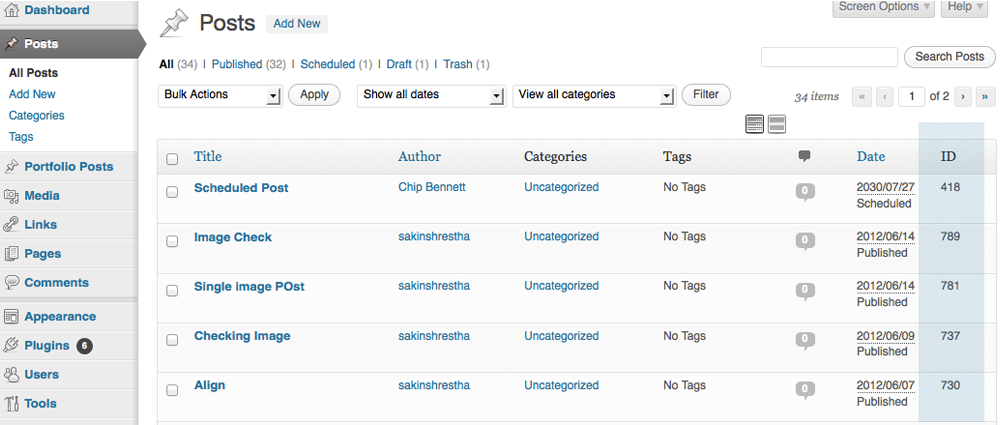
Catch IDs is a plugin that allows you to easily see the IDs of various elements in your WordPress admin section. It was originally created to support theme features, but is now available to all WordPress users. Simply install and activate the plugin to start using it.Screenshots


Frequently asked questions
What is Catch IDs?
Catch IDs is a plugin that shows the Post ID, Page ID, Media ID, Links ID, Category ID, Tag ID and User ID in the Admin Section Table.
Why was Catch IDs developed?
Catch IDs was initially developed to support our themes features slider, but we realized it would be helpful to all WordPress Admin Users.
What other features does Catch Web Tools offer?
Catch Web Tools offers Webmaster Tools, Open Graph, Custom CSS, Social Icons, Catch IDs and basic SEO Optimization modules.
How do I use Catch IDs?
Just install and activate the plugin.
Changelog
2.7.1 (Released: April 16, 2024)
- Bug Fixed: Deprecation notice in PHP 8.2
- Compatibility check up to version 6.5
2.7 (Released: November 15, 2023)
- Compatibility check up to version 6.4
2.6 (Released: November 03, 2022)
- Compatibility check up to version 6.1
2.5 (Released: February 24, 2022)
- Compatibility check up to version 5.9
2.4 (Released: September 15, 2021)
- Bug Fixed: Security issue on ajax calls
2.3 (Released: July 23, 2021)
- Compatibility check up to version 5.8
2.2 (Released: March 04, 2021)
- Compatibility check up to version 5.7
2.1 (Released: Aug 19, 2020)
- Bug Fixed: Issue in add new theme page
2.0 (Released: March 10, 2020)
- Compatibility check up to version 5.4
1.9 (Released: November 12, 2019)
- Compatibility check up to version 5.3
1.8 (Released: May 31, 2019)
- Added: Option to turn off Catch Themes and Catch Plugin tabs
- Updated: Compatibility to WordPress version 5.2
- Updated: Catch Themes and Catch Plugins tabs displaying code
1.7 (Released: February 21, 2019)
- Compatibility check up to version 5.1
1.6 (Released: December 12, 2018)
- Added: Catch Themes and Catch Plugins tabs in Add themes and Add plugins page respectively
- Added: Themes by Catch Themes section under Themes panel in customizer
- Compatibility check up to version 5.0
1.5 (Released: May 07, 2018)
- Update: Moved domain from catchthemes.com to catchplugins.com
- Compatibility check up to version 4.9.5
1.4.8
- Compatibility check up to version 4.9.4
- Added: Toggle ID column option to display in selected pages
1.4.7
- Compatibility check up to version 4.9
1.4.6
- Compatibility check up to version 4.8
1.4.5
- Compatibility check up to version 4.7
1.4.4
- Fixed: ID column display issue in mobile devices
1.4.3
- Compatibility check up to version 4.6
= 1.4.2
* Compatibility check up to version 4.5
= 1.4.1
* Changed: ID column width size to support upto 8 digit ids
* Changed: http to https in links
= 1.4
* Bug Fixed: IDs not showing in category and tags page(Reported by wwkipday)
= 1.3
* Update: Made the ID column sortable
* Code Optimization
= 1.2.6
* Compatibility check up to version 4.4
= 1.2.5
* Translation ready update
= 1.2.4
* Compatibility check up to version 4.3
= 1.2.3
* Compatibility check up to version 4.1
* Added plugin icons
= 1.2.2
* Compatibility check up to version 3.9.2
= 1.2.1
* Fixed ID not showing in Taxonomies (Reported by Lesley)
= 1.2
* Check WordPress compatibility up to version 3.9.1
= 1.1
* Check WordPress compatibility up to version 3.7.1
= 1.0
* Initial Public Release

