

Just another contact form plugin. Simple but flexible.
About ApplyOnline – Application Form Builder and Manager
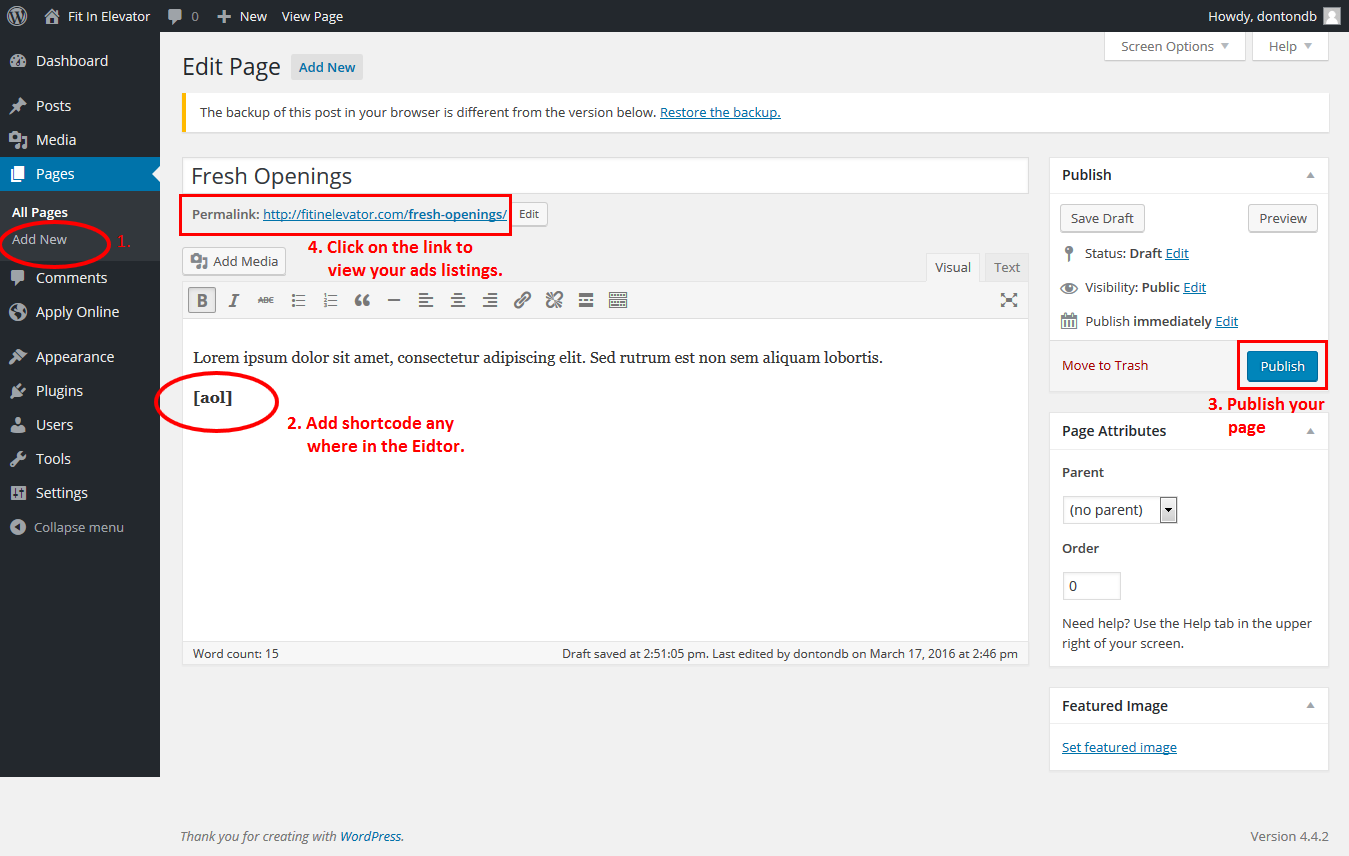
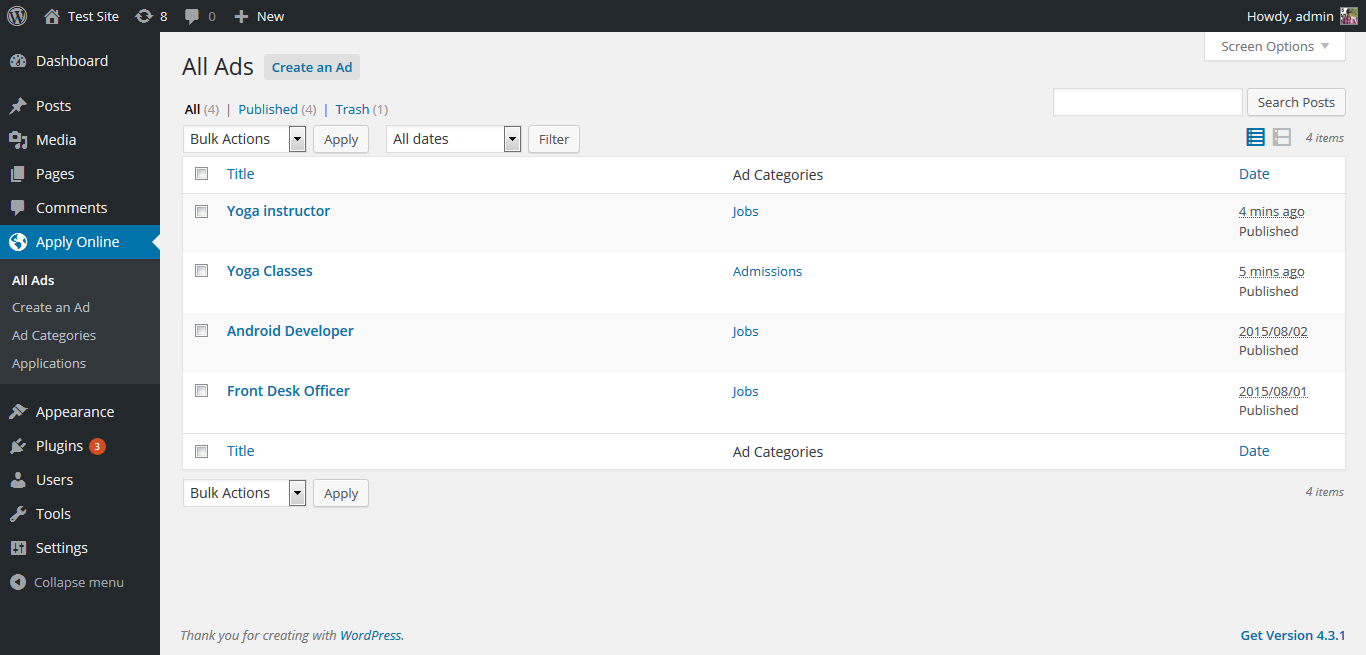
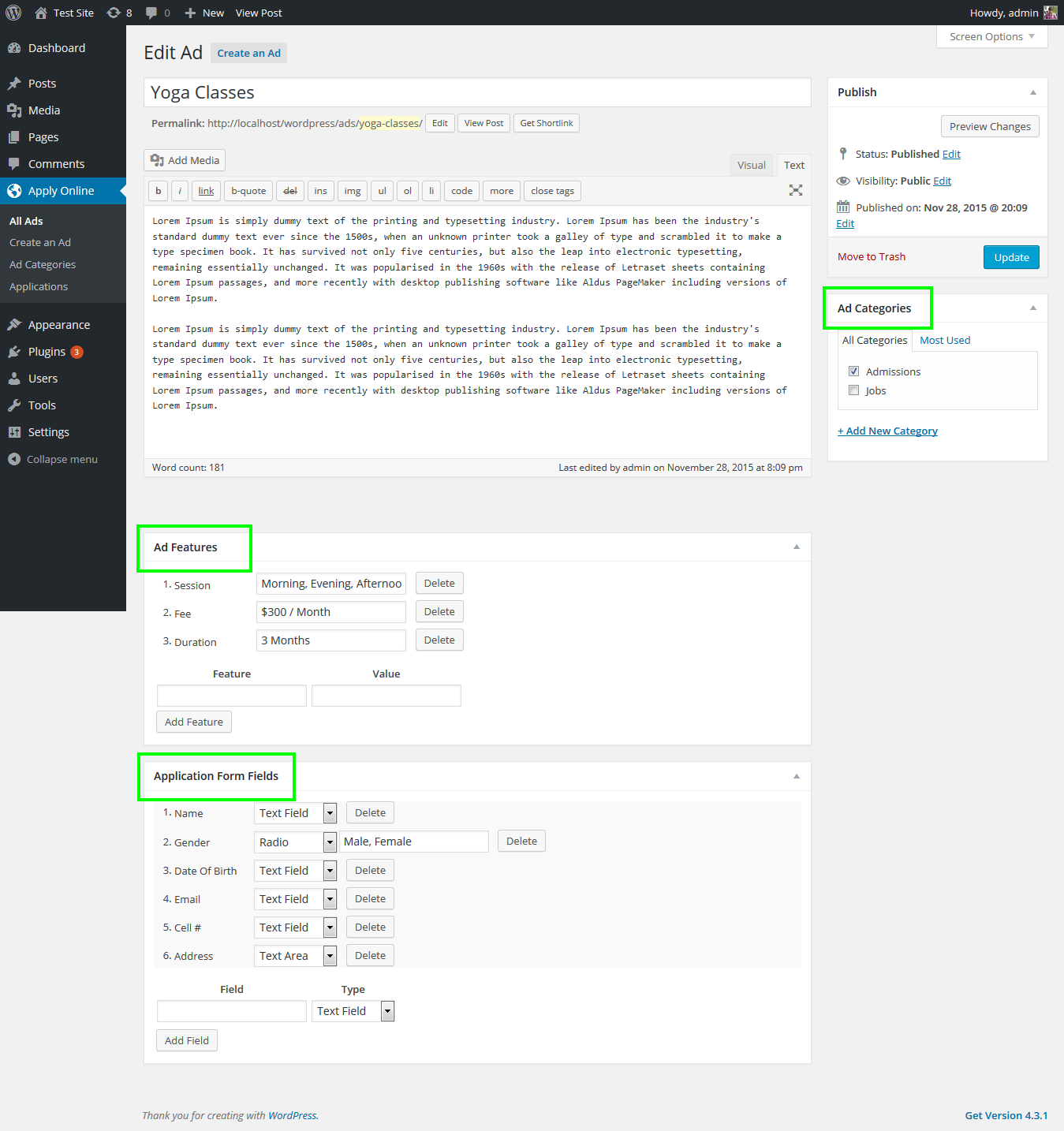
ApplyOnline is a user-friendly WordPress plugin that allows you to create job boards, school admissions, event bookings, and more. With its drag and drop form builder, you can easily create stunning application forms without any designing or development skills. The plugin also offers powerful features such as ad types support, application tracking, email notifications, and more.Screenshots

Changelog
Upcoming
Scroll bar with fixed height for form fields section.
Recaptcha integration for secure form submission.
Required field mark in the received application data.
Different layout options e.g. grid layout, list layout, sidebar filter, popup form, etc.
2.6.7.2
New: Nonce for template forms for added security.
2.6.7.1
Fixed: Fatal error on form submission due to incorrect PHP class name.
2.6.7
Fixed: Broken Access Control.
2.6.6
Fixed: 500 Server error.
2.6.5
Fixed: 500 Server error.
Fixed: Replaced jQuery AJAX with JS Fetch API.
2.6.4
Fixed: Removed NULL values for wp_insert_post function parameters.
2.6.3
Fixed: Fixed authorization for Quick View button in applications section in WordPress admin panel.
Fixed: Security patch for CVE-2024-2036.
2.6.2
Fixed: Default file upload path set to private path.
Fixed: Applications table admin ID column width.
2.6.1
Fixed: Critical admin notice if file upload path is public.
2.6
New: Admin email subject option in the settings.
New: Option to use gladd custom size limit for attachment fields in the form builder.
Fixed: Set admin the default email recipient.
Fixed: Settings API callback function.
2.5.7
Fixed: Empty recipients email option in settings.
Fixed: Mail header HTML content type.
2.5.6
Fixed: Paragraph field line break issues.
Fixed: Checkbox & Radio button fields’ styling issues.
Fixed: Security patch for PSID-149593e79c87 & CVE-2023-45756.
Fixed: Security patch for PSID-e59ab80d07f4 & CVE-2023-24391.
2.5.5
Fixed: PHP warning in class-applyonline.php file.
2.5.4.2
Fixed: PHP warning in class-applyonline.php file.
2.5.4.1
Fixed: Attachment link in the Printable version of the received application.
2.5.4
New: Application IDs in the Application table in the WordPress admin panel.
New: Option to write ad title in the email subject.
New: Security patch for PSID-baadd6626a79 & CVE-2023-46080.
Fixed: Email issues due to missing charset in the email header.
2.5.3
Fixed: Attachment link for received application forms.
2.5.2
Fixed: Attachment field issue in the received application data.
Fixed: Security issues.
2.5.1
Fixed: Progress-bar for text-area field.
Fixed: Data sanitization and validation issues.
2.5
New: Application form progress bar.
New: Option to overwrite global settings for each ad from the ad editor screen.
Fixed: Select2 library inclusion in admin panel.
2.4.4
Fixed: Max File Type option appearing in all field types in the form builder.
2.4.3
Fixed: File type field for File Attachment field.
2.4.2
Fixed: Email Notification issues.
Fixed: Application submission confirmation at the application page.
2.4.1
Fixed: Added support for PHP 8
2.4
New: Email notification subject & message option in the plugin setting.
New: Keyword Search added in application filter on ads listing page.
Fixed: Application data hidden after upgrading from an older version.
Fixed: Paragraph field text added in the received application & print format.
2.3
- New: Exclude attributed for [aol] shortcode.
- New: aol_before_application & aol_after_application Action hooks added for received applications.
- Fixed: Bulk edit options updated.
2.2.2
- Fixed: Character limit on some form fields in Application Form Builder.
- Fixed: Required field option in application form builder.
2.2.1
- Fixed: Nonce security switch default value in ApplyOnline settings.
- Fixed: Selection of Notify This Email option in Application Form Builder.
2.2
- New: Import existing form in Application Form Builder.
- New: Applicant Email notification.
- Fixed: Saving ad transcript along with application for consistency.
- Fixed: Form fields drag & drop issue in templates.
2.1.1
- Fixed: After applying filters scroll moves to top of the page instead of filters section.
- Fixed: Session Expired error on form submission by introducing a new settings field.
2.1
- New: Quick View button for received applications.
- New: Applications filtration option on top of applications admin table.
- New: Separate admin dashboard for plugin.
- New: Custom filters for ads listing.
- New: Custom statuses for received applications.
- Fixed: Checkboxes option didn’t get selected when someone clicks on the option name.
- Fixed: AOL Managers access to Ad Types.
- Fixed: Translation issues at some places.
2.0.6
- Fixed: Invalid Ad Type name shown under All Ads section in WordPress admin panel.
2.0.5
- Fixed: Front-end design issues.
2.0.4
- Fixed: Radio Button default selection issue in Application Form Builder.
- Fixed: Application Form Builder saves form field with empty UID.
- Fixed: [aol_form] and [aol_ad] shortcodes did not display form.
2.0.3
- Fixed: Print Form fields order.
2.0.2
- Fixed: Filter name shown multiple times under each ad on ads listing page generated with [aol] shortcode.
- Fixed: Time always saved as 11:59pm.
2.0.1
- Fixed: Template Form Builder in Apply Online/Settings section.
2.0
- New: Enhanced Form Builder with great user interface.
- New: More options for each form field type.
- Fixed: Required fields notice when Application Tracking System is installed.
1.9.98
- Fixed: DropDown field 1st value not included.
- Fixed: Radio button 1st value selected.
1.9.97
- Fixed: Access to attachment in received application.
- Fixed: Ad not shown after plugin update.
1.9.96
- Fixed: Security issues.
- Fixed: Locally included 3rd party scripts.
1.9.95
- Fixed: Security issues.
1.9.92
- Fixed: Thumbnail margin issue.
- Fixed: Lower case alphabets for labels on Application page in admin panel.
- Fixed: Unwanted & string in the email alerts.
1.9.91
- Fixed: Uploads folder path.
- Fixed: Unnecessary CSS links in admin panel.
1.9.9.9
- Fixed: Warnings on Application page.
- Fixed: Form builder for wrong form field titles.
- Fixed: Required field warning for removed form fields.
1.9.9.8
- Fixed: Option to delist complete ad or hide only application from after closing date.
- New: Paragraphs between form fields introduced.
- Fixed: Date picker on ad editor.
1.9.9.7
- Fixed: Fixed file format issue for File upload field in settings.
- Fixed: Date picker on ad editor.
- Fixed: Applicant name on applications listing page in admin panel.
1.9.9.6
- Fixed: Subject & message of admin email alert.
1.9.9.5
- Fixed: Shortcode ads archive without content.
1.9.9.4
- Fixed: Unexpected error on Application submission.
1.9.9.2
- Fixed: Menu & plugin name disappear issue.
1.9.9.1
- Fixed: Thumbnail on [aol] shortcode archive.
1.9.9
- Fixed: Styling issues.
- Fixed: Submit button text replacement.
- Fixed: Read More button by [aol] shortcode text replacement
- Updated: FAQs section.
- Added: Download link for attachments in received applications.
1.9.8.1
- Fixed: Filter base permalinks.
1.9.8
- Fixed: Application submission error of Form field Separator .
1.9.7
- Fixed: Compatibility issues with Captcha addon.
1.9.6
- Fixed: File upload form field styling.
- Fixed: Underscore in fields separator title.
- Fixed: Ad closing date.
- Fixed: Other CSS issues.
1.9.5
- Fixed: 404 error for custom ad types after plugin re-activation.
1.9.4
- Fixed: AOL Manager role’s capabilities issue.
- Fixed: Application status change issue.
1.9.3
- Fixed: Hidden form after plugin update to 1.9.3
- Fixed: PHP Warning on ads archive page.
1.9.2
- Fixed: Ad types direct links 404 error.
- Fixed: Custom ad types detail page 404 error.
1.9.1
- Fixed: Conflict with Applyonline eMail add-on.
- Fixed: Application status issues.
- Fixed: Issues with [aol_form] shortocde.
1.9
- New: Ads filters.
- New: Ads types.
- New: Application statuses.
- New: Form fields separators.
- New: More hooks & filters.
- Fixed: minified JavaScript files.
1.8.3
- Fixed: jquery-ui-sortable library attachment.
1.8.2
- Fixed: Application form fields sorting.
1.8.1
- Fixed: Apply Online Metabox hook.
1.8
- New: Thumbnail support for ads.
- New: More hooks to extend the plugin for add-ons
- Fixed: Compulsory fields default notice.
- Fixed: Language issues.
1.7.2
- Fixed: Form submitted but unexpected form submission failed message.
- Fixed: Required form field option for newly generated field in ad editor.
1.7.1
- Fixed: Required form fields notice.
- Fixed: Date format for date form fields.
1.7
- New: Application Print facility.
- New: [aol_ad] shortcode to show single ad anywhere in the website.
- New: [aol_form] shortcode to show form anywhere in the website.
- New: Add-on support.
- Fixed: Warnings on custom template page single-aol_ad.php
- Fixed: Translation issues.
1.6.3
- Fixed: Underscores between words of form fields names.
- New: Application removal option.
1.6.2
- Fixed: Salient Features heading when no feature is provided on single ad page.
1.6.1
- Fixed: Hidden items of AOL Menu.
1.6
- New: AOL Manager user role.
- New: Comments system for hiring staff to discuss an application.
- New: Email validation for form input field.
- New: More hooks and functions to extend the plugin.
- Fixed: Improved search of applications in admin panel.
1.5.1
- Fixed: Removed odd alert at the time of application submission.
1.5
- Fixed: Default file field issue in settings.
- New: aol_content filter hook introduced to control the output of [aol] shortcode.
- New: aol_features function added to show application featres in custom template.
- New: aol_application function added to show application form in custom template.
1.4
- Fixed: Email issue.
- New: Custom file upload field in ad editor introduced.
- Fixed: Overall enhancement.
1.3
- Fixed: Application Form Fields delete issue.
- Fixed: Delete button disappears in application form fields in post editor.
- New: Templates/Default Fields introduced.
1.2.1
- Fixed: Link to new application in email alert.
1.2
- New: Plugin Settings introduced.
- New: List of recipient to get application alerts.
- Fixed: Overall enhancement.
1.1
- New: Categories introduced.
- New: Shortcode updated.
- Fixed: Bug for CV / resume attachment in application form.
1.0
- Plugin launched.

