

Easily add tracking code snippets, conversion pixels, or other scripts required by third party services for analytics, marketing,…
About AddQuicktag
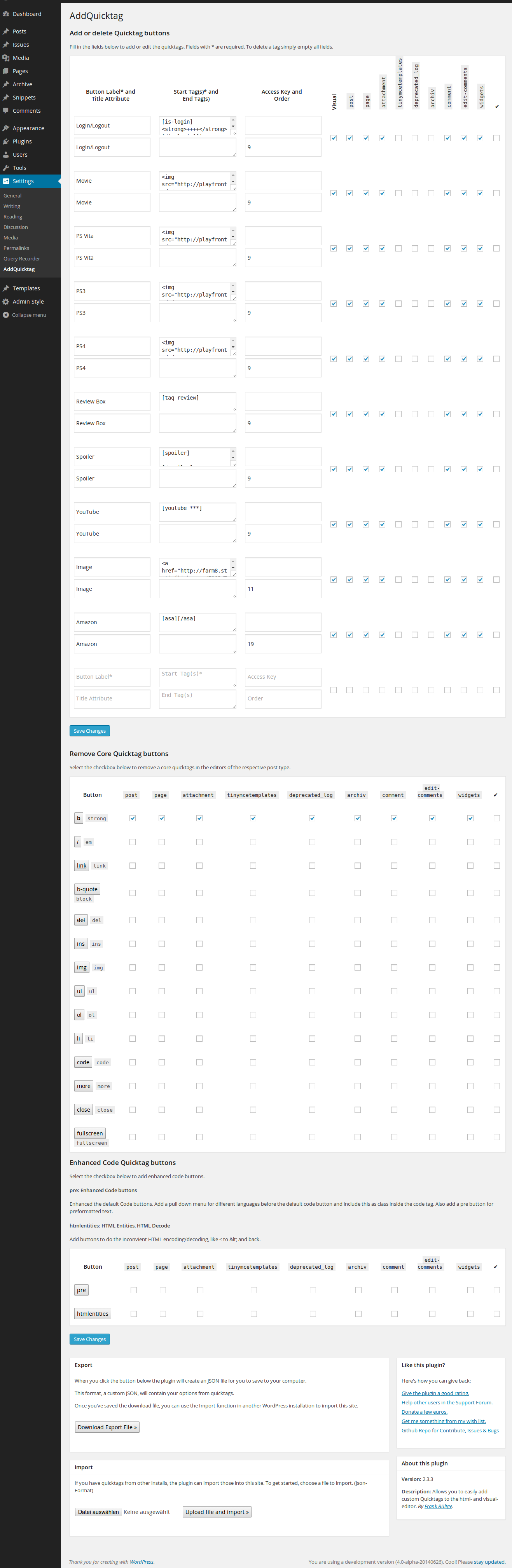
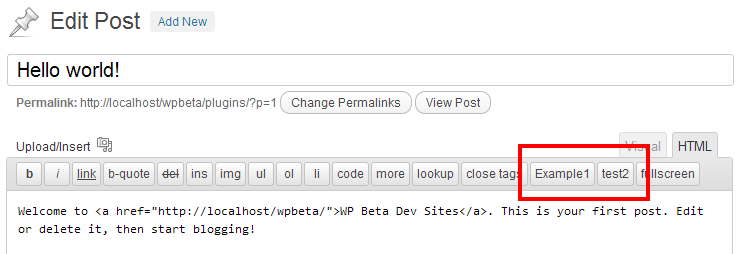
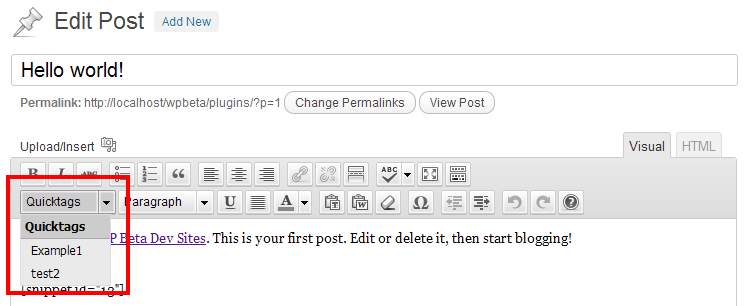
This plugin allows you to easily add Quicktags to the html and visual editor in WordPress. You can also export your Quicktags as a JSON file to be imported in other installations. The plugin can be customized to add quicktags to specific post types and pages.Screenshots
Frequently asked questions
What does this plugin do?
This plugin makes it easy to add Quicktags to the html and visual-editor.
Who originally created WP-AddQuicktag?
WP-AddQuicktag for WordPress is originally created by Roel Meurders.
What post types does the plugin add the quicktag to by default?
The plugin adds the quicktag by default to post types/ID post, page and comment.
How can I add the Quicktags to the editor of comments?
See this Gist as an example for how to add the Quicktags to the editor of comments.
Is it possible to add custom buttons to the editor?
It is possible to add custom buttons to the editor, if the plugin is active.
Changelog
2.6.1 (2021-05-20)
- Fix storage and update of post type checkboxes in the settings pages.
2.6.0 (2021-04-29)
- Maintenance for the jQuery Update to run with the last WP Core update, jQuery 3.5*
- Maintenance several code styles, testing PHP7/8
- Remove dependecies for WP version smaller 3.3
2.5.3 (2018-11-06)
- Fix error warning in edit mode without button settings.
2.5.2 (2017-11-16)
- Fixed several code strict style issues.
- Fixed javascript topics to write more strict.
2.5.1 (2017-03-09)
- Fixed Multisite error for check, is the plugin active in the MU Environment.
2.5.0 (2017-02-21)
- Fixed PHP7.1 problem to save new buttons.
- Adds title attribute to view on hover to each button in the TinyMCE listbox.
- Adds possibilty to use Dashicon “icons” for TinyMCE buttons.
- Button Label is not more required, only the start-tag
2.4.3 (2015-08-21)
- Add czech translation, thanks to https://github.com/MikkCZ
- Bugfix: TinyMCE input select was changed in his object, changes on the script for the visual editor to set quicktags.
2.4.2 (2015-02-24)
- Remove
remove_accents()for save title and attribute on buttons to allow all characters.
2.4.1 (2015-01-19)
- Bugfix for save label of each button; change sanitizing
2.4.0 (12/18/2014)
- Add traditional Chinese (zh_TW) language files
- Fix filter topic to use tags with attributes issue #30
- Update grammar topics Issue #29
2.3.3 (06/26/2014)
- Fix PHP notice on different installs
- Update french, turkish and german language files
- Update description, hint on the settings page
- Order setting works now also on the visual drop down menu
- Update readme
- Update screenshots for the new version, possibilities
2.3.2 (06/20/2014)
- Bugfix Javascript to add quicktags
2.3.1 (06/19/2014)
- Fix JavaScript error on code_buttons
2.3.0 (06/19/2014)
- Allow quicktags on edit-comment and quick-edit screen on default
- Add possibility to remove core quicktags from each post type
- Add possibility to add enhanced code buttons to mask code and format
- Rewrite the Im-Export function (now works simple with json)
- Rewrite the german language file
2.3.0-RC1 (05/22/2014)
- Use on default all post types with active UI, incl. Custom and Default Post types
- New settings UI to easier add quicktags to each post type
- Add Widget area, now it is possible to use quicktags on widgets with WP editor
- Add brazilian translation
- Add turkish translation
- Add possibility to remove default quicktags
- Changes on settings style, check in MP6 design, WP 3.8
- Add ukrainian translation
- Add solution to remove core quicktag, Beta Status
- Fix TinyMCE Select Box in WordPress 3.9*
2.2.2 (02/09/2013)
- Add Filter Hook for custom button, see issue #9
- Small check for undefined var on settings page
2.2.1 (13/11/2012)
- Fix for im/export
- Add toggle checkboxes for each type
2.2.0
- Add checkboxes for different post type, use also filter for custom post type
- Change script on HTML editor, only include buttons, there have an active checkbox on options for his post type
- Add more data in JSON
- Fix for custom post types; works now also on settings page
- Change function to add button in html editor –>
QTags.addButton() - Update im/export function for use with custom post type
- Fix settings page on network for WP 3.5
2.1.0
- Add fix, see Forum thread ‘array_multisort error’
- See quicktag button in visual editor, only if an button is active for visual
- Change hooks for include scripts
- Add filter for page in backend
- Add edit comments to use quicktags
2.0.4
- Add fix for use older settings from previous versions
- Unicode fix for upload XML file
2.0.3
- Add Filter ‘addquicktag_post_types’ for use the plugin also on custom post types
- Update readme and add an example for this filter; also an Gist for use faster
2.0.2
- change hook for including styles and scripts for compatibility in WP 3.4
2.0.1
- Bugfix on JS for WP smaller 3.3; use quickbuttons clean on html-editor with core-buttons
2.0.0
- complete redesign, new code from the first line
- add function for add quicktags on html and visual editor
- works also on Multisite Network
- new settings page
- add fallback in JS to use this new version also in WordPress smaller 3.3
v1.6.5 (02/02/2011)
- changes for admin-hints
- kill php warnings on debug-mode
v1.6.4 (12/22/2010)
- small changes for deprecated WP functions
v1.6.3 (16/06/2009)
- Add belorussian language file, thanks to Fat Cow
Find out about older changes on the the official website!

