Podcasts are taking over the content world, with over 464.7 million listeners globally, and the numbers are climbing faster than your client’s next deadline. If you’re an agency helping creators make their mark, now’s the perfect time to explore how WordPress podcasts can amplify their voice.
Whether it’s a true-crime storyteller looking to scare the world or a tech guru sharing insights, hosting a podcast on WordPress is a surefire way to build a professional platform. But here’s the twist: finding the perfect WordPress podcast plugin can feel like hunting for Wi-Fi in a dead zone—it’s tricky, but not impossible.
So, we’ve done the heavy lifting for you! This blog dives into the 15 best WordPress podcast plugins, tailored for podcasters and the agencies supporting them. Ready to help your clients make some noise in the podcast universe? Let’s hit play!
Table of Contents
What Are the Resources Required to Host a Podcast on WordPress?
Hosting a podcast on WordPress requires a mix of technical tools and creative resources to ensure smooth operation and an excellent listener experience. Here’s a breakdown of the key resources you’ll need:
1. A Reliable Hosting Provider
Since podcasts involve large audio files, you need WordPress hosting with ample storage, bandwidth, and uptime guarantees. Look for providers that offer podcast-friendly features, like CDN integration and media file optimization.
2. A Podcast-Compatible WordPress Theme
Choose a theme from a WordPress repository designed specifically for podcasters. These themes often include built-in audio players, episode galleries, and subscription options to make the listening experience seamless.
3. A Podcast Plugin
A podcast WordPress plugin allows you to upload, manage, and distribute episodes directly from your WordPress dashboard. They also integrate with popular directories like Spotify and Apple Podcasts.
4. Media Hosting Service
While WordPress hosts your website, it’s better to use a dedicated media hosting service (e.g., Libsyn, Podbean) for your audio files. This prevents your site from slowing down due to large file sizes.
5. Audio Editing Software
To create professional-quality episodes, you’ll need audio editing tools like Audacity (free) or Adobe Audition. This helps you polish your content before uploading it to WordPress.
6. A Podcast RSS Feed
Your podcast needs an RSS feed to distribute episodes to podcast directories. Many WordPress RSS plugins can automatically generate and update this feed for you.
7. Professional Microphone and Recording Equipment
For quality audio, invest in a good microphone, pop filter, and headphones. A basic recording setup can significantly improve your podcast’s sound.
8. Marketing Tools and SEO Plugins
Promote your podcast using tools like Yoast SEO or Rank Math to optimize episode descriptions and metadata for search engines. Social media integrations and email marketing plugins can also help expand your reach.
9. Analytics Tools
Track your podcast’s performance with analytics tools. You can install a Google Analytics plugin on WordPress Plugins and get detailed insights into downloads, listens, and audience demographics.
10. Time and Creativity
Finally, the most crucial resource is your team’s creativity and time. Engaging content and consistent publishing are key to building a loyal audience.
By combining these resources, you can easily host a podcast on WordPress and help your clients connect with their audience effectively.
Which are the Best WordPress Podcast Plugins to Host a Podcast on WordPress?
Looking to turn your WordPress site into a podcasting powerhouse? You need a reliable and best WordPress podcast plugin that can help you manage episodes, integrate with major platforms, and dazzle your audience with a seamless listening experience.
1. Buzzsprout Podcasting WordPress Plugin
Active Installations: 20,000+
WordPress Version: 5.0 or higher
Audio Players Supported: Buzzsprout Podcast Player, Spotify Player, Apple Podcast Player, Stitcher, PocketCasts
Podcast Directories: Apple Podcasts, Spotify, Stitcher, iHeartRadio, Google Podcasts, Podchaser, Alexa, Overcast
Buzzsprout is the go-to WordPress podcasting plugin that makes hosting a podcast on WordPress both simple and powerful. Whether you’re an aspiring podcaster or a seasoned pro, Buzzsprout’s user-friendly interface and robust set of features help you create and manage your podcast with ease.
This podcasting WordPress plugin offers seamless integration with major podcast directories like Apple Podcasts, Spotify, and Google Podcasts, ensuring your content reaches a global audience. With automatic episode optimization, advanced podcast statistics, and the Magic Mastering feature for professional audio enhancement, Buzzsprout ensures your podcast sounds its best every time.
The Buzzsprout podcast player provides an excellent listening experience, while its monetization features like subscriptions and ads help you turn your podcast into a revenue stream. It’s a WordPress podcasting plugin that simplifies the process of sharing your podcast with the world while providing all the tools you need to grow and succeed.
Key Features
- Seamless integration with top podcast directories like Apple Podcasts and Spotify
- Advanced podcast statistics for audience insights and performance tracking
- Magic Mastering to enhance and optimize audio files automatically
- Easy monetization with Buzzsprout Ads and subscription options
- Mobile app for on-the-go podcast management
Price
- Free: Limited to 2 hours/month, hosted for 90 days
- 3 hours/month: $12/month
- 6 hours/month: $18/month
- 12 hours/month: $24/month
Why We Loved It
Buzzsprout’s user-friendly design, Magic Mastering feature, and seamless integration with podcast directories make it stand out. It’s an all-in-one solution for hosting, enhancing, and monetizing your podcast effortlessly.
Pro Tip
Use Magic Mastering for every upload to ensure your audio matches industry standards, giving your podcast a polished, professional sound.
2. Seriously Simple Podcasting
Active Installations: 30,000+
WordPress Version: 5.0 or higher
Audio Players Supported: Castos Player, Apple Podcasts Player, Spotify Player, Vimeo Player, VideoPress Player
Podcast Directories: Apple Podcasts, Spotify, Amazon Music, Google Podcasts, Overcast, Stitcher, PocketCasts
Seriously Simple Podcasting by Castos is the ultimate WordPress podcast plugin for anyone who wants to host a podcast on WordPress without any hassle. Whether you’re a beginner or an experienced podcaster, this plugin’s intuitive setup makes it super easy to start a podcast with zero complexity.
With built-in RSS feed management, multiple player options, and free integration with top directories like Apple Podcasts and Spotify, it takes care of all the technical aspects.
This WordPress podcast plugin also allows seamless syncing with Castos podcast hosting, ensuring smoother uploads and more efficient content management. Plus, its free features mean you don’t need to break the bank to create a professional-sounding podcast. This is a must-have WordPress podcasting plugin for anyone looking to create and share podcasts with a seamless experience.
Key Features:
- Effortless management of your RSS feed directly from WordPress
- Multiple player options, including customizable embeds and HTML5 players
- Support for multiple podcasts on the same WordPress site
- Video podcasting support with integrated video players from Vimeo and VideoPress
- Easy integration with Castos for automatic syncing and hosting options
Price:
- Free: Full functionality with no hidden costs (optional hosting with Castos)
- Essentials: $19/month
- Growth: $49/month
- Pro: $99/month
- Castos Premium: From $499/month
Why We Loved It:
Seriously Simple Podcasting offers a perfect blend of simplicity and advanced features, with no extra cost unless you choose to host with Castos. The ability to manage your RSS feed from WordPress, plus support for both audio and video podcasts, makes it an all-in-one solution for podcasters.
Pro Tip:
Leverage the automatic syncing feature with Castos to save time—every time you upload an episode, your changes will sync to your Castos account, streamlining your publishing process.
3. Podcast Player

Active Installation: 100,000+ active installations
WordPress Version: Requires WordPress 5.0 or higher
Audio Players Supported: MP3, MP4, and most common audio formats
Podcast Directories: Supports Apple Podcasts, Google Podcasts, Spotify, and more
If you’re looking to host a podcast on WordPress, the Podcast Playe by VedaThemes is a game-changer. This WordPress podcast plugin is all about simplicity and functionality, making it effortless for anyone to start sharing their episodes. With a user-friendly setup, this podcast plugin for WordPress automatically pulls in your podcast feed, allowing you to showcase episodes with ease.
Whether you’re a seasoned podcaster or just beginning, this plugin’s responsive design and customizable features help deliver a smooth, professional listening experience across all devices. Ready to get your podcast online? The Podcast Player has you covered!
Key Features
- Automatically pulls podcast feed URLs and displays episodes with ease
- Fully responsive design, ensuring a seamless experience on any device
- Allows listeners to search through your episodes with live search
- Add subscribe buttons for platforms like Apple Podcasts and Spotify
- Customizable elements like colors, titles, and episode descriptions
Price
- Yearly @ $39.99/year
- Lifetime @ $59.95 (one-time payment)
Why We Loved
The Podcast Player excels with its ease of use and robust features. From its automatic episode import to its responsive design, it ensures a hassle-free, engaging podcast experience. The ability to customize everything from colors to layout sets it apart from many others.
Pro Tip
For a more organized podcast archive, use the filtering feature to display specific seasons or episodes to your listeners. This helps you curate content based on listener preferences and keeps your site neat and easy to navigate.
4. PowerPress Podcasting plugin by Blubrry
Active Installation: 30,000+ active installations
WordPress Version: Requires WordPress 3.6 or higher
Audio Players Supported: Blubrry Player (exclusive for Blubrry Hosting), MediaElement.js, HTML5 Audio Player
Podcast Directories: Supports Apple Podcasts, Spotify, YouTube Music, Amazon Music, and more
Ready to host a podcast on WordPress? The PowerPress Podcasting Plugin by Blubrry is the ultimate solution for anyone looking to manage multiple podcasts directly from their website. Whether you’re a solo podcaster or managing several shows, this WordPress podcast plugin delivers robust features with an easy-to-use interface.
Perfect for both beginners and seasoned podcasters, it supports various media players, offers seamless integration with major podcast directories, and comes with advanced podcasting tools. From publishing to managing multiple episodes, the PowerPress WordPress podcast plugin ensures your podcast runs smoothly across all platforms. Make podcasting easier with PowerPress!
Key Features
- Integrated media players for both audio and video content
- Effortless import and migration from popular platforms like Libsyn and SoundCloud
- Customizable subscribe tools to grow your audience
- Support for multiple podcasts and categories on one site
- Regular updates with new Podcasting 2.0 features, including transcripts and funding options
Price
- Free version
- PowerPress Hosting plan @ $12/month (for Blubrry Hosting customers)
Why We Loved
PowerPress stands out for its comprehensive features, such as integrated audio/video players, customizable subscribe tools, and multilingual support. The plugin’s ability to seamlessly migrate from other platforms makes it an excellent choice for both beginners and experienced podcasters.
Pro Tip
Take full advantage of PowerPress’ subscription tools by creating a dedicated subscribe page on your site. This increases visibility and makes it easier for listeners to find all the ways they can subscribe to your podcast.
5. AudioIgniter Music Player

Active Installation: 10,000+ active installations
WordPress Version: Requires WordPress 6.0 or higher
Audio Player Supported: HTML5 MP3 player
Podcast Directories Supported: Acast, Amazon S3, Anchor, Art19, AudioBoom, Castbox, Captivate, Icecast, Podbean, Radiojar, Shoutcast, Speaker, Stitcher, Libsyn
The AudioIgniter Music Player plugin lets you create and showcase unlimited audio playlists directly on your WordPress site. Whether you’re a musician, podcaster, or event organizer, the AudioIgniter WordPress podcast plugin enables you to stream MP3s, radio shows, or podcasts with ease.
It’s compatible with Elementor Page Builder, Visual Composer, and Gutenberg, making it simple to embed audio in posts, pages, or custom post types. With flexible settings for track listing and player style, the AudioIgniter podcast plugin for WordPress offers a customizable, responsive solution for music and podcast lovers alike.
Key Features
- Unlimited playlists and tracks
- Responsive layout with multiple player styles
- Customizable settings per playlist (e.g., show/hide track listings, show artist names, etc.)
- Compatible with Elementor, Visual Composer, and Gutenberg
- Optional “Buy Track” and “Download” buttons for each track
- Integration with WooCommerce for selling digital music
- The pro version adds bulk upload, track rearrangement, shuffle mode, and more
Price
- Free version
- Pro version @ $34.30 per year, with additional features like track skipping, lyrics per track, and premium support
Why We Loved
AudioIgniter makes creating and managing audio playlists a breeze. It offers extensive customization options and supports integration with popular platforms like WooCommerce for selling music tracks. The plugin’s flexibility and compatibility with popular page builders ensure it can be adapted to any WordPress site.
Pro Tip
For those with large music libraries, take advantage of the bulk upload feature available in the Pro version to save time managing your tracks.
6. Podlove Podcast Publisher

Active Installations: 5,000+
WordPress Version: Requires WordPress 4.9.6 or higher
Audio Players Supported: MP4 AAC, MP3, Vorbis, Opus, MP4 H.264, WebM, Theora
Podcast Directories: Compatible with major podcast directories
Looking to host a podcast on WordPress? Podlove Podcast Publisher is a powerful and user-friendly WordPress podcasting plugin that simplifies the process of creating, managing, and publishing your podcast episodes.
With its advanced features and intuitive interface, it ensures a seamless experience for both podcasters and listeners. Whether you’re a seasoned podcaster or just starting out, the Podlove WordPress podcast plugin provides all the tools you need to deliver high-quality content to your audience.
Key Features
- Create and manage multiple podcast feeds with complete control over metadata.
- Seamless multi-format publishing for audio and video.
- Integrated Podlove Web Player with HTML5 support and multi-format compatibility.
- Chapter marks, transcripts, and related episodes for an enhanced listening experience.
- Powerful analytics to track your podcast’s reach and performance.
Price
This is a free WordPress podcast plugin for agencies and podcasters.
Why We Loved
Podlove Podcast Publisher stands out because it puts you in control of every aspect of your podcast. From advanced publishing tools to customizable templates and in-depth analytics, it’s everything a podcaster could ask for—free and open-source.
Pro Tip
Use Podlove’s flexible templates to design your podcast pages exactly how you want, ensuring a unique and professional look for your podcast episodes!
7. Podcast Importer SecondLine

Active Installations: 5,000+
WordPress Version: 4.8 or higher
Audio Players Supported: Native players from 15+ podcast hosting providers including Buzzsprout, Anchor.fm, Podbean, and more.
Podcast Directories Supported: Compatible with major podcast directories and hosting platforms.
Podcast Importer SecondLine is a cutting-edge WordPress plugin designed to simplify the process of importing podcasts into your WordPress site. It is a perfect solution for automating the synchronization of your podcast RSS feeds with your website, eliminating the need for manual updates.
It also supports native audio players from 15+ podcast hosting providers, making it the ultimate solution for podcasters looking to automate their feed imports. Plus, with continuous syncing, your new episodes are imported automatically every time.
Key Features
- Automatic import of podcast episodes into WordPress posts or custom post types.
- Support for continuous sync of podcast RSS feeds to keep your content up to date.
- Import episodes from popular podcast hosting platforms like Buzzsprout, Anchor.fm, and Podbean.
- Flexible import schedules, allowing you to set specific intervals for importing new episodes.
- Import categories, tags, and featured images from your RSS feed to streamline your workflow.
Price
- One Website: $24/12 months of support and updates.
- Multiple Websites: $49/12 months of support and updates.
Why We Loved
Podcast Importer SecondLine simplifies the process of importing and syncing podcasts with WordPress, saving podcasters time and effort. With its support for multiple podcast hosts and customizations, it’s an essential tool for podcasters looking for a seamless integration with WordPress.
Pro Tip
Make use of the Pro version’s unlimited scheduled imports and manual “Sync” feature to ensure your episodes are always up to date and accurately displayed.
8. MP3 Audio Player
Active Installation: 20,000+
WordPress Version: 4.7 or higher
Audio Players Supported: MP3, M4A, FLAC, Radio streaming, Icecast, Shoutcast
Podcast Directories Supported: Libsyn, Stitcher, Shoutcast, Podbean, SoundCloud Podcasts, Acast, and many more
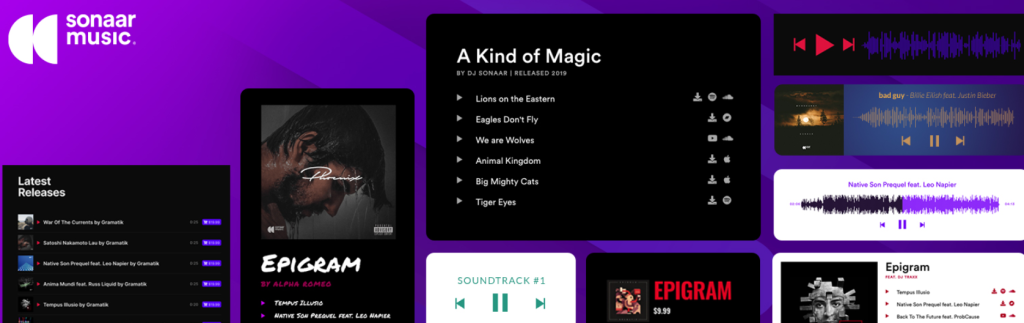
Looking to host a podcast on WordPress? The MP3 Audio Player WordPress podcast plugin by Sonaar is the ultimate solution for podcast creators. This user-friendly podcast player allows seamless integration with your WordPress site, giving you full control over your episodes.
Whether you’re starting a podcast or enhancing an existing one, this WordPress podcasting plugin offers all the tools you need to engage listeners with a professional audio experience. From customizable players to automatic updates from podcast directories, it’s the perfect podcast plugin for WordPress users.
Key Features
- Add unlimited podcast players and playlists to your posts, pages, and custom post types.
- Import podcasts from major distributors like Libsyn, Podbean, and Acast with just one click.
- Offer subscription buttons, show notes, and automatic updates for a streamlined listener experience.
- Embed audio players via Elementor, Gutenberg, or shortcode for flexible display options.
- Continuous sticky player for uninterrupted listening across pages.
Price
- Free Version
- Pro Version: $49/year
Why We Loved:
This WordPress podcast plugin stands out with its ease of use and seamless integration with major podcast distributors. It’s perfect for both beginners and pros, offering features like automatic RSS feed updates and a customizable, professional-looking player that ensures your podcasts shine.
Pro Tip:
For a smooth listening experience, enable the continuous sticky player to keep your podcast playing as users navigate through your site.
9. Liteweight Podcast plugin by bPlugins
Active Installation: 500+
WordPress Version: 5.1 or higher
Audio Players Supported: MP3, WAV, OGG
Podcast Directories Supported: Shoutcast, Acast, and so on
Ready to launch your own podcast on WordPress? The Liteweight Podcast plugin by bPlugins is a great solution for podcasters looking to start their journey. This user-friendly WordPress podcasting plugin makes it easy to upload, manage, and customize podcasts.
From MP3, WAV, and OGG audio support to HTML5 compatibility across devices, this WordPress podcast plugin provides everything needed to host a podcast on WordPress. Whether you’re creating your first episode or building a full-fledged podcasting website, this plugin delivers a simple, effective, and responsive podcast player with social sharing options.
Key Features
- Supports MP3, WAV, and OGG audio file formats for flexible podcast uploads.
- Fully responsive player, compatible with most mobile devices and browsers.
- HTML5-powered, ensuring smooth playback across all platforms.
- Integrated social sharing icons to help promote your podcast.
- Shortcode-driven for easy embedding of podcasts anywhere on your site.
Price
- Free Version
Why We Loved
The Liteweight Podcast plugin is perfect for users looking for a simple, hassle-free way to host their podcast. It combines responsive design, easy-to-use controls, and social sharing, making it a powerful yet lightweight solution for podcasters of all levels.
Pro Tip
To maximize engagement, utilize the audio file download button and the audio speed control feature to give your listeners a customizable listening experience.
10. Meks Audio Player
Active Installation: 2,000+
WordPress Version: 5.5 or higher
Audio Players Supported: MP3, Audio block, Audio shortcode
Podcast Directories Supported: Acast, Shoutcast, Podbean, Radiojar, and many more
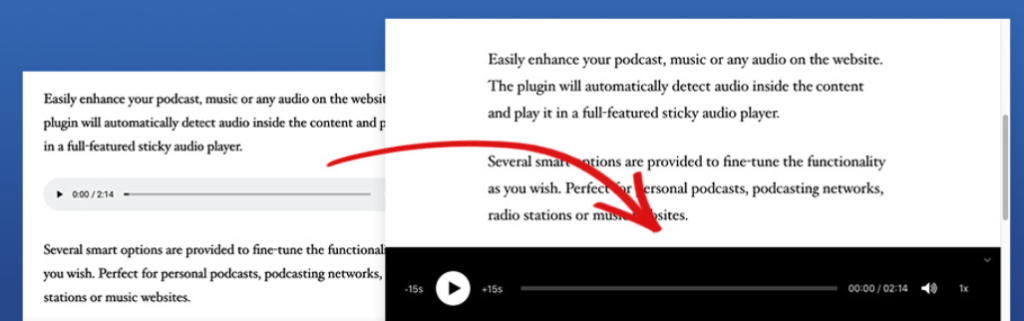
The Meks Audio Player plugin is the perfect solution for adding a professional touch to your WordPress site’s audio content. Whether you’re hosting a podcast, sharing music, or running a radio station, this WordPress podcast plugin seamlessly detects audio files within your content and plays them with a stylish sticky audio player.
The customization options allow you to tweak everything from the color scheme to the player controls, making it an ideal choice for podcasters looking to enhance their site. If you’re seeking a flexible, easy-to-implement podcast plugin for WordPress, Meks Audio Player has you covered.
Key Features
- Customizable color options to match your theme’s design.
- Player Timestamps block for easy audio navigation with title support.
- Extensive control options for play/pause, skip, mute, volume, speed, and more.
- Automatic detection of audio within content; no setup required.
- Supports WordPress audio block, audio shortcode, and custom post types.
Price
- Free Version
Why We Loved
Meks Audio Player stands out for its simplicity and advanced customization features, allowing you to seamlessly integrate audio into your site with zero hassle. The ability to style and control the player’s functionality makes it a go-to WordPress podcast plugin for both beginners and advanced users.
Pro Tip
Maximize user experience by using the timestamp feature to create an interactive podcast with chapter markers, allowing your listeners to jump to specific topics easily.
WordPress Podcast Plugins: What, How, and When?
WordPress podcast plugins are specialized tools designed to enhance the functionality and features of your WordPress website specifically for podcasting purposes. These plugins offer various functionalities to streamline the process of publishing, managing, and promoting podcasts on your WordPress site.
How to Choose the Best WordPress Podcast Plugins
When choosing the best WordPress podcast plugins, there are several factors to consider to ensure you select the best ones for your specific needs:
- Features: Consider the features offered by each WordPress podcast plugin and whether they align with your podcasting goals. Look for essential features such as audio player integration, RSS feed generation, episode management, analytics, SEO optimization, and subscription options.
- Compatibility: Ensure that the WordPress podcast plugin is compatible with your version of WordPress and any other plugins or themes you’re using on your website. Compatibility issues can lead to functionality problems and potential conflicts with other elements of your site.
- Ease of Use: Look for WordPress podcasting plugins with user-friendly interfaces and intuitive workflows. A plugin that is easy to use will save you time and frustration when setting up and managing your podcast.
- Customization Options: Consider whether the WordPress podcast plugin offers customization options to match your branding and website design preferences. Look for features that allow you to customize the appearance of the audio player, subscription buttons, and other podcast elements.
- Performance: Choose plugins that are optimized for performance to ensure fast loading times and smooth functionality. Avoid WordPress podcast plugins that are known to slow down your website or cause performance issues.
- Support and Updates: Check the developer’s track record for providing timely support and regular updates. Reliable support is essential if you encounter any issues or have questions about using the plugin, while regular updates ensure compatibility with the latest WordPress versions and security patches.
- Reviews and Ratings: Read reviews and ratings from other users to get an idea of their experiences with the plugin. Pay attention to both positive and negative feedback to make an informed decision.
- Cost: Consider the cost of the WordPress podcast plugin and whether it fits within your budget. Some plugins may offer free versions with limited features, while others may require a one-time purchase or subscription fee for access to advanced features or premium support.
By considering these factors and thoroughly researching your options, you can choose the best WordPress podcast plugins to create a professional and engaging podcasting experience for your audience.
When Should You Use WordPress Podcast Plugins
WordPress podcast plugins are required when you want to host and manage a podcast directly on your WordPress website. Here are some scenarios when WordPress podcast plugins become necessary:
- Starting a Podcast: If you’re starting a podcast and already have a WordPress website, you’ll need podcast plugins to publish and manage your episodes. These WordPress podcast plugins help you organize your episodes, create an RSS feed, and integrate audio players into your site.
- Integration with WordPress: If you want your podcast to be seamlessly integrated with your existing WordPress website, podcast plugins are essential. They allow you to maintain control over your podcast content and website from a single platform.
- Customization and Branding: Podcast plugins provide customization options, allowing you to brand your podcast player, subscription buttons, and other elements to match your website’s design and branding guidelines.
- Analytics and Insights: If you want to track the performance of your podcast episodes, including metrics like downloads, listens, and engagement, WordPress podcast plugins offer built-in analytics and insights to help you understand your audience better.
- SEO Optimization: Podcast plugins often come with SEO optimization features to improve the discoverability of your podcast episodes in search engines. This can help attract more listeners to your podcast and increase your website’s visibility.
- Monetization: Some podcast plugins offer monetization options, such as integrated advertising, sponsorships, or premium subscription models, allowing you to generate revenue from your podcast directly on your WordPress website.
Overall, WordPress podcast plugins are required when you want to host, manage, and promote your podcast on your WordPress website, providing you with the tools and features necessary to create a professional and engaging podcasting experience for your audience.
How to Host a Podcast on WordPress?
Want to host a podcast on WordPress? Well, the process is super easy.
Select a hosting provider for storing podcast files.
Login to the WordPress dashboard.
Go to Plugins>Add New to install a WordPress podcast plugin like PowerPress or Seriously Simple Podcasting on your WordPress site.
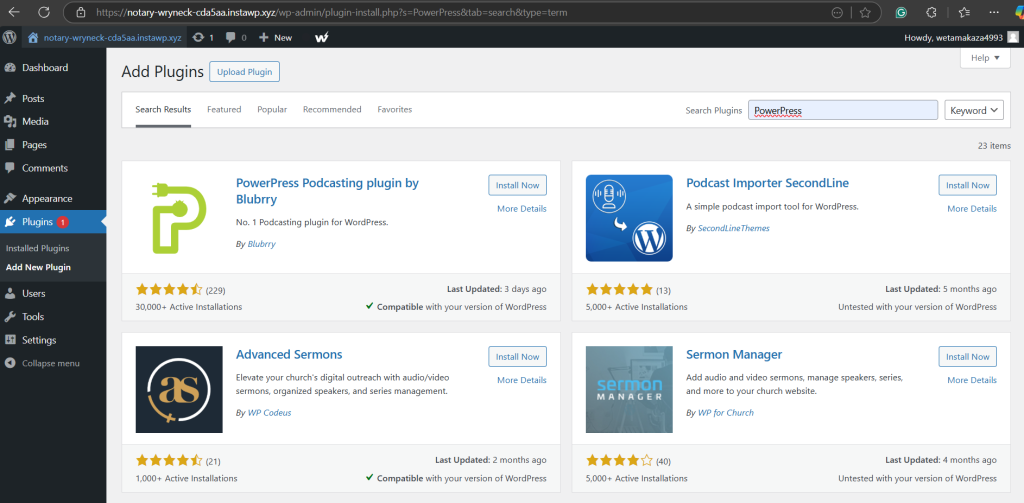
After Install>Activate, set up the WordPress podcast plugin by adding your podcast feed URL, title, description, and other details.
Upload podcast audio files (MP3s) to your hosting provider and add them to your WordPress site via the plugin.
For each episode, create a new post on WordPress, add your audio file, and write show notes.
Publish your episodes and share them on social media or email newsletters to reach your audience.
Submit your podcast RSS feed to platforms like Apple Podcasts, Spotify, and Google Podcasts.
Final Words
The top WordPress podcast plugins mentioned above offer a range of features to streamline your podcasting process, enhance your audience’s listening experience, and grow your podcast. Each of these plugins is designed with unique capabilities, so it’s crucial to understand their features, benefits, and pricing structures to make an informed decision.
So, take action today – try out these plugins, read more reviews, or engage with this blog through comments or sharing, and take your podcasting to the next level.
FAQs
What are the best podcast plugins for WordPress?
The best WordPress podcast plugins include options like PowerPress, Seriously Simple Podcasting, Podlove Podcast Publisher, and Simple Podcast Press. These plugins offer robust features like automatic podcast feeds, episode management, and integration with popular podcast directories like Apple Podcasts.
How do I install a podcast plugin on WordPress?
To install a podcast plugin, navigate to your WordPress dashboard, go to Plugins > Add New, search for the desired podcast plugin, and click “Install Now.” Once installed, click “Activate” to start using the plugin.
Do I need a podcast plugin for my WordPress site?
While not required, a podcast plugin can greatly enhance your podcasting experience by offering essential features like episode management, integration with podcast directories, and advanced audio player options. It simplifies your workflow and improves the user experience for your audience.
Are WordPress podcast plugins free?
Many WordPress podcast plugins are free, but some offer premium features through paid versions. Popular free options include Seriously Simple Podcasting and PowerPress, while premium plugins like Simple Podcast Press offer advanced functionalities at a cost.
Can I add a podcast to my WordPress site without a plugin?
Yes, it is possible to add podcasts manually using the built-in WordPress media library. However, using a plugin provides added convenience, such as episode management, RSS feed generation, and automatic submission to podcast directories, making the process much easier.
How do I monetize my podcast on WordPress?
Monetizing your podcast can be done through WordPress plugins that support ads, donations, and paid subscriptions. Plugins like Simple Podcast Press offer options to integrate monetization features like sponsorships, affiliate marketing, and premium content.


