AdSanity is a popular choice for managing WordPress ads, offering robust reporting and streamlined ad code management. However, the perfect plugin depends on your specific needs and budget.
Whether you’re a seasoned ad pro or just starting, exploring alternatives can unlock a world of possibilities and elevate your ad management experience.
In this blog post, we’ll delve into top-rated WordPress ad manager plugins that complement (or even replace) AdSanity. We’ll explore features like budget-friendly options, user-friendly interfaces, advanced targeting capabilities, and seamless integrations.
By the end, you’ll be well-equipped to choose the perfect plugin that aligns with your goals and unleashes the full potential of your WordPress ads.
Table of Contents
AdSanity Alternatives: Top WordPress Ad Manager Plugins
Ad Inserter – Ad Manager & AdSense Ads
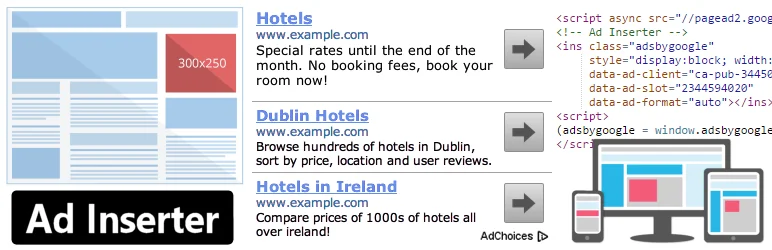
Ad Inserter is a robust ad management plugin designed to streamline the process of inserting ads into your website. It supports a wide range of ad types including Google AdSense, Google Ad Manager, Amazon Native Shopping Ads, Media.net, Infolinks, and rotating banners.
The plugin is more than just an AdSense plugin or a plugin for ads; it offers advanced options to insert opt-in forms, header scripts, Javascript, CSS, HTML, PHP, analytics, tracking or advert code anywhere on the page.
Features and Benefits
- AdSense Integration: Connect your website to Google AdSense effortlessly.
- Supports Google Ad Manager: Manage your ad campaign on Google’s platform with ease.
- Syntax Highlighting Editor: Makes code editing and debugging easier.
- Ads on Posts and Pages: Automatically insert ads on your posts and pages.
- Ad Placement: Allows you to insert ads before or after posts, content, paragraphs, images, comments, excerpts, etc.
- Ad Rotation: Rotate ads on both server-side and client-side, even with caching.
- Ad Blocking Detection: Detect ad blockers and take action like displaying a popup message or redirecting the page.
- Desktop/Mobile Device Detection: Detect the device and display the appropriate ad.
- GDPR Consent Checks: Ensure your ads comply with GDPR.
- Ad Labels: Show customized labels above adverts.
Pricing Structure
The plugin is free to use with the premium version starting from €20 for two sites.
Advanced Ads – Ad Manager & AdSense

The Advanced Ads – Ad Manager & AdSense plugin is a comprehensive tool for managing your ads on WordPress. As a trusted solution used by thousands of businesses, this plugin is designed to simplify ad placements, making it easy to integrate banners, ads, and other codes automatically.
Whether you are managing Google AdSense, affiliate networks, or custom ad campaigns, this plugin offers a versatile solution for your advertising needs.
Features and Benefits
- Usability: The plugin is designed with a clear and intuitive interface and smart workflows to streamline your ad management tasks.
- Functionality: It offers a wide range of robust features, setting the market standard for ad management plugins.
- Compatibility: The plugin supports all ad networks and has dedicated integrations with numerous popular plugins and themes.
- Expertise: Users have access to fast and top-rated support. The plugin is developed by professionals with extensive experience in publishing and ad optimization since 2009.
- Reputation: The plugin is recommended by Google and is fully compliant with Google AdSense policies.
- Ad Types: It supports a variety of ad types, including banners from all ad and affiliate networks, Google AdSense ads, image banners, content-rich ads, and more.
- Display Conditions: Users can set conditions to display ads based on content, individual posts, categories, tags, taxonomies, author, and age.
- Visitor Conditions: The plugin allows targeting ads based on visitor conditions like device type, role, and logged-in status.
- Ad Injection: It offers placements to insert ads in pre-defined positions in your theme and content.
- Mobile Devices: The plugin supports targeting ads to mobile devices, tablets, or desktops, and displays responsive image ads.
Pricing Structure
The plugin is free to use with the premium version starting from € 59 / year.
Ads.txt Manager

Ads.txt Manager is a highly intuitive ad management plugin that offers you an unparalleled level of control over your ad inventory.
Developed by the Interactive Advertising Bureau, this plugin allows you to create, manage, and validate your ads.txt and app-ads.txt files directly from within WordPress. The plugin eliminates the need to upload a file and helps avoid malformed records which can lead to a drop in ad revenue.
Features and Benefits
- Direct Management: With Ads.txt Manager, you can control your ads.txt and app-ads.txt files just like any other content on your WordPress site. This means less hassle and more control over your ad inventory.
- Compatible: The plugin requires PHP 7.4+ and WordPress 5.7+, ensuring it works optimally with your WordPress site.
- Error Checking: The plugin includes pre-save error checking to avoid malformed records, protecting your ad revenue and ensuring your ads.txt file is formatted correctly.
- Future Ready: The team behind Ads.txt Manager is closely monitoring developments in ad fraud, ensuring the plugin is prepared for future changes and upgrades to specifications.
- Multisite Compatible: The plugin can be used with multisite, although it will only work for the main site in a subfolder installation.
Pricing Structure
The Ads.txt Manager plugin is currently available for free. You can download and install it on your WordPress site at no cost. However, it’s always wise to check the latest pricing details on the official website.
Ads by WPQuads – Adsense Ads, Banner Ads, Popup Ads
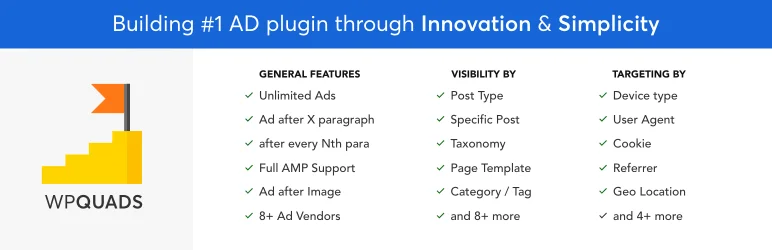
Ads by WPQuads is a powerful ad management plugin that takes your WordPress website’s advertising game to the next level. This modern ad solution is built for WordPress and is perfectly coded to handle millions of monthly page impressions without causing any overhead.
Whether you are running a small blog or a high-traffic e-commerce site, WPQuads ensures that your advertising needs are met, and your ad revenue is maximized.
Features and Benefits
- Web Stories Integration: Allows you to advertise in AMP Web Stories, providing a new avenue for ad placement.
- Click Fraud Protection: Provides safety against click fraud, ensuring stable ad revenue.
- GDPR & Privacy Tools: Ensures your website complies with privacy laws, eliminating the stress of legal compliance.
- Deep Integration with AMP Plugins: Seamlessly works with AMPforWP and Official AMP by Google for mobile-friendly advertisements.
- Google Adsense Support: Allows integration with various ad types of Google Adsense, including Display ads, In-feed ads, In-article ads, and Auto ads.
- 8 Ad Vendor Support: Supports 8 ad vendors with 20 more planned for future development, providing a vast array of options.
- 12 Ads Positions: Allows you to control where the ad will appear, giving you full control over ad placement.
- 10 Post-Specific Ads Control: Provides conditional ad visibility positions to control on which pages the ads appear.
- Ad Blocker Support: Advanced ad blocker that lets you add notice in 4 types – Bar, Popup, Page Redirection, and Block Message.
- Unlimited Ads: Allows you to add an unlimited number of ads to your website, providing unlimited revenue potential.
Pricing Structure
The plugin is free to use with the premium version starting from $89 for one site.
FlatPM – Ad Manager, AdSense and Custom Code

Flat PM is a groundbreaking ad management plugin that caters to your professional needs. It is designed to outshine its competitors like Advanced Ads and Ad Inserter with its unique functionalities.
The plugin offers a new level of ad organization, allowing you to create and save ad blocks and categorize them into folders for easier management. Worry no more about front-end performance, as the plugin code is written without using jQuery, ensuring a smooth and efficient performance.
Features and Benefits
- Output based on pixels or the height of the user’s screen: This unique feature is not found in other plugins. It allows for a more flexible and customized ad display.
- Output based on characters or percentage of your article text: This allows your ads to be more relevant and integrated within your content.
- Option for output once or with repetitions based on CSS selectors: This offers flexibility and is not limited by your article content.
- Pop-up display and leaving blocks on various positions: This allows for more visibility and engagement with your ads.
- Display ads when hovering over an element: This increases the chances of user interaction with your ads.
- Video preroll before watching videos on YouTube, and Vimeo: This increases ad visibility and can potentially increase click-through rates.
- Content targeting options including publications, publication types, categories and taxonomies, authors of the publication, types of templates, and templates: This allows for more specific and relevant ad display.
- User targeting options based on various factors including GEO, referrer, browser, operating system, ISP, cookies, date and time, user role, user-agent, and possibility to block display by IP: This ensures that the right ads reach the right audience, increasing the potential for engagement.
- Additional options such as reloading ads, fixed widgets, lazyload advertising, stylization, fine-tuning the interface of the plugin itself, export-import, output in head and footer, full compatibility with caching plugins, auto reset cache when changing ad settings: These features ensure a smooth and efficient ad management experience.
Pricing Structure
The plugin is free to use with the premium version starting from $17.99 for one site.
AdRotate Banner Manager – The only ad manager you’ll need

AdRotate Banner Manager is a comprehensive ad management plugin that simplifies the process of managing and running your ad campaigns on your WordPress and ClassicPress websites.
With AdRotate Banner Manager, you can easily place and manage any type of advert including Google Adsense, Amazon ads, Media.net Ads, and banners from local businesses or sponsors. Trusted by over 50,000 website owners, AdRotate Banner Manager is your go-to solution for all your ad management needs.
Features and Benefits
- Works with every ad: AdRotate Banner Manager supports all kinds of ads, whether they are self-made, from local businesses, or ad networks like Google Adsense and Amazon.
- Unlimited ads: There’s no limit to how many ads you can create and manage with this plugin.
- Advert block and group block: These features provide an easy way to manage your ads in the WordPress block editor.
- Widgets: The plugin offers easy-to-use widgets for traditional themes.
- Error checking: The plugin offers advanced error checking for adverts and groups.
- Click and impression tracking: You can track clicks and impressions for many adverts.
- Advert previews: The plugin offers advert previews when editing them.
Pricing Structure
The plugin is free to use with the premium version starting from € 49.
Why You Should Consider Alternatives to AdSanity Plugin
Here are some reasons why someone might explore alternatives to AdSanity, focusing on user needs and highlighting the strengths of other options:
- Focus on Budget: While AdSanity offers a free version, some advanced features require a premium plan. If budget is a primary concern, free or freemium alternatives like AdRotate Banner Manager could be a good starting point.
- Simplicity Needs: AdSanity offers robust reporting and ad code management. However, plugins like Ad Inserter might be a simpler fit if someone prioritizes a very user-friendly interface with basic ad placement needs.
- Specific Feature Focus: AdSanity excels in reporting and ad code management. However, some users might prioritize different features. For example, if advanced targeting and A/B testing are crucial, Advanced Ads might be a better choice.
- Integration Needs: AdSanity integrates with popular ad networks. However, some users might have specific integration needs not supported by AdSanity. Exploring alternatives could reveal plugins that cater to those specific integrations.
- Focus on Learning: For someone new to WordPress ad management, starting with a free, simpler plugin like AdRotate Banner Manager can be a good way to learn the ropes before diving into more advanced options like AdSanity.
By presenting these reasons, you can acknowledge the value of AdSanity while offering readers alternative solutions based on their specific needs and priorities.
Final Word
Harnessing the power of these plugins can revolutionize your ad management strategy, opening up exciting possibilities for your website. You can streamline ad insertion, integrate with popular ad networks, target specific audiences, and much more.
These tools are designed to help you meet your goals, whether you’re looking to grow your audience, boost engagement, or establish authority in your niche. So, don’t wait — take the next step in elevating your ad management game today!
FAQs About WordPress Ad Manager Plugins
- What are WordPress Ad Manager Plugins?
WordPress Ad Manager Plugins are tools designed to help website owners efficiently manage and optimize advertising on their WordPress sites. These plugins provide features such as ad rotation, scheduling, tracking, and reporting, enabling users to maximize their ad revenue. - Why should I use other WordPress Ad Manager Plugin instead of AdSanity?
While AdSanity is a popular choice, other WordPress Ad Manager Plugins may offer additional functionalities, more customization options, or better compatibility with your specific needs and other plugins. Exploring alternatives can help you find a solution that best fits your website’s advertising strategy. - What are the key features to look for in a WordPress Ad Manager Plugins?
Important features to consider include support for multiple ad types (e.g., text, image, video), automated ad rotation, geotargeting, detailed analytics and reporting, easy integration with other plugins and platforms, and responsive customer support. - Can WordPress Ad Manager Plugins help increase my ad revenue?
Yes, by providing advanced management tools like targeting specific audiences, scheduling ads for optimal times, and rotating ads to avoid banner blindness, these plugins can help optimize your ad placements and potentially increase revenue. - Are WordPress Ad Manager Plugins suitable for beginners?
Many WordPress Ad Manager Plugins are designed with user-friendly interfaces that are suitable for beginners. However, some plugins might offer advanced features that require a bit of a learning curve. Look for plugins that offer good documentation and support to ease the setup process. - How do WordPress Ad Manager Plugins integrate with other tools and services?
Most WordPress Ad Manager Plugins integrate seamlessly with popular analytics tools (like Google Analytics), payment processors, and email marketing services. This integration helps streamline various aspects of ad management from tracking to monetization. - What is the cost of using a WordPress Ad Manager Plugin?
The cost can vary widely based on the plugin’s features, support, and update policies. Some plugins offer free versions with basic features, while premium versions with advanced features typically require a subscription or a one-time payment. - How can I choose the best WordPress Ad Manager Plugin for my site?
Consider your specific needs such as the type of ads you intend to manage, the level of automation you desire, and your technical expertise. Additionally, review user feedback, support and update policies, and the plugin’s compatibility with your current WordPress version and other installed plugins.


