

Just another contact form plugin. Simple but flexible.

About Bitcoin and Altcoin Wallets
Bitcoin and Altcoin Wallets is a free WordPress plugin that allows users to deposit, withdraw, and transfer cryptocurrencies on your website. You can also extend the plugin to work with other coins by installing wallet adapters. Premium members have access to additional features such as an exchange extension, airdrop extension, faucet extension, and more.Screenshots




Changelog
6.4.0
- Add: New feature allowing old transactions to be aggregated to reduce DB table sizes and improve performance.
- Add: Upon plugin activation, an index is added to the postmeta table’s columns post_id and meta_key, to improve performance.
6.3.3
- Fix: Issue affecting creating new transactions from admin, introduced in 6.3.2, now fixed.
6.3.2
- Fix: Security issue where a logged in user with access to the admin screens could perform XSS attacks is now fixed.
- Fix: Deprecation warnings in PHP8.4 about implicitly nullable types are now squashed.
- Improve: Along with easycron, the plugin also now suggests cron-job.org which is a free alternative.
6.3.1
- Fix: Issue regarding editing addresses/transactions via the admin screens, introduced in 6.2.6, is now fixed.
6.3.0
- Add: It is now possible to submit bank transfer requests with a combination of SWIFT/BIC and Account Number. This will be useful for African countries.
- Improve: Saving transactions and addresses to the DB is now much faster. This should improve the UI experience when submitting transactions.
- Fix: When submitting a bank transfer request, it is no longer possible to click the submit button again while another request is underway.
6.2.7
- Fix: Issue with withdrawal fees not loaded, introduced in 6.2.6 is now fixed.
- Fix: Issue with transaction emails not being sent in some environments, introduced in 6.2.6, is possibly now fixed (CNR).
6.2.6
- Change: When the plugin loads batches of Wallets, Currencies, Transactions, or Addresses, it now does it faster and with less SQL queries to the DB to improve performance.
- Add: New built-in object cache to further improve DB performance. Can be turned off in general settings.
6.2.5
- Fix: Issue preventing the plugins from running on Windows (XAMPP).
- Fix: Deprecation warning in WP-REST API currency endpoints.
- Fix: Plugin header now correctly indicates that the plugin requires PHP 7.0 or later.
- Fix:
DSWalletsTransactionobjects now correctly load the timestamp field from the DB.
6.2.4
- Fix: Issue with Fiat Withdrawals not checking for the
has_walletscapability correctly is now fixed. - Add: Extensible way to exclude some currency tags from
[wallets_deposit]and[wallets_withdraw]shortcodes, for the upcoming Taproot Assets adapter.
6.2.3
- Fix: Clicking the re-scrape button in Bitcoin-like wallet adapters now refreshes the page again.
6.2.2
- Fix: Issue introduced in
6.2.0where wallets were prevented from being enabled/disabled, now fixed. - Fix: Minor warning in logs when saving bitcoin wallet adapters.
- Add: The debug tab in the Dashboard panel now shows the database version.
- Add: Mention of rpcbind in accompanying installation instructions.
6.2.1
- Fix: Issue introduced in
6.2.0where the wallet admin screen would crash on new installations is now fixed. - Add: Generic error handling for when the metabox of a wallet adapter crashes.
- Add: New REST API endpoint for retrieving an Address by its post ID. See the REST API documentation for details.
- Change: The wording for the description for the “Contract Address” field under Addresses is now changed to include Taproot Asset IDs for the upcoming tapd Wallet adapter.
6.2.0
- Add: New feature for Bitcoin Core (and similar) wallet adapters: Admin can now restart scraping from a specific block height.
- Fix: If another theme or plugin loads an old version of Parsedown, causing ParsedownExtra to fail to load, the documentation viewer falls back gracefully to whatever Parsedown is currently loaded.
- Change: The “Contract address” field for “Currency” entries can now accept Asset ID hex strings. This is necessary for the upcoming Taproot Assets Wallet Adapter.
- Improve: If cron jobs are not running, the warning message in the admin screens now links to the relevant documentation.
6.1.10
- Fix: Fixed issue where the PHP curl library would not return meaningful error messages to the admin user in case of connection failures.
- Add: When actions are initiated via the frontend UIs by clicking a button, the button is now animated until the action completes. Additionally, the actions are performed asynchronously for a better user experience.
- Remove: Duplicate display of Confirmation link in withdrawal transactions is now removed. The Confirmation link is shown once at the top left part of the screen.
- Remove: The “post slug” metaboxes are not useful and have been removed from the following CPTs: Wallets, Currencies, Addresses, Transactions.
- Remove: The plugin’s CPTs are no longer available to be added to frontend menus, since the posts themselves are only useful in the backend.
- Add: The PHP templates now come with a warning about not editing the templates in-place. The warning links to the documentation where the admin can learn more about this.
- Add: Troubleshooting section in documentation now has more information on how to restore the
manage_walletscapability to the admin user.
6.1.9
- Fix: Silly syntax errors introduced right before summer vacation.
6.1.8
- Add: New setting allows for deposits to be ignored if they have a timestamp earlier than a set cutoff value.
- Add: When initiating an addresses and balances-only migration, the deposit cutoff value is set to the current timestamp.
6.1.7
- Fix: Issue introduced in 6.1.6 which prevented admin transaction editing is now fixed.
- Fix: If you have setup walletnotify for Bitcoin core and similar wallets, the notification API is now disabled while migration is underway.
- Change: The
walletnotifyandblocknotifyWP-REST API endpoints associated with Bitcoin core and similar wallets now returns uniform error messages. The HTTP status is not always 200, but reflects the error that was encountered. The value of the returnedstatusfield is no longer success/error but is the HTTP response code, which is 200 when the call was successful.
6.1.6
- Change: In the plugin’s general settings, the maximum deposit address limit is now applied per user and per currency. Was previously applied per user only over all currencies.
- Fix: When listing transactions in the admin screens, if the associated currency has block explorer URIs, these are now used to link addresses and TXIDs to a block explorer.
- Add: New filter
wallets_tags_exclude_min_withdrawallows a currency’s minimum withdrawal amount to not apply to transactions with the specified tags. This will allow the upcoming lnd extension to bypass this restriction for Layer2 transactions. - Improve: Transactions that are not modified will no longer be re-written to the DB. This improves performance, plus it allows the last modified timestamp to remain intact in case of no actual modification of transaction data.
- Fix: The new mechanism for detecting whether a camera is available for scanning QR-Codes, introduced in
6.1.4, was buggy and is now fixed.
6.1.5
- Fix: Usage of words “debit” and “credit” is now correct according to how the terms are used in everyday language, as opposed to their usage in accounting.
6.1.4
- Fix: Shortcode
[wallets_fiat_withdraw]does not submit withdrawal requests with invalid amount. - Add: Shortcode
[wallets_fiat_withdraw]now accepts atttributes:currency_id,symbolto specify the default currency. - Add: New WP-REST API endpoint
/users/U/currencies/Cfor retrieving a single currencyCand the balances of userUfor that currency. - Improve: Added a new withdrawal check: It is now impossible for a withdrawal to be executed as long as it has a TXID assigned. If you need to repeat execution, you must clear the TXID.
- Improve: The
[wallets_withdraw]UI now uses agetUserMedia()call to determine if a camera is available to scan QR-Codes. Previous method using CSS media queries was not optimal. - Improve: The included copy of
moment.jsis now upgraded to version2.29.4.
6.1.3
- Fix: Setting the
currency_idattribute on the[wallets_deposit]shortcode now works again. - Fix: Listing the addresses of a specific user now works again.
- Fix: Listing the addresses of a specific type (deposits, withdrawals) now works again.
- Improve: The transactions editor now loads faster on sites with many thousands of users. The user dropdown is replaced with an text input where you type a
user_loginand it autocompletes with AJAX. - Improve: It is now possible to search addresses by keyword, and the keyword is matched against the address title AND the address string.
- Add: Addresses with the
archivedtag will not be shown in the REST API and frontend. This will be useful for the Lightning adapter later, among other things.
6.1.2
- Fix: Issue with editing transactions in admin when system holds too many transactions is now fixed.
6.1.1
- Fix: Issue with transactions search in admin is now fixed.
- Fix: When editing wallet adapter settings, it is now possible to uncheck boxes for boolean values.
6.1.0
- Add: New option “Admin must approve withdrawals”. When on, pending withdrawals must be approved by an admin in the Transactions list screen using the “Approve” batch action.
- Add: The frontend “VS amounts”, i.e. the equivalent amounts expressed in “VS currencies”, are now shown with a number of decimals that is configurable by the admin.
- Add: Admin can now search transactions by TXID.
- Fix: Admin can now search for cancelled or failed transactions.
- Fix: When filtering posts, all enabled filters are now shown in bold and with ARIA accessibility attributes.
- Add: For pending withdrawals, admin can view the results of withdrawal pre-checks.
- Fix: Daily withdrawal counters for currencies are now correctly enforced at all times.
- Add: Daily withdrawal counters are now visible in the profile screen of each user.
- Add: For pending withdrawals, developer can add withdrawal pre-checks with action
wallets_withdrawal_pre_checkand with filterwallets_withdrawals_pre_check. - Fix: When showing
[wallets_account_value]shortcode without any enabled “VS currencies”, the account value is now shown as ‘?’ and not ‘Undefined ?’. - Fix: Documentation updated to reflect changes in premium plugin payment method and added mention to new Paywall extension.
- Fix: Improved logging for wallet adapters cron task.
- Fix: Added guard clause in currency icons cron task to protect against missing returned data from remote service.
6.0.0
- Change: Sourcecode rewritten from scratch and modernized for PHP7.x compatibility: Namespaces, callbacks, etc.
- Change: Coin adapters removed and replaced with wallet adapters. Wallet adapters are a more versatile abstraction of external wallets.
- Change: All amounts stored on the DB are now stored as integers. This avoids FP/rounding errors, but requires the admin to specify the number of decimals on a Currency explicitly.
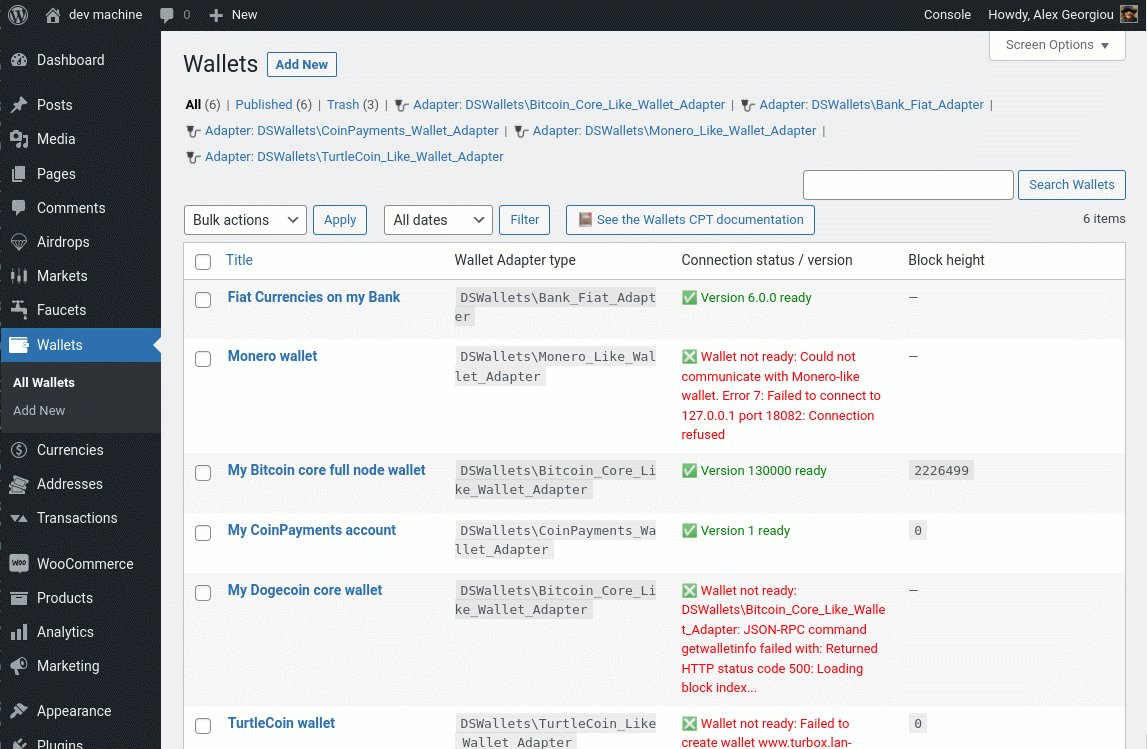
- Add: Wallets now have their own CPT and editor screen. Connection information for wallet APIs is now decoupled from currency details.
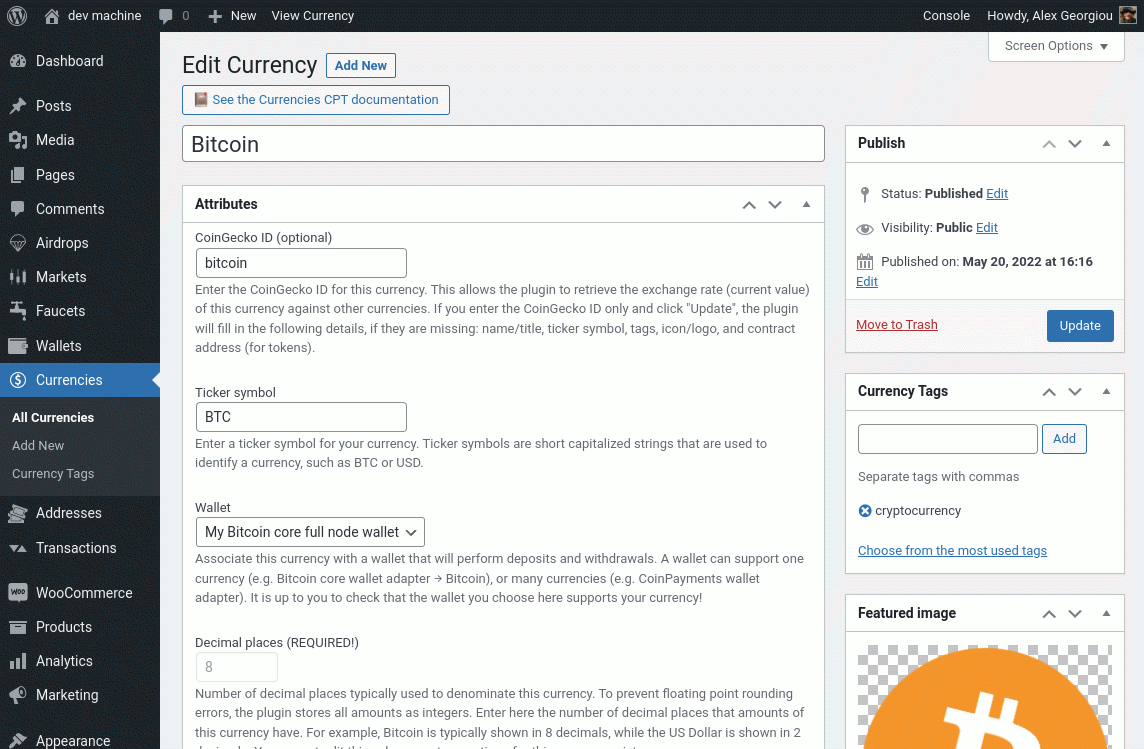
- Add: Currencies now have their own CPT and editor screen. Currency details are now decoupled from wallet connection information details.
- Change: Currencies are no longer identified by their ticker symbol, since these can clash. Currencies are now uniquely identified by their post ID.
- Change: Transactions now have their own CPT and editor screen. Transactions are no longer stored in custom SQL tables, but are stored as posts.
- Add: If a transaction is saved without a comment, a basic comment is entered as a title.
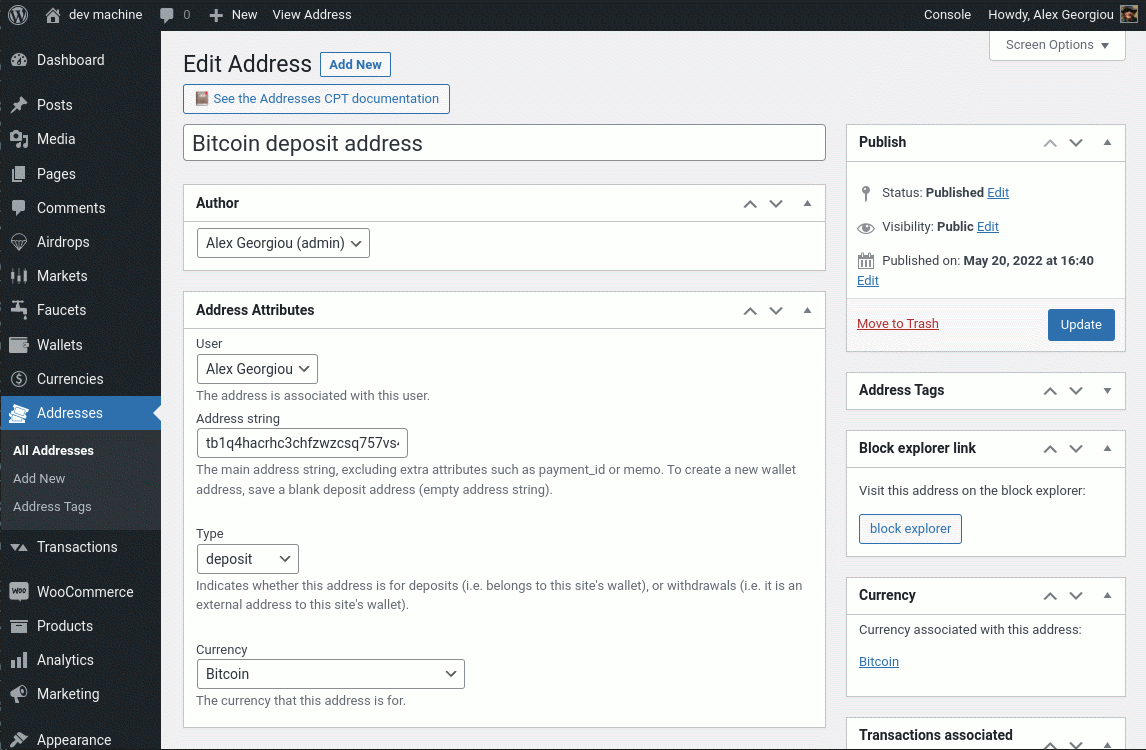
- Change: Addresses now have their own CPT and editor screen. Addresses are no longer stored in custom SQL tables, but are stored as posts.
- Add: When creating a new address, if admin sets the address string empty, a new address string is created from the wallet.
- Add: Currencies, Transactions and Addresses can be organized via tags. These are implemented as WordPress custom taxonomies.
- Add: When listing Wallets, these can be filtered by Wallet Adapter type.
- Add: When listing Currencies, these can be filtered by associated Wallet or Currency tag.
- Add: When listing Transactions, these can be filtered by Currency, User, Type (deposit/withdaw/move), Status (pending, done, cancelled, failed), or Transaction tag.
- Add: When listing Addresses, these can be filtered by Currency, User, Type (deposit/withdaw/move), Status (pending, done, cancelled, failed), or Transaction tag.
- Add: When editing Wallets, Currencies, Transactions, or Addresses, there are now metaboxes that let an admin easily jump between associated CPTs. For example, can click a link to go from a Currency to the Transactions of that Currency.
- Add: A new “Migration” tool helps users transfer balances from the old custom SQL tables to the new format. Please study the documentation for details.
- Add: A new Object-Oriented way to create and manipulate Wallets, Currencies, Addresses and Transactions. Lots of example code snippets included in the docs and PHPdocumentor files.
- Add: A documented library of helper functions can be used by PHP developers to interface with the plugin. This lives in the
DSWalletsnamespace. - Change: The old PHP-API is renamed as “Legacy PHP-API”, but not removed. Only the
wallets_api_adaptersfilter is removed, since there are no more Coin Adapters. - Add: A new cron job scheduler that runs jobs based on priorities. Can be triggerred externally to improve site performance.
- Add: New email queue system based on cron, handles large volumes of outgoing emails by sending them in batches.
- Add: New cron job that iterates over defined currencies and pulls icons/logos from CoinGecko when possible. Adds images to the WordPress media collection, and sets the logo as Currency featured image. Admin can override the featured image.
- Change: All the plugin’s settings are now placed under the Settings menu, and organized in tabs. Extensions, when installed, add tabs to the settings screen.
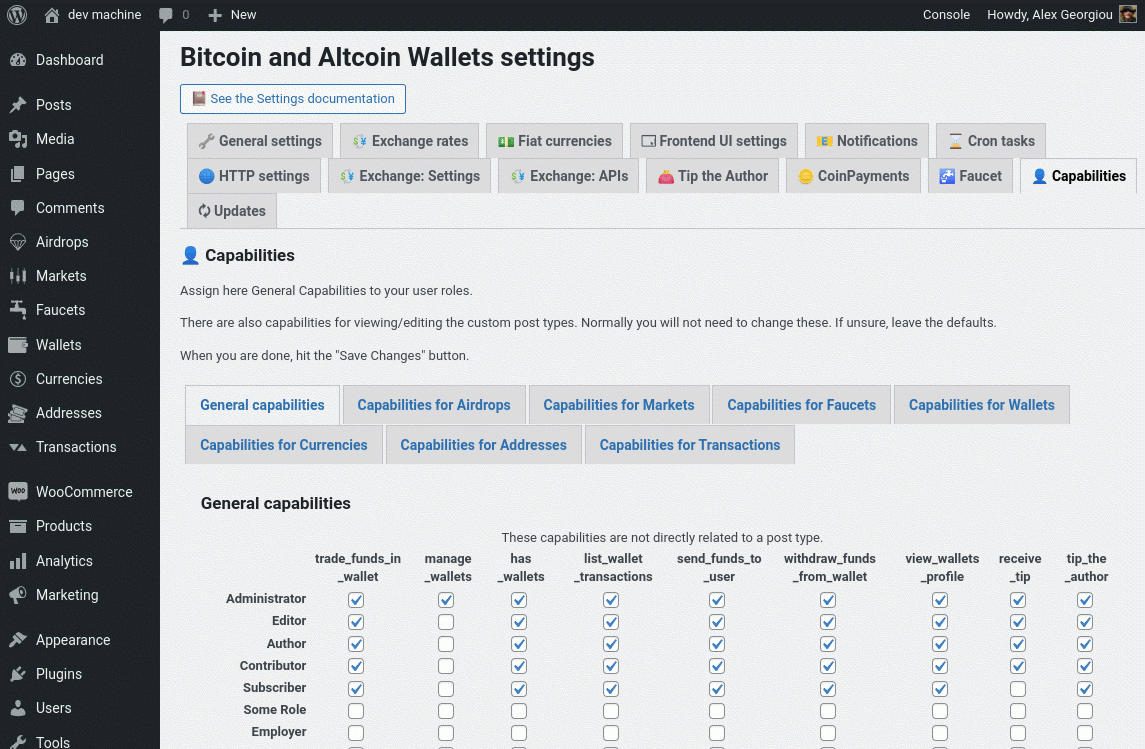
- Change: Capability settings are now in a settings tab. The existing capabilities are retained. It is also possible to edit the capabilities related to the new CPTs (Wallets, Currencies, Addresses, Transactions).
- Add: Fiat currencies are now created automatically by a cron job when you enter a fixer.io API key. Fiat currencies can be associated to the built-in wallet adapter that handles manual Bank transfers. The Fiat Coin Adapter extension is removed.
- Change: It is now possible to define any number of Bitcoin-like wallets and currencies without any plugin extensions. The Full Node MultiCoin Adapter extension is removed.
- Change: The UIs are now self-contained. All the HTML markup, knockout.js attributes, JavaScript code, and CSS rules are encapsulated within the template files, and are overridable.
- Change: The UIs are now rendered independently. This improves frontend performance. If one UI crashes, the remaining UIs continue to work.
- Remove: There are no more static templates. All templates are dynamic. This reduces confusion about how templates work.
- Add: Currencies can be used by users even if not associated with a Wallet, or if the wallet API is unreachable. If wallet API is unreachable, only deposits and withdrawals will not be available, but on-site transactions are still possible.
- Add: New shortcode
[wallets_status]informes users if a wallet is online. - Change: The exchange rates mechanism now relies on CoinGecko. If the admin provides the CoinGecko ID for a Currency, the exchange rates are retrieved automatically via cron.
- Improve: In the Currency editor, if a currency is not associated with a CoinGecko ID, it is still possible for an admin to setup a fixed exchange rate for a currency.
- Improve: The admin can choose against which well-known currencies the exchange rates are stored (these are the “VS currencies” and correspond to CoinGecko data).
- Improve: The frontend UIs, when they display equivalent amounts in other currencies, no longer display amounts in one fixed site currency. User can click to rotate between displaying the equivalent amounts in all available “VS currencies”.
- Add: Daily withdrawal limits per Currency. Can be set for all users, or per user role.
- Add: More information in the plugin’s widget in the dashboard screen.
- Add: A new WP-REST API which utilizes the RESTful API mechanism built into WordPress replaces the old JSON-API.
- Change: The old JSON-API is now marked as deprecated and is disabled by default. Can be enabled in settings for backwards compatibility.
- Add: A new system that displays documentation in the admin screens. Some screens feature direct links to the relevant documentation. As extensions to the plugin are installed, their documentation books are added to the system.
- Change: The user profile screen has been improved. Lists all balances held by a user and links to the user’s lists of Addresses and Transactions.
- Change: The cold storage UI screens have been improved.
- Remove: The frontend Widgets have been removed. Please use the shortcodes instead.

