

The Elementor Website Builder has it all: drag and drop page builder, pixel perfect design, mobile responsive editing,…

About Options for Twenty Seventeen
This plugin is specifically designed for the Twenty Seventeen theme. It adds various modification options to the theme, including fixing bugs, changing colors, customizing headers and navigation, modifying content options, and adjusting the footer. There are also premium options available for users who upgrade to the premium version of the plugin.Screenshots
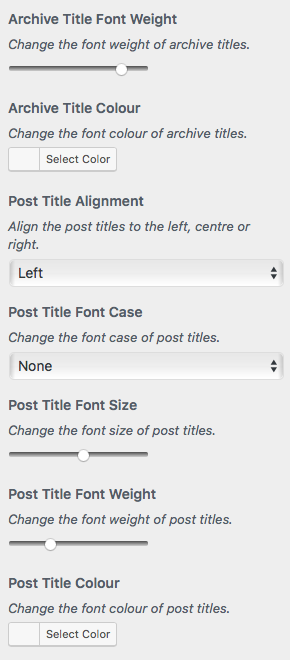
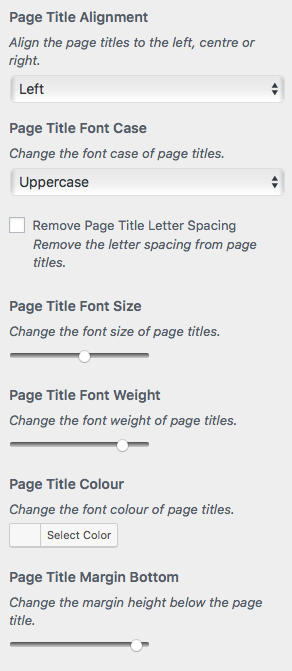
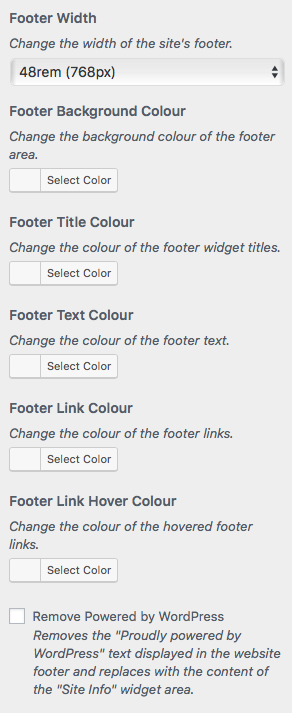
Frequently asked questions
What does the 'Options for Twenty Seventeen' plugin do?
This plugin adds various customization options to the default WordPress theme, Twenty Seventeen. It allows users to modify aspects of the theme's general appearance, header, and navigation.
What kind of general options are available?
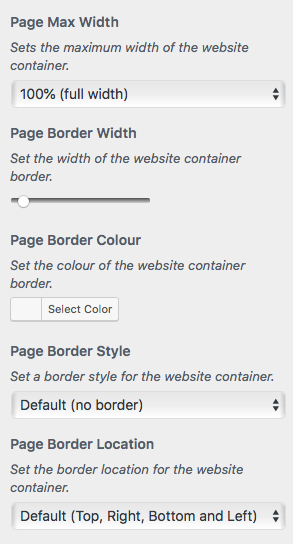
General options include fixing image pixelation on iPads and logo cropping issues. Users can also change the page's max width, background color, add a page border, and modify link underlines.
What header modifications can be made?
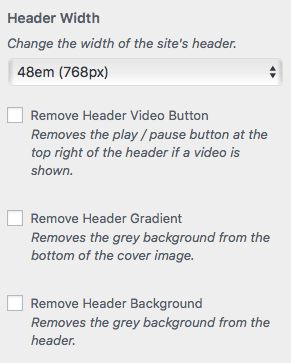
Header options allow users to change the header's width, remove the video play/pause button, and set the color of the site logo, title, and description background. It also provides alignment and styling for site branding and fixes YouTube video issues.
What navigation options are included?
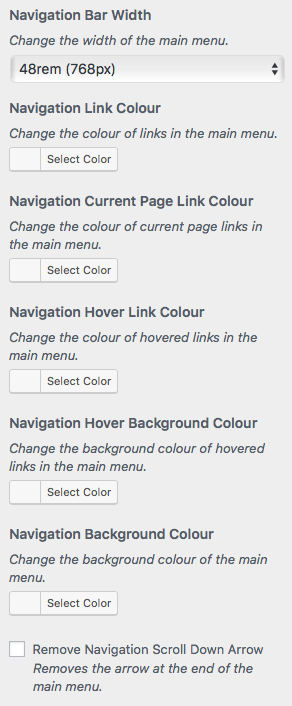
Navigation options include preventing the main menu from moving after page load and changing its width, both standard and when sticky. Users can also remove 'Menu' text from the mobile hamburger button, choose a background image for the main menu, and adjust main menu padding.
Changelog
2.5.4
- Remove Customizer CSS due to incompatible change introduced in WordPress v6.7
2.5.3
- Added option to remove the “Menu” text from the mobile hamburger
2.5.2
- Minor security updates to translation strings
2.5.1
- Fixed Authenticated (Contributor+) Stored XSS via Shortcode
2.5.0
- General housekeeping
2.4.9
- Over sanitization of child theme directory bug fixed
2.4.8
- Added general options for heading and paragraph color
- Bug fixes
2.4.7
- Preparing for WordPress v6.0
2.4.6
- Added an option to prevent the main menu from moving after the page has loaded
2.4.4
- Added JavaScript to improve location of images in search results
2.4.3
- Option to inject featured images into search results
2.4.2
- Fixed a bug in “Full Cover Image” to show normal page style cover image when home page is a static page
2.4.1
- Removed all PHP short tags
2.4.0
- Preparing for WordPress v5.8
2.3.9
- Moved “Widget Unordered Lists” into “Customizer – General Options – Remove Link Underlines”
2.3.8
- Fixed a theme bug with widget unordered list links not having underlines
2.3.7
- Added an option to turn off full cover header video
2.3.6
- Fixes a theme bug that pixelates homepage panel featured images
2.3.5
- General housekeeping
2.3.4
- Bug fix to Navigation Link Vertical Padding option
2.3.3
- Update to live preview and child theme detection
2.3.2
- Bug fix
2.3.1
- General housekeeping
2.3.0
- Options to change border heights and content background color
2.2.9
- Options to change the height, color and opacity of the grey header gradient
2.2.8
- Increased the range for Content Padding Top
2.2.7
- Added opacity control to navigation background
2.2.6
- Added “Video Looping Off” option details
2.2.5
- Added options to style post meta, bug fix
2.2.4
- Added option to change menu width when sticky
2.2.3
- Added option to Full Cover Image option to select “Disabled – Use Page Style”
2.2.2
- Blog page title can be styled with Archive Title styling options
2.2.1
- Option to allow “Advanced Twenty Seventeen” JS if required, otherwise it is blocked as it breaks Customizer Color Control
2.2.0
- General housekeeping
2.1.9
- Added options to hide tag and category links on single posts
2.1.8
- Fixed bug with Twenty Seventeen theme preventing cropping of logo larger than 250px x 250px
2.1.7
- Option to choose and style a background image for the main menu
2.1.6
- New Full Cover Image option, bug fix
2.1.5
- Cleaned up action links
2.1.4
- Moved all premium options to a new premium plugin
2.1.3
- Option to change footer opacity
- Changed front page sections to drop down menu
2.1.2
- Fix bugs with page background color / image
2.1.1
- Re-ordered options
- Bug fix
2.1.0
- Bug fixes
2.0.9
- Option to move the scroll down arrow
- Bug fix
2.0.8
- Bug fixes
2.0.7
- New “Reset Options” buttons
- Option to control the speed of “True Parallax” effect
- Bug fixes
2.0.6
- Option to animate the scroll down arrow in the main menu
- Option to hide the sidebar on single posts
2.0.5
- Option to select and style a page background image
- Option to hide the header image on all but the home page
2.0.4
- Option to hide the post navigation
- Bug fix
2.0.3
- Option to change the height of the home page header image
- Option to hide the sidebar on pages
- Bug fix
2.0.2
- Option to change the background colour of the website
2.0.1
- Option to add a background image to the footer
- Bug fix
2.0.0
- Bug fixes
1.9.9
- Compatibility fix for old versions of PHP
1.9.8
- Added support for MetaSlider plugin in the home page header
1.9.7
- Option to align the site branding to the center or right
1.9.6
- Option to align the navigation menu hamburger to the left or right
- Bug fixes
1.9.5
- Bug fixes
1.9.4
- Bug fixes
1.9.3
- Bug fixes
1.9.2
- Integration with SlidersPack plugin
- Bug fixes
1.9.1
- Bug fixes
1.9.0
- Bug fixes
1.8.9
- Bug fix
1.8.8
- Option to remove header link hover opacity
- Bug fixes
1.8.7
- Option to increase the mobile menu responsive breakpoint
- Bug fixes
1.8.6
- Bug fixes
1.8.5
- Bug fixes
1.8.4
- Option to hide individual post / page titles
- Bug fixes
1.8.3
- Option to ignore en_GB translations
- Bug fix
1.8.2
- Option to fix mobile menu to the top of the screen
- Bug fix
1.8.1
- Option to change the font size and weight of featured image captions
- Bug fix
1.8.0
- Option to change the content link colour
- Reverting to base language of en_GB
1.7.9
- Option to change the content hover link colour
- Chrome YouTube bug fix
1.7.8
- Fixes bug to YouTube header video caused by v2.1 of Twenty Seventeen
1.7.7
- Option to animate logo on just the home page
- Bug fixes
1.7.6
- “True Parallax” cover image
- Align and style main menu items
1.7.5
- Bug fixes
1.7.4
- Added option to change site identity background colour
- Added center align to header sidebar
- Bug fixes
1.7.3
- Added “True Parallax” to home page panels
- Change the height of home page panel images
- Align and style the site title and description
1.7.2
- Option to implement Yoast SEO Breadcrumbs
1.7.1
- Moving to en_US translation compliance
1.7.0
- Bug fixes.
1.6.9
- Admin notice when trial has started.
1.6.8
- Make metabox Gutenberg compatible
- Bug fix
1.6.7
- Option to how child pages as panels like the home page
1.6.6
- Making all admin notices dismissable
1.6.5
- Option to change the background colour of sub menus in the main menu
1.6.4
- Option to show the caption of a featured image on top of the image
- Bug fixes
1.6.3
- Option to rotate the arrow in main menu items with sub menus
- Bug fix
1.6.2
- Navigation align and dark theme underline option bug fixes
1.6.1
- Option to add caption overlay to Nivo Slider with links
- Bug fix
1.6.0
- Option to use featured image as header image and show full screen header on inside pages
- Bug fixes
1.5.9
- Option to fix the social links to the left or right on large screens
- Bug fixes
1.5.8
- Now shows details of all options in Customiser
1.5.7
- Bugfix
1.5.6
- Option to remove main menu padding
- Option to increase main menu link padding
- Option to align the logo in the main menu
1.5.5
- Added a free trial of the premium options
- Bug fixes
1.5.4
- Added option to remove link underlines
- Bug fix
1.5.3
- Increased title maximum font sizes
- Disabled “Full Cover Image” when using a YouTube video in the header
- Bug fixes
1.5.2
- Added option to hide post featured images on archive pages
- Fix jumpy parallax effect in IE11
- Bug fix
1.5.1
- Added option to enable featured images on front page section blog
- Added option to turn on front page section parallax effect on mobiles
- Added option to fix the “Back to top” link to the bottom right of the browser window
1.5.0
- Added option to hide YouTube video until loaded
- Added option to pause YouTube video on user scroll
1.4.9
- Hide featured images on single posts and pages
- Auto detect and fix YouTube play / pause button bug
- Fixed nav and footer width issue by changing em to rem
- Bug fix
1.4.8
- Created drop down options for width of page, header, nav, content and footer
- Auto detect and fix responsive YouTube header CSS
1.4.7
- Option for fourth footer widget sidebar
- Auto detect and fix full width YouTube header CSS
1.4.6
- More bug fixes … sorry!
1.4.5
- Various bug fixes
1.4.4
- Added [social-links] shortcode to show the social network menu in your content
- Added ability for plugin to work with Twenty Seventeen during a Live Preview
1.4.3
- Added option to move or copy the site logo to the main menu
- Added option to animate the logo in the main menu on scroll
1.4.2
- Added option to hide Blog Sidebar on small screens
- Bug fixes
1.4.1
- Bug fixes
1.4
- Added option for “Front Page Sections” box in admin Menus panel
1.3.9
- Option to move the main menu to the top of the custom header
- Bug fixes
1.3.8
- Option to change footer title, text and link colours
- Option to remove the header video play / pause button
- Option to remove the main menu scroll down arrow
- Bug fix
1.3.7
- Option for third footer widget sidebar
- Option to change footer background colour
- Options to remove letter spacing from titles
1.3.6
- Added option to reduce margin below page titles
- Bug fixes
1.3.5
- Entire plugin should now be localised and ready to be translated
1.3.4
- Make social menu links square
- Colour social menu links with their brand colours
1.3.3
- Option to disable parallax effect on front page section featured images
- One Column layout for blog and search pages
- Back to top links on all pages
1.3.2
- Function added to detect unique static front page panel section ids
- More comprehensive activation failure notice
1.3.1
- Changed anchor links on static front page sections to page slugs
- Added option to include “Back to top” links on static front page sections
- Bug fixes
1.3
- Bug fix
1.2.9
- Bug fixes
1.2.8
- Moved front page section anchor to section title
- Added smooth scrolling to anchor links
- Added option to hide post dates
- Added styling options for Page, Post and Archive titles
1.2.7
- Added option to increase number of sections to the static front page
- Added anchor links to static front page sections in menu editor
1.2.6
- Added options to modify width and colour of website container border
- Bug fixes
1.2.5
- Added option to modify the navigation link background hover colour
- Bug fix
1.2.4
- Added option to reduce space between navigation and content
- Page and post titles now align independently
- Bug fixes
1.2.3
- Align Page, Post and Archive titles to the center or right
- Remove “Category:” and “Tag:” from Archive titles
- Added the ability upgrade the plugin
- Bug fixes
1.2.2
- Added the ability to remove the author from posts
- Added the ability to move the featured image into the post content
- Added the ability to reset Tag Cloud widget styles to defaults
- Added the ability to display automatic post excerpts on home and archive pages
- Bug fixes
1.2.1
- Added some general layout options
- Grouped the options into easier categories
- Bug fixes
1.2
- Added a dismissible notice for those feeling generous
- Modified the default header image to match the new logo
- Bug fixes
1.1.9
- Support for the new Privacy Policy Page setting with Site Info Sidebar
- Theme Options – Page Layout menu remains in Customiser
1.1.8
- Option to change current item navigation link colour
- Option to change width of Primary Content area
- Option to change width of gap between Primary Content area and Blog Sidebar
- Option to swap position of Primary Content area and Blog Sidebar
- Bug fixes
1.1.7
- Plugin now only works when Twenty Seventeen is active
- Admin notice when wrong theme active
- Option to match height of content and Blog Sidebar
- Right aligned navigation submenus aligned to left
- Bug fixes
1.1.6
- Option to remove grey header background
- Option to align navigation menu items
1.1.5
- Option to add the Blog Sidebar to pages
- Settings link on Plugins page
- Bug fix
1.1.4
- Bug fix
1.1.3
- New footer site info widget sidebar
1.1.2
- Removable header gradient
1.1.1
- New header widget sidebar
- Bug fixes
1.1
- Integration with Nivo Slider
- Sanitization of options
- Bug fixes
1.0
- First version of the plugin

