

Site Kit is a one-stop solution for WordPress users to use everything Google has to offer to make…

About International Telephone Input for Contact Form 7
This plugin adds a new input field to Contact Form 7 that allows users to enter and validate international telephone numbers. It includes a flag dropdown with the prefix of the telephone number, detects the user's country, provides formatting/validation methods, and can display additional information in the email such as the country name and code. The plugin uses the International Telephone Input JavaScript library and the eXTReMe-IP-LOOKUP.com API.Screenshots

Changelog
1.5.7 — Sep 15, 2020
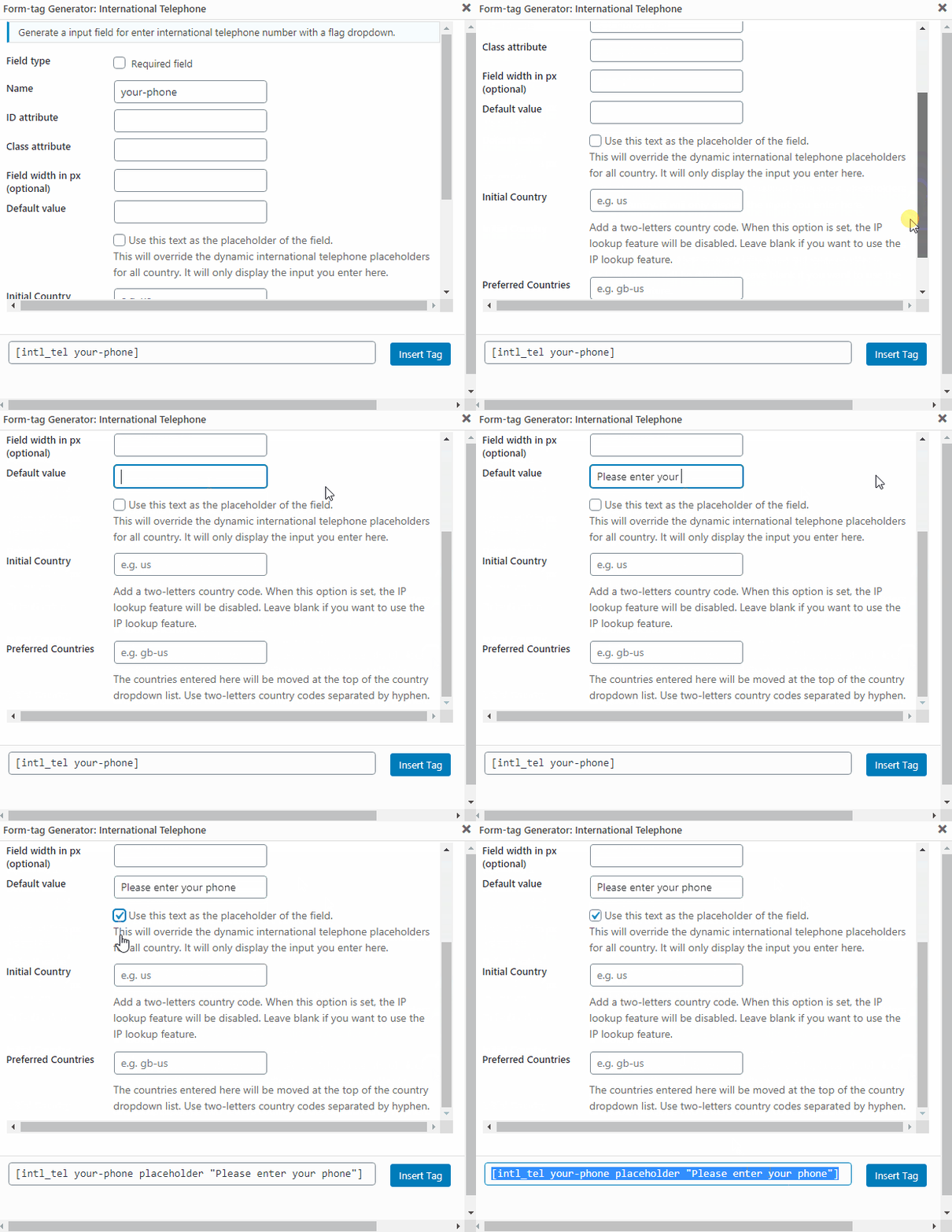
- Added new options: Default or placeholder value. Now you can set a default or placeholder value for the telephone input.
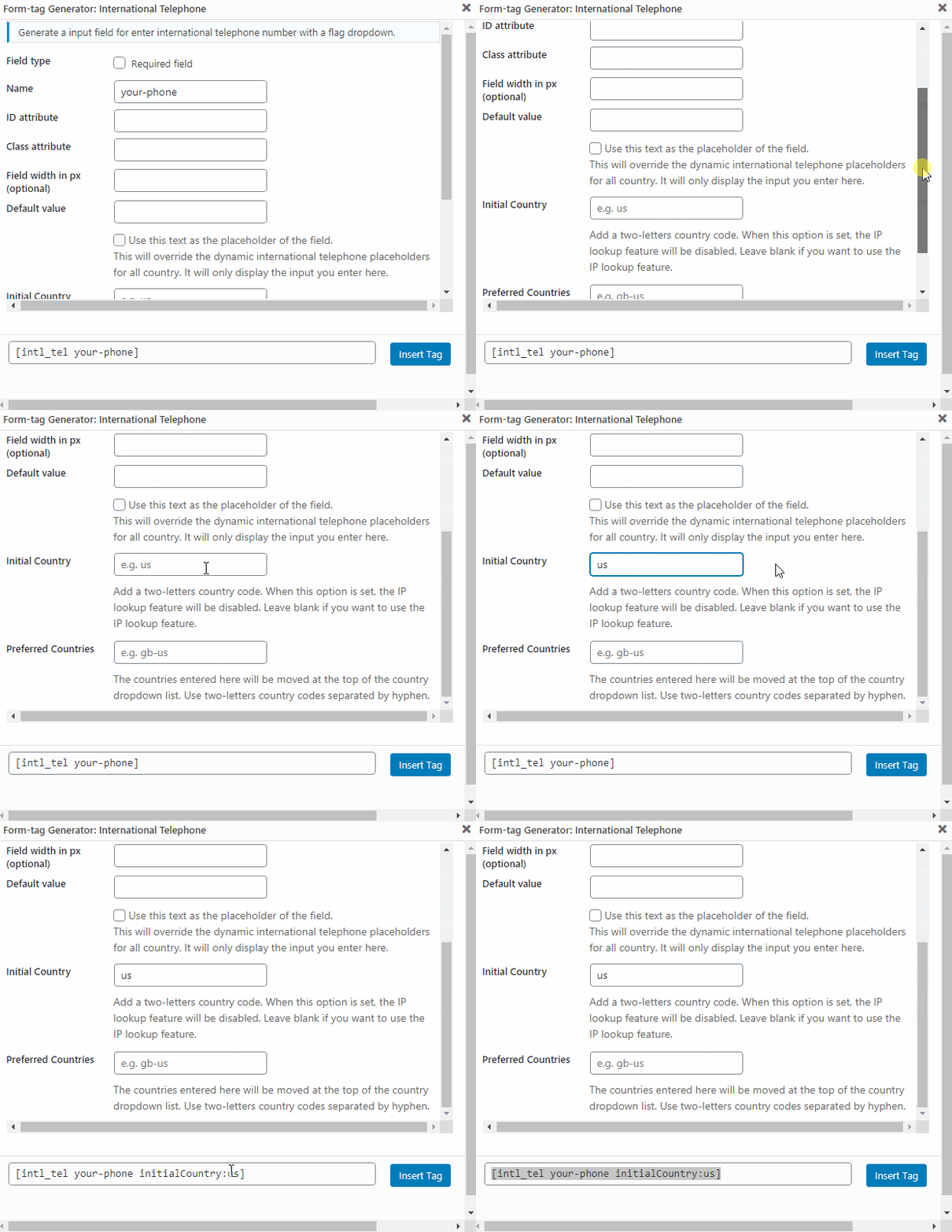
- Added new option: Initial Country. Now you can set a initial country by default. When this option is set, the IP lookup feature will be disabled.
1.5.6 — May 11, 2020
- Fixed the flags alignment in Retina screens.
- Improvement: now the file size of flags images are 69% smaller. Thanks to @marcusasiabc.
1.5.5 — April 25, 2020
- Switch API service from freegeoip.app (it no longer works) to extreme-ip-lookup.com, which offer free usage until 20 requests per minute and 50,000 requests per month.
1.5.4 — April 06, 2020
- Added a check to verify if Contact Form 7 is activated.
- Added support for Retina screens. Thanks to Aboobacker P Ummer (@abooze) for reporting.
- Fixed some typos in README.md. Thanks to @sylvain68 for reporting.
1.5.3 — April 03, 2020
- Code refactored.
- Updated the API service to freegeoip.app (up to 15,000 queries per hour).
- Now the plugin includes the “International Telephone Input” library built-in.
- Added new info tags in header comment.
- Fixed text domain in plugin header comment.
- Fixed some typos and strings without translation functions.
1.5.2
- We change ipinfo.io IP API by freegeoip.net IP API because it has a higher requests limit. As suggested at https://wordpress.org/support/topic/ipinfo-io-limits/
1.5.1
- We add the possibility to define de preferrec countries by adding the option preferredCountries. For example preferredCountries:es-fr (They have to be 2-letter country codes separated by hyphens ‘-‘)
- We add teh preferredCountries and size option to the GUI form tag creator form.
1.5.0
- We use upgrade JS version to 12.1.3. It fixes iPhone issues of old version
- We add mail tag that recovers iso code of the selected country
1.4.6
- We change to new CF7 functions naming (shortcode->form-tag) to avoid deprecated message with debug active (completed). No new features added
1.4.5
- We change to new CF7 functions naming (shortcode->form-tag) to avoid deprecated message with debug active (partial). No new features added
1.4.4
- We add the size attribute if it is sent as an option. For example: size:40
1.4.3
- We avoid the placeholder text to be copied into the value of the input field. This, sometimes caused the flags to desappear
1.4.2
- We repare special mail tags
1.4.1
- We make it https compatible
1.4.0
- We add new mail tags in order to be able to recover the country name of a telephone, the contry code and the telephone number without the country code
- In order to get the country name use [{your-phone}-cf7it-country-name] where {your-phone} has to be replaced by the name of your tag
- In order to get the country code use [{your-phone}-cf7it-country-code] where {your-phone} has to be replaced by the name of your tag
- In order to get the phone number without the country code use [{your-phone}-cf7it-national] where {your-phone} has to be replaced by the name of your tag
1.3.0
- We force the dependecies between the JS files
1.2.0
- We load the minified JS by default. If SCRIPT_DEBUG is set to true, we use the non-minified.
1.1.0
- CDN is used for all JS and CSS files and script is loaded at the bottom
1.0.0
- First release

