
WooCommerce Shipping & Tax offers automated tax calculation, shipping label printing, smoother payment setup, and other hosted services…
About WP Sticky Sidebar – Floating Sidebar On Scroll for Any Theme
The WP Sticky Sidebar plugin keeps your sidebar menu visible at all times, making it easier for visitors to navigate your website and reducing bounce rates. The plugin is easy to install and works with many different themes, but there is also a Pro version available with additional features such as custom CSS styles and the ability to disable the floating sidebar on certain pages.Screenshots

Frequently asked questions
What does the WP Sticky Sidebar plugin do?
The WP Sticky Sidebar plugin makes your floating sidebar menu permanently visible while scrolling, increasing your website's usability and accessibility.
How does the WP Sticky Sidebar plugin work?
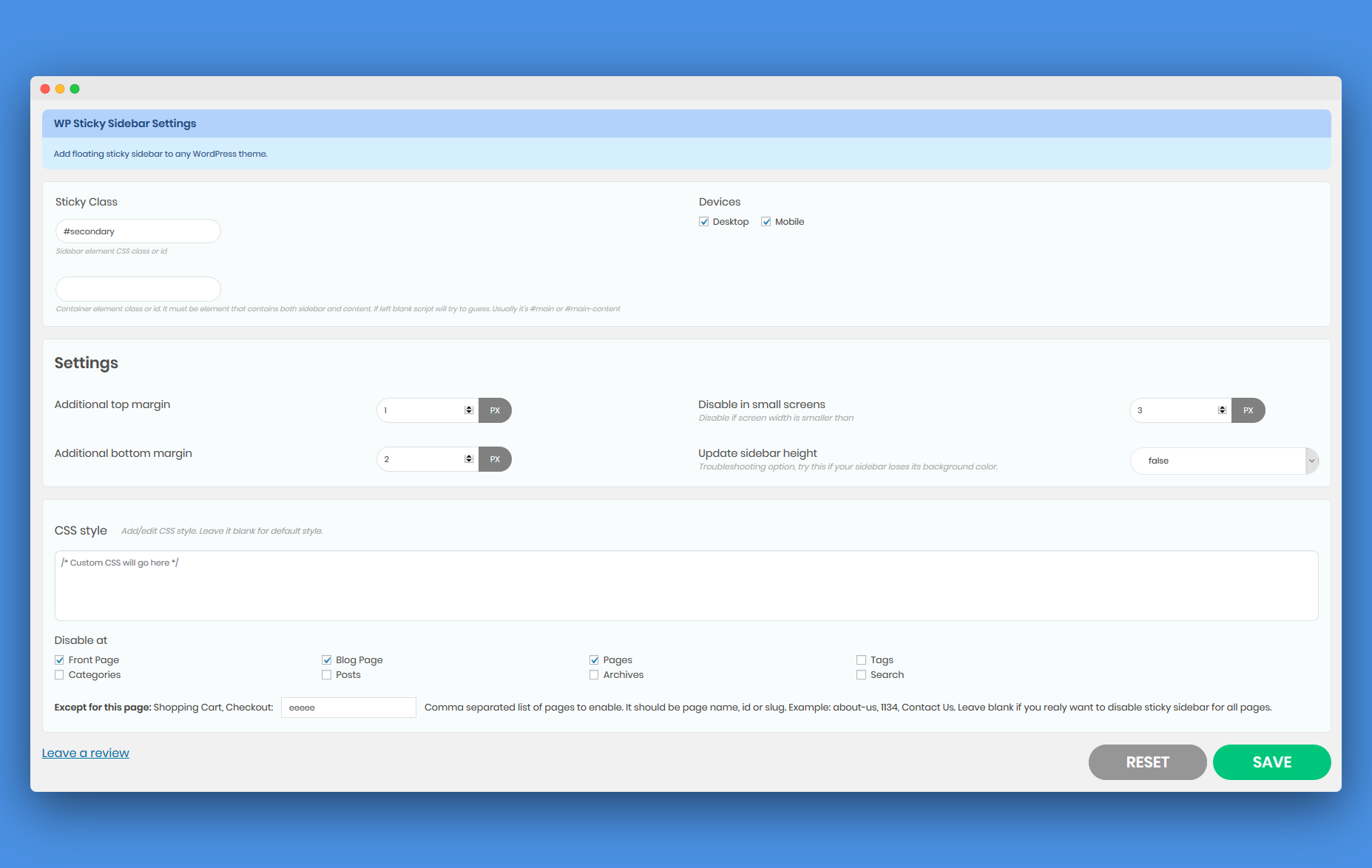
By default, the plugin uses the CSS id '#secondary' for the sticky sidebar menu. You can modify this setting for different themes. Additionally, you can use additional margin top to fine-tune the position of the sidebar menu.
What features are included in the free plan of the WP Sticky Sidebar plugin?
The free plan includes the Sticky Sidebar Class (CSS class or id of the sidebar element desired to be sticky), Container Class (container element class or id), Additional Top Margin, Additional Bottom Margin, Disable sidebar stickiness if screen width is smaller than, and Update floating sidebar menu height.
What features are included in the pro plan of the WP Sticky Sidebar plugin?
The pro plan includes the ability to disable floating sidebar on Desktop/Mobile, add CSS style to the sticky sidebar to create a custom sidebar, and disable floating sidebar on specific pages (front page, blog page, posts, categories, tags, archives).
Is there any testimonial for the WP Sticky Sidebar plugin?
Yes, a testimonial from Divesh Diggiwal, WebTechPreneur, states that the plugin worked perfectly for their blog.
Changelog
1.4.1
Added plugin recommendations
1.4
WordPress 6.5 compatibility
1.3.9
Flow changes
1.3.8
Bugs fixed
1.3.7
Security update
1.3.6
jQuery minor bugs fixed
1.3.5
Infrastructure improvements
1.3.4
Review change
1.3.3
Sanitize input fixes
1.3.2
Security update
1.3.1
Variable warning fixed
1.3
New UI
1.2.5
- Fixed: enable / disable at search pages
1.2.4
- Fixed: additional margin top when admin bar is showing
1.2.3
- Improved: Better compatibility with various themes
1.2.2
- Added options: Disable at: front page, blog page, pages, posts, categories, tags, archive
- Added options: Enable for: Enable only selected pages or posts
1.2.1
- Added options: Disable if screen size is smaller than number of pixels
1.2
- Updated script: Theia sticky menu v1.7.0
- Added options: additional margin bottom + update sidebar height
1.1
- Fixed: Notice: Undefined index: myfixedside_disable_small_screen
1.0
- First release of myStickysidebar plugin

