

Just another contact form plugin. Simple but flexible.

About Smart Manager – WooCommerce Advanced Bulk Edit, Inventory Management & more…
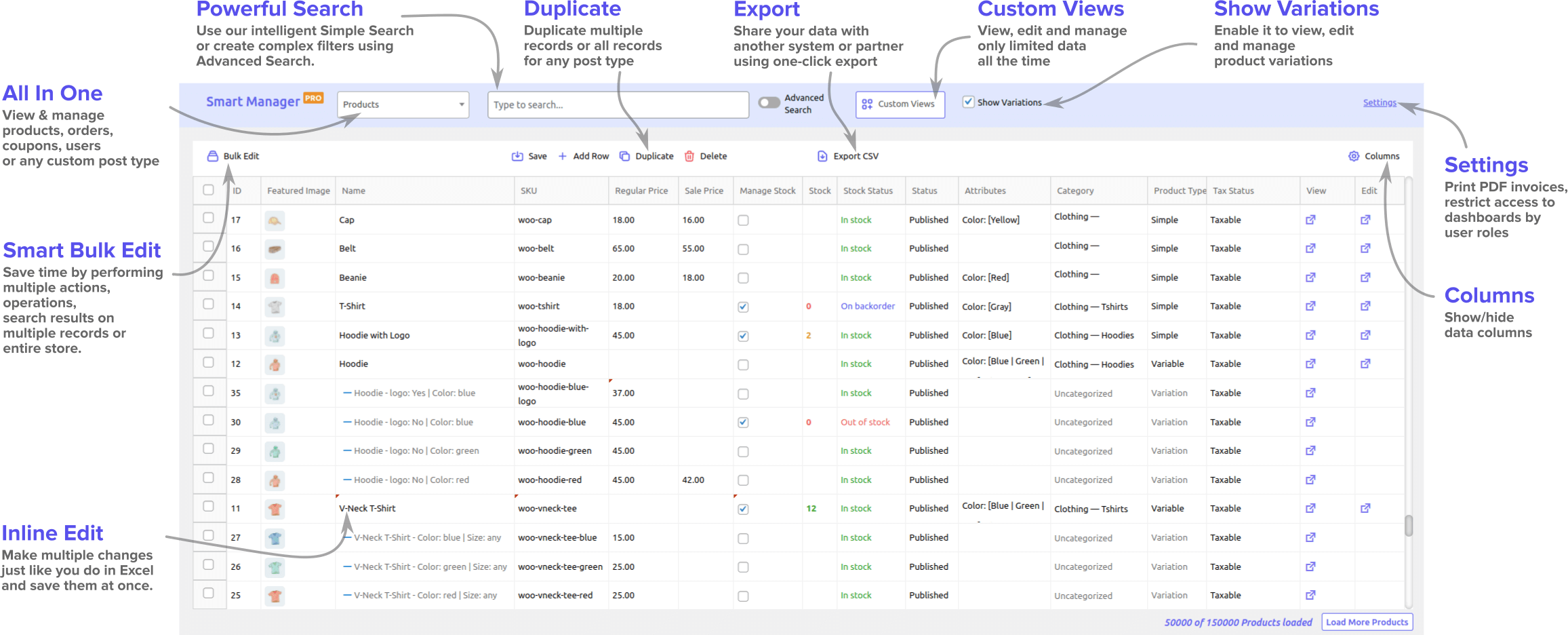
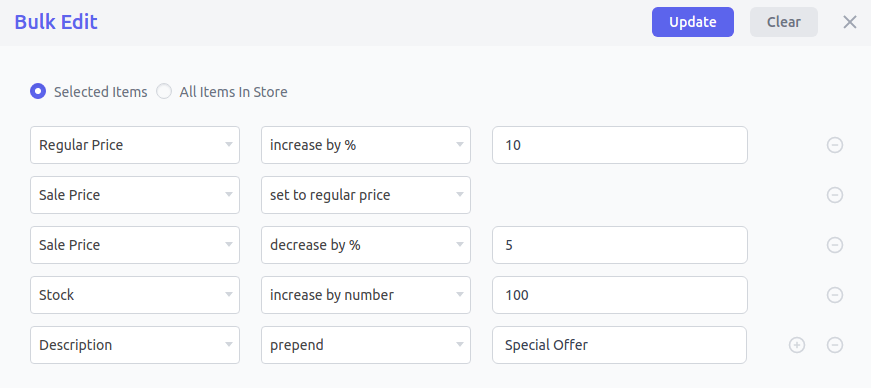
Smart Manager is a powerful WooCommerce bulk edit plugin that allows you to manage your store from one place. It provides an Excel-like sheet editor where you can easily edit products, orders, blog posts, and coupons. With features like bulk editing, advanced search, and scheduling tasks, Smart Manager saves you time and improves your store management.Screenshots
Frequently asked questions
What is Smart Manager?
Smart Manager is a powerful WooCommerce advanced bulk edit and inventory management plugin. It allows shop owners to manage and bulk edit their inventory, product stock, orders, coupons, blog posts, users, and more from a single interface.
What features does Smart Manager Lite offer?
Smart Manager Lite offers a single-screen interface to browse and manage products, orders, blog posts, and coupons. It supports infinite scrolling, inline edits, live preview, stock log, search filters, and more.
What features does Smart Manager Pro offer?
Smart Manager Pro offers advanced features such as inline edit, infinite scrolling, advanced bulk edit, copy fields, advanced search, custom views, advanced CSV export, PDF invoice printing, user role management, and compatibility with other WooCommerce and WordPress plugins.
Is Smart Manager GDPR-ready?
Yes, Smart Manager is GDPR-ready and does not collect personal data.
Are there any other plugins offered by StoreApps?
Yes, StoreApps offers other plugins such as Offermative, WooCommerce Bulk Variations Manager, Smart Offers For WooCommerce, Email Customizer for WooCommerce, and more. They also have free plugins like Temporary Login Without Password, Icegram, Email Subscribers & Newsletters, and more.
Changelog
8.57.0 (20.02.2025)
- New: WooCommerce 9.6.2 compatible
- Fix: Navigation bar height increasing when the Advanced Search checkbox is checked
- Fix: Slight delay in hiding dashboard combo box dropdown list after selection
- Fix: Inconsistent modal height when searching for the WooCommerce product ‘Category’ field in the Inline Edit modal
- Fix: Selected value does not persist after updating with the ‘copy from field’ operator in Bulk Edit functionality (Pro)
- Fix: Improved performance when loading Custom Views and Saved Advanced Search dashboards (Pro)
- Update: POT file
8.56.0 (13.02.2025)
- New: WordPress 6.7.2 compatible
- New: Search for WooCommerce Product ‘Category’ field in Inline edit modal
- New: Saved searches for Advanced Search and application across multiple dashboards (Pro)
- Fix: WooCommerce Product ‘Category’ field is not shown in hierarchical structure in Inline edit modal
- Fix: Export CSV not working for ‘All items in search results – Stock Columns’ when using Simple Search and Advanced Search functionalities
- Fix: Inline edit and Bulk edit not working for Custom Views dashboards (Pro)
- Update: Grid layout to fully utilize screen space
- Update: POT file
8.55.0 (07.02.2025)
- New: WooCommerce 9.6.1 compatible
- New: Added ‘New’ and ‘Manage scheduled edits’ as dropdown options under Bulk Edit (Pro)
- Fix: In-app plugin update link not converting plugin back to Pro version
- Fix: Advanced Search in WooCommerce Orders dashboard not filtering WooCommerce product fields like SKU
- Fix: Validation not working for datetime fields in Inline edit
- Fix: Update failing for field values containing special characters like single quotes
- Update: Displayed ‘Undo’ link in Inline edit success message (Pro)
- Update: POT file
8.54.0 (16.01.2025)
- New: WooCommerce 9.5.2 compatible
- Fix: Dashboard selection not working in some cases
- Update: 10x boost in loading speed for the WooCommerce Products dashboard
- Update: 10x speed improvement for updating taxonomy fields using Inline edit and Bulk edit (Pro)
- Update: POT file
8.53.0 (31.12.2024)
- New: Compatibility with Germanized for WooCommerce Pro (Pro)
- Fix: SQL vulnerability in Advanced Search functionality [Thanks to Patchstack team]
- Update: UI/UX for dashboard combo box
- Update: POT file
8.52.0 (19.12.2024)
- New: WooCommerce 9.5.1 compatible
- Fix: Advanced search functionality not working for ‘Featured’ column on WooCommerce Products dashboard
- Fix: Advanced search functionality not working for ‘Catalog Visibility’ column with the ‘is not’ operator on WooCommerce Products dashboard
- Fix: Pricing page appears blank in some cases
- Fix: PHP fatal error when saving Access Privilege Settings from taxonomy dashboards (Pro)
- Fix: ‘Restrict by users’ option in Access Privilege Settings not working (Pro)
- Update: POT file
8.51.0 (05.12.2024)
- New: WooCommerce 9.4.3 compatible
- Fix: ‘save_post’ hook doesn’t trigger when updating meta or taxonomy data
- Fix: Move to Trash not working for WooCommerce Orders dashboard
- Fix: Bulk Edit functionality not working when multiple actions are applied to the same field (Pro)
- Fix: Delete Permanently and Move to Trash not working for WooCommerce Orders, Users and taxonomy dashboards (Pro)
- Update: POT file
8.50.0 (25.11.2024)
- New: WordPress 6.7.1 compatible
- New: WooCommerce 9.4.2 compatible
- Update: UI/UX for combo boxes
- Update: POT file
8.49.0 (15.11.2024)
- New: WordPress 6.7 compatible
- New: WooCommerce 9.4.1 compatible
- New: WooCommerce Product ‘Slug’ column in WooCommerce Import CSV suite
- Fix: Fetching hidden meta fields in the grid impacting dashboard load speed
- Fix: Broken user interface due to ‘select2’ library conflict with other plugins
- Fix: Column header height updated with update in row height setting
- Fix: Image in the ‘Featured Image’ column not respecting the row height setting
- Fix: Internationalization related warnings on WordPress v6.7
- Update: 10x speed improvement for Bulk Edit, Move to Trash & Delete Permanently functionalities (Pro)
- Update: UI/UX for combo boxes
- Update: POT file
8.48.0 (01.10.2024)
- New: WooCommerce 9.3.3 compatible
- Fix: ‘Post Date’ column not saving when adding the record using Add Row functionality and updating using inline edit functionality
- Fix: ‘Post Date’ column not saving when updating using Bulk Edit functionality (Pro)
- Update: UI/UX for Advanced Search functionality
- Update: Automatically resize the display of ‘Featured Image’ in the WooCommerce Products dashboard to match the ‘Grid Row Height’ global setting
- Update: POT file
8.47.0 (12.09.2024)
- New: WordPress 6.6.2 compatible
- New: WooCommerce 9.2.3 compatible
- Fix: Clicking on column headers displays modal dialogs in some cases
- Fix: Incorrect last accessed dashboard on page refresh
- Update: UI/UX for ‘Public’ view settings in Custom Views (Pro)
- Update: POT file
8.46.1 (26.08.2024)
- Fix: WordPress database error message when updating WooCommerce Products using inline edit functionality in WooCommerce v9.2.0+
- Update: POT file
8.46.0 (26.08.2024)
- New: WooCommerce 9.2.2 compatible
- Fix: Broken access control vulnerability [Thanks to Patchstack team]
- Fix: Height for longtext data in the grid cells broken after last update
- Update: POT file
8.45.0 (08.08.2024)
- Fix: Height for longtext data in the grid cells not respecting the ‘Grid row height’ global setting
- Fix: ‘Order Subtotal’ column not showing the correct value on WooCommerce Orders dashboard
- Fix: ‘Order Subtotal’ column not showing the correct value on WooCommerce Subscriptions dashboard (Pro)
- Fix: Date picker for the ‘Schedule Later’ option allowing selection of past dates (Pro)
- Update: POT file
8.44.0 (02.08.2024)
- New: WooCommerce 9.1.4 compatible
- Fix: ‘copy from field’ operator not working when the field data type is numeric in the Bulk Edit functionality (Pro)
- Update: Persist search conditions when switching from post type/taxonomy dashboard to task dashboard (Pro)
- Update: POT file
8.43.0 (26.07.2024)
- New: WordPress 6.6.1 compatible
- New: WooCommerce 9.1.2 compatible
- New: Manage ‘Shipping Method Title’ column on WooCommerce Orders dashboard
- New: Manage ‘Shipping Method Title’ column on WooCommerce Subscriptions dashboard (Pro)
- New: Manage ‘Note For Customer’ column on WooCommerce Orders dashboard (Pro)
- Update: Show warning modal for unsaved changes in inline edit functionality
- Update: POT file
8.42.0 (09.07.2024)
- New: WordPress 6.5.5 compatible
- New: WooCommerce 9.0.2 compatible
- Fix: Simple search functionality not working for ‘Shipping Method’ column in both HPOS and non-HPOS stores on WooCommerce Orders dashboard
- Fix: Simple search functionality not working for ‘Shipping Method’ column in both HPOS and non-HPOS stores on WooCommerce Subscriptions dashboard (Pro)
- Fix: Field values not loading when switching to ‘copy from’ operator in Bulk Edit panel for non-HPOS stores on WooCommerce Orders and Subscriptions dashboards (Pro)
- Update: POT file
8.41.0 (21.06.2024)
- New: WooCommerce 9.0.1 compatible
- New: Provision to edit ‘Shipping Method’ column on WooCommerce Orders dashboard
- New: Provision to edit ‘Shipping Method’ column on WooCommerce Subscriptions dashboard (Pro)
- Fix: Inline edit functionality not working for ‘Order Shipping/Shipping Total Amount’ and ‘Shipping Method’ columns on WooCommerce Orders dashboard in both HPOS and non-HPOS stores
- Fix: Bulk Edit functionality not working for ‘Order Shipping/Shipping Total Amount’ and ‘Shipping Method’ columns on WooCommerce Orders dashboard in both HPOS and non-HPOS stores (Pro)
- Fix: Inline edit and Bulk Edit functionalities not working for ‘Order Shipping/Shipping Total Amount’ and ‘Shipping Method’ columns on WooCommerce Subscriptions dashboard in both HPOS and non-HPOS stores (Pro)
- Fix: Advanced search functionality not working for ‘Shipping Method’ column on WooCommerce Orders and Subscriptions dashboards in both HPOS and non-HPOS stores (Pro)
- Update: Pricing page related changes
- Update: POT file
8.40.0 (14.06.2024)
- New: WordPress 6.5.4 compatible
- New: WooCommerce 8.9.3 compatible
- Fix: ‘Edit’ column not fetched on WooCommerce Orders dashboard in HPOS stores
- Fix: ‘Edit’ column not fetched on WooCommerce Subscriptions dashboard in HPOS stores (Pro)
- Update: Pricing page related changes
- Update: POT file
8.39.0 (01.06.2024)
- New: WooCommerce 8.9.1 compatible
- Fix: PHP warnings occur and no content is displayed on the ‘Go Pro’ page if WooCommerce is not activated
- Fix: Array to string conversion PHP notice when loading WooCommerce Products dashboard (Pro)
- Fix: Settings button not redirecting properly on ‘Docs & Support’ page (Pro)
- Update: ‘Author’ column now displays name and email address on WooCommerce Product Stock Log or any tasks dashboard
- Update: Administrators now have the capability to manage and undo tasks performed by any user directly from the WooCommerce Product Stock Log or tasks dashboard
- Update: POT file
8.38.0 (10.05.2024)
- New: WordPress 6.5.3 compatible
- New: WooCommerce 8.8.3 compatible
- Fix: Product type updated incorrectly, when updating ‘Backorders’ column on WooCommerce Products dashboard using inline edit functionality
- Fix: PHP warning when loading WooCommerce Products dashboard
- Fix: Record values not updated in some cases when using Bulk Edit functionality in background (Pro)
- Update: POT file
8.37.0 (18.04.2024)
- New: WordPress 6.5.2 compatible
- New: WooCommerce 8.8.2 compatible
- New: Compatibility with Legal Pages
- Fix: PHP warning when loading WooCommerce Products dashboard
- Fix: Using ‘increase by/decrease by’ Bulk Edit operators setting value to ‘0’ for WooCommerce Products ‘Regular price’ & ‘Sale price’ fields having empty values (Pro)
- Fix: Using ‘increase by/decrease by’ Bulk Edit operators setting value to ‘0’ for any numeric fields having empty values (Pro)
- Update: Replace ‘woo.com’ links with ‘woocommerce.com’
- Update: POT file
8.36.0 (05.04.2024)
- New: WordPress 6.5 compatible
- Fix: ‘Featured’ column not detected in ‘Column Manager’ on WooCommerce Products dashboard
- Fix: PHP 8.1.27 Uncaught TypeError: Cannot access offset of type string on string when clicking on ‘Load More Products’ button on WooCommerce Products dashboard
- Fix: Advanced Search not filtering null value for date fields on WooCommerce Subscriptions dashboard (Pro)
- Fix: PHP warning when fetching all accessible views for current user (Pro)
- Update: POT file
8.35.0 (22.03.2024)
- New: WooCommerce 8.7.0 compatible
- Fix: Dashboard not loading due to ‘select2’ library conflict with other plugins
- Update: Integrated product specific low stock threshold value in ‘Stock’ column color-coding on WooCommerce Products dashboard (Pro)
- Update: POT file
8.34.0 (15.03.2024)
- Fix: Advanced Search functionality displays variations of products whose parents are not published for ‘Post Status’ column in WooCommerce Products dashboard
- Update: POT file
8.33.0 (08.03.2024)
- Fix: ‘Attributes’ column values doesn’t render properly in Bulk edit panel for WooCommerce Products dashboard (Pro)
- Fix: Simple Search not searching ‘Billing Email’ field properly in WooCommerce Orders dashboard
- Fix: Custom post statuses not visible in the ‘Post Status’ column on the dashboard for any post type
- Fix: Advanced Search query returning cached results
- Update: POT file
8.32.0 (01.03.2024)
- New: WooCommerce 8.6.1 compatible
- Fix: Column tooltip not getting updated after enabling/disabling using show/hide columns
- Fix: ‘increase by/decrease by’ operators for date fields not working properly in Bulk edit functionality (Pro)
- Fix: Undo functionality not working properly for date/datetime fields (Pro)
- Fix: HTML tags in the ‘Description’ and ‘Additional Description’ fields within the exported CSV causing issues during CSV import (Pro)
- Update: POT file
8.31.0 (19.02.2024)
- New: WooCommerce 8.6.0 compatible
- New: Access Privilege Settings – give controlled access to individual users in addition to user roles (Pro)
- Fix: Data not loading for WooCommerce Subscriptions ‘Date’ fields like ‘Schedule End’, ‘Schedule Next Payment’, etc. (Pro)
- Fix: Inline edit, Bulk edit & previous value not getting updated for WooCommerce Subscriptions ‘Date’ fields like ‘Schedule End’, ‘Schedule Next Payment’, etc. (Pro)
- Fix: PHP fatal error when updating ‘Attributes’ field data using Bulk edit on WooCommerce Products dashboard
- Fix: PHP warning when loading ‘Attributes’ field data on WooCommerce Products dashboard
- Update: Improved Access Privilege settings UI/UX (Pro)
- Update: POT file
8.30.0 (02.02.2024)
- New: WooCommerce 8.5.2 compatible
- New: WordPress 6.4.3 compatible
- Fix: WooCommerce Products ‘Stock Status’ column doesn’t update automatically with changes in the ‘Backorders’ column
- Fix: Duplicate values in the ‘Product categories’, and ‘Exclude categories’ WooCommerce Coupons restrictions fields when updating using Bulk edit
- Update: POT file

