Keeping ahead of the competition in today’s competitive world requires constant innovation. The speed with which WordPress teams can develop, test, and deploy new features is crucial.
Nevertheless, this process can be hindered by typical obstacles, including lengthy setup periods, ineffective iteration cycles, and the complexity of managing many settings.
With its comprehensive set of tools meant to simplify WordPress development and encourage creativity, InstaWP stands out as a formidable answer to these problems.
Learn how WordPress teams can improve their workflows, increase productivity, and drive continuous innovation with InstaWP in this blog post.
Overview of InstaWP Features/ Benefits
You might be wondering about how InstaWP can help in innovation for WordPress Teams.
Well, the answer lies in its explicit features that help your team to innovate by offering a robust platform designed to streamline the development process.
From instant site creation to seamless staging and cloning, InstaWP provides a wide array of tools that enhance efficiency, maintain quality, and simplify project management.
- Instant Site Creation: Create WordPress sites instantly with a single click, significantly speeding up development and testing processes.
- Staging and Cloning: Develop and test changes in a safe environment with easy-to-create staging sites and clone existing sites for seamless project management.
- Templates and Blueprints: Save and reuse site configurations as templates, ensuring consistency and reducing setup time for similar projects.
- Automatic Git Integration: Ensure your codebase is always up-to-date with automatic Git pulls for sites and templates, enhancing version control.
- Remote CLI Commands: Execute CLI commands remotely without SSH access, offering greater control and ease of troubleshooting.
- 2-Way Sync: Maintain accurate synchronization between staging and live sites, reducing deployment risks and data inconsistencies.
- QA Automation: Automate testing processes to ensure high-quality releases, freeing up time for teams to focus on innovation.
- Hosting Management: Centralize hosting operations, making it easier to manage multiple projects and streamline maintenance tasks.
- Recurring Revenue Opportunities: Generate recurring revenue by selling pre-made templates with hosting, an ideal feature for agencies and freelancers.
- Product Demos: Simplify the creation and presentation of product demos, allowing teams to showcase innovations effectively to clients and stakeholders.
These features not only save time but also enable teams to focus on creativity and productivity, ensuring they stay ahead in a competitive landscape.
Innovation through Speed and Efficiency with InstaWP
Innovation in WordPress development hinges on the ability to work quickly and efficiently. Are you still trying to convince yourself about how InstaWP fosters innovation?
InstaWP empowers your WordPress team to work smarter, not harder. As we have seen InstaWP provides several features that streamline workflows, reduce time-consuming tasks, and enhance overall productivity.
Here’s how InstaWP achieves innovation through speed and efficiency:
How to reduce setup time for new projects
One of the most significant barriers to rapid development is the setup time required for new projects. Traditionally, setting up a new WordPress site involves multiple steps, including server configuration, database setup, and theme and plugin installations.
InstaWP eliminates these steps by allowing you to spin up a new WordPress site in seconds. Choose any combination of PHP, WordPress, plugins, and themes you want. You can build your site from scratch or use a pre-designed template from their store.
With a single click, InstaWP takes care of everything for you in seconds, including your domain name, security certificate (SSL), database, and all the setup.
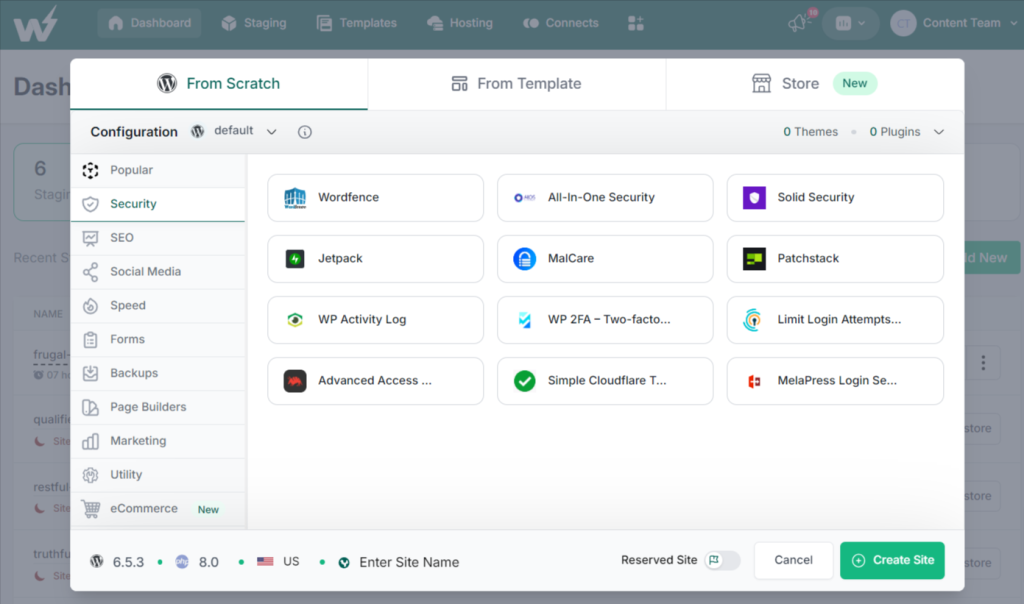
This instant setup means your team can start working on new projects immediately without wasting valuable time on administrative tasks.
The speed at which new sites can be created enables your team to handle more projects simultaneously and respond quickly to new opportunities.
How to Have Faster Iteration and Testing Cycles
Do you agree that fast iteration and testing cycles are crucial for innovation? If yes, then read on!
InstaWP provides a streamlined workflow that allows for quick creation, testing, and deployment of changes.
By using staging environments, you can test new features and updates in a controlled setting before pushing them live. This capability ensures that any issues are identified and resolved early, preventing costly errors on the live site.
With WordPress staging, stakeholders, developers, designers, and testing teams can work together effortlessly to test, iterate, and refine the website until it achieves its goals.
The ability to iterate quickly means your team can incorporate feedback and make improvements faster, keeping your projects aligned with client expectations and market demands.
How to Increase Developer Productivity
InstaWP significantly enhances developer productivity by streamlining and automating various aspects of the WordPress development process.
Developers can set up new WordPress sites in seconds, bypassing the lengthy setup process and jumping straight into coding. The platform offers an intuitive interface with pre-configured templates and automated workflows, reducing time spent on repetitive tasks.
Seamless Git integration facilitates efficient version control, enabling easy collaboration and tracking of changes. InstaWP’s robust staging environments allow for thorough testing without affecting live sites, while advanced debugging tools help quickly identify and resolve issues.
Automated backup and restore features ensure the safety of development work, encouraging experimentation without the fear of losing progress. Additionally, easy access to pre-installed plugins, themes, and development tools ensures that developers have everything they need at their fingertips.
Exploring New Ideas and Features
Now you understand how InstaWP comes as a blessing to WordPress Teams!
The time saved by using InstaWP can be redirected towards innovation and experimentation. With more time on their hands, your team can explore new plugins and themes, prototype innovative solutions, and conduct user testing to validate new ideas.
Version Control Integration
For a development team to be productive, version control is essential. It facilitates smooth teamwork, makes change tracking simple, and provides version reversion when needed. Your WordPress team can now work more efficiently and confidently innovate thanks to InstaWP’s seamless integration with Git, the most popular version control system.

How to Use Git with InstaWP
Using Git with InstaWP is straightforward and enhances your development workflow.
You start by connecting your Git repository to InstaWP, allowing you to manage code changes directly from the platform.
InstaWP supports creating branches for new features or experiments, merging changes into the main branch, and rolling back to previous versions if needed.
This integration simplifies version control, making it easy to track, review, and manage code changes efficiently.
For more information on how to use Git with InstaWP, click here.
Benefits of Using Git Integration
Version control with InstaWP offers significant benefits for team projects.
It enables enhanced collaboration, allowing multiple developers to work on the same project without overwriting each other’s work.
Safe experimentation is encouraged through branching, where developers can test new ideas without affecting the main codebase.
Efficient rollbacks ensure that any issues can be quickly resolved, maintaining project stability.
Clear documentation and accountability are provided by tracking who made each change and why, fostering a transparent and organized workflow.
Additionally, streamlined code reviews and support for continuous integration and deployment (CI/CD) ensure that innovative features are quickly and reliably implemented, enhancing overall project quality and innovation.
How Staging Environments in InstaWP Help WordPress Teams Innovate
We can’t stress enough about InstaWP’s one-click staging feature. Staging environments in InstaWP provide a safe space for testing new features, plugins, and themes without impacting the live site, enabling realistic and thorough testing conditions.
This setup allows for rapid feedback and iteration, accelerating the innovation process. By supporting collaborative development, team members can work on the same project simultaneously, enhancing idea sharing and innovation.

Types of Staging Environments
InstaWP offers three types of staging environments to cater to different testing needs:
- Quick Staging: Ideal for rapid testing of minor changes. It allows developers to quickly spin up a staging site to test small updates or bug fixes without much overhead.
- Full Staging: This is a complete replica of the live site, perfect for thorough testing. It mirrors the live environment exactly, making it suitable for major updates, feature additions, and comprehensive quality assurance processes.
- Custom Staging: Tailored environments that can be configured to meet specific testing requirements. This flexibility allows teams to create staging environments that match unique scenarios, ensuring that all aspects of the project are tested thoroughly.
Innovative Testing Practices to Ensure Quality Before Live Deployment
InstaWP’s staging environments support innovative testing practices that ensure the highest quality before live deployment:
- Automated Testing: Integrate automated testing tools to run a suite of tests on the staging environment, ensuring that new code doesn’t introduce bugs or regressions.
- Performance Testing: Conduct performance tests in the staging environment to ensure that new features or changes don’t negatively impact site speed and responsiveness.
- User Acceptance Testing (UAT): Engage stakeholders or a select group of users to interact with the staging site, providing valuable feedback on usability and functionality before going live.
- A/B Testing: Use the staging environment to perform A/B tests on different versions of a feature or page to determine the most effective approach before implementing it on the live site.
- Security Testing: Perform security audits and vulnerability scans in the staging environment to identify and address potential security issues before deployment.
Have we convinced you enough about how InstaWP empowers WordPress teams?
Are you not yet?! Wait till you learn about the Two-Way sync Feature in detail!
How the Two-Way Sync Feature of InstaWP Fosters Innovation for WordPress Teams
InstaWP’s two-way sync feature allows you to sync changes between your staging and live sites effortlessly. This capability ensures that your live site remains up-to-date with the latest changes, reducing the risk of inconsistencies and ensuring that your users always experience the most current version of your site.
The 2-way sync allows teams to experiment in staging, confident that successful changes can be effortlessly transferred to the live site. It supports continuous development and testing cycles, enabling rapid iteration and refinement of features. By facilitating a smooth transition from development to deployment, teams can quickly bring new ideas to market.
Enhanced collaboration is another key benefit of Two-Way Sync. Multiple team members can work on different project aspects simultaneously without version conflicts. Changes made in staging can be synced with the live site in real-time, fostering a collaborative environment that encourages innovative solutions.
Additionally, efficient issue resolution is made possible by cloning and fixing live site problems in staging, then syncing the fixes back to the live site. This minimizes downtime and ensures quick implementation of solutions.
Streamlined workflows maintain synchronization between environments, simplifying project management and reducing administrative overhead. This allows teams to focus on creative development, driving innovation and delivering high-quality solutions.
Troubleshooting with InstaWP
Everything is working well with your site? No? Fret not! InstaWP has got you covered with troubleshooting your site’s issues.
The rapid issue identification and replication in sandbox environments allow teams to experiment with solutions without risking the live site.
Comprehensive debugging tools provide detailed insights into code performance, streamlining the troubleshooting process and freeing up time for innovation.
The platform’s advanced logging capabilities track errors and changes across the site. By reviewing these logs, developers can pinpoint the exact cause of issues and implement targeted fixes, enhancing the efficiency of the troubleshooting process.
Enhanced collaboration features enable multiple developers to work together on resolving issues, leading to more creative solutions.
Safe and efficient testing in sandboxes encourages the exploration of unconventional ideas, while efficient rollback capabilities reduce the fear of failure, promoting experimentation. This approach supports continuous improvement and learning, helping teams to constantly refine and enhance their projects, driving ongoing innovation.
Conclusion
InstaWP provides WordPress teams with a powerful suite of tools designed to enhance innovation through efficiency, collaboration, and robust testing practices.
Features like instant site creation, automated testing, two-way sync, and advanced troubleshooting tools streamline workflows, allowing teams to focus on creativity and quality.
By using these capabilities, WordPress teams can stay ahead of the curve, delivering high-quality projects rapidly and effectively.
If you want to speed up your WordPress development workflow, sign up for a free trial of InstaWP.