

Improve your WordPress SEO: Write better content and have a fully optimized WordPress site using the Yoast SEO…
About Stock Manager for WooCommerce
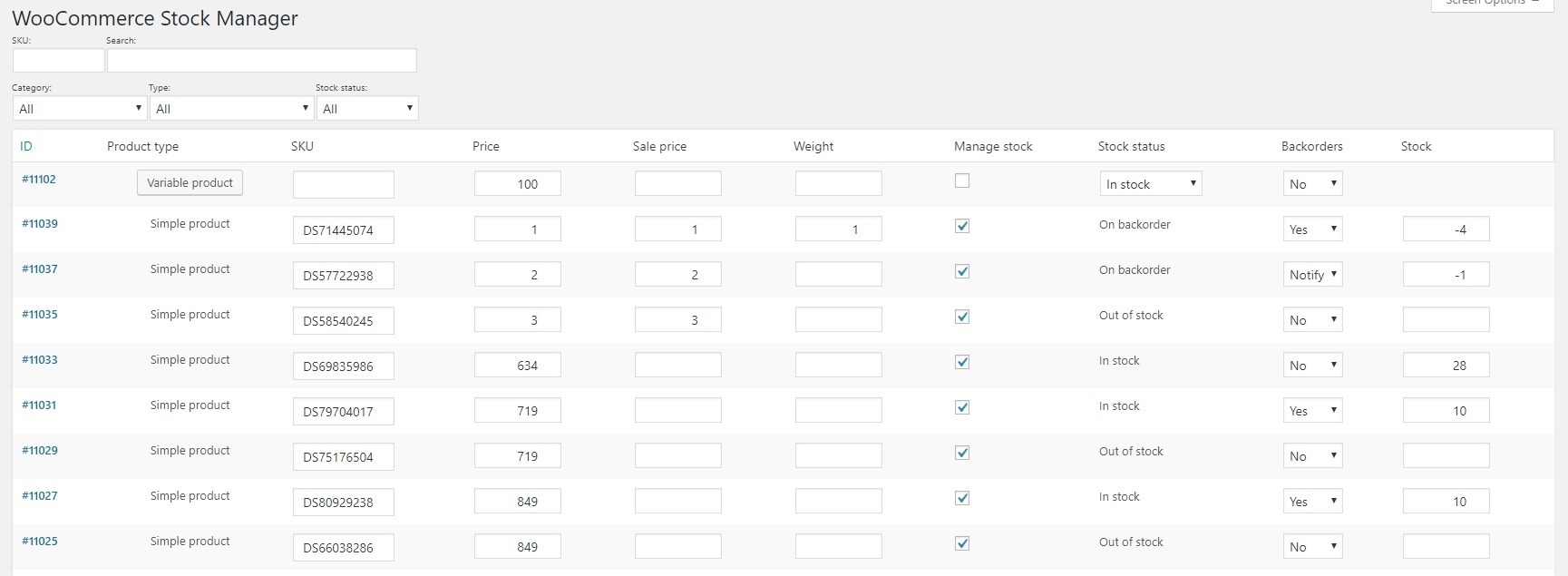
Stock Manager for WooCommerce is a free plugin that allows you to easily manage your product stock and variations. With features like table editing, inline editing, and stock history, you can efficiently update and track your inventory. You can also import and export stock data using CSV files.Screenshots


Frequently asked questions
What is Stock Manager?
Stock Manager is a powerful WooCommerce stock management plugin that allows you to manage product stock and their variations from one screen.
Is Stock Manager free to use?
Yes, Stock Manager for WooCommerce plugin is completely Free to use. There's no paid or Pro version of this plugin.
What features does the Stock Manager dashboard provide?
The Stock Manager plugin provides a dashboard to view all product stock and inventory information details at one place. Some of the features include table editor, inline edit, stock and price management, support for all product types, admin columns, pre-defined search filters, view product thumbnail image, and edit variations for variable products.
Does Stock Manager provide a stock log page?
Yes, Stock Manager for WooCommerce plugin provides a Stock log page, wherein you can see each product's stock history. This helps you track the stock movement for each product.
Can I import/export stock data with Stock Manager?
Yes, you can export all stock data of your shop, edit them, and import back with a CSV file. Please note that this feature needs refactoring, so use it at your own risk.
Changelog
3.2.0 (26.11.2024)
- New: WordPress 6.7.1 compatible
- New: WooCommerce 9.4.2 compatible
- Fix: Internationalization related warnings on WordPress v6.7
- Fix: CSV export fails when WooCommerce Product title contains ‘#’
- Update: POT file
3.1.0 (18.07.2024)
- New: WordPress 6.6 compatible
- New: WooCommerce 9.1.2 compatible
- Fix: Stock Manager page loading blank screen on WordPress 6.6+
- Fix: Creation of dynamic property Stock_Manager_Admin::$page and Stock_Manager_Admin::$product_id are deprecated in PHP v8.0.0+
- Fix: Export functionality not exporting all products in Import/Export page
- Update: POT file
3.0.0 (01.08.2023)
- New: Declare Stock Manager for WooCommerce compatible with High-Performance Order Storage (HPOS)
- New: WooCommerce 7.9.0 compatible
- New: Access Stock log page from product list and edit page (Thanks to Eric Caron)
- Update: POT file
2.11.0 (14.06.2023)
- New: WordPress 6.2.2 compatible
- Fix: [In App Offer] Not respecting the UTC start and end dates
- Fix: Strengthen security for CSRF vulnerability [Thanks to Patchstack team]
- Update: Remove Settings sub-menu page
- Update: License version
- Update: POT file
2.10.0 (10.11.2022)
- New: WooCommerce 7.0.1 compatible
- New: WordPress 6.1.0 compatible
- Fix: PHP Fatal Error: Call to undefined function wp_set_script_translations()
- Update: POT file
2.9.0 (20.10.2022)
- New: WooCommerce 7.0.0 compatible
- New: WordPress 6.0.3 compatible
- Update: Readme file changes
- Update: POT file
2.8.3 (18.11.2021)
- New: WooCommerce 5.9.0 compatible
2.8.2.1 (25.10.2021)
- Fix: Check if current page is of Stock Manager
- Update: POT file
2.8.2 (22.10.2021)
- Update: Product type column UX on Stock log page
- Update: POT file
2.8.1 (15.10.2021)
- New: WooCommerce 5.7.1, 5.8.0 compatible
- Fix: Pagination not working on Stock log page
- Update: Stock Manager menu position
- Update: StoreApps Plugins page
- Update: POT file
2.8.0 (17.09.2021)
- New: WordPress Coding Standards
- Fix: Variation product link not opening parent variable product on Stock log page
- Fix: Incorrect plugin slug and text domain at few places
- Fix: Plugin name broken in admin footer text on Stock Manager pages
- Update: Check product instance before calling product functions
- Update: Stock log page
- Update: Removed unused code
- Update: POT file
2.7.0 (03.09.2021)
- New: WooCommerce 5.4.2, 5.5.1, 5.6.0 compatible
- New: WordPress 5.8.0 compatible
- Fix: Unique action name for ‘Export’ to avoid conflicts
- Fix: Prevent exposure of export data [Thanks to WordPress.org team]
- Update: Strengthen security during export and subscribe process [Thanks to WordPress.org team]
- Update: Automate versioning
- Update: Code cleanup
- Update: Plugin name
- Update: POT file
2.6.0 (28.05.2021)
- New: WooCommerce 5.2.2, 5.3.0 compatible
- Update: Strengthen security during import process [Thanks to: Chloe Chamberland | Wordfence]
- Update: POT file
2.5.7 (03.04.2021)
- Fix: ‘Cannot modify header information – headers already sent’ in some cases
- Fix: jQuery error
- Update: POT file
2.5.6 (26.03.2021)
- Update: Admin footer text for Stock Manager pages
- Update: Code Improvements
- Update: POT file
2.5.5 (19.03.2021)
- New: WooCommerce 5.0.0, 5.1.0 compatible
- New: WordPress 5.7.0 compatible
- Fix: PHP Fatal error: Call to a member function set_sku() on bool when importing products via CSV
- Fix: jQuery ‘ready’ event is deprecated
- Update: Column names on Import/Export page
- Update: POT file
2.5.4 (29.01.2021)
- New: WooCommerce 4.8.0, 4.9.2 compatible
- New: WordPress 5.6.0 compatible
- Fix: Updating stock for External/Affiliate product killing the Stock Manager page
- Fix: Incorrect text domain at few places
- Update: POT file
2.5.3 (21.11.2020)
- New: WooCommerce 4.7.0 compatible
2.5.2 (28.10.2020)
- New: WooCommerce 4.6.1 compatible
- Fix: variation_data was called incorrectly error when exporting CSV
- Update: Admin menu name
- Update: POT file
2.5.1 (07.10.2020)
- Fix: Price, Sale Price & Weight getting set to blank when importing CSV
- Fix: Minor fixes
2.5.0 (03.10.2020)
- Update: Compatibility with latest version of WordPress & WooCommerce
- Fix: Clicking on ‘Variable product’ in case of variable products breaking the Stock Manager page
- Fix: Import CSV not updating products
- Fix: Warnings related to insert into ‘stock_log’ table
- Fix: Minor fixes
2.4.0 (07.08.2020)
- New: WooCommerce 4.3.1 compatible
- New: Provision to show/hide ‘SKU’ column
- Fix: ‘Create export File’ not exporting all the products in the generated CSV
- Update: Title to product thumbnail column
- Update: Disable autoload of few options
- Update: Product icon
- Update: POT file
2.3.0 (20.06.2020)
- Fix: Product Variation thumbnail not loading in dashboard
- Update: Updated POT file
- Fix: Minor fixes
2.2.0 (06.06.2020)
- Update: Compatibility with latest versions of WordPress & WooCommerce (v4.2+)
- Update: Product low stock handling as per WooCommerce low stock threshold setting
- Update: Stock Manager menu position
- Fix: Default delimiter not set to “,” for Export CSV
- Fix: Product variation Id displaying as blank in exported CSV
- Fix: Dashboard going blank after enabling the ‘thumbnail’ column in some cases
- Update: Updated POT file
2.1.1 (02.05.2020)
- Update: Added stock related columns in the dashboard by default
- Update: Compatibility with latest version of WooCommerce
- Update: Added option for ‘No Shipping Class’ for ‘Shipping Class’ product field
- Fix: ‘Sale Price’ product field showing as blank in case of ‘0’ value
- Fix: Table headers of the Stock Manager dashboard table not translating
- Update: Updated POT file
2.1.0 (06.04.2020)
- New: New contributor’s name added
- New: Added POT file
- Update: Display the date in localized format in Stock log history
- Update: Removed language specific translation files
Earlier Versions
For the changelog of earlier versions, please refer to the separate changelog.txt file.

