

Just another contact form plugin. Simple but flexible.
About Accept Stripe Payments
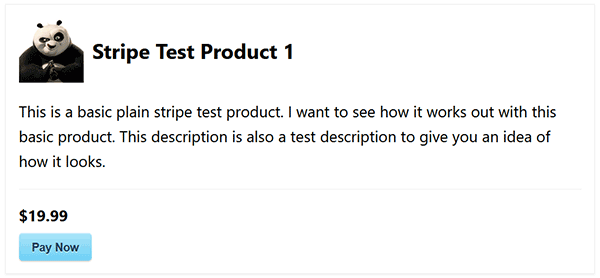
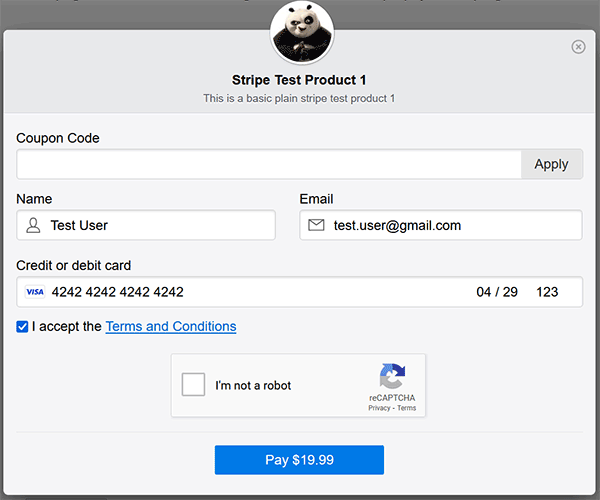
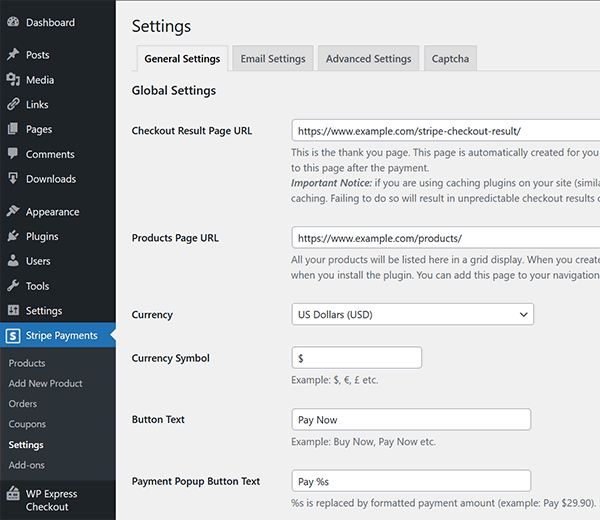
The Stripe Payments plugin for WordPress allows you to easily accept credit card payments and donations on your website. It offers features such as one-click payments, responsive design, and the ability to view and manage payments from your WordPress dashboard. Setting up the plugin is simple and it provides detailed documentation for further guidance.Screenshots
Frequently asked questions
What is the primary function of the Accept Stripe Payments plugin?
The Accept Stripe Payments plugin allows you to easily accept credit card payments via the Stripe payment gateway on your WordPress site. You can add Stripe 'Buy Now' buttons anywhere using a shortcode or block, and it also supports donations.
How does the plugin handle customer payment information and security?
Credit card details are never stored by the plugin or your site. All payments are processed directly by Stripe and securely stored in your Stripe account, utilizing their state-of-the-art security measures.
What happens after a customer completes a payment?
After completing a payment, customers are automatically redirected to a 'Thank You/Checkout Result' page where they can view detailed information about their transaction, including the purchased item.
Can I sell digital products with this plugin?
Yes, you can sell files, digital goods, or downloads such as music, video, ebooks, or PDFs using your Stripe merchant account.
How are transactions managed within WordPress?
All transaction details are securely recorded in the plugin's 'Orders' menu. You can conveniently review and manage your payments and orders directly from your WordPress admin dashboard.
Changelog
2.0.90
- Resolved an issue with the newly added ‘Use Separate Name Fields’ option when used alongside the ‘Prefill Logged In User Name and Email’ settings.
- Moved the payment popup related options to the Advanced settings menu of the plugin.
- Added the following new email merge tags:
{item_description}, {download_url}, {product_url}
2.0.89
- Stripe API version updated to the latest version (2024-12-18.acacia).
- Added a new option to display security badge and message on the payment popup window.
- Added a new filter hook ‘asp_ng_pp_security_message_content’ to allow customization of the secure badge content.
2.0.88
- Introduced a new option in the Advanced Settings menu to display the “First Name” and “Last Name” fields as separate entries on the checkout/payment form.
- The Orders menu in the plugin now displays the customer’s name within the “Customer Details” section of each order.
- The tax amount for a transaction is now passed to Stripe via the metadata field.
- Added a new action hook ‘asp_stripe_process_ipn_error’ to allow custom handling of IPN error.
- Updated the update checker addon to be PHP 8.3 compatible.
- Fixed the incorrect use of a sanitization function for the customer name in the dynamic product shortcode.
- Added a 3rd parameter to the ‘shortcode_atts’ function of the ‘accept_stripe_payment_ng’ shortcode to allow further customization.
- The default ‘Thank You’ page shortcode has been enhanced to display additional checkout details.
2.0.87
- Updated the help text of the “Send Emails in Parallel” feature to explain that this feature is not recommended for most sites as it can have conflict with some server environments.
- Minor adjustment – for trial subscriptions product, the encode function is not used on the email input field.
- Sanitization added to accept_stripe_payment_ng shortcode params.
2.0.86
- Added a new surcharge feature that you can use to collect a transaction surcharge. documentation for transaction surcharge
- Added new email merge tags {surcharge_total_amt} and {surcharge_label} to show surcharge data in the email body.
- Added a new filter hook (asp_ng_pp_extra_output_before_closing_body) in the payment popup window to allow adding custom HTML content before the closing body tag.
2.0.85
- The order item will capture and display the username of the logged-in user, provided the user is logged in at the time of the purchase.
- Added new email merge tag {logged_in_user_name} to capture logged in user’s username (if available).
- Added new filter ‘asp_get_logged_in_user_info’ to allow customization of the logged in user info.
- Scaled down the reCAPTCHA badge size using CSS for better mobile screen compatibility.
- Updated the language translation POT file.
- Fixed a price validation bug for checkbox type variation.
2.0.84
- Added a new option to customize the payment button text (in the popup window) on a per product basis.
- Added support for ‘coupon_code’ query param to apply coupon directly in the product link url feature.
- Corrected the issue causing an error when a product is created or updated with an empty variation group.
- Regional tax variation deletion issue fixed.
- Added support for Custom Fields Addon’s new fields position feature.
- Added an API pre-submission amount validation function.
2.0.83
- Fixed a recent PHP8 related change that caused an issue in the download URL function.
2.0.82
- Fixed an issue with the coupon code delete function.
- Added a new utility function to retrieve the current page URL.
- New action hook in the payment popup window.
2.0.81
- The currency mismatch error message won’t be displayed when the product is configured to use a variable currency.
2.0.80
- Added a currency check when the create payment intent request is made.
- Added more sanitization to the billing_details object data.
2.0.79
- New shortcode to show available quantity of a product: [asp_available_quantity id=”123″]
- Better handling for zip/postal code (when it contains empty space character).
- Some php deprecated warnings has been fixed.
- Fixed a PHP 8.2 related warning.
- Updated the language translation POT file.
2.0.78
- Refactored some lines of code to remove the use of deprecated FILTER_SANITIZE_STRING filter.
- PHP 8.2 compatibility.
2.0.77
- Settings UI improvement: the individual captcha configuration fields are now displayed above the transaction rate limiting section.
- New option (Don’t Use Cookie) in the advanced settings menu to disable the use of cookie.
2.0.76
- Improved the sorting by price option in the shop/products page.
- The coupon code option will be enabled by default for variable amount product as well. It can be disabled via the product specific coupon configuration.
- The custom field position for the legacy API option has been removed as it is no longer used.
- Added Bulgarian language option to the checkout language selection field.
2.0.75
- Sorting option added in the shop/products page via shortcode parameter.
- Visitors can also sort the products in the shop page by latest, sort by title, sort by price.
- Updated the integration with Simple Membership plugin.
Full changelog available at changelog.txt

