Multiple WordPress development tools focus on specific aspects of development, like creating local environments. But isn’t it frustrating juggling between multiple tools to build, deploy, and manage your WordPress websites?
If you’re a freelancer or agency owner drowning in a sea of plugins, WordPress code editor tools, and dashboards, then save yourself by getting InstaWP.
InstaWP promises to be your all-in-one solution, streamlining your entire workflow from building to managing your WordPress sites. The platform offers features like local development, staging, version control, and deployment.
It won’t be an overstatement to say that InstaWP is the only WordPress development tool among many tools with a dedicated and complete toolset.
But how can it alone replace all the other tools? Let’s explore InstaWP’s features and see how it is your one-stop shop for WordPress project delivery.
In this blog, you’ll understand the necessity of efficient project delivery in WordPress development, the essential features of a WP project delivery tool, and how InstaWP can become your best friend in WordPress project development.
Table of Contents
Understanding the Need for an Efficient Project Delivery in WordPress Development
Efficient project delivery matters so much in WordPress development for many reasons.
Everyone wants their websites up and running fast and efficiently. This is especially true for WordPress development, where the platform’s popularity creates a highly competitive environment.
Think of a project you’ve handled—work-related, personal, or community-driven. What factors led to its success or failure? Timely completion likely played a major role.
From client satisfaction to cost control and competitive advantage, there are many reasons why efficient delivery is crucial.
Challenges Faced with Project Delivery in WordPress Development
- Traditional development processes in WordPress are a hassle, involving manual tasks and repetitive actions that slow down project delivery.
- Setting up a new WordPress site involves configuring basic settings, installing plugins and themes individually, and customizing various elements like logos, fonts, and layouts.
- Customizing themes, choosing widgets, creating menus, and adding content all contribute to the time-consuming nature of WordPress development.
- Limited access and the risk of data loss are common challenges, especially when working on a local site where computer crashes or power issues can lead to lost progress.
- Collaboration is also tricky as sharing a local test site restricts others to viewing and commenting only, requiring tedious exporting and importing processes to involve team members.
- The performance gap between local and online environments when migrating code from development to production is a true struggle.
Why Efficient Project Delivery in WordPress Development is Crucial
Let’s have a look at why it is crucial to deliver projects timely:
- Client Satisfaction: You must be aware of how important it is to keep your client happy. According to PwC, about 97% of organizations agree that good project management is crucial for keeping clients satisfied.
- Reduced Costs: Have you ever heard of the saying “time is money”? This is true in the case of project delivery. PMI found that for every billion dollars invested, companies waste a big amount of $122 million due to poor project performance. But with efficient project delivery, you can avoid those cost overruns and keep your budget in check.
- Competitive Advantage: McKinsey & Company found that companies with effective project management practices are 2.5 times more likely to achieve their goals. So, by delivering projects efficiently, you’re not just meeting deadlines; you’re also outperforming your competitors.
- Resource Optimization: Standish Group’s CHAOS Report found that only 36% of projects are completed on time and within budget. Efficient project delivery helps organizations optimize resources by aligning project timelines with available resources.
- Risk Mitigation: Projects come with risks, but don’t worry, PMI’s Pulse of the Profession report found that high-performing organizations successfully complete 89% of their projects. How? By identifying and addressing risks throughout the project. Efficient delivery keeps those risks in check and ensures smooth navigation.
- Faster Time-to-Market: The quicker you can deliver a high-quality website, the sooner your client can reap the benefits of their online presence. This can lead to increased sales, lead generation, and brand awareness.
- Market Saturation: With WordPress powering over 43% of all websites as per W3Techs Web Technology Surveys, clients have a wide range of options. Delivering projects on time and within budget sets you apart from the competition.
Investing in efficient project delivery isn’t just about convenience; it’s a strategic advantage. Implementing robust project management tools and processes ensures your WordPress projects are completed successfully, on schedule, and within budget. This translates to happy clients, a thriving business, and the ability to scale your operations effectively.
What must your WP Project Delivery Tool do?
Ever wondered what makes a project delivery tool truly exceptional for your WordPress site?
Your project delivery tool should be your buddy, helping you navigate the complexities of WordPress management with ease.
From testing new features to ensuring easy and quick hosting, the right tool can make all the difference. So, let’s dive into what the tool should do to tackle all your pain points:
Provide a Staging Environment
Your project delivery tool should be like a backstage area for your project, allowing you to test changes, experiment with new features, and adjust designs before launching them live. A tool with a staging environment lets you do just that.
Imagine having a safe space to play around with themes, plugins, and content without impacting your actual website. This is exactly what a staging environment offers: peace of mind and the assurance that everything works smoothly before you make it public.
Has advanced tools for developers
A powerful tool goes beyond basic functionality–packed with advanced tools to make developers’ lives easier. From built-in debugger to version control integration, it should empower developers to write clean, efficient code and streamline their development workflow, making development a breeze.
Allows quick hosting
Speed is the key when it comes to hosting your WordPress site. A tool must offer quick and easy hosting that ensures your site loads quickly, keeping visitors engaged and satisfied. Whether it’s shared hosting, VPS, or cloud hosting, quick and reliable hosting is non-negotiable.
Helps in Site Management
Managing multiple WordPress sites is a pain when you struggle with managing things manually and separately. Features like bulk editing, cloning, and one-click updates should be in just a snap, making site management at ease.
Imagine updating plugins or themes across all your sites with just a few clicks or creating a duplicate of a successful website as a starting point for your next project. It can save hours of your repetitive tasks.
Automate WordPress Development
Tired of the traditional development process? Imagine if your project delivery tool does more than just deliver; it helps build your WordPress site from scratch. This is where WaaS (Website as a Service) comes in.
With WaaS, you can leverage pre-built templates, automated workflows, and drag-and-drop functionalities to streamline your development process. Here, automation takes center stage, handling everything from setup to maintenance so you can focus on what really matters—creating amazing content and engaging with your audience.
Enables simple Migration between any 2 hosting providers
Moving your WordPress site from one hosting provider to another can be a daunting task. But with a good WP project delivery tool, you can do it in just a snap. The tool should offer features enabling simple migration between hosting providers.
This gives you the flexibility to switch providers without worrying about data loss or downtime. Isn’t it amazing to seamlessly transfer your entire website with just a few clicks, ensuring a smooth transition?
Introducing InstaWP: Your Ultimate WordPress Project Delivery Tool
By now, you must have clarity about lots of things related to WordPress development tools, the challenges, and requirements.
When you seek the perfect WP project delivery tool in WordPress development, using multiple tools for different tasks and juggling between them is frustrating. And this is why developers, designers, and freelancers prefer InstaWP.
InstaWP: Features and Functionalities at a Glance
InstaWP—a game-changer in the WordPress development environment- is a platform that is all about making development faster and simpler than ever before.
InstaWP offers powerful features that transform WordPress development, making it the ultimate choice.
With its intuitive interface and powerful features, InstaWP eases out the website creation, allowing developers to build and launch WordPress sites in just a few clicks. It also excels at creating staging environments in the cloud, giving developers the perfect place to test changes and updates before they go live.
It’s no wonder why InstaWP is the go-to choice for WordPress developers everywhere, offering personalized solutions, expert guidance, seamless integration, and top-notch customer service.
How to Use InstaWP to Deliver Your WordPress Project Efficiently
Follow this step-by-step guide to learn how to use InstaWP to build, customize, and deliver WordPress projects efficiently.
Effortless Staging
Create staging environments with just a few clicks. InstaWP allows you to create your website from scratch or clone your live site and make changes in a secure sandbox before making them live.

Step 1. Login to your InstaWP dashboard.
Start with logging in to your InstaWP dashboard. If you do not have an InstaWP account, create one by quickly registering yourself on the InstaWP platform.
Step 2. Creating Your First Staging Site
Once logged in, click on the “Create Your First Staging Site” button.
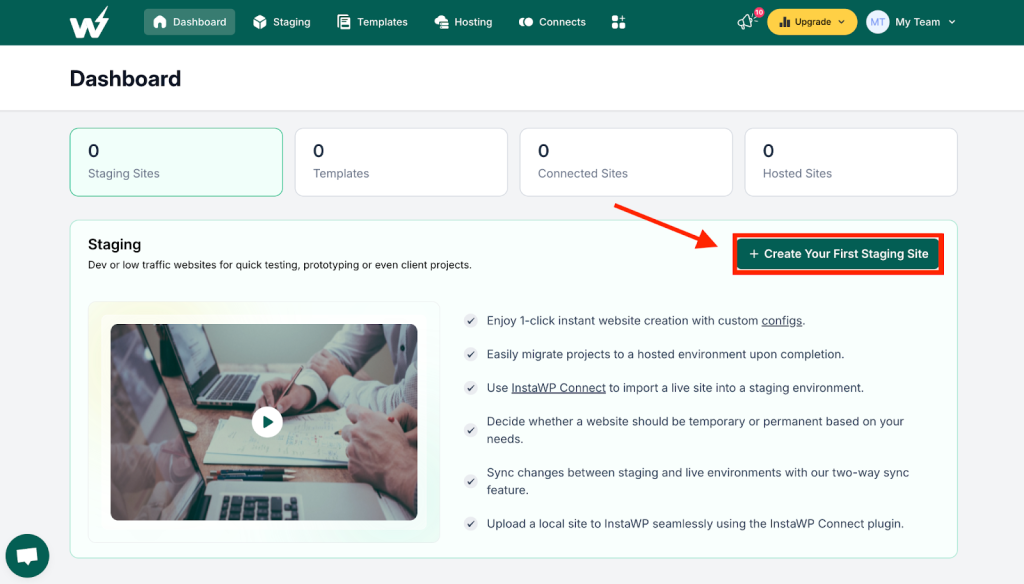
You can create the WordPress site from scratch with the existing templates.
To start, select From Scratch and follow the instructions.

You will get your brand-new WordPress staging site ready within seconds!
You can check the comprehensive guide here!
Advanced Developer Toolkit
After creating the site, you can manage and organize it by using various in-built tools to help improve your site’s structure. InstaWP allows you to easily integrate popular integrated development environments (IDEs) like VS Code and Sublime Text for effortless code editing and debugging directly within your preferred environment.
Step 3: Managing and editing your WordPress Site

Here is the complete guide to using the advanced developer tool kit!
Instant WordPress Hosting
Easy, quick, high-performance, and secure hosting for your development sites. With a few clicks, you can push your sites from staging to up and running in just a snap of your fingers.
InstaWP allows you to push any WordPress site to InstaWP hosting, any InstaWP hosting partner, or your trusted hosting providers.

Check the step-by-step guide to manage your hosting quickly!
Automated WordPress Development
WaaS features help you automate critical tasks like:
- Backups: Schedule automatic backups of your websites at regular intervals to ensure you always have a restore point in case of emergencies.
- Updates: Keep your WordPress core, themes, and plugins updated automatically to maintain the highest level of security and functionality.
- Security Patches: InstaWP automatically applies the latest security patches to your WordPress sites, protecting them from vulnerabilities and malware attacks.
Watch this video to set up your WaaS now.
Or explore this detailed guide to enable WaaS instantly!
Simplified Migration
Effortlessly migrate your WordPress sites between any two hosting providers using InstaWP’s intuitive migration tool. With just a few clicks, it allows you to migrate your entire site, including databases, themes, plugins, and content.
See this guide to migrate your website easily!
Cost-effectiveness and ROI of Using InstaWP
InstaWP promotes cost-effective website development. Without investing unnecessary cost, time, and resources into developing from scratch or getting someone to develop, you can leverage templates from InstaWP to design your site instantly.
Investing in InstaWP can significantly improve your return on investment (ROI) by:
- Reduced Development Time: Streamlined workflows and automation features lead to faster project completion times.
- Less or No Errors: Consistent staging environments and automated tasks reduce the risk of errors during development and deployment.
- Improved Client Satisfaction: Faster project delivery and fewer bottlenecks lead to happier clients.
- Scalability and Growth: InstaWP can handle multiple projects efficiently, allowing you to scale your development business.
Implementing InstaWP as Your Only WordPress Project Delivery Tool
Here’s a quick guide to implementing InstaWP for efficient and quick project delivery:
- Sign Up for a Free Trial: InstaWP offers a free trial to explore all its features before committing.
- Connect Your WordPress Sites: Link your existing WordPress sites to your InstaWP account.
- Explore the Features: Get familiar with the various tools and functionalities offered by InstaWP.
- Start Building & Migrating: Begin developing new projects and migrate existing ones using InstaWP’s intuitive interface.
Conclusion
InstaWP, as a WP project delivery tool, is a game-changer for any WordPress developer and agency looking for a one-stop solution to manage their WordPress development and deliver projects efficiently.
By leveraging InstaWP, you can save time, minimize errors and costs, deliver high-quality WordPress projects, and scale your business efficiently.