

Improve your WordPress SEO: Write better content and have a fully optimized WordPress site using the Yoast SEO…
About Customizer for WooCommerce
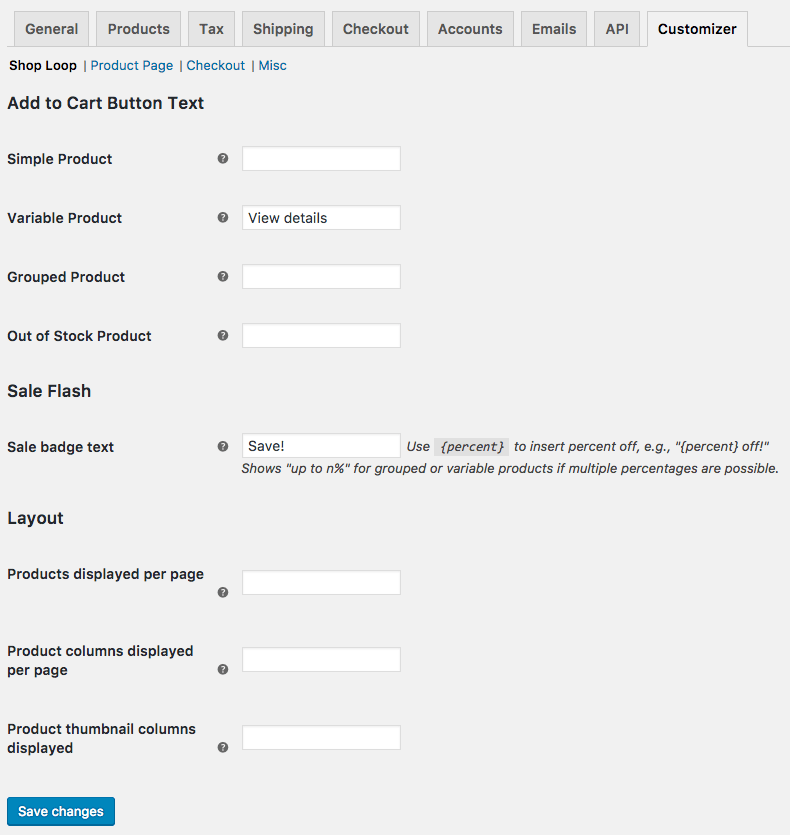
This plugin allows you to customize various elements in your WooCommerce store without needing to write any code. You can change button text, labels, and more, and easily save your customizations. It is compatible with WooCommerce 3.9.4 and above. Please note that it does not support being network activated on multisite. Support for this free plugin is available through the forums.Screenshots
Frequently asked questions
What is Customizer for WooCommerce?
Customizer for WooCommerce is a WordPress plugin that allows you to customize various aspects of your WooCommerce store without writing any code. It provides a settings page where you can add and save your customizations.
What kind of customizations can I make with this plugin?
You can customize elements like Add to Cart button text, sales badge text, the number of products displayed per page, heading text for product tabs, and various checkout page texts and options. It also allows changes to tax label text and placeholder image source.
How do I access the customization options?
To make changes, navigate to WooCommerce > Settings and then view the "Customizer" tab within your WordPress admin area.
Does this plugin support multisite installations?
This plugin does not support being network activated on multisite. To use it on a multisite network, you must activate the plugin individually on each site.
What are the support terms for this plugin?
Support is provided for free plugins and extensions, though premium product support takes priority. Forums are typically checked every few days, with a maximum delay of one week.
Changelog
2024.10.29 – version 2.9.0
- Fix – Avoid deprecation notice in PHP 8.2+ for dynamic property
- Misc – Add support for WooCommerce 9.3.3
- Misc – Add support for WordPress 6.6.2
2023.07.28 – version 2.8.0
- Misc – Add compatibility for WooCommerce High Performance Order Storage (HPOS)
- Misc – Require PHP 7.4 and WordPress 5.6
2022.07.31 – version 2.7.7
- Misc – Rename to Customizer for WooCommerce
2022.03.02 – version 2.7.6
- Fix – Remove image placeholder (this is included in WC 3.5+)
2022.03.01 – version 2.7.5
- Misc – Require WooCommerce 3.9.4 or newer
2020.05.04 – version 2.7.4
- Misc – Add support for WooCommerce 4.1
2020.03.10 – version 2.7.3
- Misc – Add support for WooCommerce 4.0
2020.02.05 – version 2.7.2
- Misc – Add support for WooCommerce 3.9
2019.11.11 – version 2.7.1
- Misc – Add support for WooCommerce 3.8
2019.08.15 – version 2.7.0
- Misc – Add support for WooCommerce 3.7
- Misc – Remove support for WooCommerce 2.6
- Misc – Require WordPress 4.4+
2019.06.12 – version 2.6.1
- Misc – Declare WooCommerce 3.6 compatibility
2018.07.17 – version 2.6.0
- Feature – Added backorder text customization on product pages (props @sandysaille!)
- Feature – Added out of stock text customization on product pages (props @sandysaille!)
- Feature – Change bundle product add to cart text with WooCommerce Product Bundles (props @DaisukiDaYo!)
- Misc – Requires WooCommerce 2.6.14
2.5.1
- Tweak – Hook customizations later to be more aggressive about using WC Customizer values rather than filters from other plugins or themes
2.5.0
- Feature – Added sales badge text customization
2.4.0
- Fix – Image placeholder replacements are only shown in the shop, not in the WP admin
- Localization – Includes Persian translation, props Saakhtani team!
- Misc – Added support for WooCommerce 3.0
- Misc – Removed support for WooCommerce 2.4
2.3.1
- Fix – Fixes “headers already sent” error if WooCommerce is out of date
2.3.0
- Misc – Added support for WooCommerce 2.6
- Misc – Removed support for WooCommerce 2.3
2.2.0
- Misc – Added support for WooCommerce 2.5
- Misc – Removed support for WooCommerce 2.2
2.1.1
- Misc – Standardize the translation string
2.1.0
- Misc – WooCommerce 2.3 Compatibility
2.0.1
- Fix error when upgrading to WooCommerce 2.2
2.0.0
- Added Checkout “Create Account” checkbox default customization
- Added Placeholder image source customization
- Moved settings to WooCommerce > Settings > Customizer
- WooCommerce 2.2 Compatibility
- Localization – Text domain changed from
wc-customizertowoocommerce-customizer
1.2.1
- Fix missing compatibility class error
1.2
- Fix issues with add to cart button text customizations in WooCommerce 2.1
1.1.1
- WooCommerce 2.1 Compatibility
1.1
- Refactor to support the upcoming WooCommerce 2.1 beta
- Localization – Text domain changed from
wc_customizertowc-customizerand loaded properly oninithook
1.0.1
- Add two new filters for customizing the Product Description and Additional Information tab titles
- Fix TipTips on Customizer page
1.0
- Initial release

