

Improve your WordPress SEO: Write better content and have a fully optimized WordPress site using the Yoast SEO…

About Media File Renamer: Rename Files (Manual, Auto & AI)
Media File Renamer is a WordPress plugin that automatically renames your media files for better SEO and organization. It offers suggestions using AI and allows for manual changes. The Pro Version includes additional features like AI Vision and bulk file movement. It is important to take precautions and make backups before using the plugin, and if issues arise, there is an undo feature and support page for assistance. Alternatively, if you only need a simple field to modify filenames, the Phoenix Media Rename plugin is also recommended.Screenshots
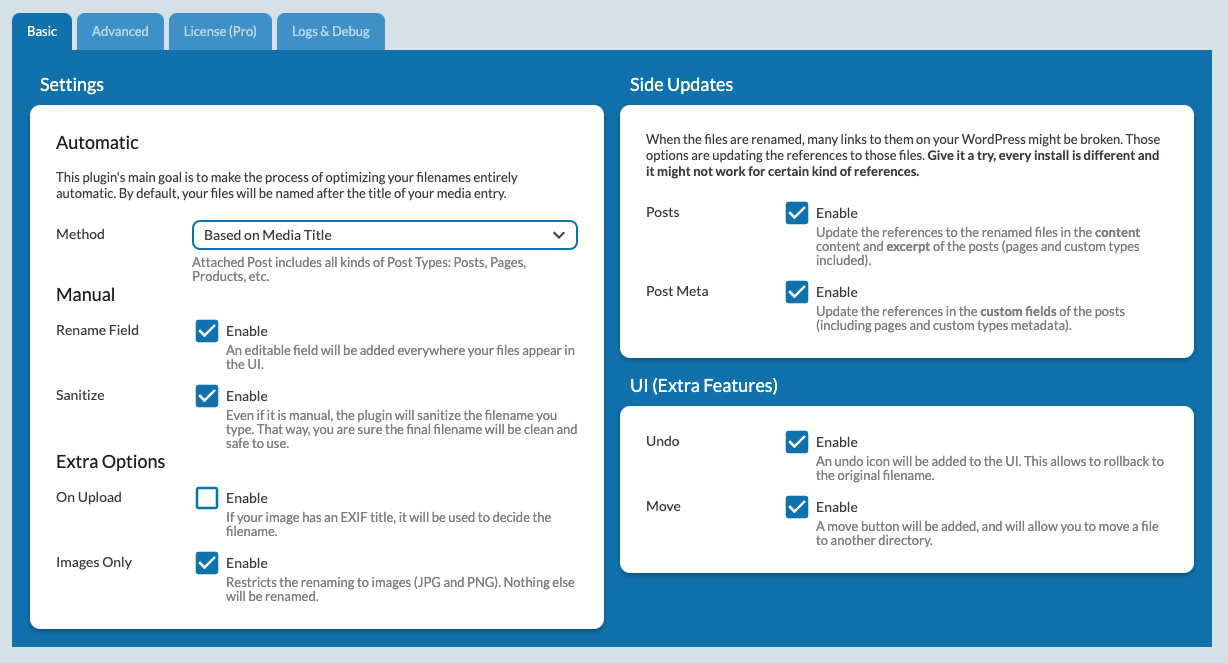
Frequently asked questions
How does Media File Renamer work?
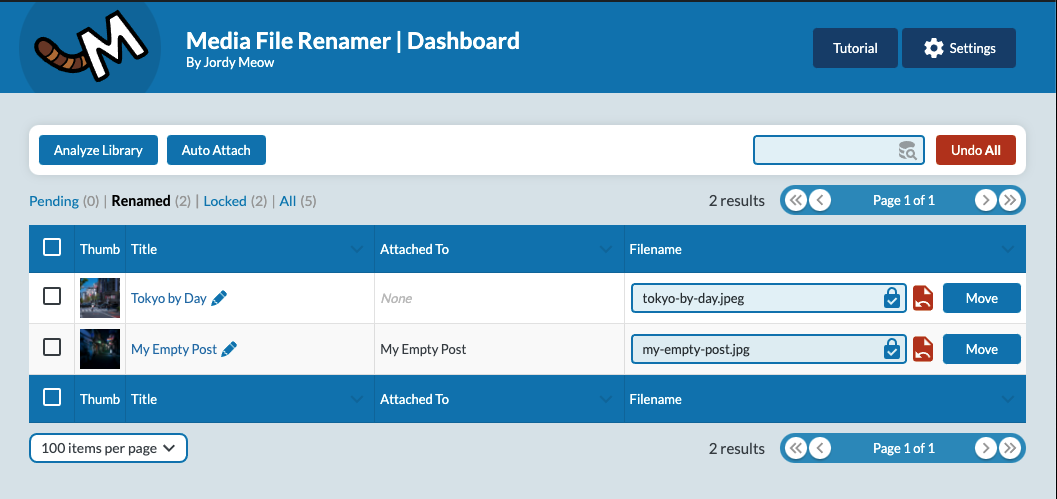
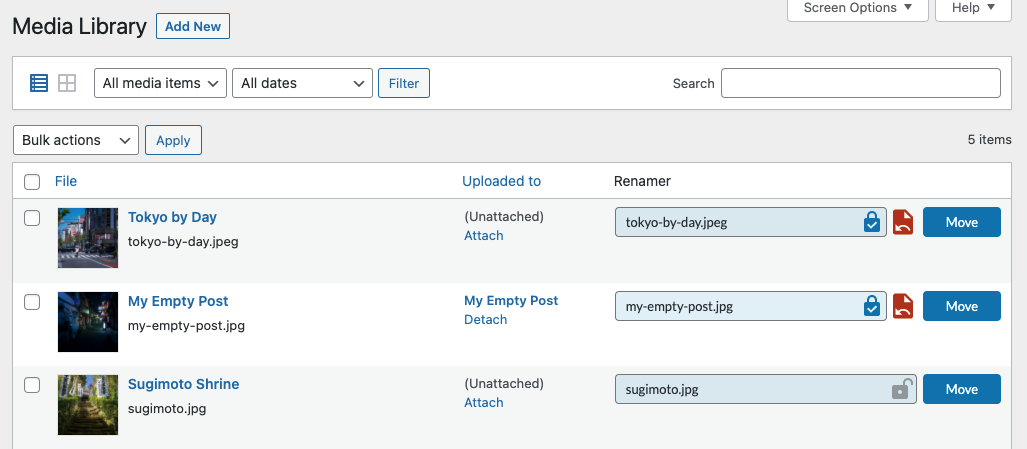
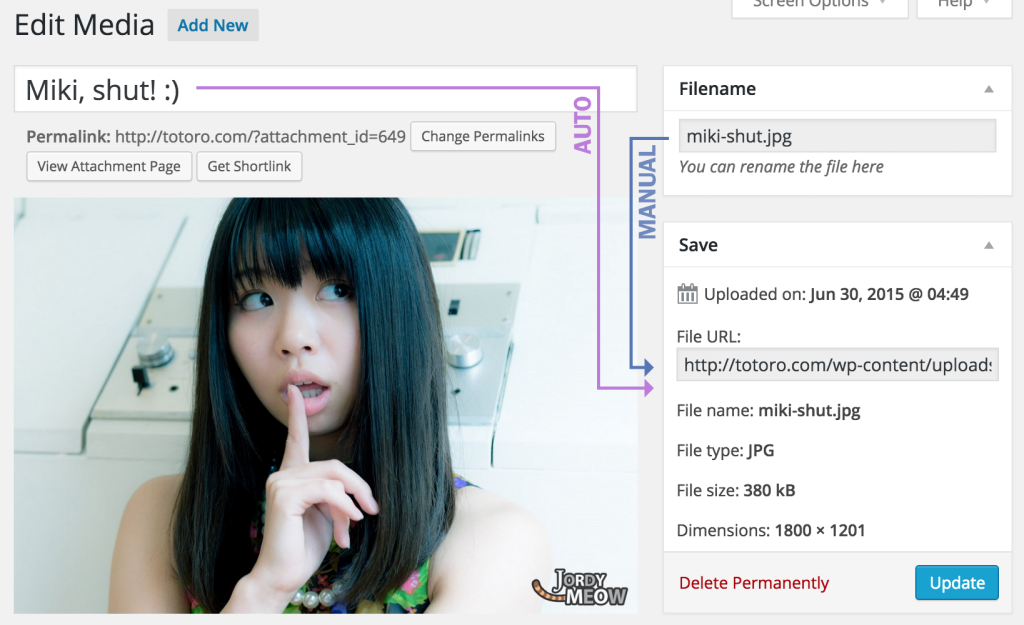
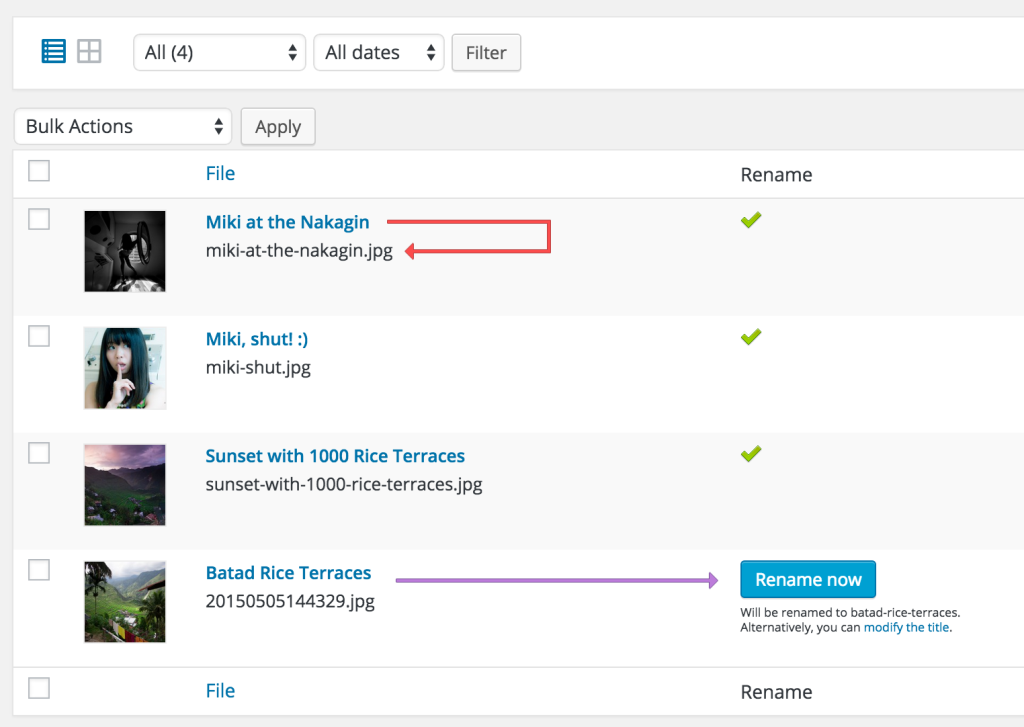
By default, it automatically renames your media filenames based on their titles every time you modify them. But you can also manually rename files and update references to them throughout your site, including posts, pages, custom post types, and metadata. The best way to use the plugin is through the sleek and dynamic Renamer Dashboard, which makes it easy to work efficiently and effectively.
What compatibility does Media File Renamer have?
Media File Renamer works seamlessly with many features of WordPress and other plugins, including Retina files, WebP, rescaled images (since WP 5.3), PDF Thumbnails, UTF8 files, optimized images, and more. It can handle a wide variety of encoding cases, making it a reliable tool for organizing your media library. There are a few page builders, like Avia Layout Builder, that currently do not allow Media File Renamer to rename images used in their posts due to encryption. However, we are actively seeking out solutions to this issue and are committed to providing users with the ability to rename these images if they desire.
What features are included in the Pro Version of Media File Renamer?
In the Pro Version, you'll find many exciting features including automatically renaming files based on attached posts, products, or ALT texts, AI Suggestions (via AI Engine and OpenAI), anonymizing files with anonymous filenames, moving files to different directories in bulk, syncing metadata like ALT texts and titles, numbering files to allow for similar filenames, attaching media entries to the posts or pages they're used in, using the Force Rename feature to re-link broken media entries to your files, and advanced transliteration that handles accents, emoticons, umlauts, cyrillic, and more.
What precautions should be taken when using Media File Renamer?
Renaming or moving files can be a risky process, which is why it's important to take precautions. Before renaming your files in bulk, try renaming them one by one to make sure the references in your pages are updated properly. It's worth noting that some plugins may use unconventional methods to encode file usage, which could cause issues with the renaming process. To ensure the safety of your files and database, it is crucial to make a backup before using Media File Renamer to its full extent. Protect your valuable media by taking these precautionary measures. If you notice any issues with your website after renaming your media files, try clearing your cache. Cached HTML can often hold onto old references, so this simple step can often resolve any issues. If you're still experiencing problems, you can use the Undo feature to roll back to the previous filenames. If you're having trouble updating references or have any other questions, please check out the support threads on our website. We're always working to cover more use cases and improve the plugin.
What other options are available for renaming media files?
If you only need a simple field in order to modify the filename, you can also try Phoenix Media Rename. It's simpler and just does that.
Changelog
6.0.6 (2025/02/17)
- Add: Introduced CLI commands (info, unlock, lock, lock_all) for better automation.
- Add: Added the mfrh CLI command to simplify Media File Renamer usage.
- Add: Implemented AI Vision support for media resync to enhance automation.
- Fix: Handled fatal errors in Vision queries for improved stability.
- Fix: Resolved force rename issues, improved meta warnings, and refined sensitive file checks.
- Update: Added filters for on-upload sync fields to improve customization.
- ? Please share some love here by writing a review. It really helps! Thank you!
6.0.5 (2025/01/04)
- Fix: Force Rename was not working properly.
- Update: Refactored History, and enhanced its UI.
- Fix: Renaming on Attachment Update enhanced, with an option for it.
- Fix: Translation issues resolved.
- Fix: Status in the Parsers.
- Add: New field to test the filename rules.
6.0.4 (2024/12/22)
- Add: Tooltip messages for auto rename methods in the renamer component.
- Add: Message displayed before “Auto” when no rename methods are selected.
- Update: Parser settings UI with a toggle functionality and improved design.
- Update: Moved Builders from Side Updates to Parsers for better organization.
- Fix: Sanitized options on script load and ensured parsers are updated with defaults.
- Fix: CSS regenerated for Elementor Parser to resolve formatting issues.
- Update: Disabled the AI Vision option instead of hiding it for clarity.
6.0.3 (2024/12/09)
- Add: Support for new parsers.
- Add: Parser for Elementor.
6.0.1 (2024/11/04)
- Add: Renaming of the PDF thumbnails.
- Add: Little enhancements.
- Update: Better logging.
- Fix: Optimized IDs retrieving for bulk queries.
6.0.0 (2024/10/18)
- Add: New “Hide Locked” option.
- Fix: Toggle Lock works better.
- Update: Enhancement related to warnings, and server-related issues.
- Fix: Avoid history to crash the UI if it’s null.
- ? Don’t hesitate to join our Discord Channel.
5.9.8 (2024/09/18)
- Update: Enhanced locking system.
- Fix: Minor issues.
5.9.7 (2024/08/11)
- Fix: Removed lodash dependency for better compatibility with other plugins using it.
- Fix: Make sure AI Engine is enabled before using it.
- Fix: Avoid writing logs if they are disabled.
5.9.5 (2024/08/08)
- Add: Options for Suffix & Prefix.
- Update: Better logging related to non-existent files.
5.9.4 (2024/08/01)
- Add: Better settings for AI.
- Update: Sanitize Manual enabled by default.
- Fix: Minor fixes in the admin, and internal improvements.
5.9.3 (2024/06/05)
- Update: Refresh the UI, and the common librairies.
- Fix: Potential issue during the plugin’s initialization.
5.9.2 (2024/05/24)
- Fix: Many fixes behind the scene, and how the filters are used.
- Update: Maintain casing on sync by Post Title and Alt.
- Update: Better logs.
5.9.1 (2024/04/27)
- Fix: Corrected metadata display issue when using AI suggest all feature.
- Fix: Resolved potential renaming loop triggered by “On Post Save” event.
- Update: Initialized core at “init” to ensure apply_filters functions correctly.
- Optimization: Removed unnecessary attributes from rename response.
- Fix: Fixed media retrieval filtering with a sub-request for improved accuracy.
5.9.0 (2024/04/06)
- Update: Better error messages.
- Fix: Issue with action_update_postmeta action.
- Fix: Issue with Sync Fields.
5.8.9 (2024/03/26)
- Update: Create five increasingly creative AI-generated filenames to ensure at least one is usable and available.
5.8.8 (2024/03/22)
- Add: New “EXIF Context” option to help AI Vision to understand better the context of the image.
- Fix: “On Save” option was not working properly.
- Fix: Better handling of errors.
- Fix: Better handling of mime types.
5.8.7 (2024/03/16)
- Add: AI Vision Cache for a faster and more efficient workflow.
- Add: Reset Metadata button to remove the renamed and lock status.
- Update: Huge improvement of the Settings, the Dashboard, and the Renamer Field.
- Update: On Upload works much better and is more reliable.
- Fix: Huge amount of little issues were corrected.
5.8.3 (2024/02/05)
- Add: New options for fields on upload, including indicators for new media.
- Add: Option to add logs to PHP logs for enhanced debugging.
5.8.2 (2024/02/02)
- Add: “On Upload Method” indicator on the media-new page for better clarity during uploads.
- Add: Auto Rename confirmation for improved user interaction.
- Add: Security enhancement with Force Rename on null values.
- Update: On Upload methods now specifically target Metadatas selected in Fields Sync, enhancing precision.
- Add: Caption Metadata for extended file information handling.
5.8.1 (2024/01/20)
- Fix: Async upload with AI Vision.
- Add: Import/Export Settings.
5.8.0 (2024/01/01)
- Fix: Issue with mfrh_media_renamed.
- Update: Enhanced UI with selection options for upload and improved AI prompts.
- Fix: Resolved issues in ‘Rename All’ AI functionality and fixed Sync selection.
- Optimization: Improved history features with new filters, styling changes, and history limit adjustments.
- Add: New renaming methods with NekoTabs, history tracking, and AI-enhanced renaming capabilities.
- Update: Streamlined settings with revised tabs for Manual, Auto, and AI, and better visual indicators for busy fields.
- Add: Additional media library field options and a new “Cancel” feature for manual renaming.
- ? Happy New Year!
5.7.8 (2023/12/25)
- Update: Tools related to AI got better.
- Fix: Little fixes and enhancements for some users.
- ? Merry Christmas!
5.7.7 (2023/12/05)
- Update: Enhanced UI, clarified options, unified things.
- Add: Bulk Rename using AI Vision.
- Add: AI Vision on Upload.
- Add: Not Renamed filter in Dashboard.
5.7.4 (2023/11/25)
- Update: Removed “mfrh_sync_media_meta” filter and added “mfrh_rewrite_title”. Enhanced code quality with cleaning and added more logs for sync functions.
- Add: Introduced Table filters (for media with no alt text, no description, no title) and improved display for empty metadata.
- Add: Added “mfrh_clean_upload” filter to customize the clean upload value.
- Fix: Removed “disabled” status on NekoModal to prevent log spamming.
- Update: Removed busyOverlay and upgraded the description field to a textarea for better input handling.
- Fix: Resolved an undefined function call issue in the API.
5.7.3 (2023/11/20)
- Add: Sync only for selected items and mfrh_sync_media_meta filter for post modification during syncing.
- Update: New modal for thumbnails with an “open in new tab” button, and enhanced auto-attach warning message.
- Fix: Adjusted the default behavior of sync functionality.
5.7.2 (2023/11/17)
- Add: AI suggestion now utilizes Vision for enhanced accuracy.
- Add: New “Clean Uploads” feature for efficient media management.
- Add: Magic Wand for Metadata Fields.
- Update: “Auto-Attach Media” feature now allows selection of target media entries.
- Update: Created Meow_MFRH_Engine class, consolidating renaming-related code.
- Update: Conducted various non-code related updates for improved performance.
- Fix: Resolved extension-related errors in thumbnails for better reliability.
5.7.1 (2023/10/19)
- Fix: The action_update_postmeta filter was not working properly.
- Fix: Missing buttons in the modals.
5.7.0 (2023/10/10)
- Update: For better confidentiality, the logs file is now randomly generated.
- Fix: Support of Windows servers.
5.6.9 (2023/09/21)
- Update: The Auto-Attach feature is a bit more robust when using Media Cleaner data.
5.6.8 (2023/09/14)
- Add: Auto-Attach feature now use the data from Media Cleaner (if available), which is extremely accurate!
- Fix: Random issues related to metadata not existing.
- Fix: Optimize the way the move feature works.
- Fix: Move didn’t handle the WebP and AVIF files properly.
- Fix: Was not possible to completely delete the filename to type it from scratch.
- Fix: When uninstalled, all the data used by the plugin is now removed properly.
5.6.6 (2023/07/21)
- Fix: Avoid warnings when the metadata isn’t found.
- Fix: Better handling of metadata synchronization.
- Update: Enhanced the UI of the Renamer Field.
5.6.5 (2023/06/21)
- Fix: Issue when automatic renaming was used with the related auto-lock.
- Update: Latest version of the UI.
5.6.4 (2023/06/02)
- Fix: Removed a few warnings.
- Fix: The paging issue.
5.6.3 (2023/05/30)
- Update: Trying to improve the UI based on your feedback. It might not please everyone, but I am trying to make it better. Please let me know if you have any idea.
- Fix: There were a few warning issues.
- Fix: There were some inconsistencies in the UI.
5.6.2 (2023/05/13)
- Add: Some issues with spacing in some buttons.
- ? I am struggling a bit to make the Dashboard UI nicer, if you have any idea, don’t hesitate to let me know via the Support Forums.
5.6.1 (2023/05/06)
- Add: We can now edit the ALT Text.
5.6.0 (2023/05/02)
- Add: ‘Attached To’ column is now hideable.
- Add: ‘ALT Text’ data now available if enabled in the options.
- Update: Minimized the size of the bundle.
5.5.9 (2023/03/18)
- Fix: Various fixes in the UI.
- Update: Latest UI framework.
5.5.8 (2023/03/13)
- Add: AI filename suggestions.
- Update: Added Unlocked instead of Pending (which was slowing-down the process and was not really useful). Let me know if you preferred it the other way.
5.5.7 (2023/02/09)
- Add: New option to disable the Dashboard.
- Note: A bit late on the support, it’s unusual, but very busy these days. I am also trying to gather the feedback/issues to fix them all at once in a good way. Thank you for your patience!
5.5.5 (2023/02/01)
- Update: Clean the dashboard a bit, depending on the options.
- Fix: Issue in the Media Library with the Renamer field.
- Fix: The Edit Title modal wasn’t working on ENTER.
5.5.4 (2023/01/29)
- Fix: Titting enter in the Edit Title modal wasn’t update with the new title.
5.5.3 (2023/01/27)
- Update: Better move features and cleaner UI.
5.5.2 (2023/01/06)
- Update: Slowly (but surely) separating the Rename mode from the Move mode. I will make the UI better and more adapted to the chosen mode. You will find the switch in the Renamer Dashboard.
5.5.1 (2022/12/24)
- Update: Enhanced the hooks (filters).
5.5.0 (2022/11/12)
- Fix: Enhanced the behavior of the UI.
5.4.9 (2022/10/30)
- Fix: The link to the Dashboard was broken.
5.4.8 (2022/10/24)
- Fix: There was an issue with WP-CLI in the latest versions.
5.4.7 (2022/10/12)
- Add: Consider WebP as an “Image” (which it is ?).
- Fix: The ‘Featured Only’ and ‘Images Only’ were not working perfectly.
- Update: Optimized the way options are updated and retrieved.
- Update: Some refactoring to simplify the code.
5.4.5 (2022/09/27)
- Add: Auto-retry on failure, up to 10 times.
- Fix: Typos.
5.4.3 (2022/08/11)
- Add: Handle errors gracefully (with retry, skip or cancel).
5.4.1 (2022/08/03)
- Fix: Tiny UI bug in Safari.
5.4.0 (2022/07/05)
- Add: Support for Elementor (update the metadata and CSS).
- Update: Use the default WordPress font (to avoid loading data from Google Fonts) and a few UI enhancements.
5.3.9 (2022/06/16)
- Fix: The WebP files weren’t not renamed perfectly.
5.3.8 (2022/03/29)
- Fix: Support for WebP.
- Fix: Anonymize (MD5) on upload now works fine.
- Fix: Decode HTML entities (in the meta, title) when renaming is based on it.
- Update: I am trying to enhance the UI (the rename field and the actions) depending on the size of the browser. I’ll try to make this better and better, but don’t hesitate to give me some feedback.
5.3.6 (2022/02/01)
- Update: Fresh build and support for WordPress 5.9.
5.3.5 (2021/11/10)
- Fix: Renaming of WebP uploaded directly to WordPress.
- Add: The possibility of locking files automatically after a manual rename (which was always the case previously), and/or after a automatic rename (that was not possible previously). With this last option, users having trouble to “Rename All” will be given the choice to do it on any kind of server. You will find those options in the Advanced tab.
- Add: “Delay” option, to give a break and a reset to the server between asynchronous requests! Default to 100ms. That will avoid the server to time out, or to slow down on purpose.
5.3.3 (2021/11/09)
- Fix: Avoid renaming when the URLs (before/after) are empty.
- Add: New option to update URLs in the excerpts (no need to use it for most users).
- Update: Avoid double call to the mfrh_url_renamed (seemed to be completely useless).
- Update: Added a new ‘size’ argument to the mfrh_url_renamed action.
- Update: Optimized queries.
- Add: We can change the page (in the dashboard) by typing it.
5.3.2 (2021/10/16)
- Add: AVIF support.
- Fix: Avoid the double renaming when different registered sizes actually use the same file.
5.3.0 (2021/10/09)
- Add: Better Force Rename.
- Add: Featured Images Only option.
- Fix: Auto-attach feature wasn’t working properly with Featured Image when attached to Product.
5.2.9 (2021/09/23)
- Add: Manual Sanitize Option. If the option is checked, the rename feature uses the new_filename function. If not, use the filename user input as it is.
5.2.8 (2021/09/07)
- Add: Option to clean the plugin data on uninstall.
- Add: Manual Rename now goes through the cleaning flow to make sure everything is clean and nice.
5.2.7 (2021/09/03)
- Fix: Security update: access controls to the REST API and the options enforced.
- Updated: Dependencies update.
5.2.5 (2021/08/25)
- Fix: Search feature was not always working well.
- Update: Better technical architecture.
5.2.4 (2021/06/13)
- Add: Remember the number of entries per page (dashboard).
- Fix: Limit the length of the manual filename.
5.2.3 (2021/05/29)
- Fix: The ‘Move’ feature now also works with the original image (in case it has been scaled by WP).
5.2.2 (2021/05/18)
- Fix: Better Windows support.
5.2.0 (2021/05/15)
- Add: Move button (this was mainly added for tests, so it’s a beta feature, it will be perfected over time).
- Add: Images Only option.
- Fix: Vulnerability report, a standard user access could potentially modify a media title with custom requests.
5.1.9 (2021/04/09)
- Fix: The Synchronize Alt option wasn’t working logically.
5.1.8 (2021/03/04)
- Add: Search.
- Add: Quick rename the title from the dashboard.
5.1.7 (2021/02/21)
- Fix: The Synchronize Media Title option wasn’t working logically.
5.1.6 (2021/02/12)
- Fix: References for moved files were not updated.
- Add: Sanitize filename after they have been through the mfrh_new_filename filter.
5.1.3 (2021/02/06)
- Add: Greek support.
- Fix: Better sensitive file check.
- Fix: Manual rename with WP CLI.
5.1.2 (2021/01/10)
- Add: Auto attach feature.
- Add: Added Locked in the filters.
- Update: Icons position.
5.1.1 (2021/01/05)
- Fix: Issue with roles overriding and WP-CLI.
- Fix: Issue with REST in the Common Dashboard.
5.1.0 (2021/01/01)
- Add: Support overriding roles.
- Fix: The layout of the dashboard was broken by WPBakery.

