

Just another contact form plugin. Simple but flexible.
About WPC Smart Quick View for WooCommerce
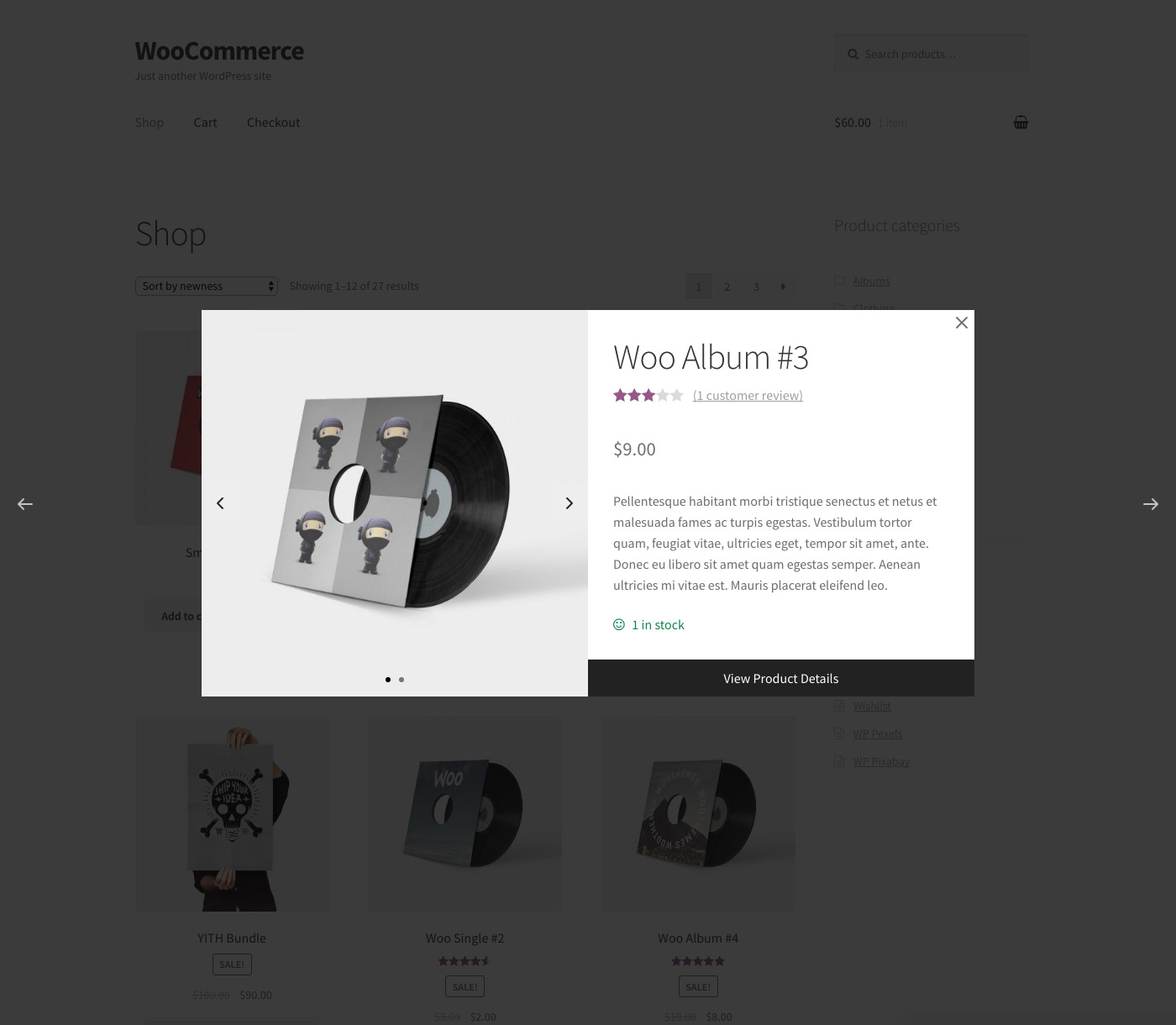
WPC Smart Quick View is a plugin for WooCommerce that allows customers to view product details without leaving the current page, improving navigation and decision-making. It is compatible with any WordPress theme and has SEO optimization. There are also premium features available for further customization and lifetime support.Screenshots
Frequently asked questions
What is WPC Smart Quick View for WooCommerce?
WPC Smart Quick View for WooCommerce allows shop owners to set up a Quick view popup, which enables customers to get a quick summary of the product details without leaving the current page. WPC Smart Quick View brings about an advanced site navigation experience for your visitors and assists people in decision making; thus, turning more visitors into potential customers. It also helps to minimize the bounce rate and improve the site ranking. Besides, WPC Smart Quick View is fully optimized for SEO, compatible with any WordPress themes & WPML plugin for site translation. Especially, even on small screen hand-held devices, your site appearance would still be great thanks to the plugin’s high adaptability.
What are the features of WPC Smart Quick View?
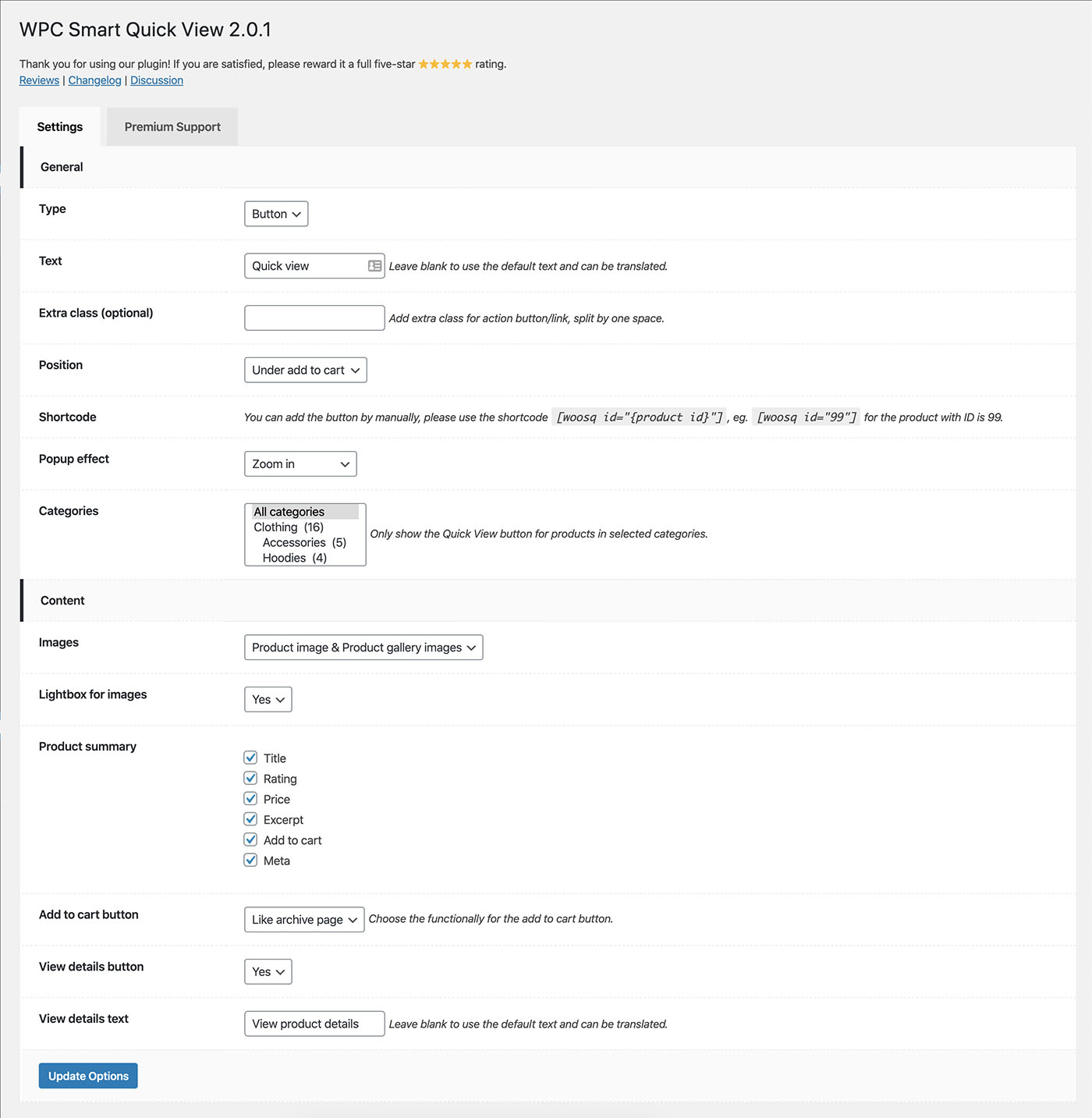
The features of WPC Smart Quick View include three types of buttons (button, link, or Quick view popup), diversifying button positions for choice, editable & translatable button text, navigation buttons for Next/Previous Products, beautiful popup effects to choose from, compatibility with all kinds of WordPress themes, ability to manually add the button on any page using shortcodes, customizable visibility of Quick view button for selected categories, highly adaptable view for all screen resolutions, a useful tool for improving site's SEO, WPML compatibility for building multilingual sites, RTL support for right-to-left languages, and premium features such as customizable Quick view content, customizable image source with lightbox images, enable/disable related products section, customizable product summary fields, customizable Add to Cart button functionality, customizable visibility and text for View Product Details button, lifetime updates, and dedicated support.
Is WPC Smart Quick View compatible with other plugins?
Yes, WPC Smart Quick View is fully compatible with all kinds of WordPress themes and the WPML plugin for site translation.
What languages are available for WPC Smart Quick View?
The available languages for WPC Smart Quick View are English (Default), German, and Vietnamese.
Are there any other plugins available from WPClever.net?
Yes, there are other plugins available from WPClever.net, including WPC Smart Compare, WPC Smart Wishlist, WPC Fly Cart, WPC AJAX Add to Cart, WPC Added To Cart Notification, WPC Custom Related Products, and WPC Smart Linked Products.
Changelog
4.1.6
- Fixed: Optimized the code
- Updated: Compatible with WP 6.7 & Woo 9.6
4.1.5
- Fixed: Optimized the code
- Updated: Compatible with WP 6.7 & Woo 9.5
4.1.4
- Updated: Compatible with WP 6.7 & Woo 9.4
4.1.3
- Updated: Compatible with WPML Media Translation
4.1.2
- Updated: Temporary disabled the Fancybox effect due to security reason
4.1.1
- Added: Filter hook ‘woosq_product_id’
4.1.0
- Updated: Use WC_AJAX for frontend
4.0.6
- Fixed: Minor issues in backend
- Updated: Compatible with WP 6.6 & Woo 9.1
4.0.5
- Fixed: Minor issues in backend
4.0.4
- Updated: Compatible with WP 6.5 & Woo 8.8
4.0.3
- Fixed: Minor issues in backend
4.0.2
- Updated: Search for a custom field
4.0.1
- Updated: Compatible with WP 6.4 & Woo 8.7
- Added: Option “Back to close” – Close the popup when pressing on the browser’s back button
4.0.0
- Updated: Optimized the code
3.5.7
- Added: Enable quick view for product link on shop/archive
3.5.6
- Updated: Compatible with WP 6.4 & Woo 8.5
3.5.5
- Updated: Optimized the code
3.5.4
- Added: Option to enable next/previous button
3.5.3
- Fixed: Redirect after added to cart to compatible with WPC Fly Cart & WPC Added To Cart Notification
3.5.2
- Fixed: Minor CSS/JS issue for the backend
3.5.1
- Fixed: Minor CSS/JS issue for the backend
- Added: Filter hook ‘woosq_button_rel’
3.5.0
- Fixed: Minor CSS/JS issues
3.4.9
- Updated: Compatible with WP 6.3 & Woo 8.0
3.4.8
- Fixed: Minor JS issues
3.4.7
- Fixed: CSRF vulnerability
3.4.6
- Fixed: Minor CSS/JS issues in the backend
3.4.5
- Updated: Optimized the code
3.4.4
- Fixed: Minor CSS/JS issues in the backend
3.4.3
- Updated: Optimized the code
3.4.2
- Fixed: Prevent reloading the page when installing a new plugin
3.4.1
- Added: Enable quick view popup for products on mini-cart and cart page
3.4.0
- Fixed: Compatible with “WPC Additional Variation Images” & “WPC Show Single Variations”
3.3.9
- Added: Shortcode [woosq_btn]
3.3.8
- Fixed: Minor CSS/JS issue in the backend
3.3.7
- Updated: Optimized the code
3.3.6
- Fixed: Minor CSS issue
3.3.5
- Fixed: Menu icon on some browsers
3.3.4
- Added: Compatible with WPC Smart Messages for WooCommerce
3.3.3
- Added: Option to enable/disable auto close popup
- Added: New options for Suggested products
3.3.2
- Updated: Optimized the code
3.3.1
- Fixed: Minor JS issue in the backend
3.3.0
- Fixed: JS issue with gallery on variable product
3.2.3
- Fixed: Minor JS issue in the backend
3.2.2
- Added: Function ‘get_settings’ & ‘get_setting’
3.2.1
- Updated: Optimized the code
3.2.0
- Added: Icon picker for the button
3.1.4
- Fixed: Compatible with WPML
3.1.3
- Fixed: Thumbnails carousel
3.1.2
- Updated: Optimized the code
3.1.1
- Fixed: Notice on settings page
3.1.0
- Added: Zoom effect for product images
3.0.3
- Updated: Optimized the code
3.0.2
- Added: Sidebar heading for sidebar
- Fixed: Minor JS/CSS issues
3.0.1
- Fixed: Minor JS/CSS issues
3.0.0
- Added: Sidebar (left/right) view type
2.9.0
- Added: Open the quick view popup by link, e.g yoursite.com/?quick-view=99
2.8.9
- Updated: Optimized the code
2.8.8
- Fixed: Error while choosing variation of a variable product
2.8.7
- Fixed: Minor JS/CSS issues
2.8.6
- Updated: Optimized the code
2.8.5
- Added: Action hooks
- Updated: Compatible with WPC Badge Management
2.8.4
- Added: Filter hook ‘woosq_button_positions’, ‘woosq_button_position_default’
2.8.3
- Updated: Compatible with WP 5.9 & Woo 6.1
2.8.2
- Added: Filter hook ‘woosq_button_class’
2.8.1
- Fixed: Add to cart button for variation
2.8.0
- Added: Drag and drop to re-arrange the content
2.7.3
- Fixed: Minor JS/CSS issues
2.7.2
- Added: Context parameter to the shortcode
2.7.1
- Fixed: Minor JS issues
2.7.0
- Added: Localization tab
2.6.9
- Added: Filter hook ‘woosq_thumbnails’
2.6.8
- Added: Filter hook ‘woosq_image_size’
2.6.7
- Updated: Compatible with WordPress 5.8 & WooCommerce 5.5.2
- Fixed: Add to cart button on related products
2.6.6
- Added: Press back button to close the quick view popup
2.6.5
- Fixed: Disable position selector when having the filter
2.6.4
- Updated: Compatible with WordPress 5.7.2 & WooCommerce 5.4.1
2.6.3
- Fixed: Minor CSS issue
2.6.2
- Updated: Compatible with WordPress 5.7.2 & WooCommerce 5.3
2.6.1
- Fixed: Minor CSS issues
2.6.0
- Fixed: Minor JS issues
- Added: Open quick view popup for any link end with #woosq-{product_id}
2.5.2
- Updated: Optimized the code
2.5.1
- Updated: Optimized the code
2.5.0
- Updated: Optimized the code
2.4.0
- Updated: Compatible with WordPress 5.7 & WooCommerce 5.0
2.3.5
- Updated: Optimized the code
2.3.4
- Fixed: Work with “Redirect to the cart page after successful addition” option
2.3.3
- Added: RTL support for better displaying right-to-left languages
2.3.2
- Updated: Optimized the code
2.3.1
- Fixed: The update checker URL
2.3.0
- Updated: Compatible with WordPress 5.6 & WooCommerce 4.8
2.2.8
- Updated: Compatible with WooCommerce 4.7
2.2.7
- Fixed: Some minor CSS & JS issues
2.2.6
- Updated: Compatible with WooCommerce 4.6.1
- Updated: Optimized the code
2.2.5
- Updated: Optimized the code
2.2.4
- Added: Option to enable/disable perfect-scrollbar
2.2.3
- Fixed: Some minor CSS & JS issues
2.2.2
- Updated: Optimized the code
2.2.1
- Added: Action hooks: woosq_before_thumbnails, woosq_after_thumbnails, woosq_before_summary, woosq_after_summary
2.2.0
- Updated: Compatible with WordPress 5.5 & WooCommerce 4.3.2
2.1.1
- Updated: Compatible with WooCommerce 4.3
- Updated: Optimized the code
2.1.0
- Updated: Compatible with WordPress 5.4.2 & WooCommerce 4.2
2.0.7
- Added: Change image when choosing variation on variable product
2.0.6
- Fixed: Responsive popup
- Fixed: Remove perfectScrollbar on mobile
2.0.5
- Fixed: Horizontal/vertical image
2.0.4
- Fixed: JS and CSS for all image sizes
2.0.3
- Added: Option to change image size
2.0.2
- Updated: Compatible with WordPress 5.4 & WooCommerce 4.0.1
2.0.1
- Fixed: Don’t redirect to single product page after adding to cart
2.0.0
- Updated: Compatible with WooCommerce 4.0.0
1.3.5
- Updated: Optimized the code
1.3.4
- Updated: Compatible with WordPress 5.3.2 & WooCommerce 3.9.2
1.3.3
- Updated: Optimized the code
1.3.2
- Updated: Optimized the code
1.3.1
- Fixed: Quick view for variation product
1.3.0
- Updated: Compatible with WordPress 5.3 & WooCommerce 3.8.0
1.2.9
- Updated: Optimized the code
1.2.8
- Fixed: Button type
- Fixed: Some minor issues
1.2.7
- Updated: Optimized the code
1.2.6
- Added: Auto close after adding to the cart
- Added: Add button before the product’s name
1.2.5
- Updated: Optimized the code
1.2.4
- Added: Filter for button html ‘woosq_button_html’
- Updated: Optimized the code
1.2.3
- Updated: Optimized the code
1.2.2
- Fixed: Multiple select categories
- Updated: Compatible with WooCommerce 3.6.x
1.2.1
- Updated: Optimized the code
1.2.0
- Added: Only show the Quick View button for products in selected categories
- Fixed: Default button text can be translated
1.1.9
- Added: Choose the functionally for the add to cart button
- Updated: Optimized the code
1.1.8
- Fixed: Minor JS issue
1.1.7
- Compatible with WooCommerce 3.5.3
- Updated: Change the scrollbar style
1.1.6
- Added: German language (thanks to Rado Rethmann)
- Fixed: Quick view for products loaded by AJAX
1.1.5
- Updated: Change the plugin name
- Updated: Optimized the code
1.1.4
- Compatible with WooCommerce 3.5
1.1.3
- Updated: Optimize the code to reduce the loading time
1.1.2
- Fixed: Error when WooCommerce is not active
1.1.1
- Fixed: JS trigger
- Compatible with WooCommerce 3.4.5
1.1.0
- Updated: Settings page style
1.0.9
- Added JS trigger ‘woosq_loaded’ and ‘woosq_open’
1.0.8
- Compatible with WooCommerce 3.4.2
- Optimized the code
1.0.7
- Fixed some minor CSS issues
- Compatible with WordPress 4.9.6
1.0.6
- Compatible with WooCommerce 3.3.5
1.0.5
- Compatible with WordPress 4.9.5
1.0.4
- Compatible with WooCommerce 3.3.3
1.0.3
- Compatible with WordPress 4.9.4
- Compatible with WooCommerce 3.3.1
1.0.2
- Update CSS enqueue
1.0.1
- New: WPML compatible
1.0.0
- Released

