

Site Kit is a one-stop solution for WordPress users to use everything Google has to offer to make…
About Quick Adsense
Quick Adsense is a WordPress plugin that allows you to easily manage and insert Adsense or other ads into your blog posts. It offers various options for ad placement, including randomization, and has a simple interface that doesn't overwhelm you with too many customizable options. It also includes features like geotargeting, device targeting, and ad statistics to help optimize your ad performance.Screenshots

Frequently asked questions
What is Quick Adsense?
Quick Adsense is an Ads management WordPress plugin. It offers a quicker & flexible way to insert Adsense or any Ads code into a blog post. Besides, it can randomly place the Ads anywhere within a post. It comes with a simple setting page, and it does not overwhelm you with complicated customizable options.
Why is randomization of Adsense placement beneficial?
In general, placing Adsense randomly within a post is a good way to experiment a variety of ads formats & placements besides optimizing your Adsense. If you have many regular visitors who frequently revisit your blog, the randomization will likely catch their attention.
What are the features of the Quick Adsense plugin?
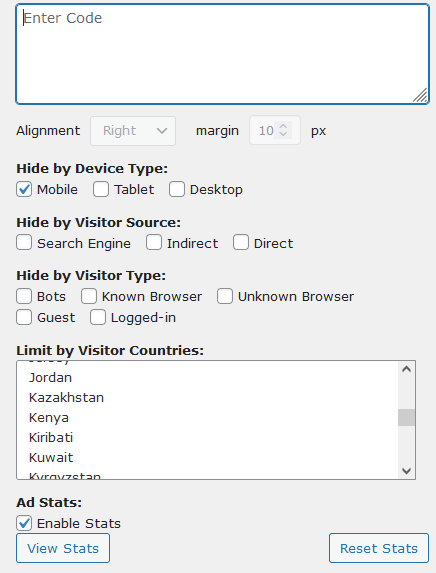
The features of the Quick Adsense plugin include: absolutely no author revenue reward or revenue sharing from your Adsense or that kind of features, default Ads positioning options, flexible Ads placement, simple configuration interface, support for any Ads code, display up to a maximum of 10 Ads on a page, support for up to a maximum of 10 Ads codes on Sidebar Widgets, support for up to a maximum of 10 Ads codes for specific placement & randomization within a post, geotargeting, device targeting, visitor targeting, ad stats, and on-the-fly Ads insertion and disabling.
How can I insert Ads on-the-fly using Quick Adsense?
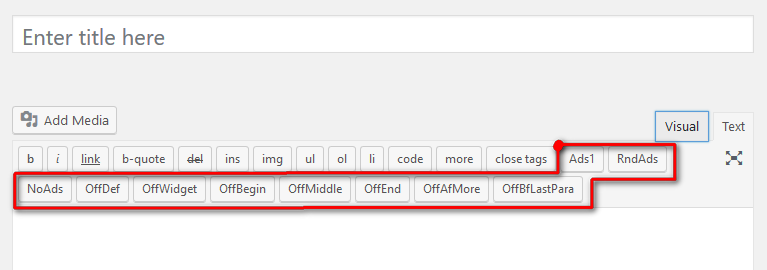
To insert Ads on-the-fly using Quick Adsense, simply insert <!--Ads1-->, <!--Ads2--> ... , <!--RndAds--> to a post.
Where can I sign up for a Google Adsense Account?
You can sign up for a Google Adsense Account at http://adsense.google.com/.
Changelog
2.6
- Vi Integration Removed
- Plugin Ownership Change
- Bring plugin opto date with latest WordPress
2.4
- GDPR consent management module added
- Updated Privacy policy
2.3.2
- Bug fixes
- 3 option fields have been removed
- The API limiter added
- QuickTag issues have been fixed
2.3
- Updated ads.txt modification logic
- UI fixes
2.2
- Fixed functionality issues
2.1
- Optimized UI
- Brought plugin uptodate with latest wordpress standards
- Removed all legacy code
- Legacy Tinymce API replaced with current API
- Legacy Widget API replaced with current API
2.0.1
- Bug Fix: Fixed a bug which caused a JS error in specific use cases.
- Date: 19-December-2017
2.0
- The number of individual database calls has been reduced from 80 to just 1, also almost all of the legacy code has been altered and code base re-structured to be better understandable.
- Info update.
- Date: 14-September-2017
1.9.3
- Info update.
- Date: 29-August-2017
1.9.2
- Update the depreciated wp code function for AdsWidget in the plugin.
- New Feature – Enable user to insert Ads after Image’s outer div wp-caption & not just right below the image.
- New Feature – Enable user to insert Ads before the last paragraph of the post.
- New Feature – Option to disable ads at particular positions, such as Beginning, Middle & End of post, ads on Sidebar, ads after ‘more’ tag and ads before last paragraph.
- Date: 8-May-2013
1.9.1
- Bug Fix – Fix the Quicktag Buttons display error on the HTML Edit Post SubPanel.
- Bug Fix – Fix the conflict with Jetpack by WordPress.com & some other plugins.
- Info update.
- Date: 11-January-2013
1.9
- New functionality added – Hide Ads when user is logged in to WordPress, giving you option to exclude ads view by you from the total ads impression.
- Date: 12-June-2011
1.8.4
- Bug Fix – Fix the Quicktag Buttons display error on the HTML Edit Post SubPanel, make it compatible with WP 3.1 onward.
- Date: 31-Mar-2011
1.8.3
- Bug Fix – Remove the ads from Feed, Ads shouldn’t be there in the first place.
- Date: 16-Jan-2011
1.8.2
- New functionality – Default Ads positioning: Assign Ads right after the <!–more–> tag.
- Date: 03-Dec-2010
1.8.1
- New functionality – Default Ads positioning: Assign Ads to Middle of post.
- Date: 22-Nov-2010
1.8
- Text correction: Change the words “must be identical” to “must not be identical”.
- New functionality – Default Ads positioning after certain paragraphs, make it up to the total of three.
- Also, option to display ads at End of Post if the above function is selected & fewer paragraphs are found.
- Date: 20-Nov-2010
1.7
- Fix the error message problem when the plugin is first activated. Error message: “The plugin generated ‘n’ characters of unexpected output during activation …”
- Date: 13-Aug-2010
1.6
- Fix for the problem on Setting page stop loading & the disappearing of “Save Setting” button in some cases.
- Fix the AdsWidget div tag’s class name. Now you can use CSS to style the AdsWidget.
- Extend the number of AdsWidget (Sidebar Ads) from 3 to 10, as requested by users. Now, AdsWidgets are automatically appear in Appearance->Widgets page only when the code is available.
- Remove the <!–OffAds–> option as this function doesn’t work well in certain theme. However, if you are using this function in previous version, you can continue to use it.
- Minor code modifications.
- Date: 10-Apr-2010
1.5.1
- v1.5 has been tested up to WP2.9, update the compatible version notice.
- Date: 04-Jan-2010
1.5
- New functionality – Default Ads positioning: Assign Ads after certain paragraphs & assign Ads after certain images.
- You can now disable AdsWidget (Sidebar Ads) on Homepage.
- Insert a <!–OffDef–> to temporary disable the default positioned Ads, so that you can insert the specific Ads or Random ad tags in the post.
- Google allows publishers to place up to 3 Adsense for Content on a page. If you are using other Ads, you may now display up to 10 Ads.
- Minor bug fix & code modifications.
- Date: 09-Dec-2009
1.4
- Fix for plugin user Roles. Now, only Administrator is allowed to read & modified the plugin.
- Quicktag Buttons for Ads1-Ads10 are now automatically shown only when the Ads codes are available. You will have the option to hide the RndAds, NoAds & OffAds Quicktag Buttons.
- Minor code modification on the AdsWidget portions.
- Update plugin screenshots & add a Paypal donation button.
- Date: 14-Nov-2009
1.3
- Code modification: Option to place all possible Ads on Homepage, Categories, Archives and Tags page. Previously, only one Ads (the one assigned to the Beginning of Post) is displayed.
- Code update to take advantage of some WP functions for options page, also for forward compatibility in future version.
- Code update to make it compatible with WordPressMU, tested on WordPressMU 2.7.1
- Some minor page & wording modification.
- Date: 13-Oct-2009
1.2
- Re-fix the frist time default options loading value.
- Date: 03-Oct-2009
1.1
- Minor fix for the removal of <p></p> tag wrapped around Ads code.
- Default options value will now load when the frist time plugin is activated, not every time during plugin reactivation.
- Change the clearing DIV height at the end of post from 1px to 0px to hide this transparent line.
- Date: 02-Oct-2009
1.0
- Initial public release.
- Date: 21-Sep-2009

