

Enables the previous "classic" editor and the old-style Edit Post screen with TinyMCE, Meta Boxes, etc. Supports all…
About SMTP Mailer
The SMTP Mailer plugin allows you to configure a mail server for your website, which will handle all outgoing email. It replaces the default email function with SMTP for better reliability. The plugin also offers add-ons for adding a reply-to address and email logging, and it is compatible with popular form and contact form plugins.Screenshots
Frequently asked questions
What does the SMTP Mailer plugin do?
The SMTP Mailer plugin allows you to configure a mail server to handle all outgoing email from your website. It takes control of the wp_mail function and uses SMTP instead of the default PHP mail() function.
What are the key settings for SMTP Mailer?
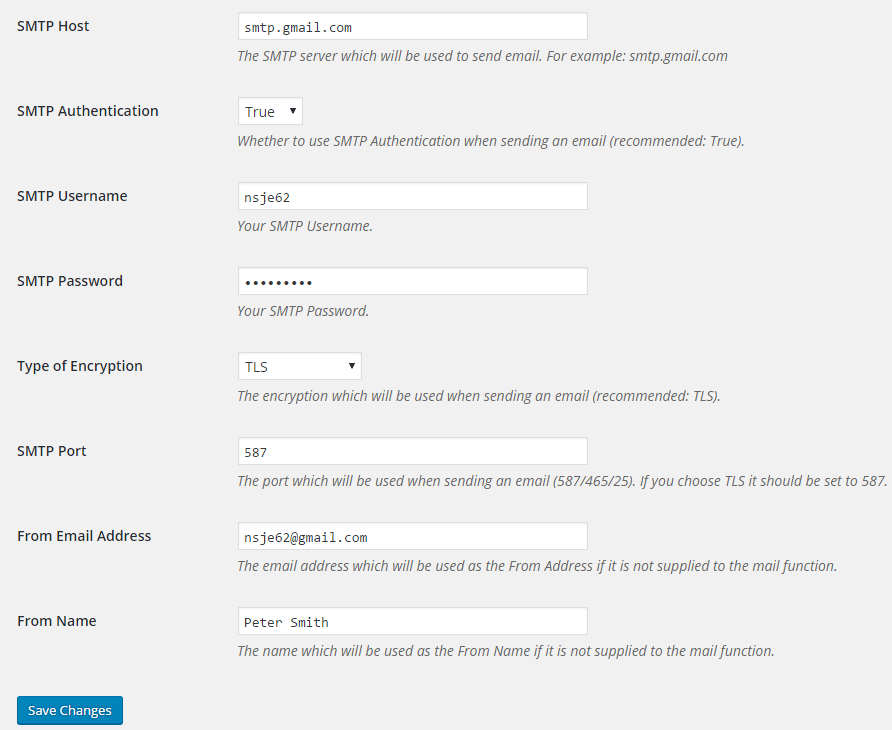
Key settings include SMTP Host, SMTP Authentication, SMTP Username, SMTP Password, Type of Encryption (TLS/SSL/No Encryption), SMTP Port, From Email Address, and From Name. TLS is recommended for encryption, typically using port 587.
How can I test the SMTP Mailer configuration?
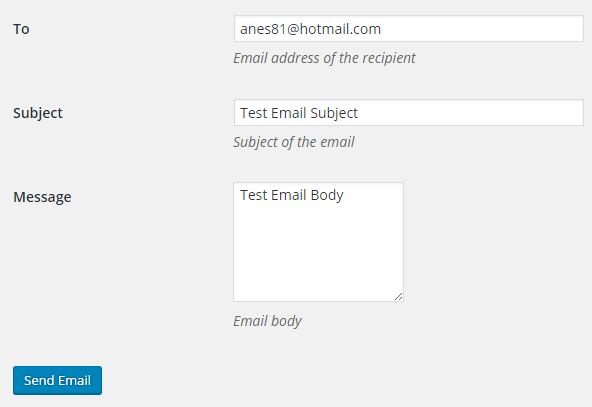
After configuring the settings, you can send a test email. You will need to provide the recipient's email address, a subject, and a message body to check the plugin's functionality.
What other plugins is SMTP Mailer compatible with?
SMTP Mailer should work with any plugin using the WordPress Mail function. It has been tested with Contact Form 7, Jetpack Contact Form, Visual Form Builder, Fast Secure Contact Form, Formidable Forms, and Contact Form by BestWebSoft.
Are there any add-ons available for SMTP Mailer?
Yes, there are add-ons available for SMTP Mailer. These include 'Reply-To' and 'Email Logger'.
Changelog
1.1.17
- WordPress 6.7 compatibility update.
1.1.16
- Removed php_uname from server info.
1.1.15
- Updated the code for sanitizing password.
1.1.14
- Added support for the email logger add-on.
1.1.13
- WordPress 6.5 compatibility update.
1.1.12
- Added support for the reply-to add-on.
1.1.11
- WordPress 6.4 compatibility update.
1.1.10
- Added an option to set the configured from address for all outgoing email messages.
1.1.9
- Additional check for the settings link.
1.1.8
- Removed admin notices to avoid confusion since configurations can vary on different servers.
1.1.7
- WordPress 6.3 compatibility update.
1.1.6
- WordPress 6.2 compatibility update.
1.1.5
- Compatibility update for WordPress 6.1.
1.1.4
- Updated the mail function for WordPress 6.0.
1.1.3
- Updated the mail function for WordPress 5.9.
1.1.2
- Fixed an issue that could cause an Undefined variable error if $attachments was not set.
1.1.1
- WordPress 5.7 compatibility update.
1.1.0
- The password field can be left empty when updating the settings.
1.0.9
- Updated the code to be compatible with WordPress 5.5.
1.0.8
- SMTP Mailer is compatible with WordPress 5.3.
1.0.7
- SMTP Mailer now checks for a valid nonce when sending a test email.
1.0.6
- SMTP Mailer no longer shows the saved password in the settings.
1.0.5
- SMTP Mailer is now compatible with WordPress 4.9.
1.0.4
- Updated the mail() function by setting its minimum requirements to WordPress 4.8.
- “phpmailer_init” action hook is now enabled so it can be used by other plugins.
1.0.3
- Fixed a bug where an apostrophe in the password would cause SMTP authentication failure.
1.0.2
- SMTP Mailer now supports the “wp_mail_failed” hook which fires after a phpmailerException is caught.
- Added a new option to bypass this error on some servers where the SSL certificate is not properly configured – Warning: stream_socket_enable_crypto(): SSL operation failed with code 1. OpenSSL Error messages: error:14090086:SSL routines:SSL3_GET_SERVER_CERTIFICATE:certificate verify failed.
1.0.1
- First commit

