

Enables the previous "classic" editor and the old-style Edit Post screen with TinyMCE, Meta Boxes, etc. Supports all…
About WP Store Locator
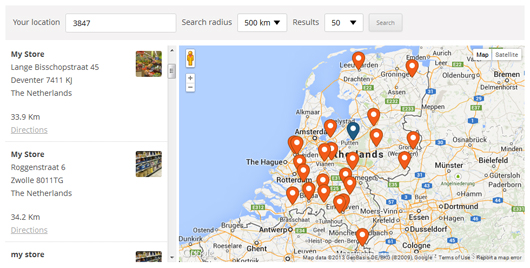
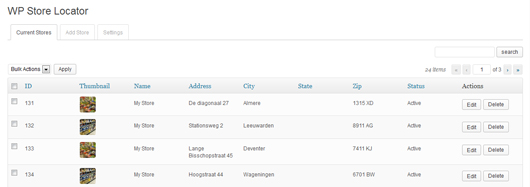
WP Store Locator is a location management system that allows you to manage an unlimited number of stores and provide details like phone numbers, opening hours, and descriptions. It also offers features like customizable map styles, driving directions, and support for multilingual plugins. Additionally, there are premium add-ons available for bulk importing/exporting locations, adding a search widget, tracking user statistics, and adding additional features for power users.Screenshots



Frequently asked questions
What is WP Store Locator?
WP Store Locator is a powerful and easy to use location management system for WordPress. It allows users to search for nearby physical stores and provides customization options for the map and entry fields.
What kind of store details can I add?
You can provide extra details for stores such as phone, fax, email, URL, description, and opening hours. Filters are available to add custom meta data.
Does it support multiple languages?
Yes, it is compatible with multilingual plugins like WPML and qTranslate X. You can also show Google Maps and driving directions in different languages.
How can users filter search results?
Users can filter the search results by radius, maximum results, or category. They can also see driving directions to nearby stores.
Is it GDPR compliant?
Yes, it can load Google Maps only after the user agrees to it, which requires the Borlabs Cookie plugin.
Changelog
= 2.2.241
* Fixed: Not all markers showing up when multiple [wpsl_map] shortcodes are used on the same page.
* Fixed: PHP 8.2 compatiblity issues.
* Fixed: The custom map style not being applied to the preview map on the WPSL settings page.
* Changed: Removed broken links to map style examples from the settings page.
= 2.2.240
* New: To reduce the chance of seeing the ‘wpslCallback is not a function’ error in the browser console ( and the map breaking ), the required JS files are now automatically excluded from the SiteGround Optimizer, Autoptimize, LiteSpeed Cache and WP Rocket plugins.
* New: Optional deactivation survey on live sites to gather feedback to improve the plugin ( nothing is shown on dev domains / localhosts ).
* Fixed: Cannot read property ‘__e3_’ of undefined error when the marker cluster and the custom info window script is used together.
* Fixed: Uncaught TypeError: callback is not a function when the start marker is dragged to a new location after a search is finished.
* Fixed: The start marker duplicating itself when it’s dragged to a new location when the ‘Attempt to auto-locate the user’ option is enabled.
* Fixed: Uncaught ReferenceError: InfoBox is not defined when the Borlabs Cookie plugin is active in combination with the custom infobox.js script.
* Fixed: Different JS event handlers not firing correctly when the Borlabs Cookie plugin is active.
* Changed: Make sure HTTPS is always used for request to the Google Maps API in the admin area.
* Changed: Included the latest version of the EDD_SL_Plugin_Updater class ( 1.9.1 ).
= 2.2.237
* Fixed: The “Loading the Google Maps JavaScript API without a callback is not supported” console warning.
* Note: If you have the search widget add-on installed and are using the autocomplete function, then please make sure to update to the latest version ( 1.2.1 ).
= 2.2.236
* Fixed: The search function can break if the created opening hours doesn’t contain every day of the week.
= 2.2.235
* Fixed: Borlabs Cookie compatiblity problem with the Google Maps placeholder.
= 2.2.234
* Fixed: PHP 8 Compatiblity
* Fixed: Polylang Compatiblity
= 2.2.233
* Fixed: A problem with the Borlabs Cookie plugin where Google Maps wasn’t blocked correctly.
* Changed: Set the loaded Google Maps JavaScript version to quarterly. So every quarter it will automatically load the latest version.
= 2.2.232
* Fixed: The opening hours triggering an error on some server configurations.
* Fixed: Restored the wpsl_skip_cpt_template filter which was accidently removed in a previous update.
* Changed: Set the loaded Google Maps JavaScript version to 3.39 instead of 3.36.
= 2.2.231
* Fixed: Bug that in some cases broken the Borlabs Cookie plugin from working correctly together with the store locator plugin.
= 2.2.23
* Fixed: The export data function on the single location pages in the admin area not working.
* Fixed: The map and location data not showing up in the TwentyNineteen theme on individual location pages.
* Changed: Updated the included EDD_SL_Plugin_Updater class that handles updates / license key checks for add-ons.
= 2.2.22
* Added: Support for the Borlabs Cookie plugin. This allows you to block the loading of Google Maps until the user agrees to it.
* Added: A ‘Validate API Keys’ tool that will provided feedback for any issues with the used API keys.
* Added: A tool that will show you the raw Google Geocode API response for any address you provide based on the current configuration together with a preview map.
* Changed: Made sure that links included in error messages from the Google Geocode API are always clickable.
* Changed: If no zip code is included in the returned location data after the users location is automatically determined, then it will now show the city / town name in the search field instead of leaving it empty.
= 2.2.21
* Changed: Set the loaded Google Maps JavaScript version to 3.36 instead of 3.33.
= 2.2.20
* New: Added an option to the permalinks section to optionally remove the front base ( for example /blog/ ) from the store locator permalinks.
* New: Added an option to the search section to force the Google Geocode API to assume the search input is a zip code. So searching for town / city names won’t work if this option is enabled.
* New: Included a wpsl_autocomplete_options filter to customize the included data in requests made to the places API ( used with autocomplete ).
* Changed: Limited the requested data for the places API ( used with autocomplete ) to only ‘geometry.location’, which should reduce the cost on high traffic websites.
* Removed: Unused CSS rules from the admin CSS.
* Fixed: Using keyboard input to select a location after the first search with the autocomplete option enabled now returns the correct location.

