

The Elementor Website Builder has it all: drag and drop page builder, pixel perfect design, mobile responsive editing,…
About WP Content Copy Protection & No Right Click
The WP Content Copy Protection & No Right Click plugin is designed to protect your posts and home page from unauthorized copying. It uses advanced content-protection techniques to prevent other web authors from copying your text and images. The plugin also offers additional features in the Pro version, such as watermarking images and the ability to set varying levels of protection per page or post.Screenshots
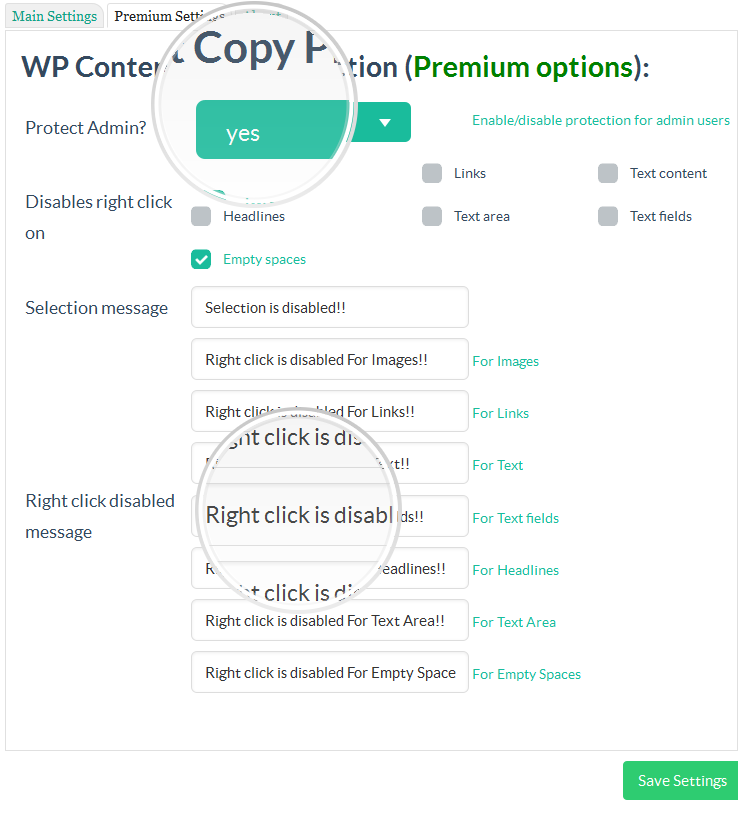


Frequently asked questions
What does this plugin do?
This plugin protects the posts content from being copied by any other web site author.
What techniques does this plugin use to protect the content?
The plugin uses multiple techniques (JavaScript + CSS) that are not found in any other wordpress plugin.
Are there any additional features in the PRO version?
Yes, the PRO version includes features such as watermarking, using htaccess rules, support for jquery overlay protection, and more.
Can I disable copy protection for admin users?
Yes, the admin has the ability to disable copy protection for admin users.
Is this plugin compatible with all major browsers?
Yes, this plugin has been tested and is compatible with all major browsers including IE9, IE10, Firefox, Google Chrome, and Opera.
Changelog
3.6.2
- Fix style error inside customizer.php theme options page
- Checking with wordpress version 6.7.1
3.6.1
- Fix security issue related to restore_defaults action inside admin panel
- Checking with wordpress version 6.6.2
3.5.9
- Checking with wordpress version 6.6.1
3.5.8
- Checking with wordpress version 6.4.3
3.5.7
- Checking with wordpress version 6.3
3.5.6
- Fix some sanitization errors
3.5.5
- Checking & some text changes
3.5.4
- Checking with wordpress version 6.2.2
3.5.3
- Checking with wordpress version 6.2
3.5.2
- Checking with wordpress version 6.1
3.5.1
- Fix ReferenceError: on is not defined, e.setAttribute(unselectable, on)
- Checking with wordpress version 6.0.1
3.4.9
- Return to the previous version (3.4.7)with some small fix and new version id (3.4.9) until do more fixes
3.4.8
- error fix for the main page
3.4.7
- Checking with wordpress version 6.0
3.4.6
- Checking with wordpress version 5.9.3
3.4.5
- security fix for the settings form
3.4.4
- Checking with wordpress version 5.9
3.4.3
- Checking with wordpress version 5.8.2
3.4.2
- Checking some code errors
3.4.1
- Checking with wordpress version 5.8.1
3.4.1
- Checking with wordpress version 5.7.2
3.4
- Important code fix
3.1.5
- Checking with wordpress version 5.7
- Important code fix
3.1.4
- Checking with wordpress version 5.6
3.1.3
- Fixed, PHP Notice: fread(): read of 8192 bytes failed with errno=21 Is a directory in /wp-includes/functions.php on line 6030
3.1.2
- Important fix for this error, PHP Warning: array_key_exists() expects parameter 2 to be array, preventer-index.php on line 691
- Top icon bar color converted to new very nice color – green
- Testing with wordpress 5.5.3 new version
3.1
- Now compatible with (elemenator page builder) plugin
- Now compatible with (siteorigin live editor page builder) plugin
- Now compatible with (WordPress Page Builder – Beaver Builder) plugin
- Now compatible with (WordPress internal preview mode)
- New control panel (restore defaults) button added
- New control panel (preview alert message) button added
- New name for the top bar icon to fix its default choice in the previous version
- Translation file updated
- Some fixes
2.9
- Important fix for content editable tags
- Now compatible with wpDiscuz plugin & some chat wordpress plugins
- Top bar icon has been returned, as it was inside previous version 2.6
- New option inside main settings to control the visibility of the top bar icon
- Stop the auto loading for the alert (warning.png) icon
- Some linguistic mistakes were corrected
2.8.1
- Important fix for 2.7 update
- Add links to dismiss the new start page links
2.7
- Disable (CTRL + Shift + I) developer tools shortcut key
- Remove recommended plugins section from admin page
- Add one starting page for all of our plugins
- Code fix
2.6
- Test all features with wordpress version 5.5
2.5
- Code fix
2.4
- Safari update and fix
- checking with new wordpress version
- Admin page Fix
2.3
- Copy paste password to log in fields and any other text field is now possible
- Some script fixes
- Admin page Fix (mailing list join message will show your email before submit)
- Admin page Fix (Our other products list is ready to go)
2.2
- Admin page Fix
2.1
- Fix iphone & ipad posts protection
- Premium feature unlocked!! the second option inside CSS protection tab
- “Review us” admin dismissable notice added
1.9
- Translation slug is now the same as the plugin slug
- Arabic translation file included inside the plugin language folder and its also included on wordpress translation plugin page
1.8
- Translation is now supported
- wp-content-copy-protector.pot Template translation file included
1.7.3
- Checking with the last update
- Unwanted ad removed
1.7.2
- Fix the error Undefined index: prnt_scr_msg in preventer-index.php on line 171
1.7.1
- Add dismiss button to the end of upgrade message
1.7
- New option to show Print preview message instead of showing page content when user try to print your page using CTRL+P key
- Fixes inside admin page layout
1.6.2
- Fix Fatal error: Cannot redeclare plugin_add_settings_link()
1.6
- JQuery important hotfix
- Sanetization for all input and output
1.5.0.5
- Internet Explorer important hotfix
- Testing on wordpress 4.4.2 new version
1.5.0.4
- Auto remove image url’s
- Fix javascript errors
1.5.0.3
- Adding adminbar link and icon redirecting you to the plugin settings page
- Adding settings link into the plugins list page
1.5.0.2
- Adding isset() function to all variables
- Improving alert message
- Fixing CTRL + U issue
- Fixing CSS tricks
1.5.0.1
- Fixing error (Warning: join(): Invalid arguments passed in /home/retailmakeover/public_html/wp-includes/post-template.php on line 478)
1.4.0.1
- Admin can disable copy protection for logged in/admin users
- disable the possible shortcut keys for copying the Text
- You can also choose where this Plugin should work like All Pages (including Home Page and all other Pages & Posts) or Home Page or Custom Pages/Posts using the Settings Page options.
- Multiple Text and Image Protection methods
- Advanced Image Protection using Responsive Lightbox
- Protect your Text and Images by Disabling the Mouse Right Click and Possible Shortcut Keys for Cut (CTRL+x), Copy (CTRL+c), Paste (CTRL+v), Select All(CTRL+a), View Source (CTRL+u) etc.
- control the protection to be on users only (if admin here dont protect)
- Option to Display Alert Message on Mouse Right Click.
- Enable Right Click on Hyperlink Option Added
- Right click problem fixed on static pages
- New flat interface
1.0
- initial version
- static pages bug fixed
- home page problem fixed
- Add new Style

