

Improve your WordPress SEO: Write better content and have a fully optimized WordPress site using the Yoast SEO…

About Really Simple CAPTCHA
Really Simple CAPTCHA is a plugin that is designed to work with other plugins, such as Contact Form 7. It creates CAPTCHAs by generating image and text files, and then checks the correctness of the answer provided by the user. However, it is important to note that this plugin is not highly secure, so if you need stronger security, you should consider other options.Screenshots
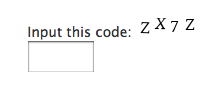
Frequently asked questions
How does Really Simple CAPTCHA work?
Really Simple CAPTCHA does not use PHP 'Sessions' for storing states, unlike many other PHP CAPTCHA solutions, but stores them as temporary files. This allows you to embed it into WordPress without worrying about conflicts. When you generate a CAPTCHA, Really Simple CAPTCHA creates two files for it; one is an image file of CAPTCHA, and the other is a text file which stores the correct answer to the CAPTCHA. The two files have the same (random) prefix in their file names. In this case, for example, when the respondent answers 'K5GF' as an answer to the 'a7hk3ux8p.png' image, then Really Simple CAPTCHA calculates hash of 'K5GF' and tests it against the hash stored in the 'a7hk3ux8p.txt' file. If the two match, the answer is confirmed as correct.
How to use Really Simple CAPTCHA with your plugin?
First, create an instance of ReallySimpleCaptcha class: $captcha_instance = new ReallySimpleCaptcha(); You can change the instance variables as you wish. Generate a random word for CAPTCHA: $word = $captcha_instance->generate_random_word(); Generate an image file and a corresponding text file in the temporary directory: $prefix = mt_rand(); $captcha_instance->generate_image( $prefix, $word ); Then, show the image and get an answer from respondent. Check the correctness of the answer: $correct = $captcha_instance->check( $prefix, $the_answer_from_respondent ); If the $correct is true, go ahead. Otherwise, block the respondent — as it would appear not to be human. And last, remove the temporary image and text files, as they are no longer in use: $captcha_instance->remove( $prefix );
Is Really Simple CAPTCHA secure?
Really Simple CAPTCHA is not strongly secure. If you need perfect security, you should try other solutions.
What is the purpose of Really Simple CAPTCHA?
Really Simple CAPTCHA is intended to work with other plugins. It is originally created for Contact Form 7, however, you can use it with your own plugin.
Where can I see a live sample of Really Simple CAPTCHA?
If you wish to see a live sample of Really Simple CAPTCHA, you can try Contact Form 7.
Changelog
2.4
- Bumps up the minimum required WordPress version to 6.6.
- Introduces the ReallySimpleCaptcha_Filesystem trait.
- Uses SHA-256 as the hash algorithm.
- Uses
wp_rand()instead ofmt_rand().

