Engage your audience more effectively by leveraging the power of WordPress Comments Plugins! This article will give you a detailed overview of the best WordPress Comments Plugins available in the market. Whether you want to fight spam, enhance user interaction, or simply manage your comment section more efficiently, there’s a plugin perfectly suited to your needs.
We understand how daunting it can be to decide on the right plugin for your website, given the numerous options available.
This is why we have carefully curated a list of top-rated WordPress Comments Plugins, complete with their features and benefits. By the end of this read, you’ll be well-equipped to choose a plugin that aligns with your goals and enhances your website’s performance. Dive in to discover the perfect tools to transform your website’s commenting system!
Akismet Anti-spam

Akismet Anti-spam is a powerful WordPress plugin designed to protect your website from spam comments and content.
This invaluable tool is a must-have for any blog or website, as it saves you time and resources by automatically filtering out spammy submissions. If your website has been plagued by spam comments or if you’re looking to add an extra layer of security, Akismet Anti-spam is a perfect solution.
Features and Benefits
- Automatic Comment Check: Akismet Anti-spam is designed to work in the background, checking all comments and filtering out those that appear to be spam. This allows you to focus on managing your website without having to worry about sifting through potentially harmful comments.
- Comment Status History: With Akismet Anti-spam, you can easily track the status of each comment. This feature highlights which comments were caught or cleared by Akismet and which were flagged or approved by a moderator.
- URL Reveal in Comment Body: Akismet Anti-spam displays URLs in the comment body to expose hidden or misleading links. This feature adds an extra layer of security and helps protect your website and your visitors from harmful content.
- Approved Comment Count: Moderators can easily see the number of approved comments for each user. This feature helps in assessing the credibility of users and in managing comments more effectively.
- Discard Feature: Akismet Anti-spam offers a discard feature that instantly blocks the worst spam, saving you valuable disk space and increasing the speed of your site.
Pricing Structure
Akismet Anti-spam is free to use for personal blogs. However, for businesses and commercial sites, a paid subscription is required.
Disable Comments

Disable Comments is a potent WordPress plugin designed to give you full control over your website’s comment section.
It provides a straightforward and effective solution to spam comments, offering you the ability to allow or disallow comments on any post type in WordPress, including Pages, Posts, or Media. Additionally, this plugin offers WP-CLI Support and control over comments via XML-RPC and REST-API.
Features and Benefits
- Global Control: Override all comments-related settings across your website, managing your comments according to your needs.
- Selective Disable: Choose which posts, pages, or media should allow comments from site visitors and configure the plugin accordingly.
- Multi-Site Support: If you manage multiple websites, you can eliminate irrelevant comments on the entire network using this plugin.
- The plugin hides all “Comments” links from the Admin Menu and Admin Bar, disables all comment-related widgets, and removes the X-Pingback HTTP header from all pages. Outgoing pingbacks are also disabled, and all comment RSS/Atom feeds are redirected to the parent post.
- Comment Type Deletion: Permanently delete certain comment types from your WordPress website, including WooCommerce product reviews and generic comments.
- The new version of Disable Comments also supports disabling comments via XML-RPC and REST API. It’s crucial to note that this plugin should be used if you don’t want comments at all on your site or on certain post types. If you want to selectively disable comments on individual posts, WordPress already provides this functionality.
Pricing Structure
The plugin is free to use.
Antispam Bee

Antispam Bee is a powerful WordPress comments plugin that effectively blocks spam comments and trackbacks on your WordPress blog or website. It fulfills the need for efficient spam protection without the use of captchas or sending personal information to third-party services. It is free, ad-free, and 100% GDPR compliant.
Features and Benefits
- Trust Approved Commenters: This feature allows you to trust approved commenters, preventing their comments from being marked as spam.
- Trust Commenters with a Gravatar: Trusting commenters with a Gravatar can help reduce spam as those who have taken the time to set up a Gravatar are less likely to be spammers.
- Consider the Comment Time: This feature helps to identify potential spam based on the time a comment was made.
- Allow Comments Only in Certain Languages: Helps to filter spam based on the language of the comment.
- Block or Allow Commenters from Certain Countries: This feature can help you manage the comments on your website more effectively.
- Email Notifications: Notifies admins about incoming spam via email.
- Delete Existing Spam: Automatically deletes existing spam after a specified number of days.
- Limit Approval to Comments/Pings: This feature will delete other comment types.
- Exclude Trackbacks and Pingbacks from Spam Detection: This feature can help to reduce false positives.
- Display Spam Statistics: Provides daily updates of spam detection rate and a total of blocked spam comments on the dashboard.
Pricing Structure
Antispam Bee is a free plugin. There are no charges for using it.
Spam protection, Anti-Spam, FireWall by CleanTalk

Spam Protection, Anti-Spam, Firewall by CleanTalk is a top-rated, all-in-one anti-spam solution for WordPress websites. It offers comprehensive protection against spam comments, registrations, orders, bookings, subscriptions, and more without the need for CAPTCHAs, questions, or puzzles. It essentially operates as a universal AntiSpam plugin that ensures a clean, spam-free user experience.
Features and Benefits
- Stops spam comments and registrations: This plugin effectively stops spam comments and user registrations, ensuring a safe and secure user experience.
- Stops spam emails: It also prevents spam emails, reducing clutter and improving the efficiency of your communication channels.
- Real-time email validation: The plugin checks if an email is real or not in real-time, adding an extra layer of security.
- Compatible with mobile users and devices: The plugin is fully responsive and works seamlessly on all types of devices.
- Anti-Flood and Anti-Crawler: The plugin includes a spam firewall that prevents flooding and crawling, protecting your site from potential threats.
- Hide ‘Website’ field for comments: The plugin allows you to hide the ‘Website’ field in the comment section to prevent spam links.
- Block messages by languages, countries, networks and stop words: You can customize the plugin to block messages based on various parameters, offering a tailor-made anti-spam solution.
Pricing Structure
The plugin is free to use with pro version available at additional cost.
Comments – wpDiscuz

wpDiscuz is a real-time AJAX WordPress comments plugin designed to supercharge the native comments section of your website.
This plugin offers a fast and responsive commenting system with dozens of features, making it an excellent alternative to Disqus and Jetpack Comments. wpDiscuz aims to keep your comments in your database and enhance your website’s commenting experience, providing new user engagement features.
Features and Benefits
- Three modern comment layouts: Enhances the visual appeal of your comments section, improving user experience.
- Fastest commenting experience: Boosts core for quick comment posting, reducing user waiting time.
- Interactive comment box on posts: Encourages more interactions from users, boosting engagement.
- Live Notification with real-time updating Comment Bubble: Keeps users updated, encouraging them to engage more.
- Social Commenting with lots of Social login options: Provides convenience to users, increasing chances of engagement.
- Post Rating: Allows users to rate posts directly, providing you with valuable feedback.
Pricing Structure
As of my current research, wpDiscuz plugin is free and available for download on the WordPress plugin directory. However, premium add-ons and features are available for purchase individually through their website.
Disqus Comment System

Disqus is a highly popular comment system for WordPress, used by millions of publishers worldwide to increase reader interaction, grow audiences, and monetize content.
The Disqus Comments Plugin helps publishers engage directly with their audiences to foster loyalty, retain readers, and create thriving communities. It replaces the default WordPress comment system with a robust and interactive one, without losing any existing comments.
Features and Benefits
Seamless Integration: The Disqus plugin offers a simple one-click installation that seamlessly integrates with WordPress, requiring no code editing.
User Engagement: Disqus enhances user engagement by offering a commenting experience that readers love, which can bring them back to your site with web and email notifications and personalized digests.
Improved SEO: Disqus can help improve your SEO ranking through user-generated content.
Anti-spam Filter: It features a top-notch anti-spam filter powered by Akismet to keep spam out.
Comment Syncing: Disqus syncs comments automatically to WordPress for backup and flexibility, in case you decide to switch to a different platform.
Analytics Dashboard: Disqus provides an analytics dashboard for measuring overall engagement on your site.
Realtime Comments: Disqus provides a real-time comments system with voting, photo and video upload, rich media embed, spoiler tags, mentions, and more.
Pricing Structure
Disqus offers a free plan with basic features. For advanced features you need paid version.
Subscribe To Comments Reloaded
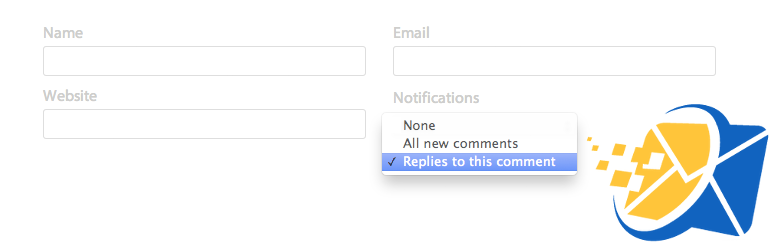
Subscribe to Comments Reloaded is a powerful WordPress plugin that enhances the functionality of your website’s comments section. It addresses the need for an efficient and manageable system to keep your website’s commenters informed about follow-up entries.
With this plugin, commenters can easily subscribe to email notifications for subsequent comments.
Furthermore, it comes with an advanced subscription manager that commenters can use to unsubscribe from certain posts or halt all notifications. This plugin is an improved version of Mark Jaquith’s Subscribe To Comments, leveraging the latest WordPress features for optimal performance.
In addition, it offers administrators a double opt-in mechanism for users to confirm their subscription via email, providing an extra layer of security.
Features and Benefits
- Easy management and search of subscriptions: This feature allows you to effortlessly manage and locate your subscriptions, saving you time and enhancing efficiency.
- Importing of data: The plugin can import data from Mark Jaquith’s Subscribe To Comments and its clones, ensuring a smooth transition if you’re switching over.
- Fully customizable messages: You can customize the messages sent to your subscribers, adding a personal touch to your interactions. Plus, no knowledge of poEdit is required, and you can use HTML. The plugin even includes a Rich Text Editor for easy editing.
- Subscription disablement for specific posts: If you want to exclude certain posts from the subscription service, this plugin allows you to do so with ease.
Pricing Structure
Subscribe to Comments Reloaded is available for download and use for free. However, for premium support and additional features, prices may vary.
Delete Pending Comments
Delete Pending Comments is a powerful WordPress Comments Plugin designed to help you quickly and efficiently delete all pending and spam comments. This plugin is the perfect solution for websites that have been victims of spammer attacks, offering a simple and effective way to restore order and cleanliness to your comments section.
Features and Benefits
- Fast and Efficient: The Delete Pending Comments plugin allows users to delete all pending and spam comments in one fell swoop, saving time and effort. A clean, spam-free comments section enhances user experience and maintains the credibility of your website.
- Easy Installation and Use: After installing the plugin, simply navigate to Comments -> Delete Pending Comments and follow the instructions to delete all the pending comments. The plugin’s user-friendly interface and simple instructions make it accessible even to beginners.
Pricing Structure
The Delete Pending Comments plugin is currently available for free.
Comment Link Remove and Other Comment Tools
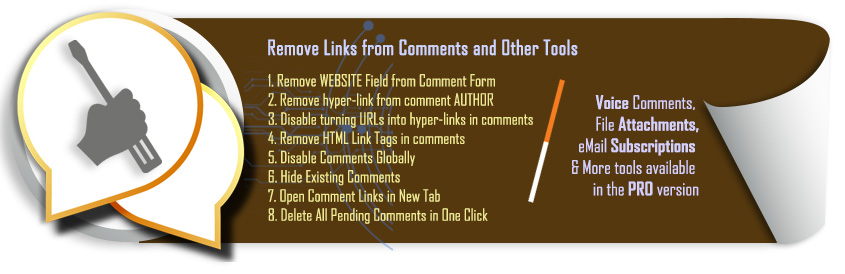
Comment Link Remove and Other Comment Tools is an all-in-one solution designed to combat blog comment spammers and enhance comment quality on your WordPress website.
The plugin is created for those who are tired of eliminating spammy comments from their blog posts. It removes author links and other links from user comments, making it an effective tool against those who write spam comments just to push a link on your website.
Features and Benefits
- Removes Website Field from Comment Form: This eliminates the chance for commenters to add spammy links in the website field of the comments.
- Removes hyper-link from comment AUTHOR: This prevents commenters from adding spammy links in their author bio.
- Disables URLs into hyper-links in comments: This prevents any URLs included in the comments from becoming clickable links.
- Deletes all comments with one click: This offers a quick way to clean up all the comments on your blog posts.
- AI Auto Comment Reply: The plugin can automatically reply to approved comments using AI technology, ensuring every comment gets a response.
Pricing Structure
The pricing depends on your requirements.
Fancy Comments WordPress
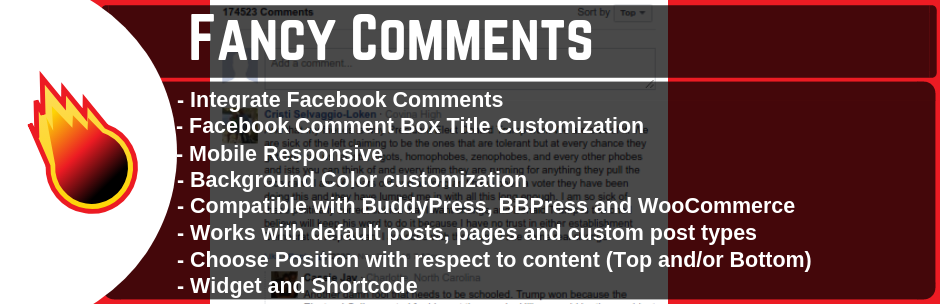
Fancy Facebook Comments is a WordPress plugin that allows your website visitors to leave comments using their Facebook account. This user-friendly plugin not only saves your visitors from the hassle of creating a new account on your website but also optimizes your website socially by integrating it with Facebook comments.
Key Features and Benefits
- Recover comments lost after installing SSL Never lose user engagement on your posts.
- Compatibility with Gutenberg editor and PHP 8 Ensures seamless integration with modern editing tools and languages.
- Pro version upgrade For advanced features and functionalities.
- Users can sort comments by Time or Social Ranking, and admins can set default comment ordering.
Pricing Structure
The plugin is free to use with pro version available at additional cost.
Comments Like Dislike

Comments Like Dislike is a free WordPress plugin that allows you to add Like and Dislike icons to the default WordPress comments. With a range of customization options, from choosing thumbs up or down, smiley or frown, right or wrong icons, or even your custom like and dislike icons, this plugin makes it easy to increase engagement with your WordPress comments.
Features and Benefits
- Enable or Disable Comments Like Dislike: Gives you the ability to turn on or off the like and dislike functionality for comments. This can help to manage the interaction on your website.
- Like Dislike Position: You can choose to position the like and dislike buttons either before or after the comment. This offers flexibility in the layout and design.
- Like Dislike Display: You have the option to display both like and dislike buttons, only the like button or only the dislike button. This can be used to guide user interaction as per your needs.
- Like Dislike Restriction: This feature allows you to restrict the like and dislike functionality based on cookie tracking, IP address, or no restriction at all. This can help prevent misuse of the feature.
- Like Dislike Order: You can choose whether to display the like or dislike button first. This can be used for aesthetic purposes or to subtly encourage positive feedback.
Pricing Structure
This plugin is free of cost and can be easily integrated into any WordPress website.
Lazy Load for Comments

Lazy Load for Comments is a WordPress plugin designed to enhance the performance of your website’s commenting system. It does this by only loading comments when required, eliminating unnecessary HTTP requests that can slow down your website. This plugin is perfect for those who want a faster, more efficient commenting system without having to navigate complex configurations.
Features and Benefits
- Loads comments only when needed: This is an efficient way to manage site resources, ensuring that your website remains fast and responsive.
- Improves page loading speed: By reducing the number of HTTP requests, your website pages load faster, providing a better user experience.
- Reduces the number of HTTP requests: This prevents server overload and ensures your website runs smoothly.
- Lazy loading comments gravaters: This feature further speeds up your page loading time.
Pricing Structure
As an open-source tool, Lazy Load for Comments is available for free on WordPress and GitHub.
What is the Need of WordPress Comments Plugins
WordPress comments plugins are additional tools or extensions designed to enhance or replace the default commenting system provided by WordPress. These plugins offer a wide range of features and capabilities that can significantly improve the interaction and engagement on a website.
Here are some key reasons why WordPress comments plugins are important and often considered necessary even when WordPress itself comes with a built-in comment system:
- Advanced Features: While the default WordPress commenting system is functional, it is quite basic. Many WordPress comments plugins offer advanced features such as social media integration, allowing users to comment using their social media accounts; comment voting; inline commenting; and rich text formatting. These features can greatly enhance the user experience and encourage more engagement from visitors.
- Improved Spam Control: Comment spam is a common problem for many websites. WordPress comments plugins often come with better spam control mechanisms, such as sophisticated filtering algorithms and integration with third-party spam protection services, which can significantly reduce the amount of spam a site receives.
- Customization and Design: Comments plugins offer more customization options and designs than the default WordPress comment system. Website owners can adjust the look and feel of the comment section to match their site’s theme and branding, improving the overall aesthetic and user experience.
- User Management and Moderation: Enhanced user management and moderation features are another reason to use a comments plugin. These plugins often provide more granular control over who can comment, comment approval processes, and tools for managing and moderating comments more efficiently.
- Performance and Speed: Some comments plugins are designed to optimize loading times and overall performance for pages with a lot of comments. They may do this by loading comments asynchronously or implementing other optimizations that can make a site faster and more responsive.
- Engagement and Community Building: With features like user profiles, comment threading (nested comments), and notifications for replies, comments plugins can help build a sense of community and increase engagement on a website. They make it easier for users to interact with each other and with the content, fostering discussions and returning visits.
- SEO Benefits: Some plugins are optimized to enhance the SEO of the comments and the page overall, by ensuring that comments are indexed by search engines or by providing SEO-friendly markup.
Even though WordPress includes a default comment section, the need for more advanced features, better spam control, customization options, and improved engagement drives the demand for WordPress comments plugins. Each website has unique needs, and these plugins allow site owners to tailor the commenting experience to better suit their audience and objectives.
Final Word
To conclude, there are a plethora of WordPress Comments Plugins available to help manage and enhance your website’s comment section. These tools offer varied features, from spam protection like Akismet Anti-spam, to increased user engagement with plugins like Comments Like Dislike.
These plugins provide a streamlined experience for both the website owner and the users, making the commenting process more efficient and engaging. Choose the one that best fits your website’s needs and don’t hesitate to experiment with different plugins to find the perfect match. Remember, a well-managed comment section can significantly boost user interaction and overall engagement.
FAQs
- What are WordPress Comments Plugins and how do they improve my website?
WordPress Comments Plugins are add-ons for WordPress sites that enhance or replace the default commenting system. They offer advanced features like social media integration, spam control, and customization options, making it easier for visitors to engage with your content, thus improving user experience and interaction on your site. - Why should I use a WordPress Comments Plugin instead of the default WordPress commenting system?
Although WordPress comes with a built-in commenting system, it is quite basic. WordPress Comments Plugins offer enhanced functionality, better spam protection, improved user engagement features, and customization options that are not available in the default system, making them a valuable tool for building a more interactive and engaging website. - Can WordPress Comments Plugins help in reducing comment spam?
Yes, one of the main advantages of using WordPress Comments Plugins is their advanced spam control mechanisms. These plugins often include sophisticated filtering algorithms and integration with third-party spam protection services, which can significantly reduce the amount of spam a site receives compared to the default commenting system. - How can WordPress Comments Plugins impact the SEO of my website?
Some WordPress Comments Plugins are designed with SEO in mind, offering features that ensure comments are indexed by search engines or providing SEO-friendly markup. This can help in increasing your site’s visibility, encouraging more organic traffic, and potentially improving your site’s overall SEO performance. - Are WordPress Comments Plugins difficult to install and manage?
WordPress Comments Plugins are generally user-friendly and can be easily installed and managed from the WordPress dashboard, similar to other WordPress plugins. Many come with straightforward settings and documentation, making it easy for site owners to configure the plugin to meet their specific needs without requiring advanced technical knowledge.


