Improve your WordPress website’s functionality with the right filter plugins! The use of WordPress Filter Plugins can revolutionize the way you sort, organize, and retrieve content on your site.
Whether you’re running an online store, blog, or any other type of website, these plugins can make your site more user-friendly and efficient. This blog will introduce you to some of the best WordPress filter plugins available, detailing their features, benefits, and pricing structures.
In this listicle, we will explore a range of WordPress filter plugins that can help you enhance your website’s performance, improve content organization, and provide a superior user experience. Read on to discover how these plugins can streamline your website management process and which one is the right fit for your site.
Table of Contents
Best WordPress Filter Plugins
Filter Everything — Product Filter & WordPress Filter
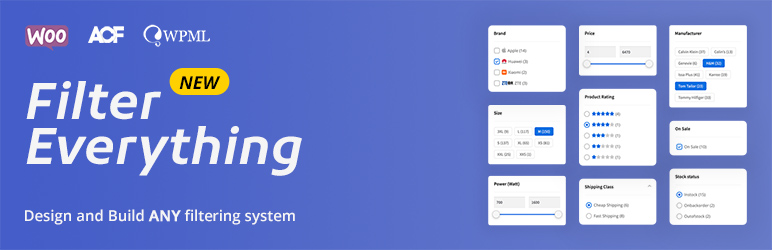
Filter Everything is a robust and comprehensive filter plugin designed for WordPress and WooCommerce. It is primarily used to filter any post types and by any criteria, making content search and organization on your website a breeze. The plugin supports step-by-step filtering, easy integration using widgets or shortcodes, and is compatible with most page builders.
Features and Benefits
- Filter Any Post Types: Filter Everything allows you to filter any post types, meaning you can sort through any content on your website. This feature makes content organization and management easier.
- Supports Any Filtering Criteria: Whether you want to sort by price, sale status, product type, or any other criteria, Filter Everything has got you covered.
- Compatibility with Page Builders: Filter Everything is compatible with almost all page builders, including Elementor, Oxygen, Divi, WPBakery Composer, etc., making it a versatile tool.
- Search by Keyword: The plugin allows you to search by keyword, enabling you to find specific content quickly and efficiently.
- Sorting Field: You can create a list of your own sorting parameters and place a sorting field anywhere on your site for easy sorting and filtering of content.
Pricing Structure
The pro version starts from $40.
HUSKY – Products Filter Professional for WooCommerce

Take control of your WooCommerce product filtering with HUSKY, a powerful and flexible plugin designed to enhance your customers’ shopping experience. HUSKY goes beyond basic filters, offering a wide range of options to refine product searches and improve navigation on your online store.
Key Features and Benefits:
- Granular Filtering: Empower your customers to filter products by various criteria, including categories, attributes, tags, custom taxonomies, price ranges, ratings, and even meta data. This allows for highly targeted searches, leading customers to the products they desire faster.
- Seamless User Experience: Enjoy real-time product filtering with AJAX technology. This eliminates the need for page reloads, keeping your customers engaged and focused on finding the perfect product.
- Dynamic Product Recounts: Get instant updates on the number of products matching the applied filters. This ensures accuracy and prevents confusion for your customers.
- Designer-Friendly Filters: Craft custom filter elements that perfectly match your store’s design aesthetic. HUSKY provides a drag-and-drop builder and a variety of filter element styles for ultimate customization.
- SEO-Friendly Filtering: HUSKY generates search engine optimized links for filtered product searches. This can improve your website’s ranking in search results and attract more organic traffic.
- Multiple Filter Presets: Create and save different filter configurations for various product categories or use cases. This allows for quick and easy implementation of different filtering options throughout your store.
- Step-by-Step Product Filtering (Pro Feature): This unique feature allows you to create a product selection wizard, guiding customers through a step-by-step process to refine their search and discover the ideal product. (Available in the Pro version)
Pricing Structure:
HUSKY offers a freemium model with a free version available on the WordPress plugin repository.
Allow HTML in Category Descriptions
Allow HTML in Category Descriptions is a powerful WordPress Filter plugin that empowers you to enrich your category descriptions with HTML formatting. By default, WordPress strips out all but the most basic formatting tags from category descriptions.
This plugin effectively disables those filters for users with necessary permissions, giving you more control and flexibility over your category descriptions.
Features and Benefits
- HTML Support in Category Descriptions: The plugin allows you to include any HTML code in your category descriptions, which WordPress would typically strip out. This feature enhances your ability to customize and make your category descriptions more engaging and informative.
- User Role-based Permissions: The plugin’s HTML support in category descriptions is not universal. It is based on user roles and their permissions. This means you can control who can add HTML to category descriptions, ensuring the integrity and consistency of your website content.
- No Additional Protection or Assistance: The plugin is straightforward in its function. It only disables the filters and does not protect invalid HTML or assistance in creating WYSIWYG HTML. This feature may appeal to users who prefer simple, unobtrusive plugins.
- Use Existing WordPress Functionality: Even though the plugin does not help in creating HTML, you can still use the post or page composing screen of WordPress to create your text and formatting. You can then switch to the ‘code’ tab and copy the HTML code into the category description field.
Pricing Structure
The Allow HTML in Category Descriptions is a free WordPress plugin. It does not offer a premium version or additional features for a fee. It is entirely free to use and download.
Plugin Load Filter
Plugin Load Filter is a dynamic WordPress filter plugin designed to enhance your website’s performance by providing the option to deactivate unnecessary plugins on individual posts and pages. This plugin addresses the common issue of website speed degradation caused by the activation of numerous plugins across all posts and pages.
Features and Benefits
- Support Post Format type: This feature allows you to filter plugins based on the format of your post. It simplifies the management of plugins on your website and enhances its performance.
- Support Custom Post type: This feature extends the flexibility of your website by allowing you to filter plugins based on custom post types, further contributing to the speed and efficiency of your website.
- Support Jetpack Modules filtering: This functionality provides the ability to filter plugins related to Jetpack Modules, easing the management of these modules and enhancing the overall performance of your website.
- Support WP Embed Content card (is_embed template): This feature aids in managing plugins for embedded content, ensuring your embedded content performs optimally.
- Support Simple Post Language Locale switcher: This feature enhances user experience by enabling you to filter plugins based on the language locale, ensuring your website remains user-friendly and efficient.
Pricing Structure
Plugin Load Filter is a free-to-use plugin available in the WordPress plugin repository.
Category Ajax Filter
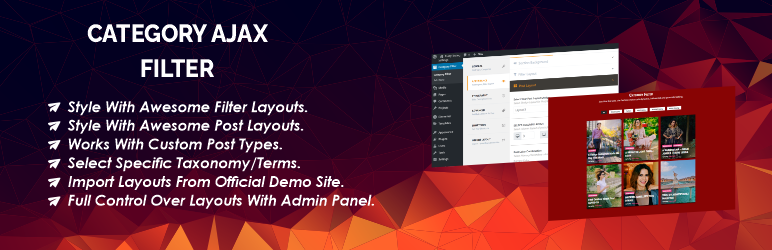
Category Ajax Filter is a WordPress filter plugin that offers a seamless way to filter posts, custom post types, and blogs by category or specific taxonomy terms without having to reload the page. It uses ajax request and offers many pre-build layouts for a more personalized experience. This filter plugin is compatible with Elementor Builder, Divi Builder, and WP Bakery.
Features and Benefits
- Ajax Filtering: Filter posts, custom post types, blogs, and articles by category or specific taxonomy terms without reloading the page. This feature enhances the user experience by making the filtering process quicker and smoother.
- Supports Multiple Builders: Compatible with Elementor Builder, Divi Builder, and WP Bakery. This offers flexibility for users who use different builders for their website.
- Custom Post Type & Taxonomies Support: It supports custom post types and taxonomy selection, offering more flexibility in filtering. This enables users to filter a wider range of content on their website.
- Pro Version Features: The pro version offers more advanced features like analytics, overwrite/modify filter/post layout, developer hooks, multiple taxonomy filter, search bar feature, post animation effects, and more. These features provide more control and customization options to the users.
Pricing Structure
The plugin is free to use with pro version starting from $33.
WooCommerce Filter Orders by Product
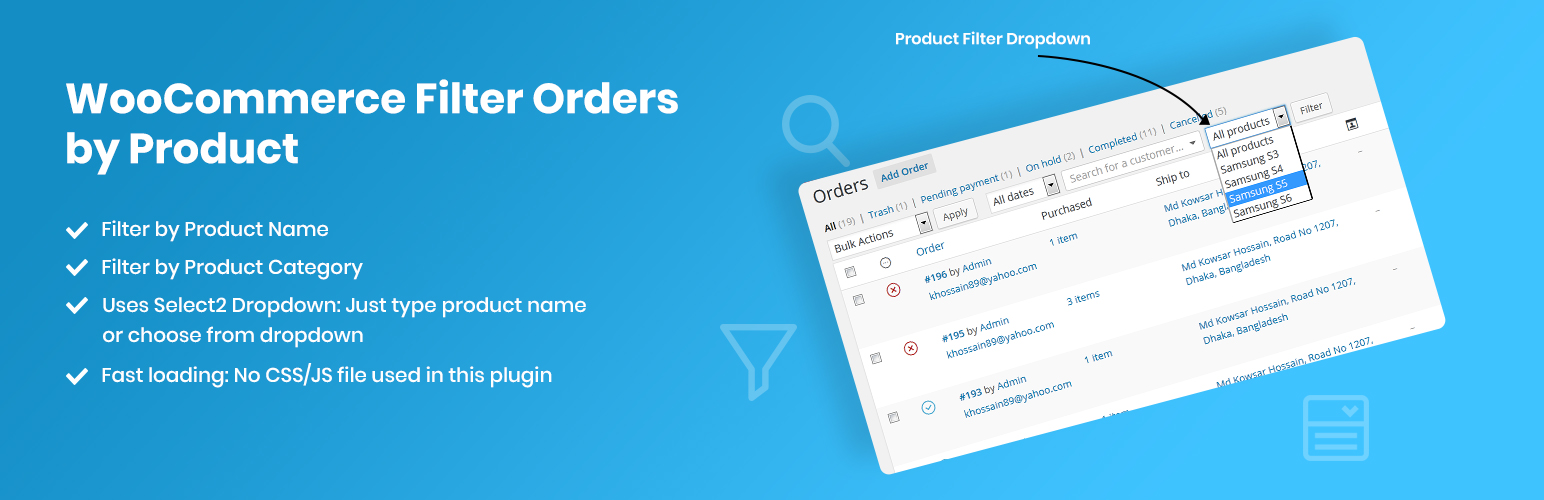
The WooCommerce Filter Orders by Product plugin is an essential tool for online store owners using WordPress. This plugin allows users to filter their order page results by a specific product, ensuring a more organized and efficient way of managing orders. It is the answer to the need for a more streamlined process of tracking orders based on the products purchased.
Features and Benefits
- Filter by Product: This feature allows you to select a specific product from a dropdown list and filter your orders based on the selected product. This makes it easy to track and manage orders for specific items in your store. This leads to more efficient order management and can help identify popular products.
- Filter by Product Category: This new feature from version 3.0 allows you to filter your orders not just by specific products, but by product categories as well. This allows for a macro view of order trends, helping you to identify which categories are performing well.
- Compatibility with all Product Statuses: Although the plugin currently works only for published products, it can be modified to work for all product statuses such as draft, private, etc., by adding a code to your theme’s functions.php file. This offers flexibility and allows you to track orders for all types of products in your store, regardless of their status.
Pricing Structure
The WooCommerce Filter Orders by Product plugin is an open-source project available on GitHub.
Jetpack Search

Jetpack Search is an efficient and highly customizable WordPress search plugin that significantly enhances the default site search functionality of your website. This plugin offers advanced site search tools that aim to provide your visitors with the best search experience.
Whether your site has thousands of posts, pages, or products, Jetpack Search ensures quick and accurate results, reducing the time your visitors spend searching and increasing their engagement.
Features and Benefits
- Highly relevant search results: Jetpack Search uses modern ranking algorithms to provide the most relevant results to your visitors.
- Prioritized results: The plugin boosts and prioritizes results based on your site’s search stats, providing users with the most relevant information first.
- Instant search: Users can see results as they type without having to reload the page.
- Advanced filtering: Jetpack Search offers filters and facets by categories, tags, dates, custom taxonomies, and post types.
- Mobile and desktop compatibility: The plugin improves theme compatibility for both mobile and desktop interfaces.
- Real-time indexing: Any changes to your site are updated in the search index within minutes.
Pricing Structure
The plugin is free to use.
WP Ultimate Post Grid
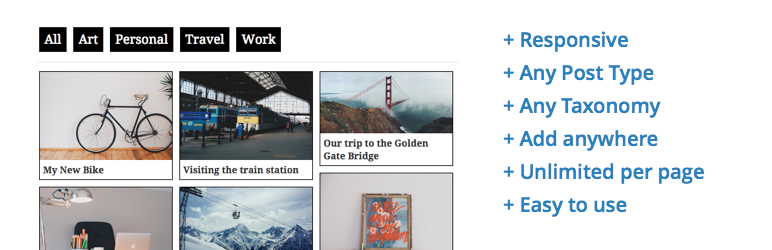
The WP Ultimate Post Grid is a robust WordPress filter plugin that allows you to create responsive grids for your posts, pages, or any custom post type. The plugin also comes with an optional isotope filter for any taxonomy associated with those posts. It solves the problem of organizing and filtering content on your website, making it easier for your users to find relevant information.
Features and Benefits
- Live Preview: This feature allows you to view your grid as you build it, providing real-time updates.
- Use posts, pages, or custom post types as the source: This versatility allows you to create grids from any content type on your site.
- Responsive grids: Your grids will look good on any device, enhancing user experience.
- Order by options: This feature gives you control over the order of your posts within the grid.
- Post or featured image link: You can link directly to the actual post or featured image.
- Custom links and images for posts: This feature allows for customization and uniqueness in your posts.
- Isotope filter: Add an isotope filter for any taxonomy or custom field, enhancing your website’s searchability.
- The Premium version of the plugin offers additional features such as limiting your posts by any taxonomy, author, date or post ID, plain text filter, dropdown filters, checkbox filters, multiselect in filters, post count for filter terms, category or tag grid, Load More button for pagination, infinite scroll pagination, clone your grids, order grid by custom field and dynamically filter grids in the shortcode.
Pricing Structure
The plugin is free to use with additional features included in premium version.
What are WordPress Filter Plugins
WordPress filter plugins are tools designed to enhance the functionality and customization options of WordPress websites by allowing users to apply various filters to their content. These filters can manipulate data, modify output, or control the behavior of WordPress themes and plugins. Here’s a breakdown of what they do and their benefits:
What they do:
Imagine WordPress as a toolbox full of parts, and filter plugins are the screwdrivers and wrenches that modify how those parts work together. They act like hooks that intercept data generated by WordPress and allow you to:
- Change content: For example, a filter could modify how product descriptions are displayed on your WooCommerce store.
- Add functionality: A filter might enable features like user-generated content ratings or hide specific content from certain user roles.
- Refine data: Filters can manipulate data before it’s displayed, such as converting dates to a specific format or filtering out unwanted characters from user input.
Benefits of using WordPress Filter Plugins:
- Enhanced Functionality: Expand the capabilities of your website beyond its default features without complex coding.
- Customization Power: Tailor your website’s behavior to your specific needs and preferences.
- Improved User Experience: Filters can streamline user interactions with your website, making it more user-friendly and intuitive.
- Integration with Themes and Plugins: Many filters work seamlessly with themes and other plugins, allowing for even greater customization possibilities.
Types of WordPress Filter Plugins:
There’s a wide range of filter plugins available, each catering to specific functionalities. Here are some common examples:
- Content Filters: Modify how text, images, or other content elements are displayed.
- Search & Filter Plugins: Create advanced search functionalities or filter content by various criteria.
- Form Processing Filters: Refine user input from contact forms or other interactive elements.
- SEO Filters: Optimize your website’s content for search engines.
- Security Filters: Enhance website security by filtering out potential threats or malicious code.
Final Word
The usage of WordPress filter plugins greatly enhances the functionality and user experience of any website.
The plugins discussed here, namely Filter Everything, HUSKY, Allow HTML in Category Descriptions, Plugin Load Filter, Category Ajax Filter, and WooCommerce Filter Orders by Product, each offer unique features that cater to different needs, from managing content and improving site performance to enriching descriptions and streamlining order management.
Given their potential to elevate your website, it is recommended to explore these plugins further and consider integrating one or more into your WordPress site. Don’t forget to share your experiences or thoughts in the comments!
FAQs About WordPress Filter Plugins
- What are WordPress filter plugins?
WordPress filter plugins are tools designed to enhance the functionality and customization options of WordPress websites by allowing users to apply various filters to their content. These filters can manipulate data, modify output, or control the behavior of WordPress themes and plugins. - How do WordPress filter plugins benefit website owners?
WordPress filter plugins empower website owners to edit their site’s content and functionality according to their specific needs. They offer enhanced search capabilities, content organization, image manipulation, e-commerce filtering, and more, ultimately improving user experience and site performance. - Are WordPress filter plugins easy to install and use?
Yes, most WordPress filter plugins are designed with user-friendliness in mind, offering simple installation processes and intuitive interfaces. Many plugins also provide documentation, tutorials, and support to assist users in effectively utilizing their features. - What types of filters can be applied using these plugins?
WordPress filter plugins enable users to apply various types of filters depending on their requirements. These may include search filters for advanced search functionality, content filters for organizing and sorting posts/pages, image filters for enhancing visuals, e-commerce filters for product refinement, and more. - Can WordPress filter plugins improve SEO?
Yes, some WordPress filter plugins include features specifically aimed at improving search engine optimization (SEO). These plugins may offer options for optimizing meta tags, schema markup, canonical URLs, and other elements essential for better visibility in search engine results pages (SERPs). - Are there security implications to consider when using WordPress filter plugins?
While WordPress filter plugins themselves don’t inherently pose security risks, it’s essential to choose reputable plugins from trusted sources and keep them regularly updated. Additionally, implementing security plugins can help protect your website from malicious requests, spam comments, and other security threats. - Do WordPress filter plugins work with all themes and plugins?
Compatibility can vary depending on the specific plugin and theme or plugin combination. However, most well-developed WordPress filter plugins are designed to integrate smoothly with a wide range of themes and plugins. It’s advisable to check compatibility and conduct testing before implementing a filter plugin on your site. - Can WordPress filter plugins be customized to suit unique requirements?
Yes, many WordPress filter plugins offer customization options that allow users to tailor the filters to their specific needs. This may include adjusting filter criteria, styling options, behavior settings, and more, ensuring flexibility and adaptability to diverse website configurations.


