Expand and streamline your online store’s functionality with WooCommerce Custom Fields Plugins. These plugins are designed to add essential features to your WooCommerce-powered WordPress website, enhancing your product listings and improving your customers’ shopping experience.
This article provides a detailed overview of the best free WooCommerce Custom Fields Plugins, helping you identify the right tool to meet your unique business needs.
In the ever-evolving world of e-commerce, versatility and customization are key to standing out from the crowd. Along with WordPress Custom Fields Plugins, the use of WooCommerce Custom Fields Plugins can significantly enhance the functionality of your online store, allowing you to offer more personalized products and services.
Whether you’re looking to add advanced product fields, modify checkout fields, or incorporate a product price calculator, this list of plugins will equip you with the tools you need to achieve your goals. Read on to discover the perfect plugin to boost your WooCommerce store’s performance.
Table of Contents
What Are WooCommerce Custom Fields Plugins
WooCommerce custom fields plugins are tools that extend the capabilities of your WooCommerce store by allowing you to add extra data points to various elements.
These data points can be anything from additional product details to specific customer information during checkout. Essentially, they act like extra compartments on a form, providing more ways to gather and store information relevant to your online store.
There are two main ways WooCommerce custom fields plugins are commonly used:
- Enhancing Product Pages: These plugins allow you to add custom fields directly to your product pages. This lets you collect additional information from customers beyond the typical details like size and color. For instance, you could use a custom field to allow customers to specify engraving options for a piece of jewelry, or add a field for them to upload artwork to be printed on a t-shirt.
- Collecting Additional Customer Data: Some plugins allow you to add custom fields to the checkout process or customer registration forms. This can be useful for gathering specific customer information relevant to your business. For example, you might use a custom field to collect a business license number for wholesale customers or add a field for customers to specify their preferred delivery time window.
Best WooCommerce Custom Fields WordPress Plugins
Here are our hand-picked WooCommerce custom field plugins that you can use while building an online store.
1. Advanced Product Fields (Product Addons) for WooCommerce

Advanced Product Fields (Product Addons) for WooCommerce is a plugin that allows you to add extra product options (form input fields) to your WooCommerce product pages.
This plugin is perfect for businesses that need to create a customizable product offering, such as a pizza configurator or extra options for a product. The plugin also allows customers to personalize their product with a variety of extra choices, input fields, and so on.
Features and Benefits
- Intuitive and beautiful backend builder that looks like Advanced Custom Fields.
- 10 different form elements to choose from including text field, text area, email, URL, number, select (drop-down), checkboxes, radio buttons, true/false, and paragraph.
- Conditional logic to show/hide fields based on other input fields.
- Increase final product price enabling you to add a flat fee to your products depending on the field value(s).
- Works with your WooCommerce tax settings.
- Optimized for speed and faster than other plugins in this genre.
Pricing Structure
The plugin is free to use, with premium features starting from $69 for one site.
2. PH Product Add-Ons for WooCommerce

PH Product Add-Ons for WooCommerce is one of the most versatile WooCommerce custom fields plugins, designed to give shoppers complete freedom to personalize their purchases.
Whether it’s adding a name to a t-shirt, uploading an image for a mug, or selecting a preferred delivery date, this plugin makes customization effortless. With built-in dynamic pricing, store owners can charge extra based on quantity, character length, or flat fees, ensuring flexible and profitable product configurations.
Key Features
- Extensive custom fields – Add text boxes, dropdowns, radio buttons, checkboxes, date pickers, file uploads, and more to collect customer preferences.
- Enhanced product personalization – Let shoppers design shoes, t-shirts, or gaming accessories by choosing sizes, colors, text, or images.
- Dynamic price adjustments – Automatically update product prices based on input values such as character length, product quantity, or percentage of base price.
- Reusable add-ons – Create add-ons once and assign them to multiple products or entire categories, saving time and effort.
- Conditional logic – Show or hide fields based on customer selections, creating a guided and clutter-free customization process.
- Seamless checkout flow – Display all selected add-ons and adjusted prices clearly on the product page, cart, and checkout for full transparency.
Pricing
Starts at $79/year for a single site, including one year of updates and premium support.
3. Product Addons for Woocommerce – Product Options with Custom Fields

Product Addons for Woocommerce – Product Options with Custom Fields is a lightweight, user-friendly plugin that simplifies the process of adding custom fields to your WooCommerce product pages. The plugin is designed to fulfill the need for eCommerce businesses to collect additional information from customers for personalized products or services.
Features and Benefits
- Drag and Drop Form Builder: The plugin comes with a user-friendly form builder that allows you to add extra product options quickly.
- Wide Range of Form Elements: The plugin supports various form elements including text fields, number fields, radio fields, checkbox fields, select fields, textarea fields, date fields, color fields, hidden fields, password fields, email fields, grid layout, and conditional fields.
- Paragraph and Header Tags: The plugin supports paragraph and header tags to set instructions or headers on the product page.
- Premium Features: The premium version of the plugin offers additional features such as custom price fields, custom price formula, upload field, drag and drop upload, AWS S3 file upload, multi-select field, image selection, color group, custom date picker, time picker, custom color picker, conditional logic, Google Map place selector, grid/column alignment, tool-tip and help text, and products field.
Pricing Structure
The plugin is free to use with premium features starting from $43 for one site.
4. Custom WooCommerce Checkout Fields Editor

Custom WooCommerce Checkout Fields Editor plugin is a powerful tool designed to simplify the customization of WooCommerce checkout and registration pages. It provides an easy solution to adding, editing, deleting, and rearranging custom fields. This is particularly beneficial for WordPress beginners who are looking to tailor their checkout process to their specific business needs.
Features and Benefits
Free Features
- Ability to add, edit, and delete WooCommerce custom fields.
- Option to add label and placeholder in each checkout field.
- Reorder fields or change the arrangement order of fields on the WooCommerce checkout page.
- Add custom fields on the additional fields section.
- Display fields in the Orders Page and Emails.
- Enable or disable WooCommerce fields.
- Reset checkout fields to the default option.
- Reorder Fields or change the order of fields on the WooCommerce Register page.
Premium Features
- Add, edit, and delete custom fields on the MyAccount page.
- Display fields conditionally based on cart contents, cart subtotal, cart total, user roles, product, product variation, product category, and other field values.
- Display sections conditionally in various parts of the checkout process.
- Add price fields and choose the price type (Fixed Price, Percentage of Subtotal, Custom Price, Percent of Subtotal excluding tax, Percentage of Cart Total, Dynamic Price).
- Premium fields include file upload, multiple file upload, date picker, time picker, and label.
Pricing Structure
The pricing starts from $29.
5. Flexible Product Fields WooCommerce Product Addons

The Flexible Product Fields plugin is a WooCommerce plugin that allows users to extend their product options with extra product add-ons. This powerful tool acts as a product page configurator, enabling users to create a product that is perfectly tailored to meet their needs.
With this plugin, creating additional product fields in the WooCommerce management panel becomes an easy task, providing a lot of flexibility when making changes.
Features and Benefits
- Customize WooCommerce Product Pages: With this plugin, you can add custom fields and extra options and edit the WooCommerce product pages with ease.
- Increase Cart Value: This plugin allows you to increase the cart value thanks to the WooCommerce product add-ons, bundles, and extra options.
- Advanced Product Fields: You can set advanced product fields for WooCommerce products, giving you more control over your product listings.
- Frontend Product Configurator: This feature enhances the shopping experience of your customers, allowing them to customize their product before purchase.
- Product Personalization: Enable product personalization in WooCommerce, allowing your customers to add their touch to the products they purchase.
- Free Version: The free version of this plugin comes with several useful features, including the ability to add extra product options on the product page, mark custom product fields as required or not, and save product configuration.
- Pro Version: The Pro version of this plugin offers additional features such as arranging field groups in order, assigning a fixed or percentage price to a field, and setting rules for conditional logic based on the values of other preset FPF fields.
Pricing Structure
The plugin is free to use with pro version pricing depending on the bundle purchase.
6. Product Fields, Addons and Price Calculator for WooCommerce

WC Kalkulator (WCK) is a WordPress plugin designed to enhance the capabilities of WooCommerce by introducing custom extra fields to products and orders. This plugin aims to solve the problem of limited product attributes by allowing you to define your own fields and calculate product prices based on these fields.
This means you are not limited to selling products only by length, volume, or other predefined attributes. With WCK, you have the freedom to create a personalized product in your store and decide how the prices will be calculated.
Features and Benefits
- Offers 23 field types to collect customer input, such as Checkbox, Color Picker, Date Picker, Dropdown, Email input, and more.
- Allows price calculation based on formulas, conditional expressions, or price add-ons.
- Provides full freedom to define fields and formulas for custom price calculation.
- You can assign fields to products, categories, or product tags, and include/exclude options.
- It has built-in validation tests for each field and allows additional conditions.
- The price is calculated server-side, ensuring the formula is protected and not visible to the client.
- Offers advanced customization options, including overloading field HTML templates in your theme file and setting custom styles using CSS classes.
Pricing Structure
WCK is a completely free plugin.
7. Advanced Custom Fields (ACF)

Advanced Custom Fields (ACF) is a powerful plugin that transforms WordPress sites into a fully-fledged content management system. It equips users with the tools to do more with their data by giving them complete control over WordPress edit screens and custom field data.
The plugin addresses the need for custom fields in eCommerce sites, blogs, business websites, and more, providing a structured data management system.
Features and Benefits
- Add Fields on Demand: ACF allows you to quickly add fields to WP edit screens with just a few clicks. It simplifies the process of adding fields, whether for a simple task like adding an “author” field to a book review post, or a complex task like managing structured data for an e-commerce site.
- Add Fields Anywhere: You can add fields across your WordPress site, including posts, pages, users, taxonomy terms, media, comments, and even custom options pages.
- Show Fields Everywhere: ACF makes it easy to load and display your custom field values in any theme template file, regardless of the complexity of the query.
- Any Content, Fast: ACF not only provides custom fields but also allows for the creation of new custom post types and taxonomies, all from within the ACF interface.
Pricing Structure
ACF is available for free with basic features. However, for more advanced features and functionality, users can upgrade to ACF PRO. The PRO version includes features like the Repeater Field, ACF Blocks, Flexible Content Field, Options Page, Gallery Field, and Clone Field. The pricing for ACF PRO starts at $49 for personal use and goes up to $249 for a lifetime agency license.
8. Custom Fields for WooCommerce By Addify
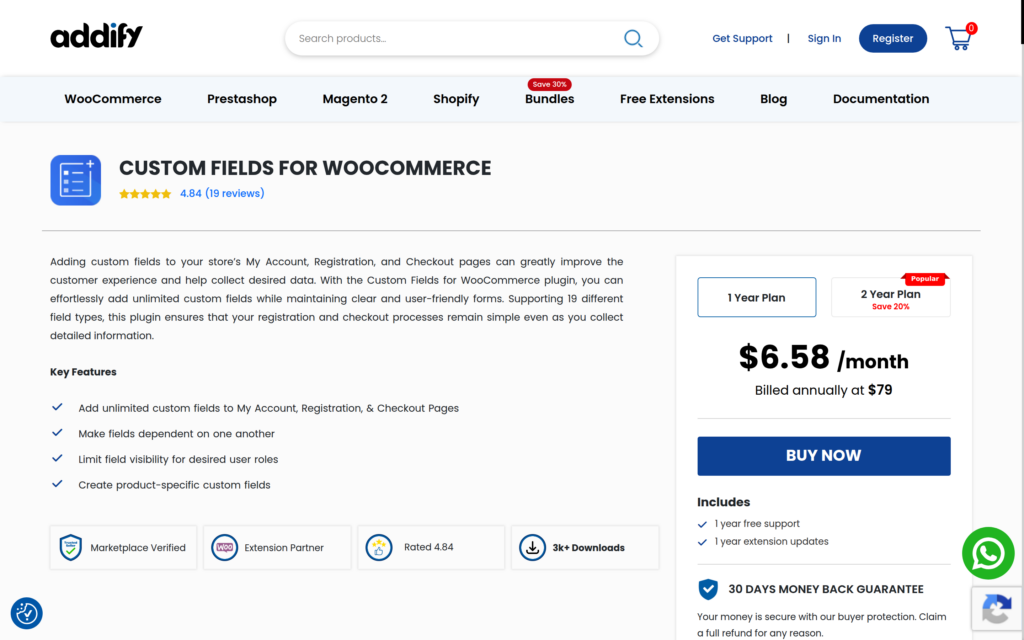
With the Custom Fields for WooCommerce, one can create new fields to add to the My Account, Registration, and Checkout pages. Choose from 19 different field types to create unlimited fields & collect desired information while keeping the forms simple and user-friendly. You can create dependent fields and choose field positions on the checkout page.
With the plugin, it is possible to create a smooth registration and checkout experience for your customers while acquiring the desired information for better decision-making.
Key Features:
- Choose from 19 field types to create new custom fields
- Place fields on the My Account, Registration, & Checkout Pages
- Make fields dependent on other fields & add prices with desired fields
- Restrict certain user roles from viewing a field
- Create custom fields for specific products
- Choose a desired field position on the checkout page
- Showcase a user role dropdown to allow customers to choose their user role
Pricing Structure
You can get one of the best WooCommerce custom field plugins at an affordable cost of $6.58/month or $79/annum.
Benefits of Using WooCommerce Custom Fields Plugins
Here are some of the key benefits of using WooCommerce custom fields plugins:
- Improved Customer Experience: By allowing customers to provide more specific details about their needs, you can offer a more personalized shopping experience.
- Increased Sales: Custom fields can help you upsell or offer product add-ons, potentially leading to higher order values.
- Better Order Management: Additional customer data can streamline your order fulfillment process.
- Enhanced Data Collection: You can gather valuable customer information to gain insights into buying behaviors and preferences.
Overall, WooCommerce custom fields plugins can be a valuable tool for store owners who want to gather more data, personalize the shopping experience, and streamline their operations.
Final Word
Adding custom fields in WooCommerce is no longer a luxury—it’s a necessity for creating personalized shopping experiences, collecting extra product or customer information, and enhancing backend workflows. The right WooCommerce custom fields plugin can help you tailor product pages, checkout forms, and order details exactly the way your business needs.
Whether you’re looking to add custom product options, capture unique customer inputs during checkout, or display dynamic data on product pages, the plugins listed above offer powerful, flexible solutions. Each one is fully compatible with the WooCommerce plugin for WordPress, making it easy to extend your store without touching code.
Choose the plugin that fits your workflow and elevate your WooCommerce store with custom fields that truly make a difference.
FAQs
What are WooCommerce custom fields plugins?
WooCommerce custom fields plugins are extensions specifically designed for WooCommerce, allowing users to add custom fields to their product pages, checkout pages, or user accounts.
Why would I need a WooCommerce custom fields plugin?
You might need a WooCommerce custom fields plugin to collect additional information from customers during the purchasing process, customize product pages with specific details, or enhance user account profiles with extra fields.
What types of fields can I add with these plugins?
These plugins typically allow you to add various types of fields, including text fields, checkboxes, radio buttons, dropdown menus, date pickers, file upload fields, and more.
Can I add custom fields to the checkout page?
Yes, many WooCommerce custom fields plugins enable you to add custom fields to the checkout page, allowing you to gather specific information from customers during the checkout process.
Do these plugins support conditional logic?
Yes, many plugins offer conditional logic functionality, allowing you to show or hide custom fields based on specific conditions, enhancing the user experience and collecting relevant data efficiently.
Are there any integrations available with these plugins?
Some WooCommerce custom fields plugins integrate with other WooCommerce extensions or third-party services, providing additional functionality and compatibility with other tools such as email marketing platforms or CRM systems.
What are some popular WooCommerce custom fields plugins?
Popular WooCommerce custom fields plugins include Advanced Custom Fields for WooCommerce, WooCommerce Custom Fields, Meta Box, WooCommerce Custom Fields & Product Add-ons, and Toolset Types. These plugins offer various features and customization options to suit different needs.


