

A simple plugin to update URLs or other text in a database.

About Zoho Mail for WordPress
The Zoho Mail Plugin for WordPress allows you to configure your Zoho Mail account in your WordPress site, ensuring that emails are sent from your account using Zoho Mail API's. This plugin provides a secure authentication process and makes use of PHPMailer's code library to send emails. To set up the plugin, you will need a Zoho Mail account, a self-hosted WordPress site, and PHP 5.6 or later.Screenshots
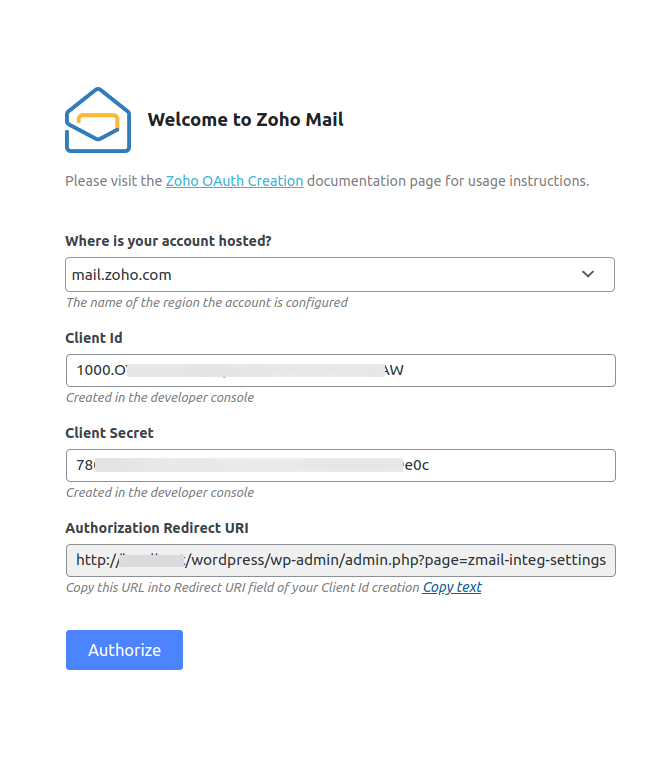


Frequently asked questions
What is the Zoho Mail plugin for WordPress?
Zoho Mail Plugin helps you to configure your Zoho Mail account in your WordPress site, to send emails from your Site.
What are the pre-requisites for using the Zoho Mail plugin?
The pre-requisites for using the Zoho Mail plugin are: A Zoho Mail Account, A self-hosted WordPress site, PHP 5.6 or later.
What are the advantages of the Zoho Mail plugin?
The advantages of the Zoho Mail plugin are: It uses OAuth 2.0 protocol for secure authentication, It customizes the PHPMailer's code library, It handles the custom send mail action anywhere from the entire site using the 'wp_mail' function of WordPress.
What are the features of the Zoho Mail API?
The features of the Zoho Mail API are: It is authenticated using OAuth 2.0 protocol, It allows you to configure your Zoho Mail account in your website to send email, The emails sent will be available in the corresponding Zoho Mail account's Sent folder.
What are the parameters of the Zoho Mail plugin?
The parameters of the Zoho Mail plugin are: Where is your account hosted?, Client ID, Client Secret, Authorized Redirect URI, From Email Address, From Name.
Changelog
1.0.1
- Added notification for successful authentication while configuring.
- Empty configuration form issue has been handled.
- Support for html content type.
- Issue fix for Back end font problem.
1.0.2
- Fix for support – Support for lower PHP version.
1.1
- support for customizable From Name in configuration.
1.1.1
- support for Bcc email field
- Fixed an issue related to style
- Zoho Mail logo change
- Fix for Support – Support html content type in mails
1.1.2
- support for .in region
- Bug Fix for .com region
1.2
- support for Reply to – Support reply to in mails
1.2.1
- Security Update
1.2.2
- WooCommerce Fix for replyTo
1.2.3
- Support for .com.cn region
1.2.4
- Support third party extension from name
1.3
- Support for attachments
1.3.1
- Fix for Invalid Client Secret issue
1.3.2
- Fix for Missing scope issue while authentication
1.3.3
- Fix for .cn region
1.3.4
- Fix for Invalid From Address
1.3.5
1.3.7
- Support for .com.au region
1.3.8
- Issue fix for Php Warnings
1.3.9
- Attachment fix
1.4.0
- Supporting special characters in From Name.
1.4.1
- Adding troubleshooting inside plugin.
1.4.2
- Providing option for default content type.
1.4.3
- Added admin notice for transmail plugin
1.4.4
- Admin notice displayed only in configuration page
1.4.5
- Zeptomail Notice and Warning message bug fix
1.4.6
- Tested for WordPress 5.8
1.4.7
- bug fix for cc emailid
1.4.8
- jp DC support added, domain param changed for clearer ux.
1.4.9
- WordPress 6.1 update.
1.5.0
- Configuration settings enhanced.
1.5.1
- bug fix for configuration settings UI issue.a
1.5.2
- Enhanced the settings flow.
1.5.3
- bug fix for issue in large file upload.
1.5.4
- Tested upto WordPress 6.4 and bug fix.
1.5.5
- Enhanced configuration settings UI.
1.5.6
- CA and SA DC support and warning bug fix.
1.5.7
- bug fix on reply-to issue.
1.5.8
- domain issue fixed
1.5.9
- Fixes on security vulnerbilities.
1.6.0
- Bug Fixes on fetal error.
