

Enables the previous "classic" editor and the old-style Edit Post screen with TinyMCE, Meta Boxes, etc. Supports all…
About Zippy
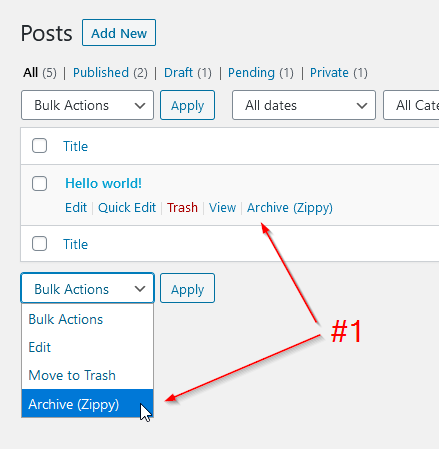
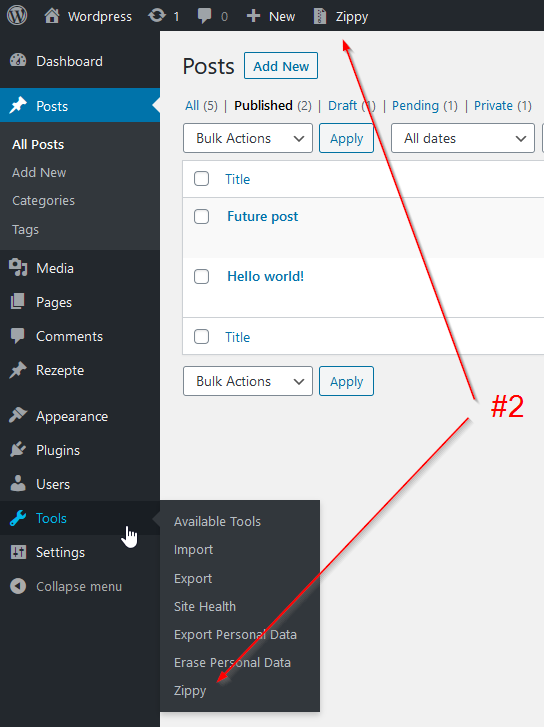
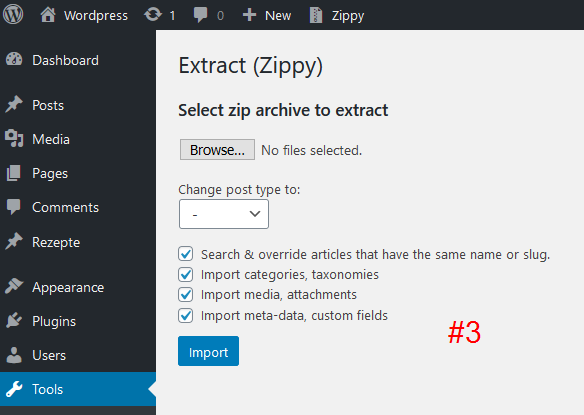
This plugin provides an easy solution to archive and unpack pages and posts as zip files. You can use this feature to transfer content to another website or to backup your articles locally. Just make sure the Zip extension is enabled on your web server for it to work properly.Screenshots
Frequently asked questions
What does the Zippy plugin do?
The Zippy plugin provides an incredibly easy solution to archive pages and posts as zip files. It also allows you to unpack them back, even on a different website.
Can I use Zippy to backup my articles?
Yes, you can use Zippy to backup your articles on your local computer by downloading and storing posts as zip archives.
What are the key features of Zippy?
Key features include archiving posts as zip-files, extracting archives on any website with the plugin installed, downloading and storing posts as zip archives, multiple posts support, and custom post types support.
Are there any server requirements for Zippy to work?
Yes, the Zip extension must be enabled on your web server for the plugin to function correctly.
Changelog
1.6.11
- Fixed import issues.
- Fixed cache issues.
- Tested up to WordPress 6.7.
1.6.10
- Enhanced security.
1.6.9
- Enhanced security.
1.6.8
- Enhanced security.
1.6.7
- Tested up to WordPress 6.4.
1.6.6
- Fixed unserialization security issue (for administrators and editors only).
1.6.5
- Tested up to WordPress 6.3.
1.6.4
- Tested up to WordPress 6.2.
1.6.3
- Enhanced security: only users with the “edit_pages” capability can archive/unarchive pages/posts.
1.6.2
- Changed exported data: author’s data will be exported only if the user has the “edit_users” capability (i.e. administrators).
1.6.1
- Fixed potential vulnerability: Zippy archive contains a post author sensitive data (email, login, password hash).
1.6.0
- Updated options in the Zippy “Unzip” form.
- Improved functionality to transfer attachments/images.
- WordPress 6.0 support added.
1.5.5
- Fixed notices when exporting posts.
1.5.4
- Security improvements.
1.5.3
- WordPress 5.6 support added.
1.5.2
- Fixed blank pop-up window on some pages.
1.5.1
- Fixed translations.
1.5.0
- Added new options to the unzip window.
- Added German translation.
- Changed labels, messages.
1.4.0
- Added access right checks.
- Added separated plugin page (admin navigation menu > Tools).
- Fixed problem with detecting parent posts.
1.3.4
- Design improvements.
1.3.3
- WordPress 5.3 support added.
1.3.2
- Improved errors handling
- Updated FAQs
1.3.1
- Fixed functionality to generate archive filename.
- Export path changed from the WordPress root directory to the wp-content directory.
1.3.0
- Added the possibility to transfer attachments that comes as ID’s inside post custom fields.
- Formatting improvements.
1.2.4
- WordPress 5.2 support added.
1.2.3
Just a minor improvements to keep the plugin alive.
1.2.2
- Name of the generated archive changed from post id to post title.
1.2.1
- Improved attachments transferring (to prevent duplicates).
1.2.0
- Added option to change the post type of the transferred article(s).
- Fixed errors handling.
- Small improvements.
1.1.6
- Improved functionality to handle translations.
1.1.5
- Added private post types support.
1.1.4
- Fixed problem with the archive files.
1.1.3
- Fixed PHP Warning during the import process.
1.1.2
- Fixed an issue when the image that is used in a multiple articles can be duplicated during the import (unzip) process.
1.1.1
- Improved multiple posts export.
1.1.0
- Added bulk action – multiple posts can be archived at once.
- Added custom post types support.
- Different improvements.
1.0.1
- Fixed bug: missed featured image on import when the checkbox ‘Replace this post with the post which have the same name/slug’ is not checked.
- Fixed bug: not possible to import custom post type article
1.0.0
- Initial release.

