

Improve your WordPress SEO: Write better content and have a fully optimized WordPress site using the Yoast SEO…
About WPC Badge Management for WooCommerce
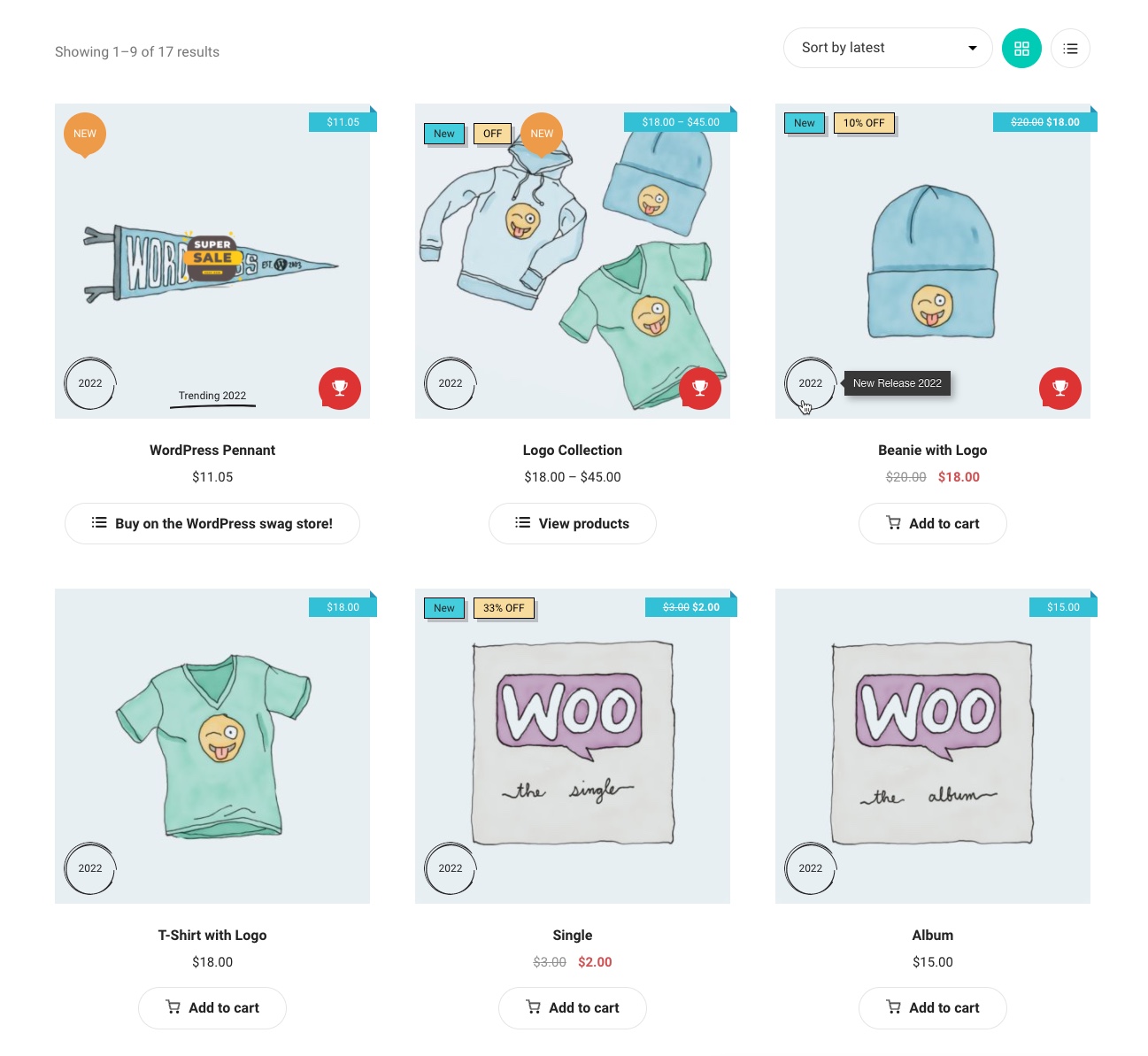
The WPC Badge Management plugin is a powerful tool for managing badges on online shops and WooCommerce sites. It allows users to customize badges with images, shapes, colors, and text, and can be used to emphasize sale events, distinguish between product lines, and build customer loyalty. The plugin also integrates with other WPC plugins, such as WPC Smart Quick View and WPC Countdown Timer.Screenshots


Changelog
3.0.8
- Fixed: Minor JS issues
3.0.7
- Added: Position “On image” for single product page
3.0.6
- Fixed: Product status ‘instock’, ‘outofstock’ and ‘onbackorder’
3.0.5
- Added: “Selected products” option
- Updated: Compatible with WP 6.7 & Woo 9.4
3.0.4
- Added: Active button on the badge editor
3.0.3
- Added: Shortcode [wpcbm_badge id=”xx”] to show individual badge by the ID
3.0.2
- Updated: Compatible with WP 6.6 & Woo 9.1
3.0.1
- Fixed: Minor CSS/JS issues in the backend
3.0.0
- Added: User roles – Specify the user roles that are allowed to view this badge
- Added: Time – Configure the date and time to display a badge
2.5.0
- Added: 7 new styles
- Added: Box shadow
2.4.3
- Updated: Compatible with WP 6.5 & Woo 8.7
2.4.2
- Fixed: Can’t search badges
2.4.1
- Fixed: Permission check
2.4.0
- Fixed: Broken Access Control
2.3.9
- Fixed: wp_date()
2.3.8
- Updated: Compatible with WP 6.4 & Woo 8.5
2.3.7
- Updated: Optimized the code
2.3.6
- Fixed: Broken Access Control vulnerability
2.3.5
- Added: “In stock” conditional
2.3.4
- Fixed: Incorrect badges order
- Added: Order column on badges table
2.3.3
- Fixed: Minor CSS/JS issues in the backend
2.3.2
- Updated: Compatible with WP 6.3 & Woo 8.0
2.3.1
- Fixed: Minor CSS/JS issues in the backend
2.3.0
- Updated: Change the data structure of “Badge Group”, remember to run the “Data Migration” on WPClever > Badge Management > Tools
2.2.6
- Updated: Optimized the code
2.2.5
- Fixed: Minor CSS/JS issues in the backend
2.2.4
- Updated: Optimized the code
2.2.3
- Added: Best selling products condition
2.2.2
- Fixed: Shortcodes
2.2.1
- Updated: Optimized the code
2.2.0
- Added: Activate/deactivate button for each badge, so you don’t need to move it to trash
2.1.9
- Fixed: Minor issue in shortcode wpcbm_best_seller
2.1.8
- Updated: Optimized the code
- Added: Shortcode [wpcbm_best_seller]
2.1.7
- Added: Shortcode [wpcbm_product_data]
2.1.6
- Updated: Optimized the code
2.1.5
- Fixed: Lose image when saving badge
2.1.4
- Fixed: Works with attribute that have special characters
2.1.3
- Updated: Optimized the code
2.1.2
- Added: Shortcode [wpcbm] to show all badges of a product
2.1.1
- Fixed: Get default values when changing the style
2.1.0
- Added: Function ‘get_settings’ & ‘get_setting’
- Updated: Optimized the code
2.0.6
- Added: ‘On backorder’ conditional
2.0.5
- Added: Filter hook ‘wpcbm_positions’ & ‘wpcbm_badges_class’
2.0.4
- Updated: Optimized the code
2.0.3
- Updated: Optimized the code
2.0.2
- Updated: Optimized the code
2.0.1
- Fixed: Notice on settings page
2.0.0
- Updated: New interface for selecting product attributes
- Added: Using a combination of conditionals (Premium Version)
1.3.2
- Updated: Optimized the code
1.3.1
- Updated: Minor CSS/JS issues
1.3.0
- Updated: Minor CSS/JS issues
- Added: Link for each badge
1.2.4
- Added: Style #23 (text only)
1.2.3
- Updated: Optimized the code
1.2.2
- Added: Set order for badges
1.2.1
- Updated: Compatible with WPC Countdown Timer
1.2.0
- Added: Manage badges by group
1.1.0
- Added: 20 new badge styles
1.0.0
- Released

