

Site Kit is a one-stop solution for WordPress users to use everything Google has to offer to make…

About WP Google Analytics Events – No-Code Custom Event Tracking for Google Analytics
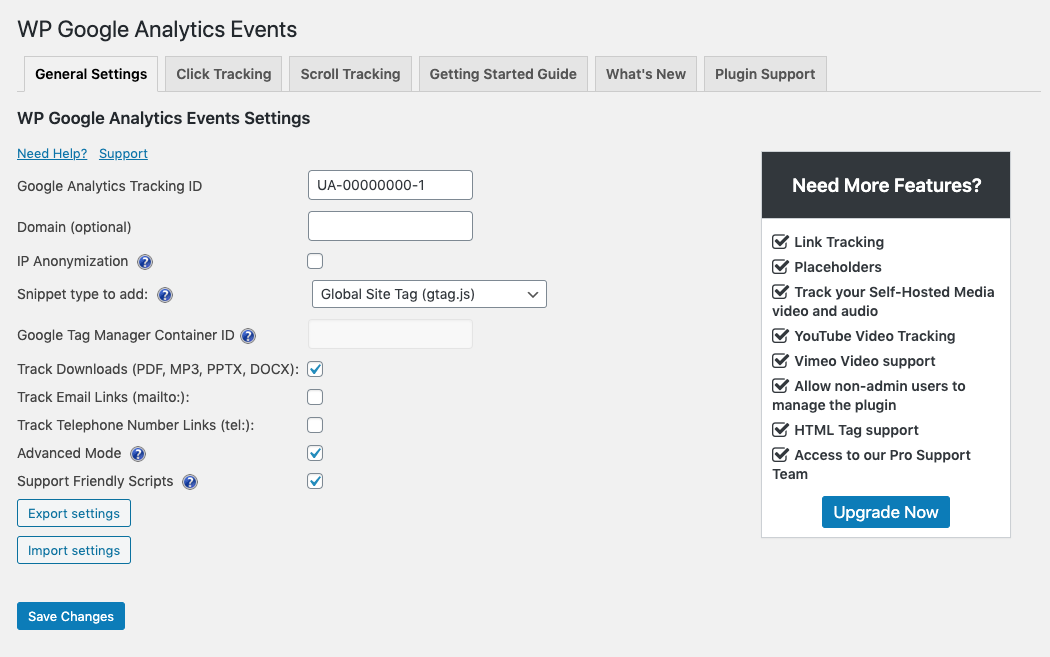
WP Google Analytics Events is a plugin that allows you to track important metrics on your website using Google Analytics. You don't need to write code as the plugin fires events whenever someone interacts with or views elements on your website. There is also a Pro version available with additional features such as one-click link tracking, placeholders for event data, and support for tracking self-hosted media and YouTube/Vimeo videos.Screenshots


Frequently asked questions
What is event tracking?
Event tracking is a feature in Google Analytics that allows you to track specific user interactions on your website, such as button clicks, form submissions, video plays, and more.
How do I configure WP Google Analytics Events?
To configure WP Google Analytics Events, you can follow the basic configuration steps outlined in our documentation. This includes installing and activating the plugin, connecting it to your Google Analytics account, and setting up event tracking for your desired elements.
How can I track clicks using WP Google Analytics Events?
To track clicks using WP Google Analytics Events, you can use the Click Tracking tab in the plugin. This allows you to specify which elements on your website should trigger an event when clicked, such as buttons, links, or images.
Is scroll tracking supported by WP Google Analytics Events?
Yes, WP Google Analytics Events supports scroll tracking. This means you can track how far users scroll on your webpages, allowing you to analyze their engagement and behavior.
Does WP Google Analytics Events support Google Tag Manager?
Yes, WP Google Analytics Events has support for Google Tag Manager. This integration allows you to take advantage of additional tracking capabilities and functionalities offered by Google Tag Manager.
Changelog
Version 2.8.1
Security updates
Version 2.7.1
- Fixing an issue with bulk actions where cached settings would not update.
Version 2.7.0
- We added the Google Analytics reports section to each dashboard.
Version 2.6.3
- User interface improvements.
- Fixin a bug with non-interaction.
Version 2.6.2
- Fixes a bug where tracking anchor links leads to an invalid page.
Version 2.6.1
- Added the force Google Analytics snippet option in the General Settings tab.
- Added tracking for email and download links.
Version 2.6.0
- Complete plugin rewrite
- New user interface for click and scroll tracking settings
- Better Google Analytics code snippet support
- Minify JavaScript option added
Version 2.5.5
- Fixed an admin panel conflict
- Updated the documentation links
Version 2.5.4
- Fixed a bug related to bootstrap modals
Version 2.5.3
- Fixed a regression bug when working with legacy Google Analytics code snippets
Version 2.5.2
- Fixed a javascript error when ad blockers are on
Version 2.5.1
- Fixed an issue with the none-interaction field
Version 2.5.0
- Added support for Global Site Tags – The new tracking code from Google Analytics
Version 2.4.6
- Minor bug fixes
Version 2.4.5
- Fixed compressed UI in firefox
Version 2.4.4
- Better support for tracking dynamic elements
- Support for older versions of PHP
- User interface fixes
Version 2.4.3
- Google Tag Manager Support
- Updated User Interface
- Added the Value field to click and scroll events (used to be a Pro feature)
Version 2.4
- Fix for a permissions problem when clicking the settings button
Version 2.4
- Added tooltips
- Buttons for the plugins page
Version 2.3
- Better dependency handling for WordPress 4.7
Version 2.2
- Added the advanced mode
- Better handling for links in new tabs
Version 2.0
- Minor bug fixes
- New intro video
Version 2.0
- IP Anonimization
- Link Issues
Version 1.9
- Added the Non-Interaction Field
Version 1.7
- Import / Export ferature added
Version 1.6
- Bug fixes
Version 1.5
- UI Changes
- Diactivating and reactivating the plugin will not delete previous settings
Version 1.4
You can now use the plugin along with Yoast Analytics.
Just check the “Don’t add the GA tracking code” option and if you are using the universal tracking code, check that option as well.
Version 1.2
- Fixes an issue that would cause tracking a page twice.
- Admin look and feel changes.
- Use the Universal Trcking code.
- Added a short delay for link clicks.

