

Enables the previous "classic" editor and the old-style Edit Post screen with TinyMCE, Meta Boxes, etc. Supports all…
About Database Reset
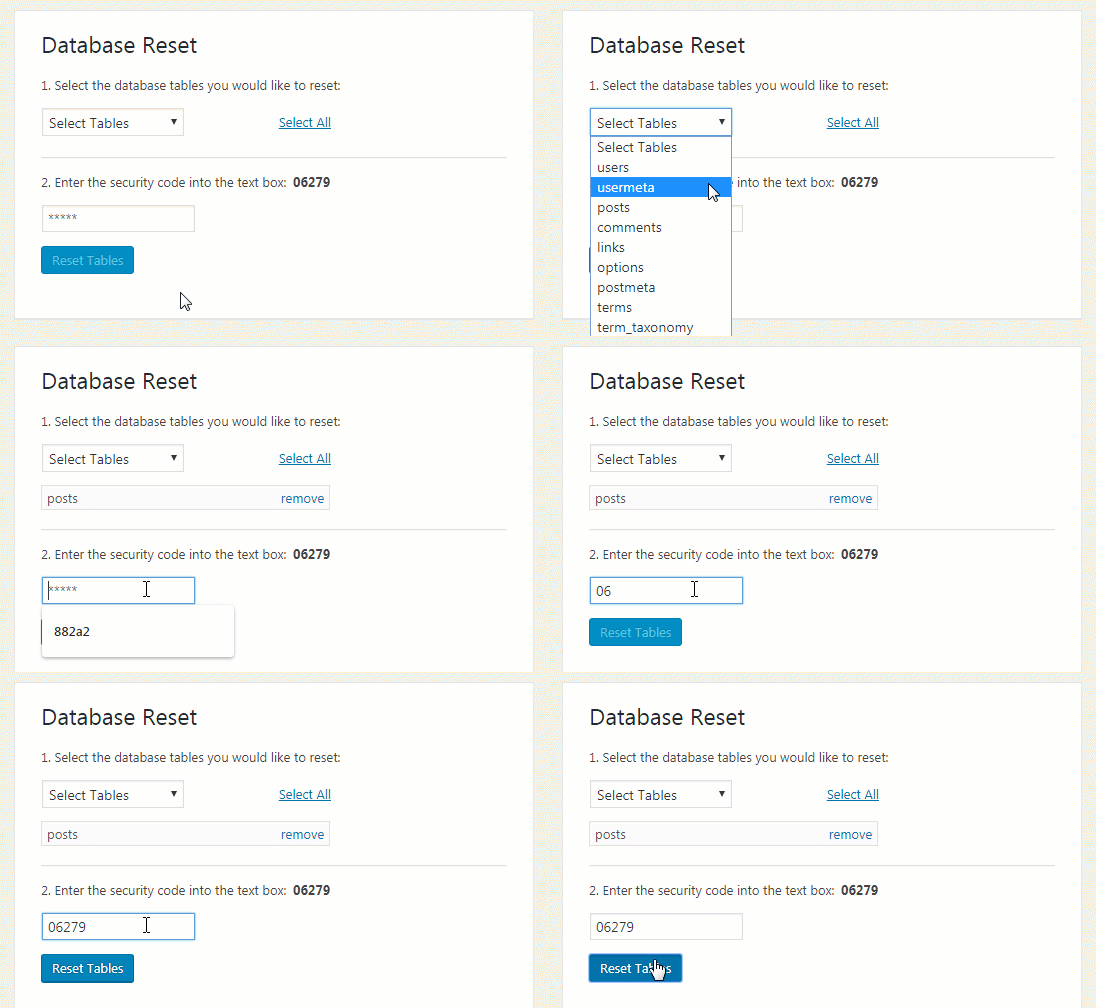
The WordPress Database Reset plugin allows you to reset your database back to its default settings without having to reinstall WordPress or modify any files. It is secure, simple to use, and can be used with the WordPress CLI for even faster resetting.Screenshots
Frequently asked questions
How can I reset the WordPress database?
The WordPress Database Reset plugin allows you to reset the database (all tables or the ones you choose) back to its default settings without having to go through the WordPress 5 minute installation or having to modify any files.
What are the features of the WordPress Database Reset plugin?
The features of the WordPress Database Reset plugin include: extremely fast one-click process to reset the WordPress database tables, ability to choose to reset the entire database or specific database tables, secure and super simple to use, safe - it's not possible to accidentally click reset, ability to reset the database using the command line, and excellent for theme and plugin developers who need to clean the database of any unnecessary content.
How can I reset all tables using the WordPress Database Reset plugin?
To reset all tables using the WordPress Database Reset plugin, you can use the following WP-CLI command: wp reset database
How can I specify a list of tables to reset using the WordPress Database Reset plugin?
To specify a list of tables to reset using the WordPress Database Reset plugin, you can use the following WP-CLI command: wp reset database --tables='users, posts, comments, options'
How can I get support for the WordPress Database Reset plugin?
To get support for the WordPress Database Reset plugin, you can create a new post in the WordPress Database Reset support forum.
Changelog
3.24
- 2024/06/30
- minor security fix
3.23
- 2024/02/19
- minor security fix
3.22
- 2022/11/22
- minor security fixes
3.21
- 2021/07/29
- fix for WP 5.8
3.20
- 2021/04/26
- still trying to warn people that this plugin will soon be discontinued
3.19
- 2021/02/25
- continuing to phase out the plugin in favor of WP Reset
3.18
- 2021/01/30
- added flyout menu
- started to phase out this plugin in favor of WP Reset
3.17
- 2020/10/06
- license fix
- added promo for WP 301 Redirects
3.16
- 2020/09/01
- fixed an issue with select tables element
3.15
- 2020/01/14
- security fixes – thanks to Chloe from Wordfence
- 80k installations; 761,300 downloads
3.1
- 2019/08/13
- WebFactory took over development
- minor improvements in GUI and messaging
- fixed a nasty bug related to admin user ID not being 1
- 70k installations; 665,500 downloads
3.0.2
- Fix for plugin page not showing up in tools menu (on some hosting providers)
- Update how session tokens were being restored
- Remove unnecessary nonce
- Bump ‘requires at least’ to version 4.2
- Change ‘theme_data’ to ‘theme_plugin_data’
3.0.1
- Fix plugin disabled after update, thanks to Ulrich Pogson
- Update the pot file
3.0.0
- Completely re-written from scratch
- Add extended WP_CLI command class
- Clean up admin interface
- Remove unnecessary help tabs
- Submit button is now deactivated until user inputs security code
- Add PayPal donation button
- Remove outdated localization files
- Update the text domain to match slug for translate.wordpress.org
2.3.2
- Add option to keep active theme, thanks to Ulrich Pogson
- Adhere to WordPress PHP coding syntax standards
- Delete the user session and recreate it
- Separate the backup_tables method into two new methods
- Reset only WP tables and not custom tables
- French language updates, thanks to Fx Benard
- Fix for undefined variable: backup_tables
2.3.1
- Fixed bug where reactivate plugins div was not displaying on ‘options’ table select
2.3
- Removed deprecated function $wpdb->escape(), replaced with esc_sql()
- Add German translation, thanks to Ulrich Pogson
- Updated screenshot-1.png
- Renamed default localization file
- Fixed broken if conditional during code clean up for version 2.2
2.2
- Fixed scripts and styles to only load on plugin page
- Formatted code to meet WordPress syntax standards
2.1
- Replaced 3.3 deprecated get_userdatabylogin() with get_user_by()
- Updated deprecated add_contextual_help() with add_help_tab()
- Small change in condition check for backup tables
- Removed custom _rand_string() with core wp_generate_password()
- Added Portuguese translation – thanks to Fernando Lopes
2.0
- Added functionality to be able to select which tables you want to reset, rather than having to reset the entire database.
- Added bsmSelect for the multiple select.
- Modified screenshot-1.png.
- Fixed redirect bug
- ‘Reactivate current plugins after reset’ only shows if the options table is selected from the dropdown.
1.4
- Made quite a few changes to the translation files
- Renamed French translation file for plugin format, not theme format
- Optimized (until potential version 2.0)
1.3
- Replaced reactivation option for all currently active plugins (not just this plugin)
- Updated language files
1.2
- Added capability to manually select whether or not plugin should be reactivated upon reset
- Modified class name to avoid potential conflicts with WordPress core
- Modified wp_mail override
- Removed deprecated user level for WordPress 3.0+
- Fixed small bug where if admin user did not have admin capabilities, it would tell the user they did
1.0
- First version
- 2011-10-04