

Enables the previous "classic" editor and the old-style Edit Post screen with TinyMCE, Meta Boxes, etc. Supports all…

About Word Balloon
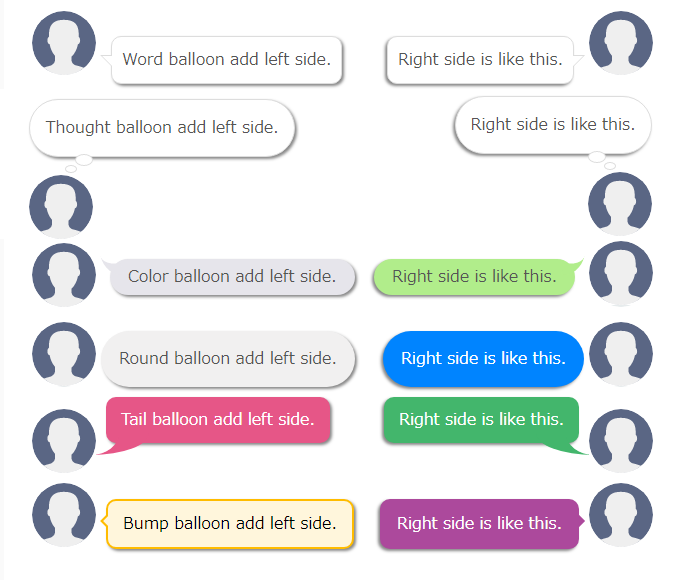
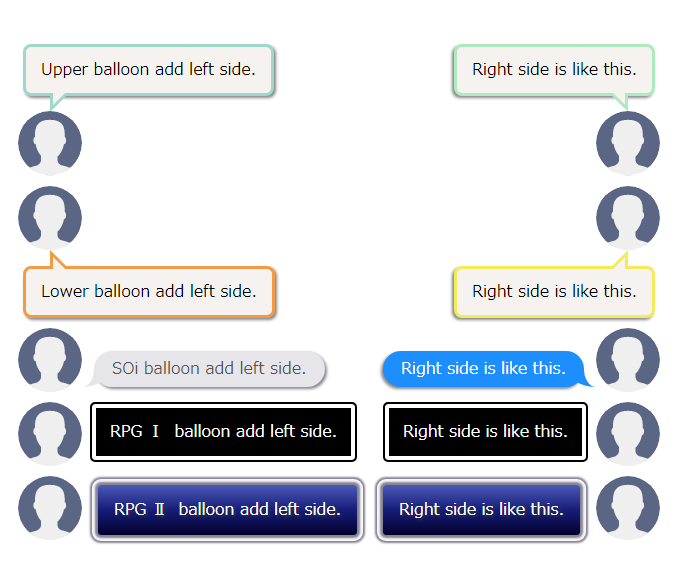
Word Balloon is a plugin that allows you to easily add speech balloons to your posts. It offers a wide variety of speech balloon options, as well as functions for adding effects, filters, icons, and sounds. The plugin is compatible with both the Block editor (Gutenberg) and the Classic editor, and it is translation ready with Japanese language support.Screenshots




Frequently asked questions
What is Word Balloon?
Word Balloon is a plugin that allows you to easily add speech balloons to your posts.
What features does Word Balloon have?
Word Balloon has a wide variety of speech balloons to choose from. It also has functions to add effects, filters, icons, and sounds.
Which editors does Word Balloon support?
Word Balloon supports both the Block editor (Gutenberg) and the Classic Editor.
Is Word Balloon translation ready?
Yes, Word Balloon is translation ready and currently translated in Japanese (日本語).
Where can I find more information about Word Balloon PRO?
You can find more information about Word Balloon PRO on the <a href='https://dev.back2nature.jp/en/word-balloon-pro/' rel='nofollow ugc'>Word Balloon PRO</a> page.
Changelog
4.22.3
- Released: February 6, 2025
- fixed: Minor fix.
4.22.2
- Released: June 28, 2024
- fixed: delete polyfill.io.
4.22.1
- Released: June 18, 2024
- fixed: Minor fix.
4.22.0
- Released: June 18, 2024
- fixed: Minor fix.
- Support Word Balloon PRO 4.22.x
- Unsupport Word Balloon PRO 4.21.x or lower
4.21.1
- Released: May 4, 2024
- fixed: Minor fix.
4.21.0
- Released: March 20, 2024
- fixed: Minor fix.
- Support Word Balloon PRO 4.21.x
- Unsupport Word Balloon PRO 4.20.x or lower
4.20.5
- Released: February 9, 2024
- fixed: Minor fix.
4.20.4
- Released: January 23, 2024
- fixed: Minor fix.
4.20.3
- Released: November 7, 2023
- fixed: Minor fix.
4.20.2
- Released: May 16, 2023
- fixed: Minor fix.
4.20.1
- Released: May 12, 2023
- fixed: Minor fix.
4.20.0
- Released: April 18, 2023
- fixed: Minor fix.
- Support WordPress6.2.
- Support Word Balloon PRO 4.20.x
- Unsupport Word Balloon PRO 4.19.x or lower
4.19.6
- Released: December 31, 2022
- fixed: Minor fix.
4.19.5
- Released: December 30, 2022
- fixed: Minor fix.
4.19.4
- Released: December 29, 2022
- fixed: Minor fix.
4.19.3
- Released: December 28, 2022
- fixed: Minor fix.
4.19.2
- Released: October 22, 2022
- Support WordPress6.1.
- fixed: Minor fix.
4.19.1
- Released: June 20, 2022
- fixed: for WordPress6.0 and Classic Editor.
4.19.0
- Released: March 12, 2022
- add Clay balloon.
- add Topic balloon.
- Support Word Balloon PRO 4.19.x
- Unsupport Word Balloon PRO 4.18.x or lower
4.18.5
- Released: February 8, 2022
- fixed: Minor fix.
4.18.4
- Released: December 7, 2021
- fixed: for iOS.
4.18.3
- Released: October 26, 2021
- fixed: BlockEditor.
- fixed: Minor fix.
4.18.2
- Released: August 3, 2021
- add Dutch json file for BlockEditor.
- Dutch translation thanks to Pieterjan Deneys and Peter Smits.
4.18.1
- Released: July 11, 2021
- Support WordPress5.8.
- fixed: Minor fix.
4.18.0
- Released: May 1, 2021
- Support Word Balloon PRO 4.18.x
- Unsupport Word Balloon PRO 4.17.x or lower
- add Thought 3 balloon.
- add Hand icon.
- add Sigh icon.
- add Fade out top right effect.
- add Fade out top left effect.
- add Fade out bottom right effect.
- add Fade out bottom left effect.
