

Site Kit is a one-stop solution for WordPress users to use everything Google has to offer to make…
About PDF Flipbook, WPBakery Addon – Unreal FlipBook
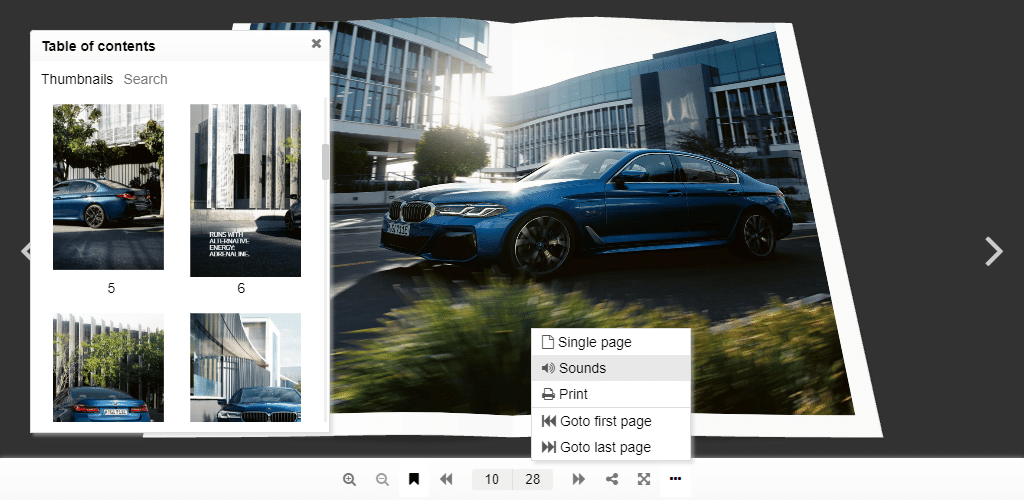
Unreal FlipBook is a WordPress plugin that allows you to browse images, PDFs, or HTMLs as a flipping book. It has many features such as visual page editing, Google Analytics integration, and customizable flipbook styles. The plugin is user-friendly and highly customizable, making it easy to use and create interactive books.Screenshots




Changelog
1.15.5
- Protection from javascript: protocol in urls
1.15.4
- Escaping bookmark titles
1.15.3
- Filtering unsecured content (css layers, ready function) from users less then editor
1.15.2
- Reverted iframe initialisation changes – loading issue on Android internal browser
1.15.1
- Allowed editing PDF URL in Flipbook editor
- Lightbox refactoring
- Flipbook editor styles optimization
- Two new predefined flipbook styles
1.15.0
- Visual page editor: AdSense, Audio, HTML, Link, iFrame, Image, Video, YouTube
- Skin: updated design, added fade effect
- Book background: color, image, CSS style
- PDF links highlighting
- Book 3d lighting options
- Book gallery: mobile layout and center alignment
- New commands: Goto first/last page
- Order by last modified imported from media gallery files
- Max book depth, limit for book thickness that recalculates cover and page depth
- WP multisite: creating table for book pages
- Fixed issues in PDF printing
1.14.0
- Book templates
- Custom bookmarks
- Auto play
- Custom slug for plugin default page
- WebP images
- Improved displaying loading animation from skin
1.13.2
- Optimized PDF rendering, especially when zoom is changing
1.13.0
- Real colors
- Book shadow
- Toolbar shadow
- Improved quality on mobile devices
- Fixed rendering artifact: a line between pages
- Fixed double tap on links
- Added creation in hidden elements
- Extra paddings for zoomed view
- Auto resolution: added min and max resolution
- Binder zero thickness
- Book thumbnail: using image from media gallery instead of it’s thumbnail
- Inline size calculation on mobiles the same as on desktops
- Plugin settings: thumbnail height option
- Plugin settings: Google Analytics
1.12.5
- Resolved issue with squares instead of buttons in Safari
1.12.4
- Initializing plugin from plugins_loaded
1.12.2
- Fixed mouse events issue for CSS layers
1.12.1
- Added nonce field to avoid CSRF attack
- Removed unused code
1.12.0
- Added new asymmetrical flip animation
- Fixed graphic artifacts between pages
- Arrow keys were binded on book pages turning
- Added web page scrolling when user swipe book pages
- Added web page scrolling by mouse wheel when book zoom is not available
- Updated PDFJS library to 2.5.207
- Fixed XSS issue
1.11.5
- Logo was removed
- THREEJS was updated to 104 rev for Safari 15 compatibility
1.11.3
- Using react library from WordPress js includes if it is defined otherwise register react 17.0.2 from the plugin folder (actual for old WordPress)
1.11.2
- Using react library from WordPress js includes
1.11.1
- Share link and social buttons
1.10.27
- Font loading patch for Safari (buttons disappearing fixed)
1.10.26
- Supporting Unicode in filenames
1.10.25
- Order for importing pages
1.10.24
- The same scale for all pages
- Toolbar moved below the book
1.10.23
- Skins refactoring
- Book option: interactive corners
1.10.22
- Option in settings: where to initialize the plugin
- Function FB3D_CLIENT_LOCALE.render() for manual rendering unrendered plugin instances (after Ajax)
- Encoding plugin data
1.10.21
- ReactJS library was updated to 17.0.2
1.10.20
- Pro version auto updates
- Book editor details are wrapped in iframe to avoid conflicts with other plugins
1.10.19
-
Added query parameter: [3d-flip-book mode=”thumbnail-lightbox” query='{“orderby”: “date”, “order”: “ASC”}’ cols=”3″ tax=””][/3d-flip-book],
see all options: https://developer.wordpress.org/reference/classes/wp_query/
1.10.18
- Insert dialog / shortcode generator: styles for fullscreen mode: height, background color, background image
1.10.17
- Advanced options switch
- For mobile devices plugin height = 0.9*screen height
- Single page mode is active by default for mobile devices
1.10.16
- Error messages
- Hidden controls while loading
- Supporting 1, 2 and 3 pages books – no blank pages
1.10.15
- Auto updating permalinks after activation
1.10.14
- b64 encoding for template data
- Up to 5% page width difference in doubled pages PDFs
1.10.13
- New pdfjsLib 2.5.207
- Fixed a bug in doubled pages PDFs navigation
1.10.12
- Preloading font for toolbar buttons
- Control settings for disabling Print and Download in narrow view mode
1.10.11
- CSS class fb3d-fix-title to fix title in thumbnail mode
1.10.10
- Auto launch lightbox using a CSS class or the book name as URL hash: http://example.com/page-with-book/#book1/5, where book1 is CSS class or the book name, 5 – page number
1.10.9
- Google Analytics
- CSS class fb3d-auto-launch to auto launch lightbox after page loading
- CSS class fb3d-activate-fullscreen to launch fullscreen instead of lightbox
1.10.5
- Css layer helper classes: play-on-shown, pause-on-hide, go-to-page, youtube
1.10.4
- New thumbnail style
- Button style
- New lightbox style
Version 1.10.3
- Removed white line on the left side of a closed book
Version 1.10.2
- Saving auto generated thumbnails on the disk for for fast loading on the client side
- Default lightbox that you can choose in the plugin settings
- User friendly pages rendering queue
Version 1.10.1
- Simplified book properties
- Added predefined book styles
- Smooth page landing
Version 1.9.29
- FullScreen emulation for iPhone
- Added error messages for flipbook editor
- Fixed zoom gesture for touchscreen devices
- Detecting mobile mode by screen diagonal
- Performance improvement – much faster initial loading
- Helpful links
- Limited height for automated widget size computation: height = min(90vh, 0.75*width)
- Added CSS class ‘fb3d-default-page’ for customization plugin default page
- Removed toolbar transparency
- Changed plugin logotype
- Review reminder
- Fixed a bug in PDF rendering
- Disappearing page CSS Layer properties (CSS, HTML, JS) was fixed
Version 1.9.22
- New version PDFJS 2.3.200
Version 1.9.21
- New pages predicting algorithm
Version 1.9.20
- Performance optimization – disabled 3D rendering for idle
Version 1.9.19
- Fixed disappearing on Android devices – Updated THREE JS library
Version 1.9.18
- Fixed the bug: “Failed to initialize plugin: 3dfbInsert”
Version 1.9.17
- Fixed disappearing edit details
Version 1.9.16
- Fixed error in classic blocks – insert dialog
Version 1.9.15
- JavaScript ready function
- Editing PDF url
Version 1.9.12
- Fixed an admin side styles issue
Version 1.9.11
- Fixed the zero size bug in FireFox
- Fixed a bug with links in doubled page PDFs
Version 1.9.10
- Fixed a bug in hits highlighting
- Fixed a bug in CSS Layers
Version 1.9.9
- Narrow View
Version 1.9.8
- Fixed the loading PDF issue in Edge
Version 1.9.7
- Updated PDFJS lib – faster loading for PDFs
Version 1.9.6
- Links in IE11/Edge
- Interactive corners for Mac
Version 1.9.5
- Fixed the iOS iframe resizing issue (wrong alignment)
Version 1.9.4
- Fixed the bug with disappearing the download button
Version 1.9.3
- Changed the PDF range chunk size – faster PDF loading
Version 1.9
- Auto resolution
- Double pages PDFs
- IE11 Fulscreen
Version 1.8.2
- Fixed bug in loading languages from global directory
Version 1.8
- 3D FlipBook categories
Version 1.7.6
- Shortcode generator
Version 1.7
- RTL mode
- Default template option in General Settings
Version 1.6
- CSS Layers
- Languages
Version 1.5
- PDF search
Version 1.4
- Thumbnails
- Flip sounds
- Deep linking
Version 1.3
- PDF bookmarks
- Printing
- Single page mode
- Control customization
- Fit view command
- Controllable script for templates
Version 1.2
- PDF links
- Mobile-Friendly
- Flipping sheet animation style
- Loading animation and progress
Version 1.1
- Smart pan mode
- Skins
- Flipping covers together with other pages
Version 1.0
- Realistic view
- Natural behaviour
- Flixible page corners
- User behaviour prediction system
- HTML, PDF, images as sources
- User friendly
- High perfomance
- Lightbox effect
- Interactive
- Responsive
- Easy to use
- Well documented

