Enables the previous "classic" editor and the old-style Edit Post screen with TinyMCE, Meta Boxes, etc. Supports all…
About Toolbar Publish Button
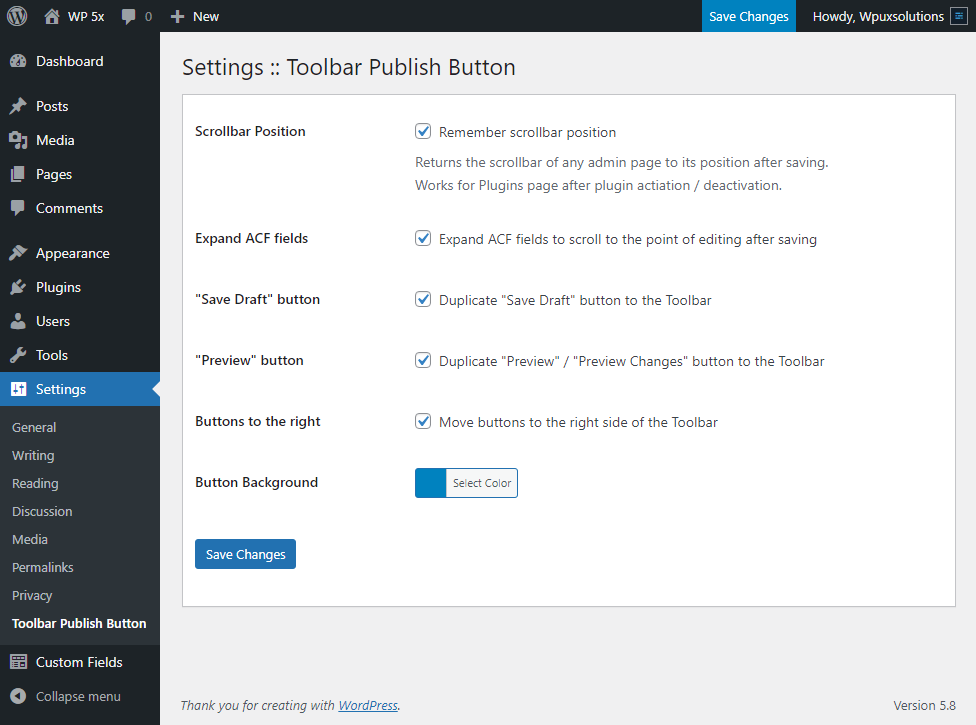
This plugin adds a duplicate button to the top WordPress admin bar, making it easier to save changes without scrolling. It works with various types of content and has options to customize its functionality, such as keeping the scrollbar position and choosing which buttons to show. It does not affect any native WordPress functionality.Screenshots


Changelog
1.8
Release Date – August 28, 2021
Improvements
- Code cleanup and improvements for better performance
- Better colorization for buttons
- A new option was added to control whether to expand ACF fields after saving or not
1.7.1
Release Date – March 09, 2021
Compatibility
- WordPress 5.7 compatibility ensured
1.7
Release Date – October 14, 2020
Improvements
- ACF Field Groups screen compatibility improved
- New option: Move buttons to the right side of the Toolbar
- The buttons are on the colored background from the initial plugin activation
1.6.2
Release Date – August 29, 2018
Bugfixes
- Conflict with ACF scripts fixed
1.6.1
Release Date – August 28, 2018
Improvements
- Compatibility with the latest ACF versions ensured
1.6
Release Date – February 2, 2017
Improvements
- “Save Draft” and “Preview” buttons are now optional
- Minor code improvements
Bugfixes
- Minor bugs fixed
1.5.2
Release Date – October 11, 2016
Improvements
- Text domain changed to ‘toolbar-publish-button’.
- Preview button added.
- Minor bugs fixed.
1.5.1
Release Date – October 10, 2016
Bugfixes
- Plugin settings change on update fixed. Please upgrade from v.1.5 for correct work.
1.5
Release Date – October 10, 2016
Improvements
- The PHP code is totally refactored, some unnecessary and obsolete code has been removed.
- ‘Save Draft’ is now changing for ‘Save as Pending’ and vise versa automatically.
Compatibility
- WordPress 4.6 compatibility ensured.
- ACF compatibility ensured.
1.4.3
Release Date – September 15, 2015
Improvements
- The button script removed from unnecessary admin pages
- Unnecessary buttons removed from the admin bar for some pages
1.4.2
Release Date – September 14, 2015
Bugfixes
- Bugs of v1.4 fixed
1.4.1
Release Date – September 14, 2015
Improvements
- Better color management for button’s background
1.4
Release Date – September 14, 2015
New
- Save Draft button added Customer’s Request
- Button’s Background option added Customer’s Request
Languages
- Serbian translation added
- Ukrainian translation added
1.3
- Update: WordPress 4.2.2 compatibility ensured.
- Bugfix: Small bugs from the Support Forum fixed.
1.2.5
- Update: Compatibility with other admin menu plugins improved: Support Request.
- Bugfix: Small javascript uploade bug fixed.
1.2.4
- Update: Minor scripts’ improvements.
1.2.3
- Bugfix: Collapsed menu incorrect behavior fixed.
1.2.2
- Update: Sticky menu behavior improved, minor bugs fixed.
- Update: JS code is totally reconsidered for better performance.
1.2.1
- Bugfix: Sticky menu incorrect scrolling mechanism fixed.
1.2.0
- Update: Huge sticky admin menu behavior improvement: menu is scrollable only within its own height if it doesn’t fit into browser window height. Just try it ?
- Update: Minor js code improvements.
1.1.7
- New: “Remembers” scrollbar position for Jetpack custom CSS editor.
- Bugfix: Corrected mechanism of choosing a button for cloning.
- Bugfix: Native button can also “remember” scrollbar position from now.
- Update: Sticky main menu changes its behavior after browser window resize to match new dimensions.
1.1.6
- New: Capability to remember a scrollbar position of the plugin list page after Activate/Deactivate button click added. It will work when Remember scrollbar position option is selected.
- Bugfix: Fixed menu CSS minor bug fixed.
1.1.5
- Bugfix: Script versions mechanism fixed. Please upgrade the plugin especially in case you can’t see the changes from version 1.1.4
1.1.4
- Update: Main menu fixation mechanism improved. From now main menu won’t be sticked if it doesn’t fit into one screen automatically, no need to turn it off manually. Thanks MP6 for inspiration.
1.1.3
- New: “Sticky main menu” option added.
- Bugfix: Minor text correction done.
1.1.2
- New: The plugin admin texts localization mechanism implemented. (Note: Frontend doesn’t need to be localized because it uses the current text (and language) of the button via javascript).
- Bugfix: Inaccurate scrollbar position calculation fixed.
1.1.1
- Update: Minor improvement of plugin upgrade process.
1.1.0
- New: “Remember scrollbar position” option added.
1.0.4
- Update: Script moved to the footer for better site performance.
1.0.3
- Update: Minor improvements.
1.0.2
- New: ACF plugin Option Page button support added.
1.0.1
- Bugfix: Minor bugs fixing.
1.0.0
- New: Toolbar Publish Button initial release.