

Improve your WordPress SEO: Write better content and have a fully optimized WordPress site using the Yoast SEO…

About Replace Image
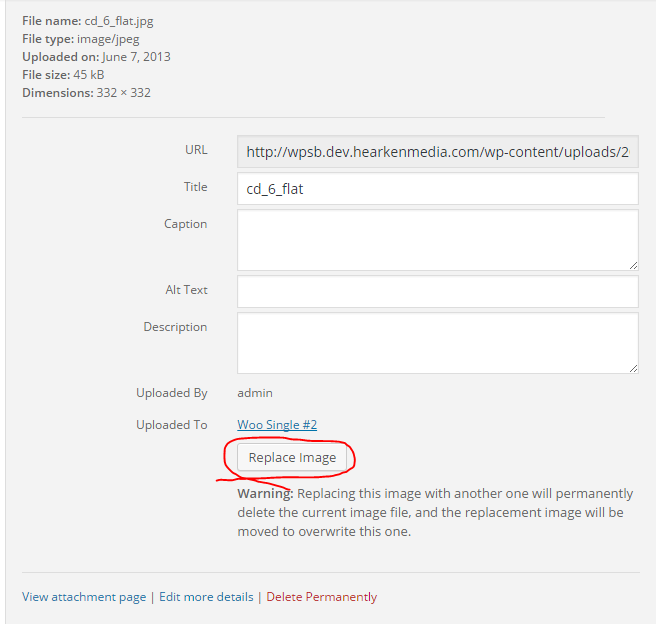
The Replace Image plugin allows you to easily replace an image on your website without having to update it in multiple places. It retains the URL and attachment ID of the original image, making the process quick and efficient. Just make sure to disable your browser's cache and any WordPress caching plugins before using the plugin.Screenshots
Frequently asked questions
What does the Replace Image plugin do?
The Replace Image plugin allows you to upload a new version of an image without deleting the old image attachment. This means that references to the image, such as its URL and attachment ID, remain intact. It helps you easily swap updated images without re-selecting them in various parts of your WordPress site.
How do I use the Replace Image plugin?
The plugin adds a button to the Attachment Details screen where you can upload or select a replacement image. Before using it, you should disable your browser's cache and any WordPress caching plugins to ensure it functions correctly. Detailed instructions can be found under Tools > Replace Image.
Who developed the Replace Image plugin?
The Replace Image plugin was developed by WP Zone. They have created several other plugins, add-ons, and themes available in the WordPress repository.
Changelog
= 1.1.11
* Add permissions check on image to be replaced
* Don’t show Replace Image button on images that the user isn’t allowed to replace
= 1.1.10
* Fix Missing Version Parameter in Asset URLs: This oversight could potentially lead to caching problems in browsers upon plugin updates.
= 1.1.9
* Fix: Image replacement may not work in some browsers
1.1.8
- Add “Replace With AI Image” button
1.1.7
- Updated links, author, changed branding to WP Zone
- Updated tested up to
- Removed donation links,
- Added aspengrovestudios as contributor
- Updated banner and icon
1.1.6
- Plugin now deletes files associated with the old image prior to replacement
1.1.5
- Fixed non-critical PHP warning
1.1.3
- Fixed undefined offset error per https://wordpress.org/support/topic/undefined-index-0-on-line-100-mainfile?replies=1
1.1.1
- Added support for image replacement where the image file being replaced doesn’t exist
- Removed anonymous functions
1.1
- Added functionality to prevent image caching in the Media Library
1.0.3
- Fixed a bug where the upload UI would temporarily stop working properly after replacing an image.
1.0
- Initial release

